
A customer buys a coffee machine. A few days later, your brand sends them a promotion for the same model. A carefully designed product carousel won’t fix the mismatch: the customer has already made that purchase. Their order history could have helped you recommend compatible accessories or exclude them from the campaign.
RCS personalization uses customer data to shape the content, offer, and next action in a message. A recent purchase, a stated preference, a loyalty balance, or an approaching renewal date can each provide a useful starting point. The value comes from the decision that information helps you make: what to show this customer, on which terms, and why now.
Building that campaign means connecting reliable data with clear targeting rules and the right message variant. A few well-chosen variants can address distinct customer needs without requiring a unique message for everyone. You also need to decide what happens when information is missing and when to skip a message because the offer no longer applies.
Which customer data should you use for RCS personalization?
Choose data that helps you decide which offer would be useful to the recipient. If a field doesn’t change the products, promotional terms, or next action you present, you don’t need it for that campaign.
Start with information your business already holds and can reliably associate with the person receiving the message.
| Data type | Examples | What it helps you personalize |
|---|---|---|
| Purchase history | Product, category, order date | Compatible accessories or a reminder to replenish consumables |
| Stated preferences | Interests, size, preferred store | Product categories, available sizes, or a local store’s offer |
| Website or app activity | Viewed products, cart contents, saved items | The products featured in the message and the destination of its buttons |
| Loyalty program data | Points balance, membership tier, available rewards | A benefit the customer is eligible to claim |
| Service or contract data | Current plan, renewal date, available upgrades | A renewal offer or a relevant service upgrade |
💡 Distinguish what customers tell you from what their behavior suggests.
A category they select in their preferences gives you a different basis for personalization than a single product-page visit. They may have been comparing prices, shopping for a gift, or opening the page by mistake. That visit can inform product selection without justifying copy that claims to know what they need.
Check the data against the offer you can deliver
Customer information needs to work alongside current product and offer data. Knowing someone’s size won’t help if the featured item is unavailable in that size. A points balance won’t support a useful recommendation if the reward has been withdrawn.
For each field used in the campaign, establish:
- Source: Which system holds the authoritative value – the CRM, store, subscription platform, or loyalty database?
- Freshness: When was it last updated, and could it change before the message is sent?
- Recipient match: Does the information belong to the person associated with the destination phone number?
Different fields need different update schedules. A preferred category may remain useful for weeks, while cart contents or product availability can change within minutes. Let that rate of change determine when you retrieve or refresh the data used in your campaign.
How to turn customer data into segments and targeting rules
Build each segment around a reason to make a particular offer. “Customers who bought a printer” identifies an audience. “Customers who bought a specific printer model and may need compatible supplies” gives you a basis for choosing what to send.
For RCS customer segmentation, define three things: who qualifies, which offer they receive, and what excludes them from the campaign. This gives the people writing the messages and configuring the send the same instructions.
An electronics retailer could use the following rule:
| Rule component | Example |
|---|---|
| Eligibility | The customer bought a printer between 60 and 120 days ago |
| Offer selection | Show ink or toner compatible with the purchased model |
| Exclusions | The customer returned the printer or bought compatible supplies within the past 30 days |
| Missing data | If the printer model cannot be identified, exclude the customer from the variant recommending a specific cartridge |
These time windows are illustrative. Set yours using repeat-purchase patterns and the product’s characteristics. The purchase date alone won’t tell you how heavily someone uses their printer.
Decide which offer takes priority
A customer might qualify for a printer-supplies campaign, have loyalty points to spend, and meet your criteria for reactivation. Without a priority rule, they could receive several messages encouraging essentially the same purchase.
Define how the campaign selects a variant. If the goal is to encourage points redemption, eligible loyalty members could receive an offer to buy compatible toner using their points. Other owners of the same printer could receive the standard offer. Once a customer is assigned to one variant, exclude them from the others within that campaign.
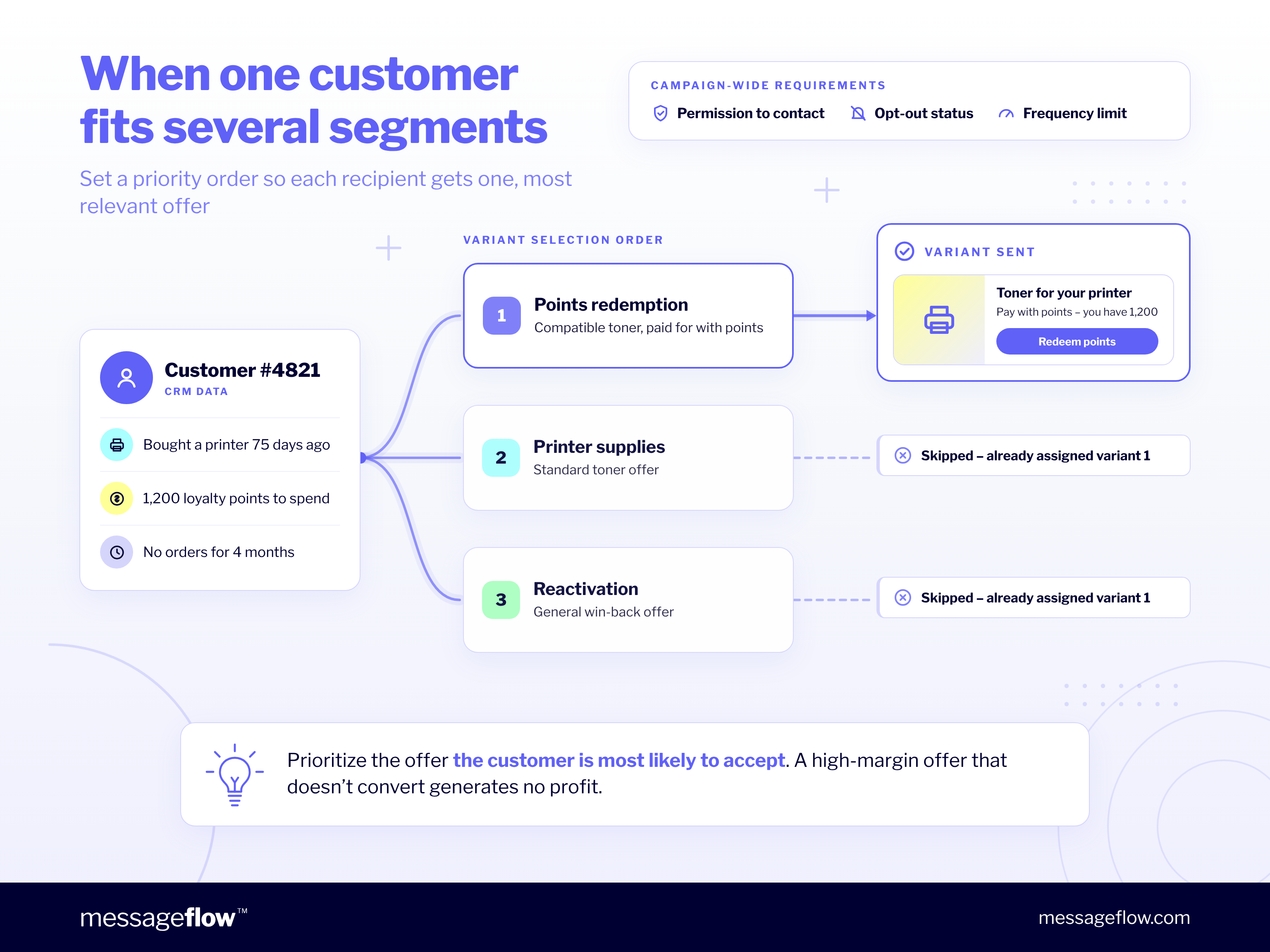
“When a customer qualifies for several segments, prioritize the offer they’re most likely to accept. Even if another offer carries a higher margin, choose the one the recipient is most likely to act on. A high-margin offer that doesn’t convert generates no profit.” — Piotr Kudzior, Product Manager – Conversational Messaging
💡 Apply campaign-wide requirements separately: permission to receive the communication, opt-out status, and your contact-frequency limit. Membership in a commercially attractive segment should not override those conditions.
Account for changes before the send
A customer can make a purchase or return a product between segment creation and campaign launch. Decide when eligibility and exclusions need to be checked again. For a replenishment offer, a purchase made after the audience list was prepared is particularly relevant.
💡 Write the rule so that someone reviewing an individual contact can answer: why will this person receive this offer? If the answer depends on guesswork, clarify the conditions before writing the message.
How to create personalized RCS message variants
Personalize the complete offer: the message, the products or benefits it presents, and the action behind each button. If the copy promises products from a particular category, the cards and destination page should help the recipient explore that category.
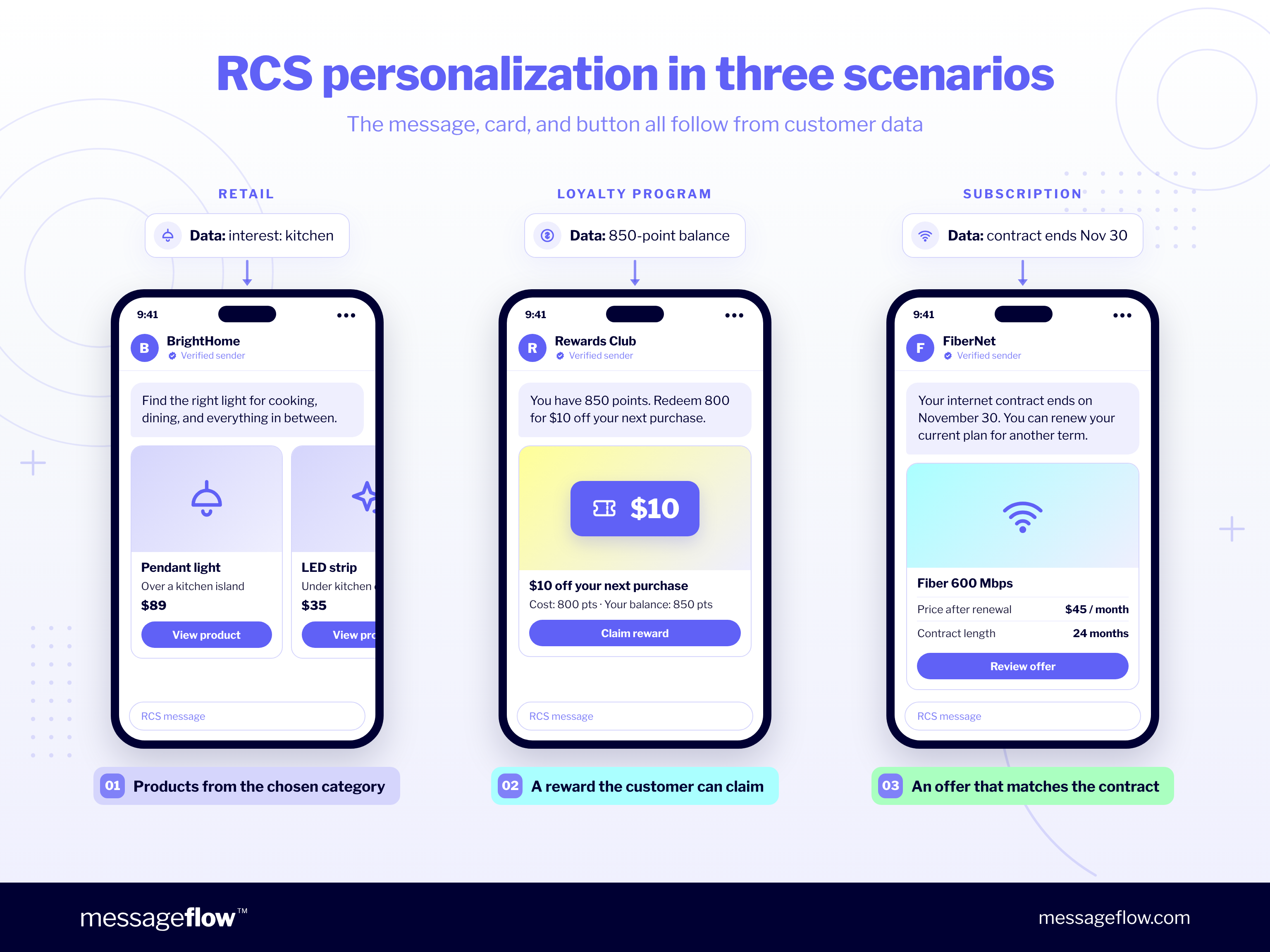
The following examples show how to create personalized RCS messages for three different situations. All message copy and offer terms are illustrative.
Retail: Select products that match the customer’s interests
A home furnishings retailer is planning a lighting campaign. Customers who have expressed an interest in kitchen renovations could receive a variant featuring pendant lights, under-cabinet lighting, and ceiling fixtures.
Message:
Find the right light for cooking, dining, and everything in between. Explore lighting for your kitchen and choose a style that fits your space.
Carousel: Selected products from those three categories, with images, prices, and brief descriptions of where each works best.
Product button: “View product,” linking to that item’s page.
Customers interested in living rooms would receive different products and different reasons to consider them: lighting for reading, relaxing, or highlighting a feature of the room. Changing the room name in the opening sentence would leave most of the offer unchanged.
Loyalty: Show a benefit the customer can claim
For a loyalty campaign, personalization can mean selecting a reward the customer already has enough points to redeem. Suppose a member has 850 points and can exchange 800 for a $10 reward.
Message:
You have 850 points. Redeem 800 for $10 off your next purchase. View the details and claim your reward in your account.
Card: The reward value, points required, and key redemption conditions.
Button: “Claim reward,” linking to the relevant account section, with sign-in if required.
Match the button label to what happens next. If it opens the full rewards catalog, use “Browse rewards.” A button promising a specific reward should take the customer to where they can claim it.
Subscription services: Make the offer relevant to the contract
An internet provider could prepare a renewal variant for customers whose contracts are approaching their end date and who qualify to keep their current plan.
Message:
Your internet contract ends on November 30. You can renew your current plan for another term. Sign in to review your renewal offer.
Card: The plan name, renewal price, contract length, and material offer conditions.
Button: “Review offer,” linking to the customer’s offer after sign-in.
An upgrade variant needs different copy: what the customer would gain and how much they would pay. Calling it “an offer just for you” doesn’t explain why changing plans would be worthwhile.
For every variant, check that the message and destination agree. The product, price, benefit, and conditions should remain consistent after the click, so customers can act on the offer without searching for it again.
“RCS is a channel for targeted messages tailored to individual recipients. It works best when customers are already engaged: clicking, responding, and returning to an offer. At that point, RCS is an ideal booster, helping them make a final decision. Keep in mind that it isn’t intended for mass messaging or customer activation.” — Piotr Kudzior, Product Manager – Conversational Messaging
Connecting RCS with your CRM and other data sources
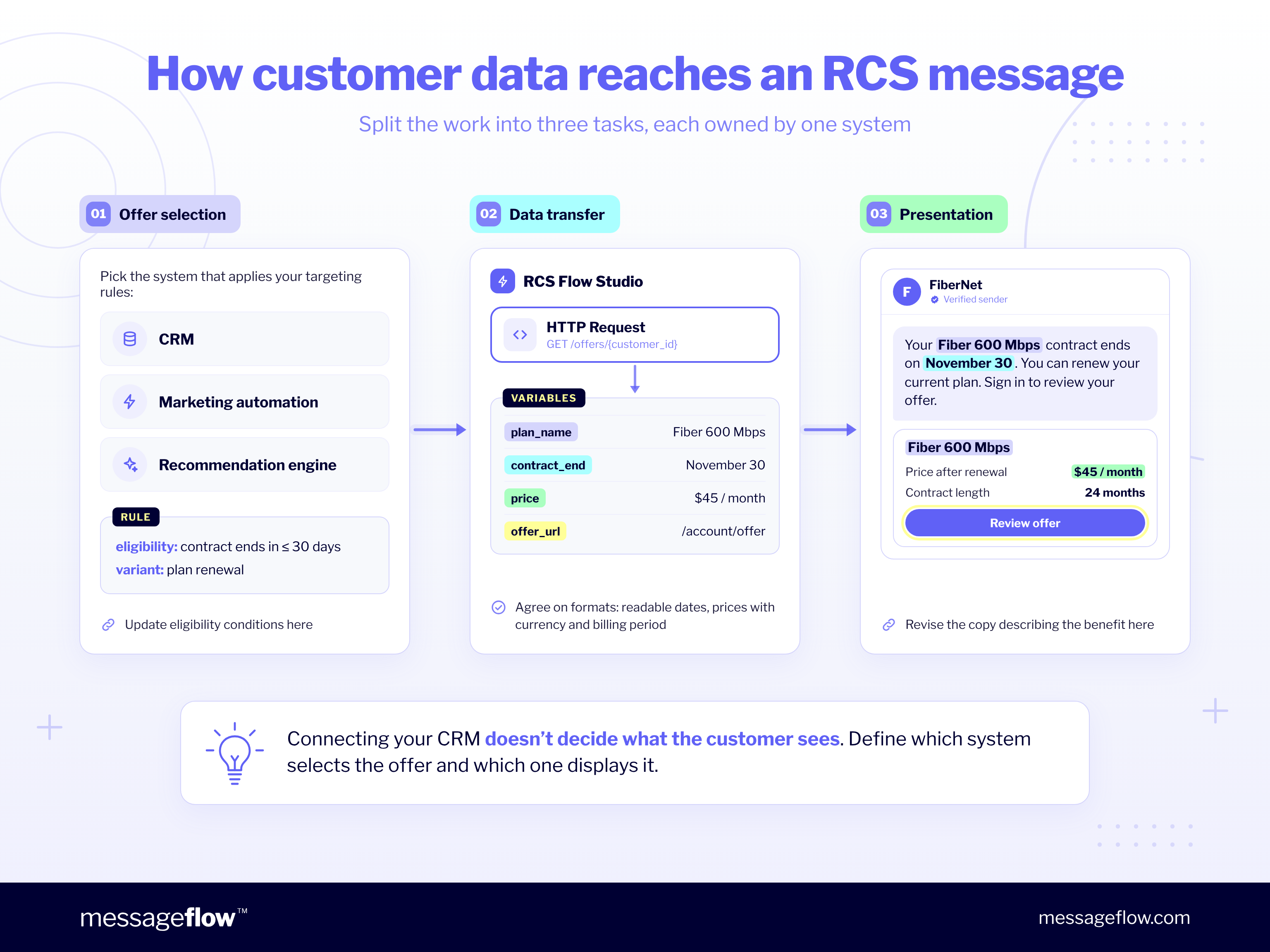
To use customer data in an RCS message, decide which system selects the offer and how it supplies the information needed to display it. Connecting your messaging platform to a CRM establishes a path for exchanging data. You still need to define what that exchange should accomplish.
Assign responsibility for three tasks:
- Offer selection: Identify the system that applies your targeting rules, such as your CRM, marketing automation platform, or recommendation engine.
- Data transfer: Specify the values the RCS flow needs, such as a plan name, contract end date, or selected product list.
- Presentation: Define where those values appear and which message variant uses them.
This makes changes easier to manage. If your business changes the conditions for claiming a loyalty reward, the team knows where to update eligibility and where to revise the copy describing the benefit.
Map source data to message content
Create a simple mapping between each source field, its meaning, and its use in the message. For a subscription renewal offer, that might look like this:
| Source data | Use in the message |
|---|---|
| Current plan name | Identify the service the offer concerns |
| Contract end date | State the renewal deadline |
| Price after renewal | Show the proposed cost on the offer card |
| Individual offer URL | Set the destination of the “Review offer” button |
Agree on formatting as well. Dates should be unambiguous, and prices should specify the currency and billing period. A field labeled “price” leaves room for error if one system supplies an annual amount while the message describes a monthly charge.
Use API data in RCS Flow Studio
In RCS Flow Studio, the HTTP Request block exchanges data with external systems during a conversation. You can store values from API responses in variables, then use them to personalize subsequent messages or choose the next conversation path. Dynamic carousels display products using API data, including descriptions and images.
Plan product selection in your campaign rules or the system supplying the offer. The carousel presents the results of that selection. To recommend accessories compatible with a customer’s device, for example, the integration needs to return a list matched to that device.
Connecting these systems requires an appropriately configured API and access permissions, and may need support from your technical team. Building messages in a visual editor and connecting business data are separate implementation tasks.
“In most systems, you have to build an advanced RCS flow from scratch using APIs. With RCS Flow Studio, you create the entire flow in the dashboard using drag-and-drop tools. You then connect it to an external API – for example, to retrieve a product feed – and each recipient receives content tailored to them. This makes building advanced, personalized RCS campaigns easier than ever.” — Piotr Kudzior, Product Manager – Conversational Messaging
What to check before sending a personalized campaign
Test every message variant with sample contacts, including those with missing data or no eligible offer. A correct preview of one message doesn’t establish that the whole campaign will behave as intended.
Prepare a set of test cases and record the expected result before running them.
| Test case | What the test should confirm |
|---|---|
| Contact with complete data | The correct variant, accurate values, and an offer assigned to that person |
| Contact eligible for several segments | The priority rule selects one variant without duplicate messages |
| Missing value used in the copy | An approved alternative message is used, or the send is skipped |
| No product matches the selection criteria | The campaign handles an empty result without sending a blank carousel or an unrelated recommendation |
| API request fails | The configured error handling runs without presenting unverified offer terms |
| Customer purchases or loses eligibility before the send | The contact is excluded or receives a different variant, according to the campaign rule |
Match the response to the missing information
Missing data should never become a guessed value. If a first name is unavailable, you can omit the greeting. If a points balance is missing, don’t promise a specific reward. If an individual price cannot be retrieved, hold the offer message or use approved copy that doesn’t state an amount.
Distinguish a valid “no offers available” response from an integration failure. In the first case, the system checked and found nothing suitable. In the second, you don’t know what the customer qualifies for. Those situations may require different handling.
Check what the recipient will actually see
Send tests to phones that support RCS and work through the prepared variants. Review the copy after values have been inserted, image cropping, card readability, and button behavior. Include long product and plan names: a layout that works with short sample text may need adjustments when populated with real data.
Check that the offer remains accessible after sign-in and that one contact’s message never contains another contact’s values. For approval, share the rendered variants alongside the test cases. That lets the reviewer assess the actual customer-facing message rather than a template containing variable names.
How to measure whether personalization improves results
Judge RCS personalization by the action the campaign was meant to encourage: a purchase, reward redemption, or contract renewal. Reads and button clicks help explain how recipients responded, but they don’t establish that the campaign achieved its business goal.
Compare personalized messages with a general version
Randomly divide eligible recipients into two groups. Send one group a general offer and the other a version tailored to their customer data. Keep the other conditions comparable: send timing, offer duration, contact frequency, and discount terms.
A home furnishings retailer could compare a carousel of popular lamps with one selected for each customer’s preferred room. If the personalized group also receives a larger discount, the result reflects both changes.
💡 Don’t assess personalization solely by comparing different customer segments.
Regular buyers and inactive customers may have different purchase intentions before receiving anything. To evaluate how you tailor the message, compare general and personalized versions within a comparable audience.
Define success before sending
Choose one primary metric that matches the campaign’s purpose. Use supporting metrics to understand the result.
| Campaign goal | Primary metric |
|---|---|
| Generate purchases | Percentage of recipients who make a purchase |
| Increase sales value | Revenue per recipient |
| Encourage loyalty participation | Percentage of members who redeem the promoted reward |
| Renew subscriptions | Percentage of customers who renew their contract |
Define the measurement period and what counts as a conversion: any purchase, a purchase from the promoted category, or the specific featured product. Use the same denominator for both groups, for example, everyone assigned to each variant. Analyze delivery, reads, and clicks separately to identify where differences emerge.
If personalization increases revenue, also check margins, discount costs, and messaging costs. Higher sales don’t necessarily make the campaign more profitable.
Separate the effect of personalization from the effect of sending
Comparing general and personalized messages tells you which approach performs better. To estimate how many additional purchases the campaign generates, you can add a third, randomly selected group that receives neither version. Keep other communications comparable across the groups.
Don’t declare a winner after the first few conversions. Plan group sizes and the observation period before launch. If too few conversions occur to support a reliable conclusion, treat the result as a reason for further testing. Expand personalization where repeated tests show a benefit worth the additional work on data, rules, and content.
Plan your personalized RCS campaign
Want to put your customer data to work in an RCS campaign? Choose one goal and bring an example offer, along with the data you have available. We can discuss how to use it in RCS Flow Studio, which integrations you’ll need, and which message variant to test first.