
A customer waiting for their size to return needs an availability alert. Someone comparing two headphones may need a compatibility answer before they buy. Both give an ecommerce brand a specific reason to start a conversation and a useful job for the message to do.
When planning WhatsApp for ecommerce, start with that customer need. It determines who should receive the message, when it should arrive and whether the next step is a purchase, a product comparison or a reply your team must handle.
A product image and a “Shop now” button can support a straightforward offer. A recommendation may need a follow-up question. An invitation to ask for advice needs someone, or a carefully configured automated process, ready to respond. Make sure you build that next step into the campaign before sending it.
Before you launch
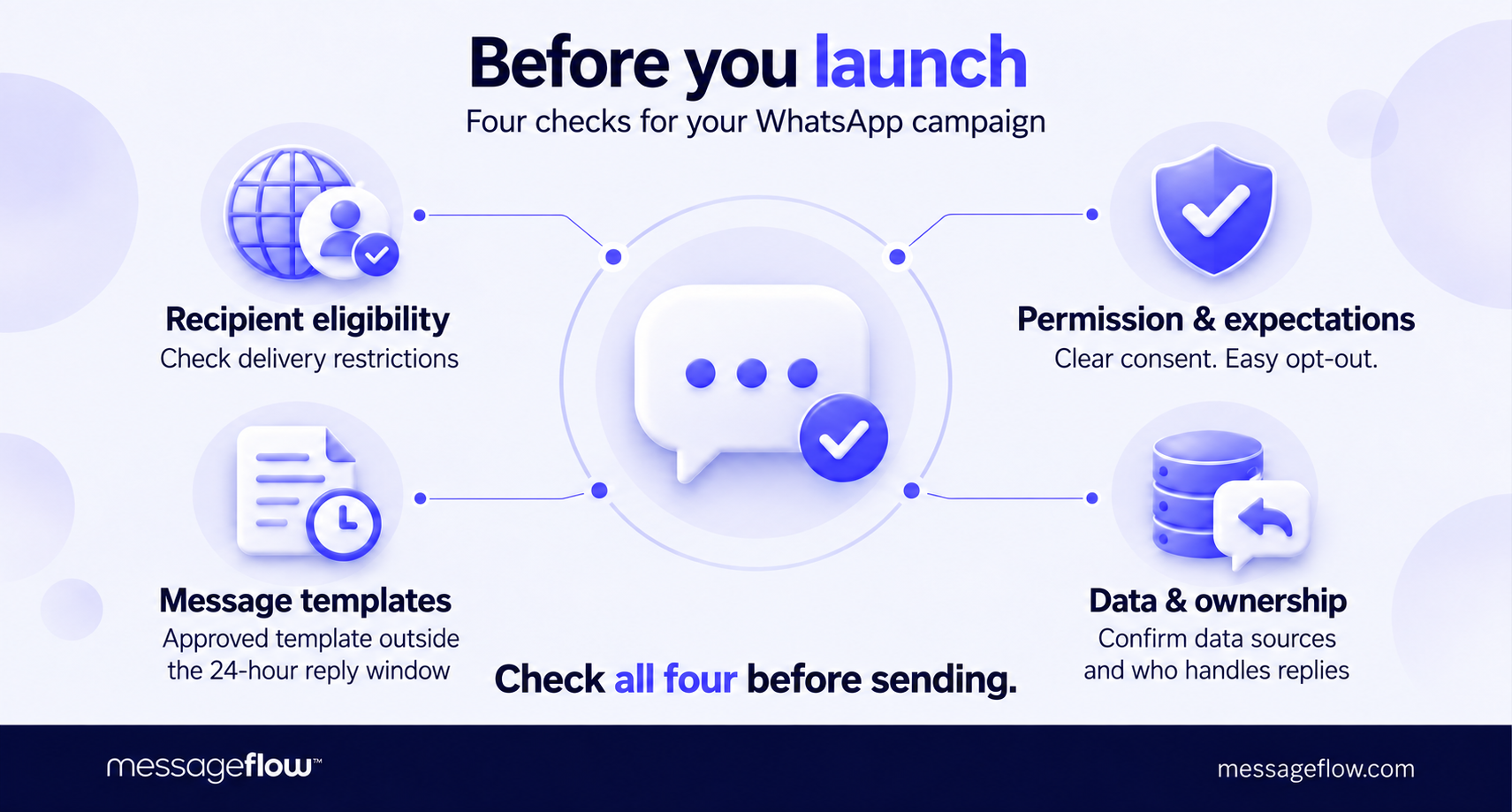
Design a campaign you can support with reliable data and a clear response process. A manually selected audience may be enough for an early-access offer. A back-in-stock alert needs current inventory data tied to the exact product variant the customer requested. Regardless of the specifics, before choosing a scenario, check four things:
- Recipient eligibility. WhatsApp currently blocks marketing template delivery to US phone numbers. A US-based business can still send these messages to eligible recipients in other supported markets though. The promotional scenarios below assume your intended recipients can receive them. See the current delivery restrictions to learn more.
- Permission and expectations. Having a customer’s phone number isn’t enough, WhatsApp requires marketing consent. Make the types of messages they’ll receive clear, provide an easy way to opt out and honor that choice. A request for an availability alert shouldn’t become an unexpected stream of promotions.
- The appropriate message template. Outside the 24-hour window following a customer’s last message, you must use an approved template. Within that window, you can reply without one. Treat the examples below as draft copy to adapt and submit where approval is required. Meta’s messaging policy explains these rules in more detail.
- Data and ownership. Identify which system supplies the audience, product details and trigger, and who handles replies. A WhatsApp ecommerce integration may need to connect your store, CRM or inventory system. Recommendation logic, chatbot automation and agent routing depend on the implementation. Confirm their scope with your provider before building the campaign around them.
And now on to the main part of the article – 10 WhatsApp for ecommerce campaigns you can test.
1. Introduce a new collection to customers with a relevant interest
A collection launch gives you a reason to contact customers who have shown interest in that product category. Choose an entry point that reflects what you know about them: someone interested in outerwear could receive a selection of jackets from the new collection, with a link directly to those products.
The objective is to generate purchases from the new collection. Keep the audience selection specific enough to explain why these customers should care.
- Audience: Opted-in customers with a relevant category preference or purchase history. Check whether recent buyers should be excluded, for example, someone who just bought a similar jacket.
- Trigger & timing: The collection becomes available to buy. Send after checking that the linked products, advertised sizes, and landing page are ready.
- Message format: A product or collection image, a short introduction, and a button linking to the featured products.
Example message
Our winter collection has arrived, including short wool jackets and relaxed layers. Explore the new outerwear edit to find your next everyday favorite.
CTA: Explore outerwear
⏭️ Next step: Direct the customer to the featured category with campaign tracking in place. If they reply about fit or availability, answer that question before sending another promotional message. Exclude purchasers from reminders promoting the same items.
🎯 Primary KPI: New-collection purchase conversion rate among delivered recipients, measured over a defined period. Track clicks as a supporting signal. They show interest, while purchases indicate whether the selection and offer worked.
2. Match a personalized offer to a customer segment
Personalize the commercial offer around a meaningful preference: the category a customer follows, the materials they prefer or the price range they usually shop. The aim is to make an incentive relevant enough to prompt a purchase while protecting your margin.
Keep the selection logic simple enough to explain. A stated preference for silver jewelry gives you a clear basis for a silver-focused offer, a single visit to a product page provides weaker evidence.
- Audience: Opted-in customers with a stated preference or consistent purchase history in the selected category. Exclude customers who already redeemed the offer.
- Trigger & timing: A scheduled campaign for an eligible segment. Confirm that the promotion is active and the discount works on the featured products before sending.
- Message format: Images of eligible products in the carousel format, the specific benefit, essential conditions and a link to the matching selection.
Example message
Enjoy 15% off our silver jewelry edit through Sunday with code SILVER15. Browse the selected pieces and find the details on our website.
CTA: Shop the silver edit
⏭️ Next step: Open a landing page containing only eligible products, with the offer clearly displayed. If a customer asks whether a particular item qualifies, resolve that question before encouraging checkout.
🎯 Primary KPI: Contribution margin per eligible customer after discounts and campaign costs. Where audience size allows, compare against a randomly selected group that receives no offer. This helps you establish whether the incentive generates enough additional business to justify its cost.
3. Give loyal customers early access
Early access rewards loyal customers with a practical advantage: the chance to choose before a collection or promotion opens to everyone. It can be especially useful when popular sizes, colors or editions have limited availability or fly off the shelves quickly.
Make that advantage real. The access link should let eligible customers buy during the preview period, and the public launch should follow at the promised time.
- Audience: Opted-in loyalty members or repeat customers who meet a defined eligibility threshold, filtered for interest in the featured category.
- Trigger & timing: The exclusive shopping window opens. Give customers enough time to browse and purchase before public access begins.
- Message format: A preview image, the reason the customer qualifies, the access window, and a link to the restricted collection.
Example message
As a loyalty member, you receive an exclusive offer to shop our new sneaker collection a week early. Your access starts now, ahead of the public launch next Monday at 10 a.m. Explore the colors and sizes available.
CTA: Shop early
⏭️ Next step: Take customers directly to a page that recognizes or verifies their eligibility. Test the journey on mobile, including login and checkout: an invitation loses value if the recipient struggles to use it. Once public sales begin, remove the early-access wording from any scheduled messages.
🎯 Primary KPI: Purchase conversion among invited customers during the exclusive window. Also review their purchases across the full launch period to distinguish additional demand from orders simply placed a week earlier.
4. Run a promotion with a clear deadline
A time-limited promotion gives interested customers a reason to decide sooner. Its usefulness depends partly on the purchase. A few hours may be enough to choose a familiar accessory, while an expensive electronics purchase may require research or advice.
Match the campaign window to that decision. State when the offer ends, including the time zone where needed, and make the eligible products easy to identify.
- Audience: Opted-in customers with a relevant category interest who haven’t already purchased through the promotion.
- Trigger & timing: The offer goes live. Schedule the message early enough for customers to evaluate it and complete checkout.
- Message format: A product image, the offer and deadline, essential conditions and a direct shopping link.
Example message
Planning your next trip? Save 20% on selected travel bags until 8 p.m. CET this Sunday. The discount applies automatically at checkout.
CTA: View travel bags
⏭️ Next step: If you plan a reminder, recheck purchase status and eligibility immediately before sending. Set a cutoff for retries and follow-ups so delayed messages don’t promote an expired offer. The destination page should clearly show when the promotion has ended.
🎯 Primary KPI: Purchase conversion among delivered recipients before the deadline. Assess any reminder separately: compare eligible non-buyers who receive it with a group who don’t, to see whether the extra contact produces additional purchases.
5. Help customers choose a product
Useful WhatsApp product recommendations narrow a decision around something that matters to the buyer. For headphones, that might be comfort during a commute, microphone quality for calls or a secure fit for exercise. Build the selection around those needs.
When your customer data doesn’t explain what someone wants, ask a focused question. Their answer can give an advisor, or a configured recommendation process – a clearer basis for suggesting two or three suitable options.
“Purchase history tells you what size a customer wears and which brands they like, but it doesn’t tell you what they’re looking for right now. That’s worth asking directly. For example, ‘What kind of shoes are you looking for?’ with suggested answers to choose from: athletic, casual, or dress shoes.
One click, combined with CRM data on their size or favorite brand from previous orders, is enough to show a few relevant styles instead of the entire product feed,” says Piotr Kudzior, Conversational Messaging Manager at MessageFlow.
- Audience: Opted-in customers who have expressed interest in a category but haven’t selected a product.
- Trigger & timing: A customer requests buying guidance, or a scheduled campaign invites the relevant segment to get help. Send invitations when your team or automated process can handle responses.
- Message format: A short invitation to describe their needs, followed by a small selection with images, links and a reason for each recommendation.
Example message
Choosing headphones? Tell us where you’ll use them most – commuting, work calls or exercise – and we’ll suggest a few options to compare.
CTA: Help me choose
⏭️ Next step: Ask about budget or compatibility if it would materially change the selection. Explain why each suggested product fits, and check availability before sharing it. Automated recommendations require connected product data and selection logic. Define who maintains both.
🎯 Primary KPI: Purchase conversion among customers who receive a recommendation, measured within a defined period. Track how many abandon the conversation before receiving one. That can reveal unnecessary questions or slow responses.
6. Answer the question holding up a purchase
A shopper may have chosen a product and still need one answer before ordering: whether a jacket fits over a blazer, a monitor connects to their laptop or an engraving affects delivery time. Give them a direct way to resolve that uncertainty while they’re considering the purchase.
Place the invitation where the question arises, such as the product page. This scenario starts with the customer opening a conversation, so the campaign’s job is to make asking for help easy.
- Audience: Visitors considering products that commonly require advice about fit, compatibility or customization.
- Trigger & timing: The customer selects a WhatsApp contact option on the product page. Display service hours so they know when to expect an answer.
- Message format: A concise invitation beside the relevant product information, followed by a conversation that identifies the item and the customer’s question.
Example invitation
Will this monitor work with your laptop? Ask us on WhatsApp! Have your laptop model ready so we can check the connection and charging requirements.
CTA: Check compatibility
⏭️ Next step: Carry the product reference into the conversation where the implementation supports it. A WhatsApp chatbot for ecommerce can collect the laptop model and retrieve documented specifications, but uncertain cases need a knowledgeable advisor. Pass along the details already collected so the customer doesn’t have to repeat them.
“A well-prepared knowledge base makes it possible to build an AI adviser on WhatsApp that truly helps customers, and newer models are getting better at connecting different pieces of information. A question like ‘Will my old charger work with my new smartphone?’ involves checking specifications – something AI can easily handle if it has access to good product data.
A trickier question might be ‘Will my shirt go with my new denim jacket?’ Even here, though, a recommendation can be based on specific attributes: colors, patterns, and the principles of combining them. The advantage of a conversation is that the model can ask follow-up questions, and the more context it has, the better its answers,” adds Piotr Kudzior, Conversational Messaging Manager at MessageFlow.
🎯 Primary KPI: Purchase conversion among customers whose pre-purchase questions were resolved, measured within a defined period. Monitor response time alongside it to identify delays that may leave shoppers waiting at the point of decision.
7. Notify customers when the right item returns
A back-in-stock alert connects an explicit customer request with a fresh opportunity to buy. Precision matters: someone waiting for black sneakers in size 11 needs an alert for that exact variant.
Connect the notification to stock available for purchase. An incoming shipment or a returned item awaiting inspection may not yet be ready to sell.
- Audience: Customers who requested a WhatsApp availability alert for the specific product variant and haven’t canceled that request or already purchased it.
- Trigger & timing: Sellable inventory becomes available. If stock is limited, release alerts in batches sized to available inventory and observed demand.
- Message format: A product image, the requested size or color, and a link that opens the correct variant.
Example message
The black sneakers you asked about are back in size 11. You can check availability and order below. Your alert doesn’t reserve a pair.
CTA: View size 11
⏭️ Next step: Check availability again before each batch sends and pause remaining alerts if the item sells out. If a recipient arrives too late, let them request another notification. Avoid silently enrolling them in repeated alerts or substituting a different product.
🎯 Primary KPI: Purchase conversion for the requested variant among delivered recipients within a defined period. Track how often recipients reach an unavailable item as well. That signals a mismatch between inventory, audience size, and notification timing.
8. Give inactive customers a relevant reason to return
Define inactivity around the product’s buying cycle. Several months without an order may be unusual for a regular coffee buyer and entirely expected for someone who purchased a television. Use category-level purchase patterns, supported by individual history where available, to decide when a customer is worth re-engaging.
Choose a reason to return that connects with their previous interest: an expanded range, a seasonal selection or a product improvement. A discount is one option, but it also reduces the margin on any resulting sale.
- Audience: Opted-in previous buyers who have passed a reasonable repurchase window. Exclude recent purchasers, customers with unresolved service issues, and people who have repeatedly ignored earlier reactivation attempts.
- Trigger & timing: The customer enters the inactive segment and a relevant offer or update is available.
- Message format: A brief explanation of what has changed, a relevant image, and one clear action.
Example message
Looking for something new to brew? We’ve added three medium-roast coffees, with tasting notes to help you choose your next bag.
CTA: Explore the coffees
⏭️ Next step: If the customer replies with a problem from their previous order, route the conversation to support. If they remain unresponsive, end the sequence at a predefined limit rather than repeatedly increasing the discount.
🎯 Primary KPI: Reactivated-buyer rate within a defined period, compared with a randomly selected group that receives no reactivation message. This helps distinguish campaign-driven returns from customers who would have purchased again anyway.
9. Suggest a useful complementary purchase
A cross-sell should explain how the additional product helps the customer use or enjoy something they already bought. A compatible sleeve protects a laptop, the right care kit helps maintain leather boots. The connection should be specific enough to justify the recommendation.
Check the original order before selecting an accessory. Customers may already have bought it, received it in a bundle or chosen a version that makes your suggestion unnecessary.
- Audience: Opted-in buyers of a specific product who haven’t purchased the proposed accessory. Exclude canceled or returned orders and customers with unresolved delivery issues.
- Trigger & timing: Confirmed delivery of the original purchase, followed by a delay appropriate to the accessory’s use. Test timing against when customers are likely to recognize the need.
- Message format: An accessory image, a clear explanation of its usefulness, and a link to the compatible option.
Example message
Taking your new laptop out and about? This padded sleeve fits the model you ordered and has a separate pocket for your charger. See the dimensions and available colors below.
CTA: View the sleeve
⏭️ Next step: Link directly to the correct size or model. Base compatibility claims on verified product information. If the customer reports a problem with the original purchase, resolve it before continuing the sales conversation.
🎯 Primary KPI: Accessory purchase rate among eligible original-product buyers within a defined period. Compare with a group that receives no cross-sell message and review margin after messaging costs, discounts and returns.
10. Make replenishment purchases easier
Coffee, cosmetics and printer cartridges need replacing as customers use them. If you know their buying pattern, you can time a reminder around the likely need and link directly to the product they previously chose.
Start with active repeat buyers whose order history gives you a reasonable basis for estimating the interval between purchases. Account for order quantity: a larger purchase may mean the next reminder should arrive later.
- Audience: Opted-in repeat customers approaching their expected replenishment date. Exclude customers with an active subscription or a subsequent order already placed.
- Trigger & timing: The customer approaches their usual reorder date, based on purchase history. Allow enough time for delivery before their supply is likely to run out.
- Message format: A reminder featuring the specific product, its image and a link that makes reordering easy.
Example message
Time to restock your coffee? Find the blend you last ordered below. Choose your quantity and get your next delivery.
CTA: Order again
⏭️ Next step: Link to the correct product with current pricing and availability. If the customer replies that they still have plenty, postpone the next reminder. After a purchase, calculate the next reminder date using the new order. Automation requires access to purchase history and configured sending rules.
🎯 Primary KPI: Additional contribution margin per customer after contact costs, compared with a group receiving your existing communications. Measure results over a full typical purchase cycle to assess whether the campaign increased sales or simply brought an order forward.
Choose one campaign and define the test
Start with the scenario that addresses a recognizable gap in your customer journey. If shoppers regularly ask about compatibility, test pre-purchase assistance. If you already collect availability requests, a back-in-stock campaign has a defined audience and trigger. Choose something your team can operate consistently and learn from.
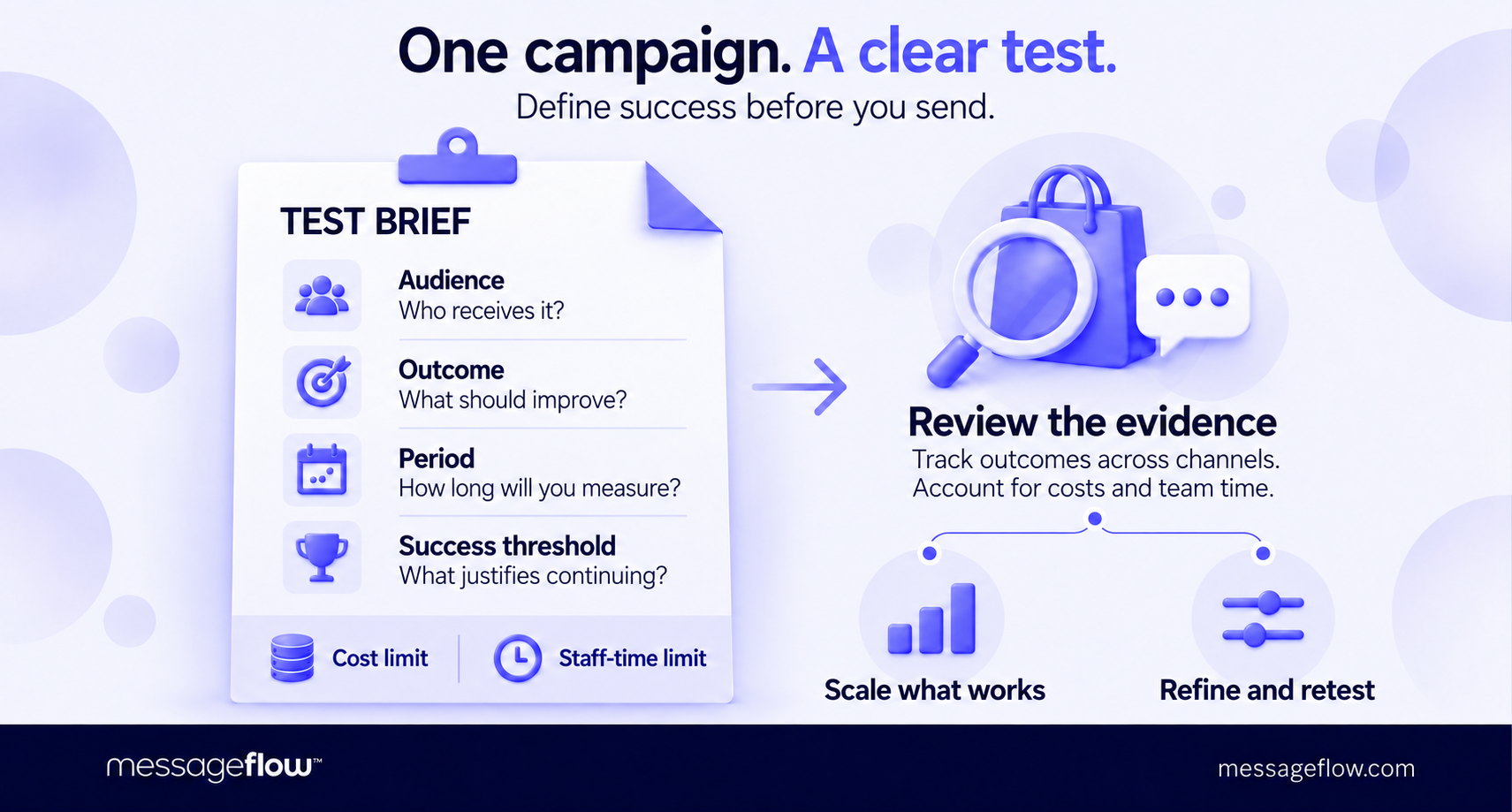
Write a short test brief before launch: the audience, the outcome you expect to improve, the measurement period and the result that would justify continuing. Set limits for cost and staff time too. A campaign that generates sales but requires lengthy conversations on low-margin orders may need a different design before you expand it.
Coordinate the test with your existing communication. Assign responsibility for updating customer status across systems, so a purchase or unresolved support request changes what happens next. Decide whether WhatsApp will replace an existing touchpoint or add another, and account for that difference when interpreting results.
“WhatsApp is usually more expensive than email, SMS, or mobile push, so I wouldn’t treat it as a tool for winning back inactive customers. If someone isn’t responding through other channels, a WhatsApp message is unlikely to change that.
The channel works best for customers who are already active: it boosts their engagement and helps increase order value.
When a customer starts a conversation, it’s worth making the most of it, because the interaction goes beyond a single message: you can clarify their needs, offer advice, and suggest something extra. I would scale up as the basket value of active customers increases,” suggests Piotr Kudzior, Conversational Messaging Manager at MessageFlow.
Measure purchases across channels within the test period, including orders completed after a conversation. For service scenarios, track whether customers resolved the problem. Where you use a comparison group, keep its other campaign exposure comparable so the result is easier to interpret.
Expand when the evidence supports a specific decision: reaching a larger eligible audience, adding a related product category or automating a process that has worked reliably. Give each next test a clear question to answer.
Put your first WhatsApp campaign in motion with MessageFlow
Have a scenario in mind already? MessageFlow can help you work out what it takes to launch – from account setup and template approval to connecting WhatsApp with your data, systems, and other communication channels. You’ll get guidance on the integration and support needed for your chosen campaign, with key scenarios tested before launch.
Bring us your campaign idea, target audience, and current setup. Let’s turn them into a practical implementation plan.
Contact us to discuss and launch your WhatsApp marketing campaign.