Branded links in SMS, RCS, and Viber do not work as one identical UX pattern copied across channels. The same branded short domain can appear as plain text in SMS, inside an RCS button label, in an SMS fallback, or through a Viber partner’s configured link layer.
This is to say that the recipient does not experience “a link” in the abstract. They see a domain, a button, a preview, a fallback, or a short URL in a very specific channel context. Each surface changes how much trust the link needs to carry on its own.
In this guide I focus on the practical, business layer: where your branded domain is visible, what the recipient sees before clicking, and how to structure the link experience across SMS, RCS, Viber, and other OTT channels. For the regulatory side of link formatting in US A2P messaging and EU privacy law, see our 10DLC and GDPR compliance guide for branded links.
The branded domain surface: Where your brand name actually appears across channels
A branded domain surface is the place where the recipient can see your domain before they tap.
In SMS, that surface is usually the visible text URL. In RCS, it may be a button label, a rich card action, or an SMS fallback. In Viber, it may depend on how your Viber Business Messages partner has configured URL shortening and tracking.
Branded link design approached the right way is a per-channel UX decision.
💡 Takeaway: The branded domain does the same essential job across channels but the place where users see it changes the message pattern you should use.
SMS: Where the branded domain does the most visible work
SMS is the most exposed environment for a branded short domain. There is no card layout, no button label, and usually no rich visual layer between the recipient and the URL. The domain is visible directly in the message body so it has to evoke trust fast.
This makes SMS the channel where the branded domain and slug do the most immediate UX work. The recipient sees the sender name, the message copy, and the link. If the link looks connected to the brand and the action, it supports the click. If it looks random, it creates hesitation.
The domain-as-trust-signal in plain text
In SMS, the recipient often scans the message in seconds. They do not study the link – they recognize or distrust it almost immediately.
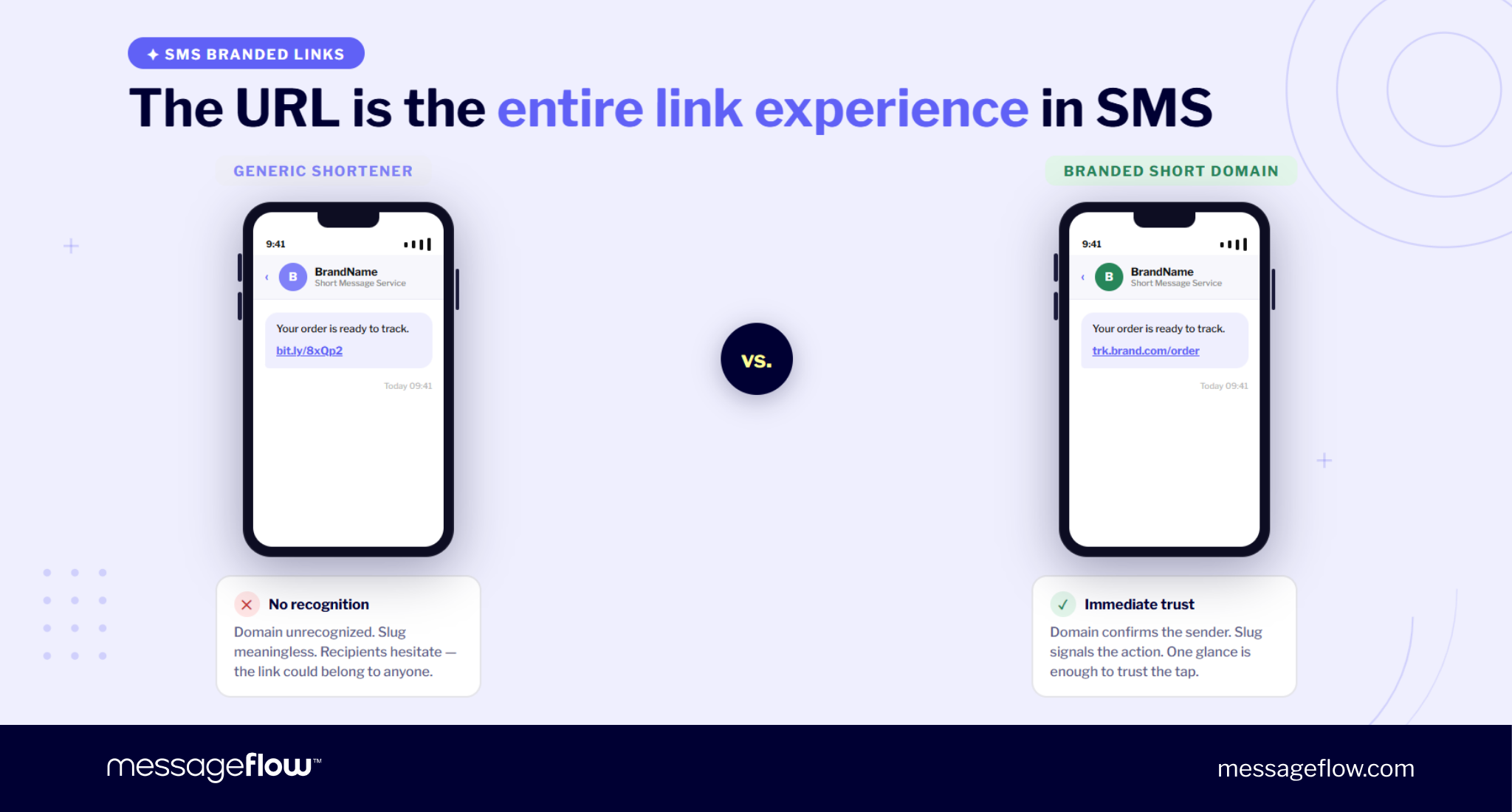
Compare these two endings:
Track your order: bit.ly/8xQp2
Track your order: trk.brand.com/order
The second link does more than save you characters. It confirms that the message and destination belong together. The domain tells the recipient, “this is still the brand you are dealing with”. The slug tells them what happens after the tap.
SMS offers fewer supporting cues than richer channels so this combo is crucial. In RCS or Viber, the user may see a branded profile, button, card, or preview. In SMS, the URL is often the CTA itself. Your custom short domain becomes part of the message’s credibility.
For international teams, character budget also matters. If SMS copy uses characters outside GSM-7 encoding, including many accented characters, the message may use UCS-2 encoding and reduce the segment limit. That makes a short branded domain and compact slug more valuable, especially when localized copy already needs more room.
Slug semantics that convert vs. slugs that raise suspicion
The domain creates recognition. The slug creates expectation.
A good SMS slug is short, readable, and aligned with the reason for the message. It should tell the recipient what kind of action is on the other end of the click without turning the URL into a sentence.
Good patterns:
- go.brand.com/pay
- trk.brand.com/order
- go.brand.com/sale
- go.brand.com/booking
- go.brand.com/verify
Risky patterns:
- go.brand.com/a9Bq7
- go.brand.com/click-here-now
- go.brand.com/free-prize
- go.brand.com/redirect
- go.brand.com/user-login-secure-update
The problem with cryptic slugs is that they weaken the branded domain advantage. The user may recognize the domain, but the path still looks automated or unclear. The issue with overpromising slugs is different: they feel promotional in the wrong way, especially in transactional or account-related messages.
The best slug usually mirrors the user’s intent. If the message is about an order, use /order or /track. If it is about an appointment, use /booking or /visit. If it is about a sale, use /sale, /offer, or the campaign name.
The three SMS anti-patterns that cancel the branded domain advantage
A branded short domain can still underperform if the message pattern around it is weak. The most common mistakes are simple.
First, using a good domain with a random slug. go.brand.com/x7ApL is better than a public shortener, but it still looks like a machine-generated link. The branded surface is present, yet the destination is unclear.
Second, placing several links in one short SMS. Multiple URLs dilute the CTA and make the message feel less controlled. In SMS, one message should usually drive one action. If the user has to decide between links, the branded domain no longer works as a clean trust signal.
Third, letting the link contradict the message tone. A service update that ends with a sales-heavy slug can feel suspicious. A promotional SMS that uses a vague account-style slug can feel misleading. The domain, slug, and copy should describe the same action.
💡 Think of SMS as the strictest channel in the mix. It gives you the least room to explain the link, so the URL has to be self-evident.
Copy-ready SMS templates
Transactional SMS
Your order is ready to track: trk.brand.com/order
Check the latest delivery status here.
Promotional SMS
Your early access offer is live: go.brand.com/sale
Shop before it ends today.
💡 Takeaway: In SMS, the branded domain and slug are the link experience. Make both recognizable, short, and aligned with the exact action you want the recipient to take.
RCS business messaging: The branded domain in buttons, previews, and fallbacks
RCS business messaging gives you more visual control than SMS but that does not make the branded domain less important. It simply changes where the domain appears.
In RCS, a link may be part of a rich card, an Open URL suggested action, a button, a plain-text message, or an SMS fallback. The recipient may not always see the full URL in the body copy but they still encounter the destination surface before or during the tap.
For broader RCS context, see the complete RCS business messaging guide.
How RCS Open URL suggested actions display the branded domain
The key RCS update is simple but important: since May 2026, Google RCS shows the destination URL directly inside the button label for Open URL persistent suggestions. This means the branded domain is no longer only a background routing decision. It can be visible inside the button experience itself.
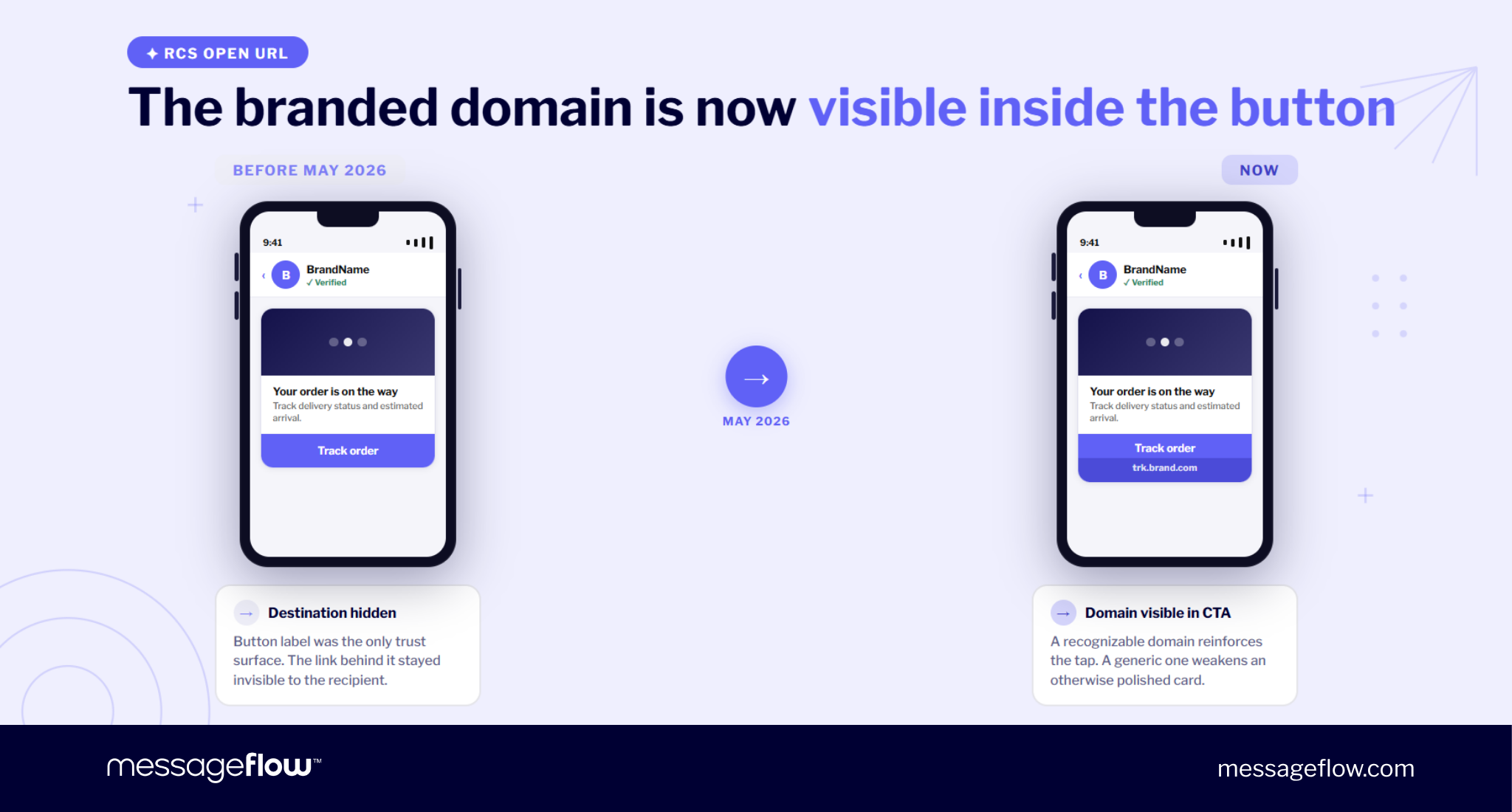
This changes how you design the button pattern. Before, you could think of the button label as the main trust surface:
Track order
Now, the user may also see the destination tied to that action:
Track order — trk.brand.com
Now it can be a part of the visible CTA. If the domain is recognizable, it supports the tap. If the destination appears as a generic shortener, partner-owned tracking domain, or long raw URL, it can weaken the button’s clarity.
This is especially relevant for branded links RCS campaigns where the rich interface may create a false sense of safety. A polished card can still lose trust if the URL surface looks disconnected from the brand.
Fallback URL: Why the branded domain matters as much as the button
RCS does not always render as RCS. A user may be on a device, network, or messaging environment where the rich experience is not available. In that case, the campaign needs a fallback path.
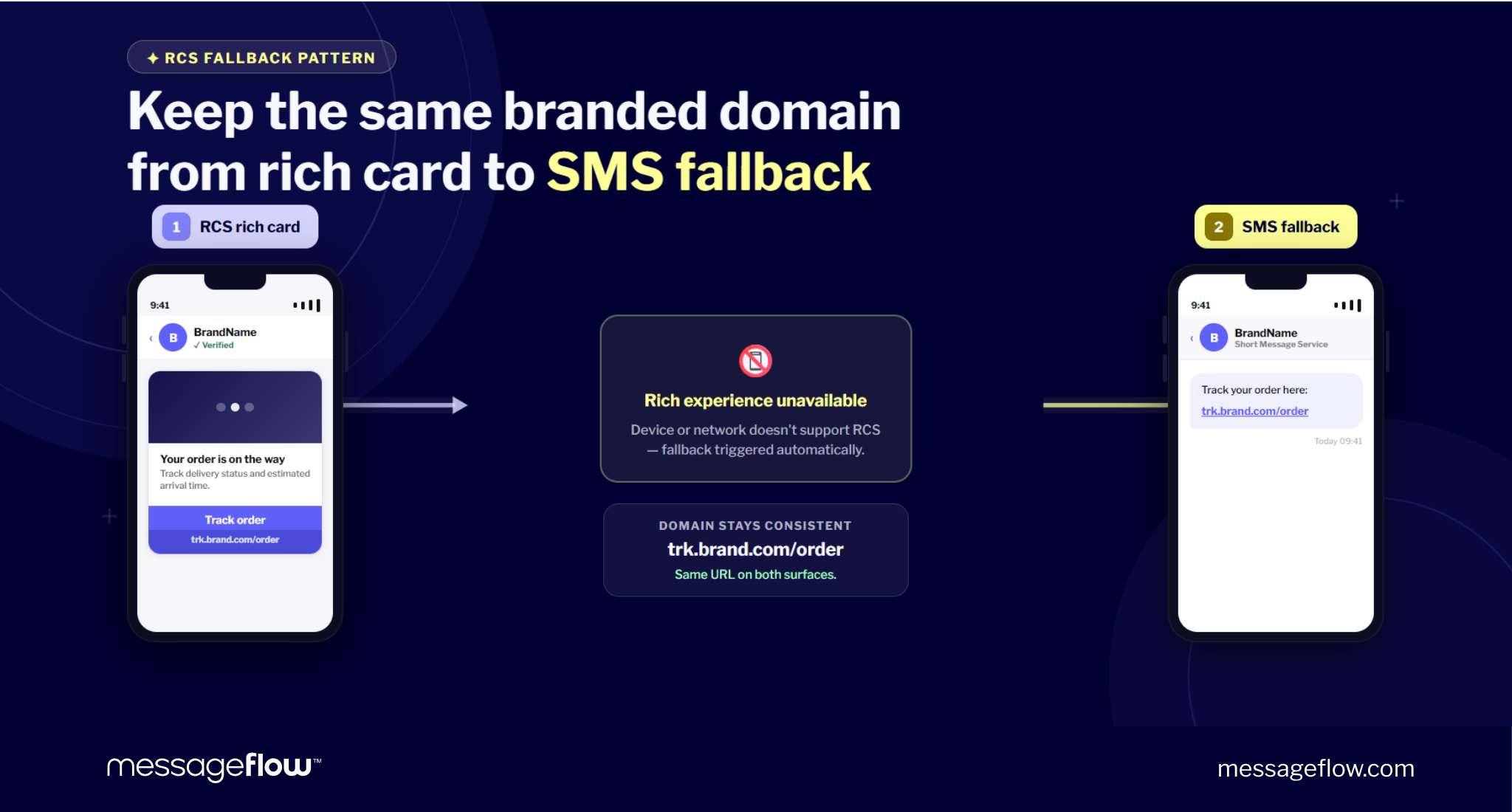
❗ That fallback URL should use the same branded short domain as the primary RCS action.
If the RCS card sends users to trk.brand.com/order but the fallback SMS exposes a long tracking URL or public shortener, the experience breaks at the exact moment when clarity is most important. The user who does not receive the rich version should not receive a less trustworthy link surface.
The fallback should feel like a controlled degradation instead of a downgrade in trust. A strong fallback pattern looks like this:
Primary RCS button:
Track order — trk.brand.com/order
SMS fallback:
Track your order: trk.brand.com/order
The channel changes but the domain signal stays consistently clear.
Rich card link patterns: What to show, what to hide, and when the button replaces the visible URL
RCS gives you three common link patterns.
The first is button-first. Use this when the action is obvious and the card already explains the context. For example, an order tracking card with a “Track order” button. The domain still matters in the button destination but you do not need to repeat the full URL in the message body.
The second is button plus visible domain. Use this when the action is higher-friction or trust-sensitive, such as account access, payment, verification, or delivery changes. Showing the branded domain near the CTA can reassure the recipient before the tap.
The third is plain URL fallback. Use this when the RCS action cannot render and the link becomes part of a text message. In that case, the URL must be short, branded, and readable enough to stand on its own.
💡 Do not use RCS richness to hide a weak destination. The better pattern is to make the branded domain consistent across the visible card, the button destination, and the fallback.
Copy-ready RCS card template
Card title: Your order is on the way
Card text: Track the latest delivery status and estimated arrival time.
Suggested action: Track order
Open URL destination: trk.brand.com/order
SMS fallback: Track your order here: trk.brand.com/order
For setup mechanics such as DNS, redirects, and UTMs, see how branded short links work (DNS, 302, UTM). For performance analysis, check out measuring branded link performance across channels.
💡 Takeaway: In RCS, the branded domain should stay consistent across the button, the destination, and the fallback because the user may see any of those surfaces before clicking.
Viber business messages: Branded domain through the partner layer
Viber business messages add another layer to the branded link question: the partner setup.
In SMS you can usually think about the link as your visible URL in the message body. In RCS, you think about buttons, cards, Open URL actions, and fallback. In Viber, the principle is the same – keep the domain recognizable – but the operational control often sits with your Viber partner.
The UX question goes from “what should the link look like?” to “which domain will actually appear when the message is sent?”
For broader Viber message-type context, use our Viber promotional vs. transactional messages guide.
How URL shortening and click tracking work in Viber
Viber Business Messages are delivered through approved partners. This means URL shortening, tracking, and branded domain configuration may not be fully self-serve in the same way as a standard SMS campaign.
Before sending, confirm whether your links will use:
- your own branded short domain
- the partner’s shared shortener domain
- a full destination URL
- a tracking URL that appears before redirecting
❗ A Viber message can look polished at the sender level but still expose a generic or partner-owned domain at the point of click. If the recipient sees a domain that does not match your brand, part of the trust signal is lost.
Button vs. inline URL: When each serves the branded domain better
Viber gives you more flexibility than plain SMS. You may use a button, an inline URL, or both depending on the message type and campaign goal.
Use a button-first pattern when the action is simple and the message already explains the context. For example, a post-purchase NPS message can use a short text and a button such as “Rate your experience.” In this case, the destination behind the button should still use your branded short domain.
Use an inline branded URL when the link itself needs to reassure the recipient. This is useful for transactional updates, account-related actions, order flows, or any message where the user may want to inspect the destination before tapping.
Use button plus visible domain when the action is high-value or trust-sensitive. The button gives convenience. The visible branded URL gives confirmation.
A weak pattern is using a strong Viber sender profile with a hidden generic tracking URL. The message looks branded until the moment of action, then the link surface breaks continuity.
What to confirm with your Viber partner before sending
Do not assume the branded domain is active in Viber just because it is active for SMS or RCS.
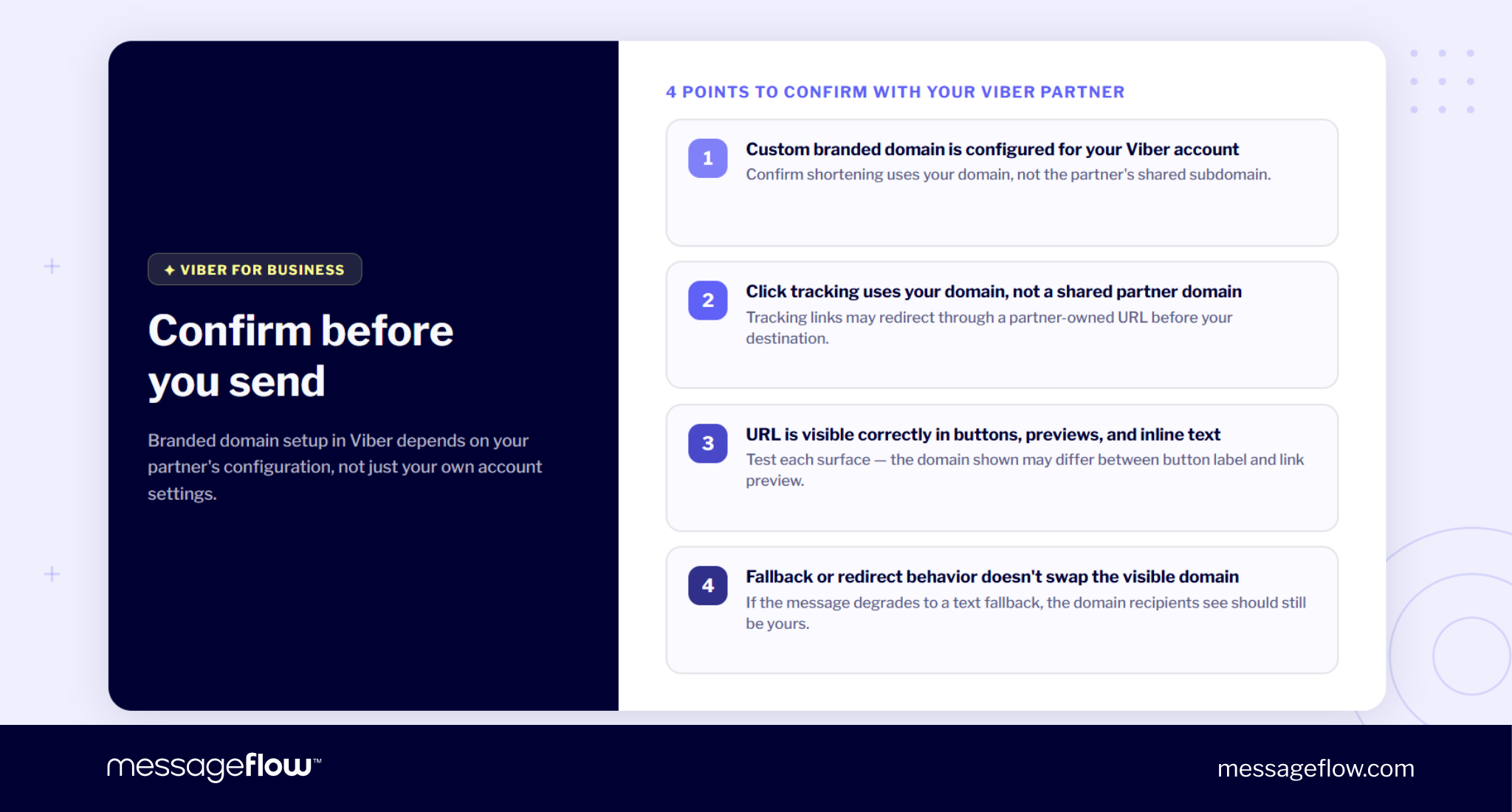
Before launch, confirm four points with your partner:
- whether custom branded domain shortening is configured for your Viber account
- whether click tracking uses your domain or a shared partner domain
- how the URL appears in buttons, previews, and inline text
- whether fallback or redirect behavior changes the visible domain
Copy-ready Viber template
Message text: Thanks for your recent order. How was your experience?
Button: Rate your purchase
Button destination: go.brand.com/rate
Optional inline support line: You can also open the survey here: go.brand.com/rate
💡 Takeaway: In Viber, branded link UX depends on the partner configuration as much as the message copy. Confirm the visible domain before the campaign goes live.
OTT beyond Viber: The reusable pattern
Viber is only one OTT channel. The same logic applies to other messaging environments where the user may see a button, preview, inline URL, fallback URL, or a combination of all four.
The channel details change but the strongest reusable pattern is simple: make the button do the action, make the branded domain support trust, and make the fallback readable if the rich experience does not render.
This works with OTT because these channels often give you more UI control than SMS but less direct control than an owned web or app interface. The recipient still needs to understand where the tap leads.
Button-first, branded fallback
In most OTT channels, the default pattern should be button-first.
The message explains the context. The button carries the action. The branded short domain sits behind the button and appears wherever the channel exposes destination details, previews, or fallback text.
A good pattern:
Message: Your return request has been approved.
Button: View return details
Destination: go.brand.com/return
Fallback text: View your return details: go.brand.com/return
This pattern gives you three advantages.
1. The button reduces friction. The user does not have to read or copy a URL.
2. The branded domain keeps the destination recognizable when the URL becomes visible.
3. The fallback still works as a clear text message if the richer OTT experience is unavailable.
Don’t fall into the trap of assuming the button eliminates the need for a clean URL though. The button may be the primary surface but the destination still needs to be branded, short, and aligned with the action.
Branded domain surface by channel
| Channel | Main visible surface | Best link pattern | What to avoid |
|---|---|---|---|
| SMS | Plain text URL | Branded short domain + readable slug | Random slug, multiple links, generic shortener |
| RCS | Button label, rich card action, fallback URL | Button-first with branded fallback | Branded button leading to unbranded fallback |
| Viber | Button, inline URL, preview, partner-configured short link | Confirm partner-configured branded domain before sending | Partner-owned tracking domain appearing instead of yours |
| Other OTT channels | Button, preview, fallback, inline URL depending on channel | Button-first with branded short URL as destination | Hiding a generic or unclear URL behind a polished button |
| QR to messaging | Printed QR destination and optional visible URL | Branded short link behind the QR code | Static raw URL that cannot be updated later |
If you’re running messaging campaigns in any or multiple OTT channels, you are essentially designing one branded domain system and adapting its visible surface to each channel.
SMS needs the link to stand on its own. RCS needs consistency between button and fallback. Viber needs partner confirmation. Other OTT channels usually need a button-first pattern with a branded fallback.
💡 Takeaway: Across OTT channels, the safest default is button-first, branded destination, readable fallback.
QR to messaging: The branded domain as entry point
QR codes are often treated as a separate offline-to-online tactic but in messaging journeys they should follow the same branded domain logic.
If a QR code opens an RCS or SMS journey, the destination behind that code should be a branded short link, not a raw long URL or an outdated dynamic link. The printed code may be scanned from packaging, a poster, a receipt, an event stand, or in-store material. In each case, the URL acts as the entry point into the conversation.
A branded short link gives you three practical advantages.
First, the printed URL under the QR code stays readable and brand-consistent. Second, the destination can be updated later without reprinting materials. Third, the same short-link infrastructure can support routing, fallback, and continuity with the messaging campaign.
This also matters for teams still migrating older deep-link flows. Firebase Dynamic Links shut down in August 2025, so any QR-based messaging entry point that still depends on FDL needs a replacement path. To read more about it, see our dedicated guide to deferred deep links in RCS and SMS.
💡 Takeaway: A QR code should not hide an unbranded or fragile destination. Use a branded short link as the visible, updateable entry point into the messaging journey.
Keep the branded domain visible where it matters
Branded links in SMS, RCS, and Viber are a part of the broader recipient experience, not just a technical setup.
MessageFlow supports custom branded short domains natively across SMS, RCS, and Viber to help you keep consistent brand surface on every channel.
FAQ – Branded links in SMS, RCS, and Viber
It depends on the message format. In a plain-text RCS message, the branded domain appears directly in the URL. In a rich card with an Open URL suggested action, the destination URL may be visible in the button label. In SMS fallback, the branded domain appears as a plain-text link.
In SMS, the domain and slug are often the only visible indicators of where the link leads. A slug like /order or /sale supports the message context. A slug like /a9bQ4t looks automated and unclear, even when the domain itself is branded.
A fallback URL is the address used when the RCS action cannot render or execute properly. If the recipient receives an SMS fallback instead of the rich RCS version, the URL may appear as plain text. A branded fallback keeps the experience recognizable even when the channel degrades.
The principle is the same but the infrastructure is different. In SMS, the sender usually controls the visible URL pattern directly. In Viber Business Messages, shortening and tracking may depend on partner configuration. Before sending, confirm that your branded domain is active for Viber links.
Use a button-first pattern with a branded short URL as the destination and a readable branded fallback for cases where the rich experience does not render. The button reduces friction, while the branded domain keeps the destination recognizable in previews, fallbacks, and exposed URLs.
A branded short link behind a QR code keeps the printed URL readable, lets you update the destination later, and keeps routing consistent with your messaging campaigns. It also avoids locking printed materials to a raw URL or outdated dynamic link setup.