A branded short link looks simple in SMS or RCS: tap, redirect, landing page. But if you have ever wondered how branded short links work or how do URL shorteners work beyond the visible link, the real answer sits in four layers: domain ownership, DNS and SSL, redirect logic, and UTM attribution.
This technical stack matters because a short link is not just a space-saving trick. In business messaging it affects click-through rate, trust, deliverability, and the quality of your campaign data. A generic public shortener may save characters, but it can also hide your brand, weaken the trust signal, and create tracking issues that only appear once the campaign is already live.
A branded short link lives on a domain you control, such as go.yourbrand.com/offer, instead of a shared public domain like bit.ly/xyz. Behind that link a DNS CNAME points your short domain to the shortening infrastructure, an SSL certificate secures the click path, a 302 redirect sends the visitor to the destination URL, and UTM parameters help GA4 attribute the session correctly.
Before choosing a standalone shortening tool or comparing options like Bitly and branded alternatives, it helps to understand the mechanics. This guide explains how each layer works, what can break, and what to check before using branded short links in SMS, RCS, Viber, or any other campaign channel.
What is a branded short link and how does it differ from a public shortener?
A branded short link is a redirect that lives on a domain you own, not on a shared public shortener. That ownership affects three things at once: the visible trust signal, the control you have over the destination, and the quality of the tracking behind the click.
With a public shortener, the link usually looks like this:
- bit.ly/3xR2mQ
- tinyurl.com/tU52k
With a branded short link, the same campaign can use a domain that belongs to the sender:
- go.yourbrand.com/sale
- sms.yourbrand.com/offer
- trk.yourbrand.com/order
A public shortener asks the recipient to trust an unfamiliar shared domain. A branded short link gives them a recognizable signal before they click. In channels like SMS, RCS, and Viber, where the message is short and the link often carries the main CTA, that signal can directly affect whether the user taps or hesitates.
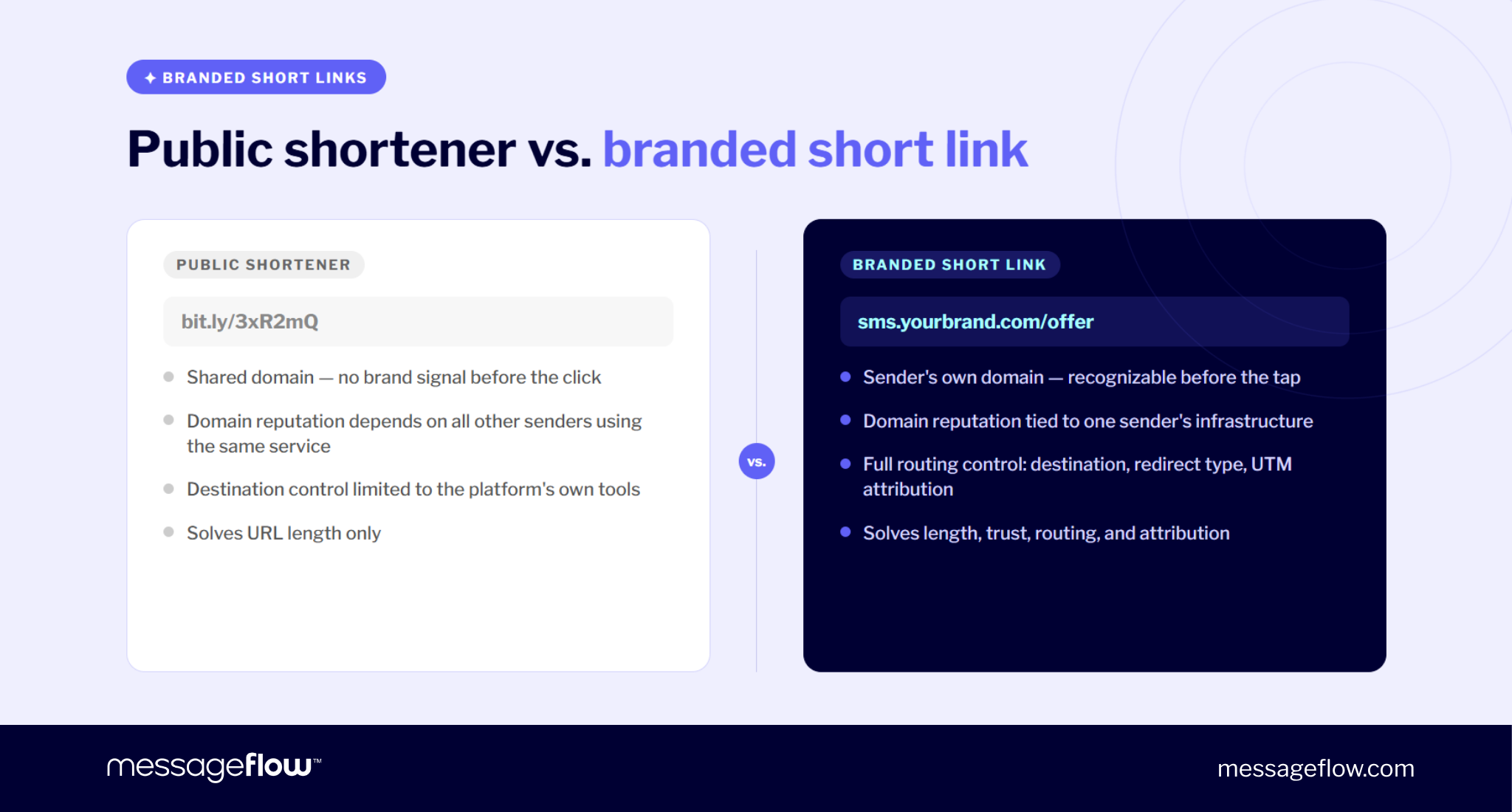
A branded short link also gives the sender a cleaner tech setup. The short domain points to the shortener through DNS, the click is secured with SSL, the redirect sends the user to the final destination, and UTM parameters preserve campaign attribution. In other words, the link becomes an integral part of your communication infrastructure rather than a disposable wrapper around a long URL.
This is super important for business messaging. Generic shorteners are commonly used across many unrelated senders, which means their domain reputation can be affected by traffic you do not control. A branded domain tied to your own campaigns is easier for recipients to recognize and easier for messaging ecosystems to evaluate as sender-specific infrastructure.
💡 Public shorteners only solve length. Branded short links solve length, trust, routing control, and attribution.
Custom domain setup: DNS CNAME and SSL
A custom domain for a URL shortener is the domain or subdomain that appears inside your short link. Instead of sending people to a shared public domain, you use something you own, such as go.yourbrand.com, sms.yourbrand.com, or a dedicated short domain like brand.to.
The setup usually has three parts:
- Register or choose the short domain.
- Add a DNS CNAME record that points it to the shortener’s hostname.
- Let the platform issue an SSL certificate so every link works over HTTPS.
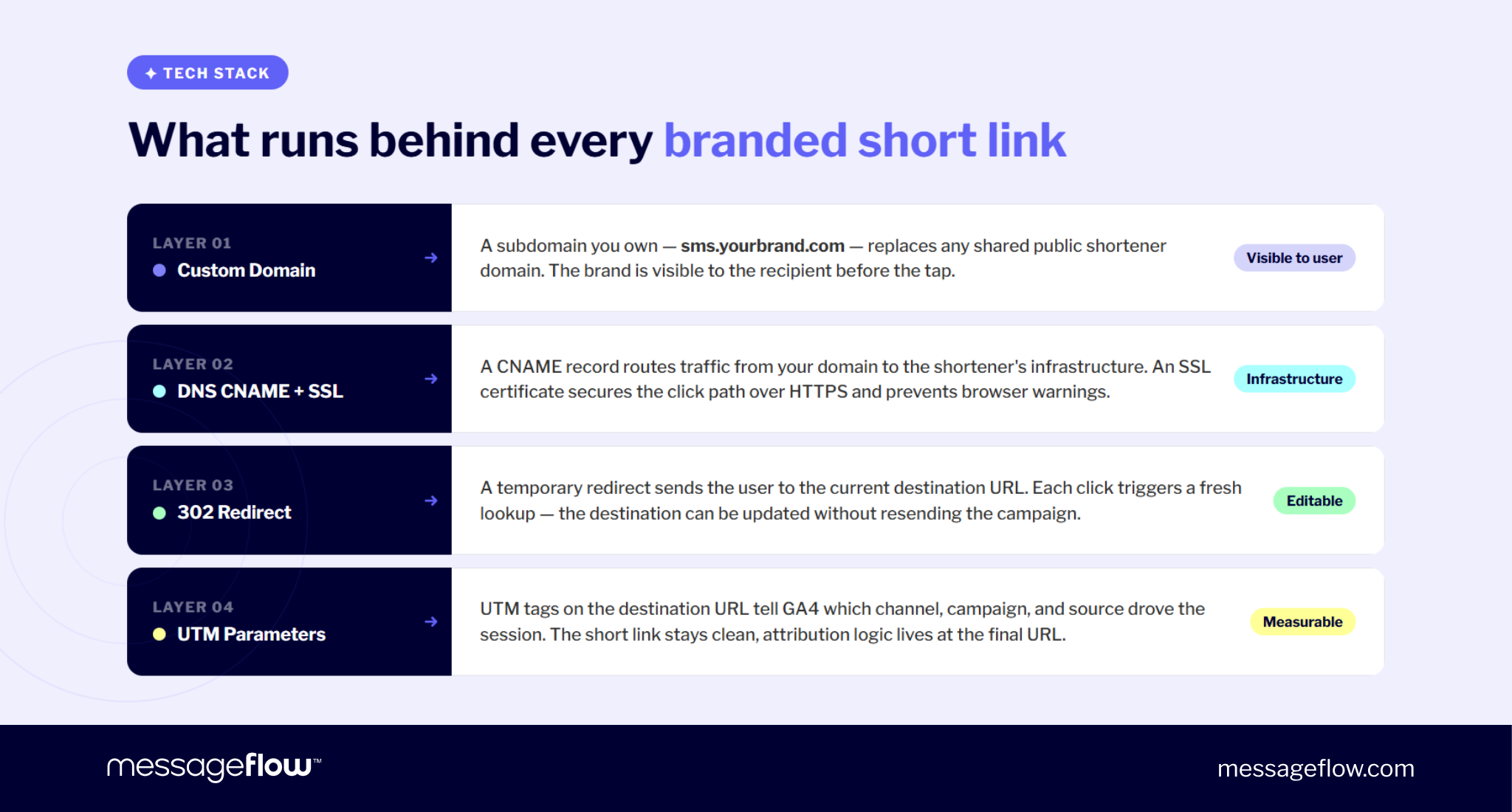
The CNAME record is the handoff. It tells browsers that requests to your short domain should be handled by the shortening infrastructure. The user still sees your branded domain, but the routing, redirect generation, click logging, and destination management happen inside the platform behind it.
SSL is the layer that makes the link safe to open. Without a valid certificate, browsers may show a security warning or block the page before the redirect happens. In campaign terms, that can make a perfectly valid offer look broken or suspicious.
💡 The common failure point is timing. DNS changes can take time to propagate and campaigns launched too early may hit SSL or routing errors even if the configuration is technically correct. This is why branded short links should be tested before a campaign goes live, especially when a new domain is being used for the first time.
HTTPS also matters for attribution. If a click starts on an insecure HTTP link and then gets upgraded to HTTPS, referrer data may be lost before the session reaches GA4. For campaign links, the cleaner setup is simple: use HTTPS from the start, preserve the query string through the redirect, and keep UTM parameters on the final destination URL.
This is the core of a url shortener custom domain setup: your domain in front, DNS and SSL underneath, and the shortener’s redirect infrastructure doing the routing in the background.
Why SSL and domain trust affect click-through rate in SMS
Domain trust turns tech setup into a commercial issue. A branded short link routes the click more cleanly and gives the recipient a visible reason to trust the CTA.
This matters in SMS marketing because the link often carries most of the conversion path. There is no rich layout, no long persuasive context, and very little room to explain where the user is going. A link like sms.yourbrand.com/claim feels different from bit.ly/3xR2mQ because it answers one question before the click happens: “Does this look like it came from the brand?”
There is also a filtering dimension. Public shorteners are widely used, including by malicious senders, so generic domains can attract more scrutiny from messaging ecosystems. A branded domain on sender-specific infrastructure gives carriers and users a cleaner signal than a shared domain used by thousands of unrelated campaigns.
That distinction has become more important as smishing has grown. Proofpoint data shows that 75% of organizations experienced smishing, and that 55% of suspected smishing texts contained URLs. Clearly, link appearance affects behavior.
A branded, HTTPS-secured short link is not just neater. In SMS, it can reduce hesitation, support deliverability hygiene, and make the click feel like a natural continuation of the brand conversation.
302 vs. 301 redirects: Which one to use for campaign links and why
For campaign short links, use a 302 redirect. A 302 tells the browser and search engines that the redirect is temporary, which is exactly what you want when the destination may change after a campaign starts.
A short link is rarely a permanent web architecture decision. It is usually tied to a campaign, offer, product drop, landing page, seasonal sale, event, or transactional flow. This means the destination may need to change without redistributing the link.
The difference between 301 and 302:
| Redirect type | What it means | SEO equity | Browser cache | Best use |
|---|---|---|---|---|
| 301 redirect | Permanent move | Passes to destination | More aggressive | Site migrations, permanent URL changes |
| 302 redirect | Temporary move | Stays with the source URL | Cleaner for repeat routing | Campaign links, short links, tests, temporary offers |
Using a 301 redirect for a campaign link may be a trap. If the sale ends, the landing page changes, or the destination needs to be swapped, some browsers may keep sending users to the old destination because the original redirect was treated as permanent. The link may keep “remembering” the previous route even after you update it.
A 302 redirect avoids that problem. Each click triggers a fresh lookup so the shortener can send the user to the current destination. This is why 302 is the safer default for SMS, RCS, Viber, email, paid media, and any campaign where the link may need to remain editable.
This is also why the SEO concern is often misunderstood. A 302 redirect is not “bad for SEO” when used correctly. For campaign short links, SEO equity is usually not the goal because the short URL itself is not meant to rank. The point is controlled routing, measurement, and flexibility.
💡 Use a 301 redirect when a page has permanently moved. Use a 302 redirect when the link is a campaign asset. For branded short links, that distinction determines whether you can update the destination without breaking the user journey.
UTM parameters and GA4 attribution: What works and what breaks
UTM parameters identify where campaign traffic came from. In a branded short link flow, they should live on the destination URL, not on the visible short link.
The flow looks like this:
go.yourbrand.com/sale → 302 redirect → yourbrand.com/landing-page?utm_source=sms&utm_medium=sms&utm_campaign=june-promo
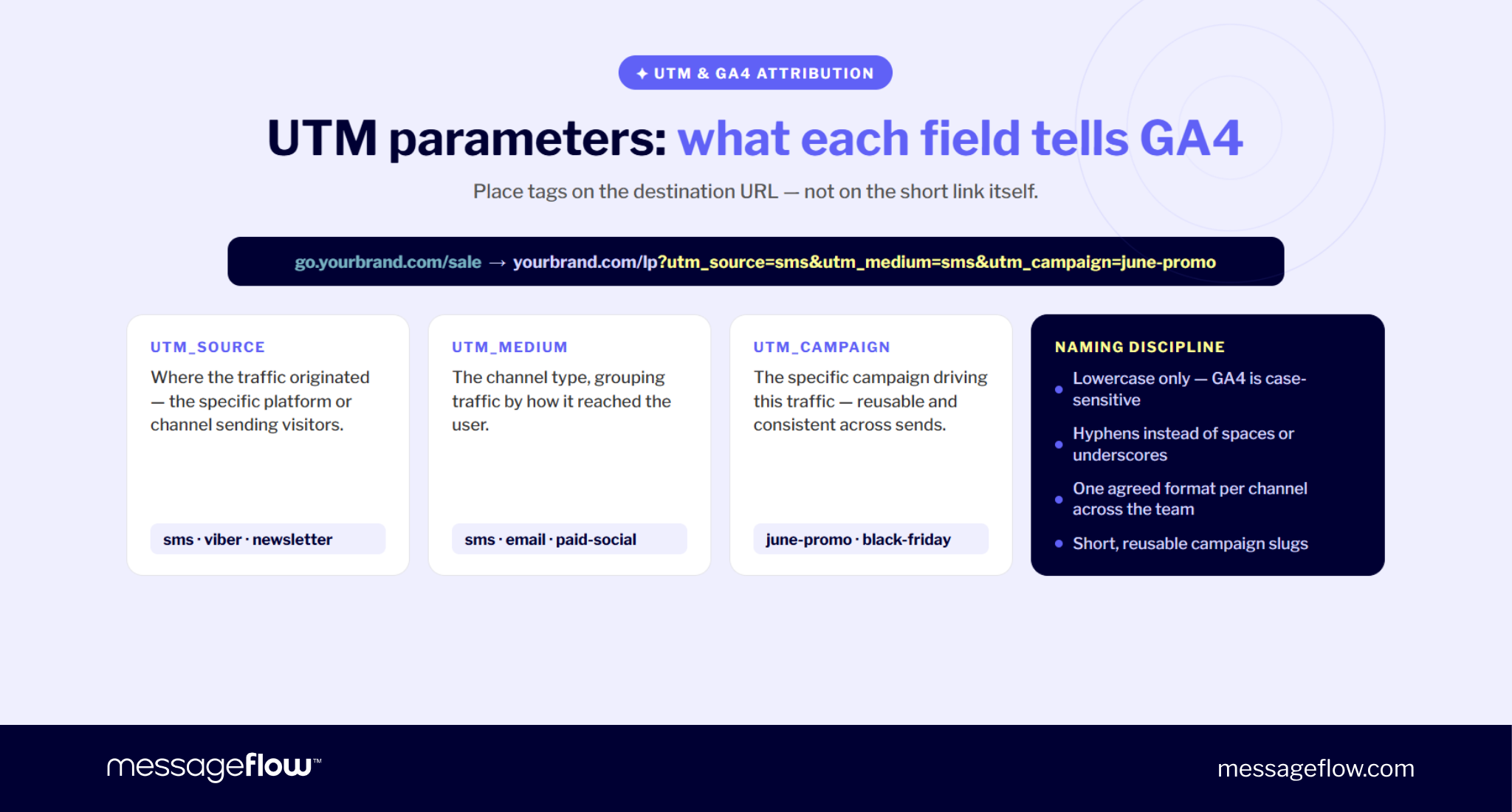
GA4 reads those parameters when the landing page loads. The short link itself is only the routing layer. Its job is to stay clean, readable, and trusted while sending the user to a destination that carries the full attribution logic.
The most important UTM fields are:
| UTM parameter | What it tells GA4 | Example |
|---|---|---|
| utm_source | Where the traffic came from | sms, viber, newsletter |
| utm_medium | The channel type | sms, email, paid-social |
| utm_campaign | The specific campaign | summer-sale, black-friday, app-launch |
💡 How to shorten a URL and add UTM parameters? Build the full tagged URL first, paste that destination into your branded shortener, then use the generated short link in the campaign.
Two things commonly break attribution.
First, intermediate redirects can drop the query string. If the user clicks a short link, passes through another redirect, and the final landing page loads without ?utm_source=…, GA4 cannot read the campaign data. The traffic may fall into direct or unattributed buckets.
Second, inconsistent UTM naming fragments your reports. GA4 treats values as case-sensitive, so SMS, sms, and Sms can appear as separate sources or mediums. The campaign still receives traffic, but the data becomes harder to analyze.
Use a strict naming convention:
- lowercase only
- hyphens instead of spaces
- one agreed format for each channel
- short campaign slugs that teams can reuse
For example:
utm_source=sms&utm_medium=sms&utm_campaign=june-promo
not:
utm_source=SMS&utm_medium=Text_Message&utm_campaign=June Promo 2026
💡 A branded short link gives you a cleaner front-end experience but UTM discipline gives you cleaner reporting. You need both. The visible link earns the click while the tagged destination explains where the click came from.
The complete stack in practice: MessageFlow branded links
A branded short link works best when the whole stack is treated as one system: domain, DNS and SSL, redirect, UTM, and click analytics. If one layer is weak, the link may still open but the campaign can lose trust, attribution, or routing flexibility.
A typical SMS campaign might use a link such as:
sms.sinsay.com/123456
That link is short enough for mobile messaging, recognizable enough to reduce hesitation, and structured enough to support tracking behind the scenes. The recipient sees a branded domain. The platform handles the redirect. The destination URL carries the UTM parameters. The analytics layer records the click and connects it to campaign performance.
Branded links available with MessageFlow are designed to bring those moving parts into one campaign workflow. Instead of managing the short domain, SSL, redirect behavior, destination URLs, and CTR reporting as disconnected tasks, marketers can use branded, trackable links inside the messaging setup itself.
That becomes particularly important when links are used across high-volume communication channels such as SMS, RCS, and Viber. The goal is not only to shorten a URL but to also make every link:
- recognizable to the recipient
- secure over HTTPS
- editable through a 302 redirect
- measurable through UTM attribution and click tracking
- aligned with the sender’s domain and messaging infrastructure
This moves branded short links from a formatting detail to a campaign control layer. Sure, a public shortener can trim a long URL. A branded link can support trust, routing, analytics, and deliverability in one controlled path.
For teams evaluating providers, the useful question is not just about the link clipping. A stronger checklist is: Can it support a custom domain? Does it handle SSL correctly? Does it use 302 redirects for campaign links? Can it preserve UTMs? Does it show CTR in a usable dashboard? Can it support messaging channels where domain trust affects both clicks and delivery?
That is the practical value of MessageFlow. It turns link shortening into part of the communication framework instead of an extra tool added at the end.
FAQ – How branded short links work
A 301 redirect means the destination has changed permanently. It is typically used for site migrations, deleted pages, or permanent URL changes where SEO equity should move to the new page.
A 302 redirect means the destination is temporary. For campaign short links, this is the better choice because the short link can keep pointing to a current destination without browsers treating the first destination as final. In simple terms: use 301 for permanent website changes, and 302 for editable campaign links.
No, not when it is used for the right purpose. A 302 redirect is appropriate when the destination may change, such as in campaign links, A/B tests, temporary promotions, or short links used across SMS, RCS, Viber, email, and paid media.
The SEO problem usually comes from using the wrong redirect type for the wrong job. If a page has permanently moved, use 301. If the link is a temporary or editable campaign asset, use 302. For branded short links, SEO equity is usually not the primary concern because the short URL itself is not meant to rank.
Sometimes, but it depends on the platform and the level of control you need. Some free or low-cost URL shorteners allow custom domains, while others reserve that feature for paid plans.
For business SMS campaigns, the more important question is about whether it gives you sender-dedicated infrastructure, HTTPS, 302 redirects, UTM preservation, click analytics, and enough control over domain reputation. A free URL shortener with a custom domain may work for light use, but high-volume messaging usually needs a more controlled setup.
Build the full UTM-tagged destination URL first, then shorten it with your branded shortener.
For example, your destination might be:
yourbrand.com/sale?utm_source=sms&utm_medium=sms&utm_campaign=june-promo
The user does not need to see that full URL. They only see the branded short link:
go.yourbrand.com/sale
When they click, the 302 redirect sends them to the tagged destination and GA4 reads the UTM parameters after the landing page loads. This gives you a clean user-facing link and proper attribution in analytics.
For business SMS, a good Bitly alternative is not really another generic shortener. It is a solution that supports branded short links on your own domain, HTTPS, sender-specific infrastructure, 302 redirects, UTM handling, and campaign-level click tracking.
That is why CPaaS-based branded links are often a better fit for messaging campaigns than a standalone public shortener. They connect link shortening directly with the communication channel, so the link is created, tracked, and managed as part of the campaign workflow rather than as a separate step.