
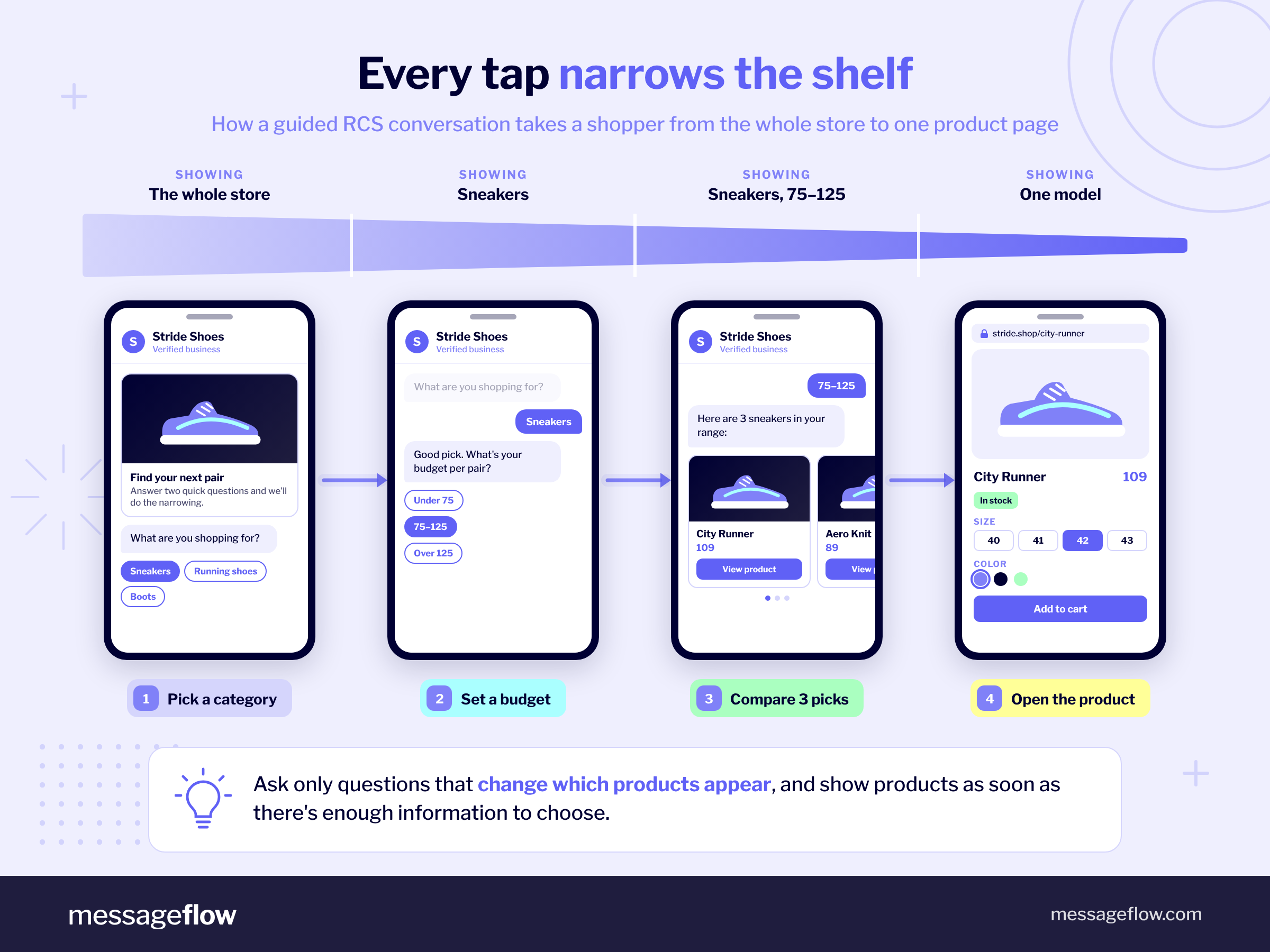
A shopper receives a promotion from your shoe store, but which products should they explore first? With RCS for ecommerce, you can help them narrow down the options within a message conversation. They choose a category, select a price range, and browse a carousel of relevant products before opening the page for their preferred pair.
Rich Communication Services (RCS) supports images, product cards, and interactive buttons in compatible messaging apps. For marketers, these features provide a way to build a shopping journey around customers’ choices, with each response shaping what appears next.
In this article we explore retail use cases and real campaign examples, then walk you through a scenario you can adapt for your business. You’ll find sample messages and buttons, guidance on designing the journey, and a measurement plan that connects message interactions with store visits and purchases.
Rich Communication Services vs. traditional SMS
RCS business messaging expands what retailers can do within a mobile message. Alongside text, you can present product images, carousels, suggested replies, and action buttons. These features let shoppers express a preference, explore relevant options, and open a product page directly from the conversation.
💡 Customers can interact through a compatible phone messaging app without downloading your store’s app or joining a separate messaging service. However, RCS business messaging availability depends on their device, messaging app, and network, as well as your brand’s coverage. Before planning an interactive campaign, check which recipients you can reach through RCS. For those you cannot, prepare an SMS fallback with a concise offer and a link to the relevant store page.
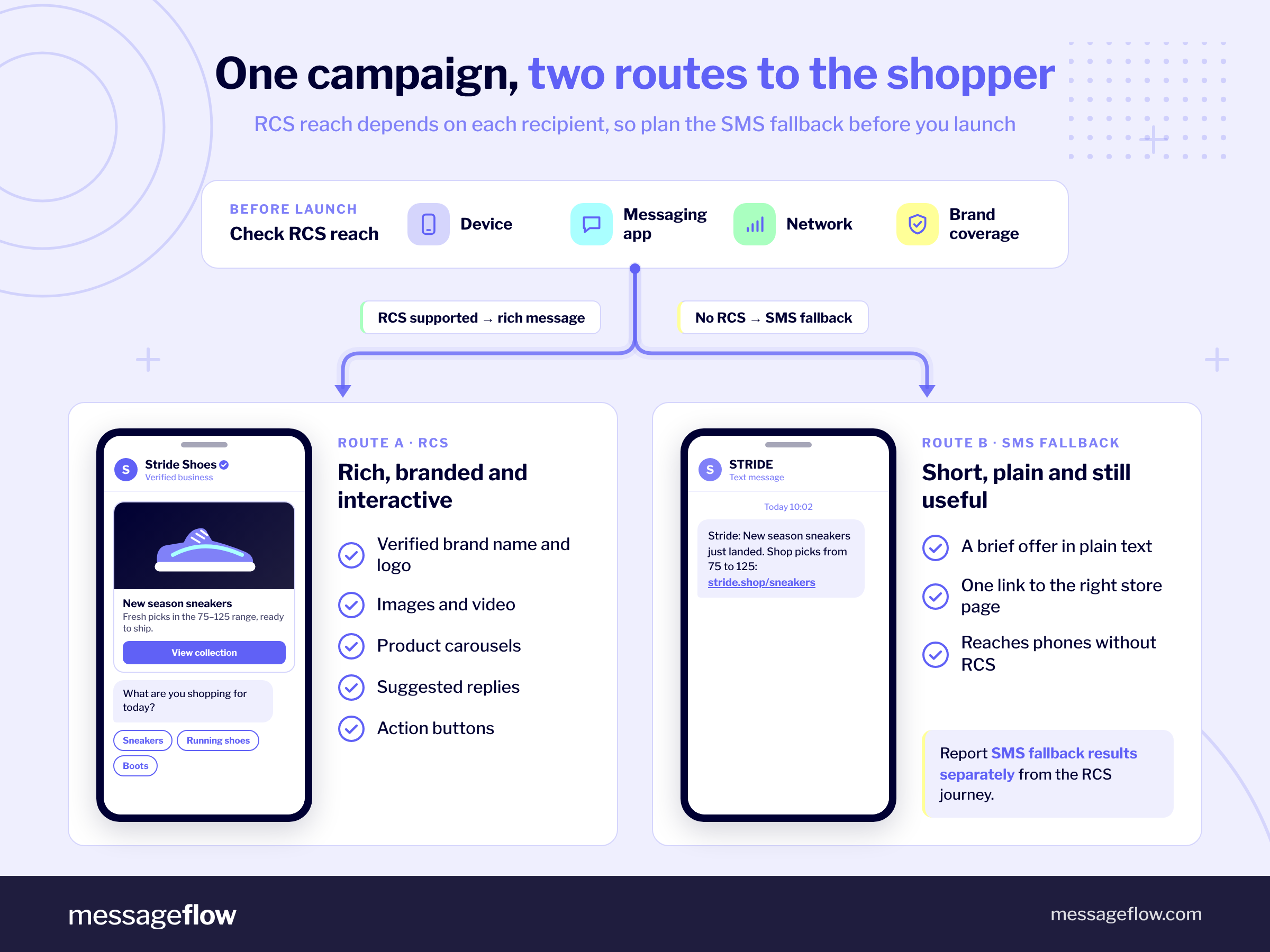
Going back to the core issue, figuring out whether RCS or SMS is better for you is a valid question. RCS is ideal for retail and e-commerce businesses wanting to deliver a seamless, multimedia-rich, personalized marketing messaging. On the other hand, SMS is still going strong. It is popular, easy to use, and cost-effective.
Here’s a brief overview of some of the essential aspects of both these channels.
| Feature | RCS Business Messaging | SMS |
|---|---|---|
| Message content | Text, images, video, rich cards, and product carousels. | Text and links. Product images and other rich content appear on the linked page. |
| Customer interaction | Suggested replies and action buttons help customers choose options and move through a conversation. | Customers can follow links or reply by text when the sender setup supports two-way messaging. |
| Personalization | Content and offers can reflect customer data and choices made during the conversation. | Text, offers, and links can reflect customer data. Personalization is not limited to inserting a name. |
| Brand presentation | A verified business profile can display the brand’s name, logo, and business information. | A phone number or sender name identifies the sender, depending on the market and setup. |
| Shopping journey | Customers can narrow their preferences and browse product cards before opening a relevant store page. | A message can direct customers to a product, category, cart, or offer page, where they continue shopping. |
| Measurement | Delivery and read events, customer replies, and supported button interactions. Available reporting depends on the platform and setup. | Delivery reporting and, with link tracking configured, link clicks. SMS does not provide native read receipts. |
| Reach | Requires RCS business messaging support and coverage for the recipient. | Reaches recipients without requiring RCS support or mobile internet to receive the text. Opening a web link requires internet access. |
Rich Communication Services use cases for e-commerce and retail
RCS messaging provides you with plenty of ways to enhance the customer experience that your business offers. The rich part of its name truly delivers, making it possible to go beyond basic SMS messages. That being said, let’s now zoom in on a number of specific use cases of Rich Communication Services in the world of e-commerce and retail.
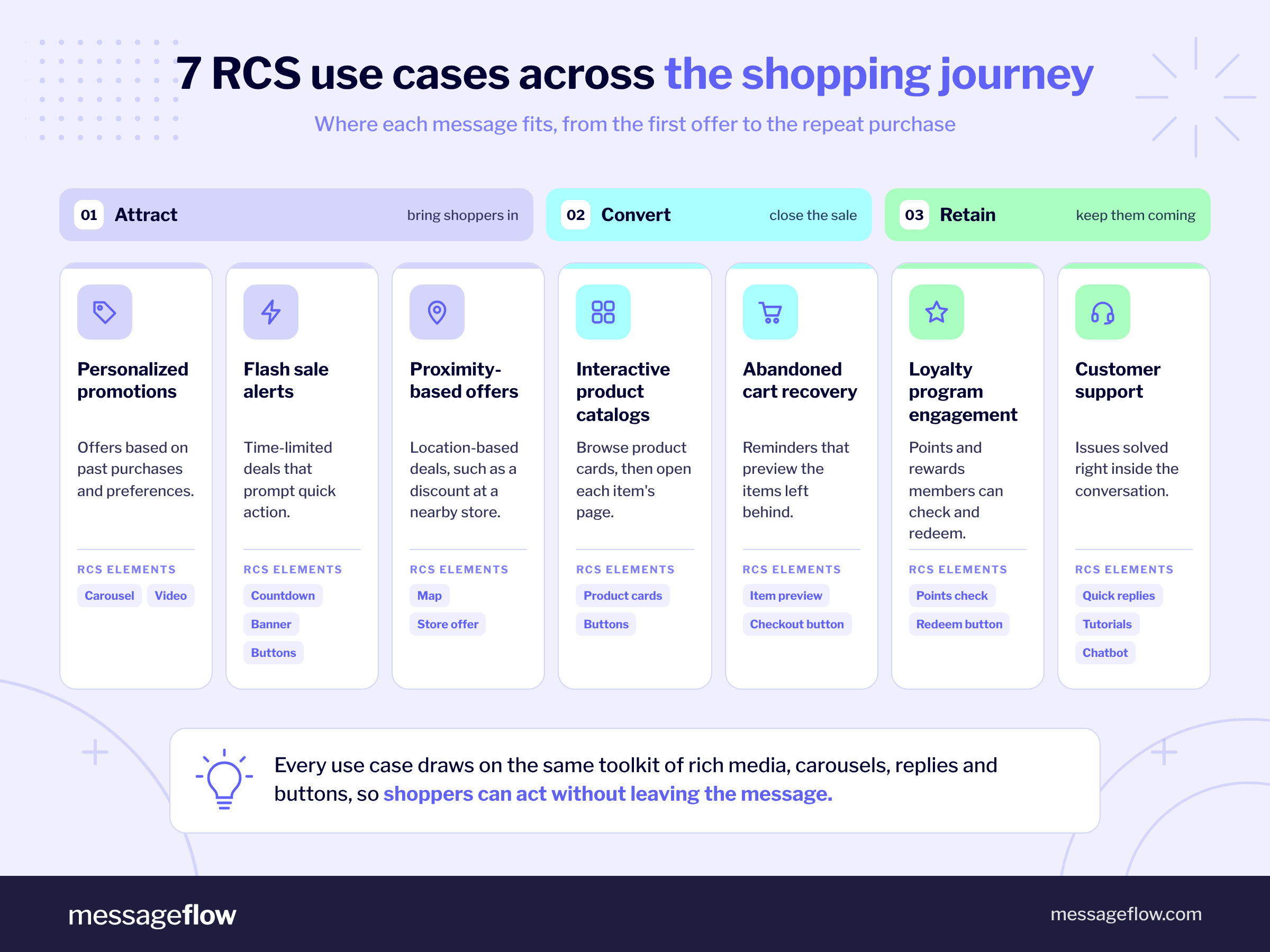
Personalized promotions
RCS enables both retail and e-commerce businesses to send personalized shopping promotions directly to customers’ native messaging app. Thanks to personalization, you can tailor offers based on past purchases or preferences. What is more, you can add engaging multimedia content into the mix, ranging from clickable carousels with product recommendations to flashy videos. This will help you drive conversions by creating an exceptional customer experience.
Interactive product catalogs
An RCS product carousel lets customers browse a selection of products within their messaging app. Each card can show a product image, name, price, and a button linking to its page in your store. You can also build the selection around choices made earlier in the conversation, such as a product category or budget. This gives customers a smaller, more relevant set of options to explore. A clearly labeled button, such as “View product,” then takes them to the selected item’s page to check details, choose available options, and complete their purchase.
Abandoned cart recovery
Did you know that RCS allows businesses to engage customers who abandoned their carts? With personalized reminders, rich media previews of left-behind items, and quick-reply buttons for checkout, you can swiftly re-capture their attention. These timely, interactive messages promise higher conversion rates, turning missed opportunities into sales.
Flash sale alerts
E-commerce businesses can use RCS to send out eye-catching flash sale alerts that demand attention. By incorporating rich media elements like countdown timers, vibrant banners, and quick-action buttons, you will be able to create a sense of urgency with ease. This, in turn, should encourage faster responses and increase the effectiveness of limited-time offers.
Loyalty program engagement
RCS can help your businesses boost its loyalty program engagement through personalized updates, exclusive rewards, and interactive points trackers. Rich, engaging messages will keep members informed and excited, fostering repeat purchases. By making use of quick-action buttons, you can also let customers easily redeem offers or check their status, enhancing overall retention efforts.
Customer support
Another way to use RCS messaging is in customer support, building trust and loyalty while strengthening relationships with clients. Using features like quick-reply buttons, rich media tutorials, and chatbot integration, you can efficiently resolve any reported issues. This reduces the need for external applications or calls, creating a smoother support experience.
Proximity-based offers
Last but not least, RCS messaging allows you to offer personalized deals based on customers’ location. Using proximity marketing, RCS messages can include interactive maps, exclusive nearby store discounts, or geo-triggered notifications. The goal here is to enhance relevance, drive foot traffic, and create a more engaging experience for customers in the right place at the right time.
How to build an interactive RCS campaign: A shoe-store example
Imagine a shoe store helping customers find their next pair. The campaign guides shoppers through four stages: choosing a category, setting a budget, browsing suitable products, and opening a product page. The following example uses illustrative products and prices.
1. Start with a category choice
Give customers an easy first question that determines which products they will see.
Message:
“Looking for your next pair? Choose the type of shoes you’d like to explore.”
Suggested replies:
“Sneakers” · “Running shoes” · “Boots”
Why this step matters: Each answer directs the customer toward a relevant part of your range. The labels should reflect categories shoppers recognize and that your store can support with suitable products.
For this example, the customer selects “Sneakers.”
2. Narrow the selection by budget
Ask one more question if it will meaningfully improve the selection.
Message:
“Sneakers it is. What price range would you like to browse?”
Suggested replies:
“Under 75”·“75–$125” · “Over $125”
Why this step matters: A budget choice helps you avoid showing products the customer is unlikely to consider. Set the ranges around your actual assortment so each option leads to a useful selection.
The customer selects “75–125.” If the chosen category already contains only a few suitable products, you can skip this question and show them directly.
3. Present a focused product carousel
Show a small selection that matches both choices.
Message:
“Here are three sneaker styles between $75 and $125. Tap ‘View product’ to check colors, sizes, and details.”
Each card includes a clear image of the corresponding shoe, followed by:
| Product card title | Description | Action button |
|---|---|---|
| Everyday Canvas | $89 · Canvas upper with a classic low-top shape. | View product |
| City Leather | $109 · Leather upper with a minimalist finish. | View product |
| Weekend Knit | $119 · Knit upper with a flexible fit. | View product |
Why this step matters: Consistent card layouts make the products easier to compare. Show the price and one useful distinguishing feature, and make sure the image represents the linked product. Keep prices and availability aligned with your store.
4. Take the customer to the selected product
Each “View product” button should open the page for that specific model. For example, tapping the button on the City Leather card takes the shopper directly to the City Leather product page.
There, the customer can check availability, choose their size and color, and use the store’s “Add to cart” button.
Why this step matters: The destination continues the choice the customer has already made. Sending them to the homepage or a broad sneaker category would make them search again. The product name, image, and price should remain consistent from the RCS card to the store.
How to design an RCS shopping journey customers can follow
Build the campaign around a specific shopping task, such as finding running shoes or comparing gifts within a budget. Use that task to decide which questions and products belong in the conversation.
- Ask questions that change the offer. Category, intended use, and budget can help narrow a broad range. Include a question only when its answer will produce a meaningfully different selection. If two answers lead to the same products, consider combining those options or removing the question.
- Add another choice when it helps the customer decide. A large running-shoe range might benefit from a road-versus-trail question. A selection of three everyday sneakers probably does not need another filter. Show products as soon as you have enough information to offer useful options.
- Provide a way to reconsider. Customers may change their minds or find that none of the products suit them. Include a route such as “Change budget” or “Choose another category.” If a combination has no matching products, explain this and offer a relevant alternative.
- Make product cards easy to compare. Use consistent images and descriptions, show prices clearly, and highlight one useful difference per product. Avoid filling cards with promotional language that obscures what shoppers need to know. Confirm that every displayed product is available at the advertised price.
- Match each button to its destination. Use “View product” for a product page and “Browse sneakers” for a category page. Check the journey on mobile, including page loading, product options, and checkout. Customers should arrive where the label promises, with their earlier choices still reflected in what they see.
How to measure your interactive RCS campaign
Before launch, decide what success means for the campaign: helping customers find relevant products, bringing them to your store, and generating purchases. Track each stage so you can identify where the journey needs improvement.
| Stage | What to measure | What it helps you understand |
|---|---|---|
| Delivery | Messages delivered compared with messages sent, measured separately for each step. | Whether customers received the opening message and subsequent responses. |
| Reads | Recorded read receipts compared with delivered messages at the same step, where available. | Whether recipients are opening the messages. A missing read receipt does not necessarily mean a message was unread. |
| Customer choices | Unique customers selecting each category and budget, plus the share responding at each question. | Which options attract interest and where customers stop participating. |
| Store visits | Product-button taps or tracked link clicks, alongside website sessions attributed to the campaign. | Which products encourage customers to visit the store. A button tap and a recorded website visit are different measures. |
| Purchases | Orders and revenue attributed to the campaign in your ecommerce analytics. | Whether campaign traffic leads to sales and which products contribute revenue. |
Confirm which delivery, read, reply, and button-interaction data your messaging provider makes available before finalizing the report. For each question, compare unique respondents with recipients who received that question. Counting every tap can inflate participation when someone changes their choice.
Add UTM parameters to product links to identify the campaign in your website analytics. Use distinct utm_content values to distinguish product cards or journey branches, and verify that purchase tracking works. UTM tags identify incoming traffic; recording purchases requires ecommerce tracking. Use a defined attribution window and consistent rules when comparing campaigns.
Keep SMS fallback results separate from the interactive RCS journey. Those recipients receive a different experience and cannot complete the same in-message choices.
Use the findings to test a specific improvement. If customers choose a category but stop at the budget question, try removing that step. If they visit product pages but rarely buy, review availability, delivery costs, and the mobile checkout experience.
RCS messaging for e-commerce and retail: 3 success story examples
The following campaigns show how brands have used RCS to promote offers, encourage app downloads, and help customers explore products. Each connects the message format with a specific next action. As you review the examples, consider how the same approach could serve your store: what would you show customers, what choice would you offer, and where would you take them next?
Club Comex
Club Comex is the loyalty program of North America’s fourth-largest paint manufacturer, Comex. It sought a more engaging way to connect with its members. While SMS campaigns helped the brand reach a broad audience, the text-only format limited customer experience, yielding low clickthrough rates of around 3% or less. Recognizing the need for a richer communication channel that reflected its vibrant identity, Club Comex turned to RCS business messaging.
In April 2019, Club Comex launched two RCS campaigns to test the potential of this dynamic messaging platform. The first one, Regalón Regalitro, focused on sales, offering a free liter of paint for every gallon purchased. It also featured interactive, branded content. The second campaign, launched in collaboration with Mexico’s interior design magazine Sensaciones, inspired members with home decoration tips and visually stunning multimedia messages.
The results were remarkable. The first sales campaign boosted revenue by 115% compared to SMS. The clickthrough rates were just as impressive, climbing to 7.9% depending on message content. Meanwhile, the second campaign achieved an impressive 20.6% clickthrough rate.
Encouraged by these successes, Club Comex now runs monthly RCS campaigns and has expanded its use to broader marketing efforts, setting a new benchmark for customer engagement.

Reserved
With more than two million Instagram followers, brick-and-mortar stores in 25 countries, and an online presence in 35 countries, RESERVED is no small fish in the clothing retailer market. The brand employs an omnichannel marketing strategy to facilitate customer engagement and drive sales.
The company takes pride in their various technological investments, so it was only right that they decided to use RCS in one of their latest messaging campaigns.
The campaign took advantage of Black Friday to strengthen RESERVED’s omnichannel approach and promote the brand’s mobile application. It did so by offering a significant discount that was available only for the users of the RESERVED mobile application.
An action button placed right under the main RCS message produced a carousel of cards displaying a number of benefits stemming from installing the application. Another button allowed the recipient to head over to the Play Store and install the application right away.

Bodemer Auto
Bodemer Auto sought to refresh its marketing efforts by enhancing customer interactions and leveraging richer media. Recognizing the potential of Rich Communication Services, the company launched an engaging RCS campaign on Black Friday, marking the start of the holiday shopping season. The channel enabled Bodemer Auto to showcase products and services, interact with customers, and gather valuable insights for future campaigns.
The campaign featured an interactive visual carousel with six different vehicle options. Customers could click to learn more about their chosen option or to connect directly with the sales support team. A follow-up message provided additional options, encouraging the recipient to explore all of the features of various vehicles.
The results were striking – a 7.7% clickthrough rate, representing a 1700% improvement over a simultaneous SMS campaign. This demonstrated RCS’ ability to significantly enhance customer experience and deliver immediate value.
Beyond the campaign’s success, Bodemer Auto gathered actionable customer data through message interactions. This made it easier for them to refine and improve their future advertising efforts. Encouraged by these results, the company plans to expand its RCS usage to include promotional campaigns and after-sales services, reinforcing its commitment to meaningful customer connections.

Turn your shopping journey into an RCS campaign
Start with one shopping goal and a focused product selection. Decide which customer choices will shape the offer, prepare the messages and product cards, and check that each button leads to the right store page. Define the measurement plan before launch so you can use the results to improve the journey.
MessageFlow’s RCS Flow Studio lets you build messages and connect the steps of a conversation in a visual editor. You can also incorporate product or CRM data through integrations, with technical support for connecting the relevant systems.
Ready to plan a campaign for your store? Bring us your goal, target market, and a sample product range. We’ll help you explore a suitable RCS scenario, confirm reach and SMS fallback options, and establish what you can measure. Talk to an expert to discuss your campaign.