TL;DR:
Two-factor authentication (2FA) requires users to verify their identity using two separate factors: a password and a second proof like a one-time code, authenticator app, or hardware key. Microsoft reports that enabling MFA blocks over 99.9% of automated account compromise attempts. For CPaaS platforms like MessageFlow, 2FA protects not just logins but also message workflows, campaign access, and customer data at every critical touchpoint.
A single compromised password can expose your entire messaging infrastructure. Campaign workflows, customer contact lists, sender IDs, and transactional data all sit behind a login screen. If that password is weak, reused, or leaked, most attackers are in within minutes.
Two-factor authentication changes that. It adds a second checkpoint that attackers can’t cross even with valid credentials. For businesses running communications at scale, having 2FA often means the difference between a near-miss and a full breach.
Most 2FA guides cover the basics: what it is, why it matters, how to turn it on. This one goes further. By 2025, attackers have built entire phishing kits specifically designed to bypass standard 2FA. If you’re relying on SMS codes or basic push notifications and assuming you’re protected, you’re working with an outdated threat model.
Here’s what’s actually happening and what to do about it.
What Is Two-Factor Authentication?
Two-factor authentication is a security mechanism that requires users to provide two distinct forms of verification before gaining access to an account or system. A password alone is no longer enough.
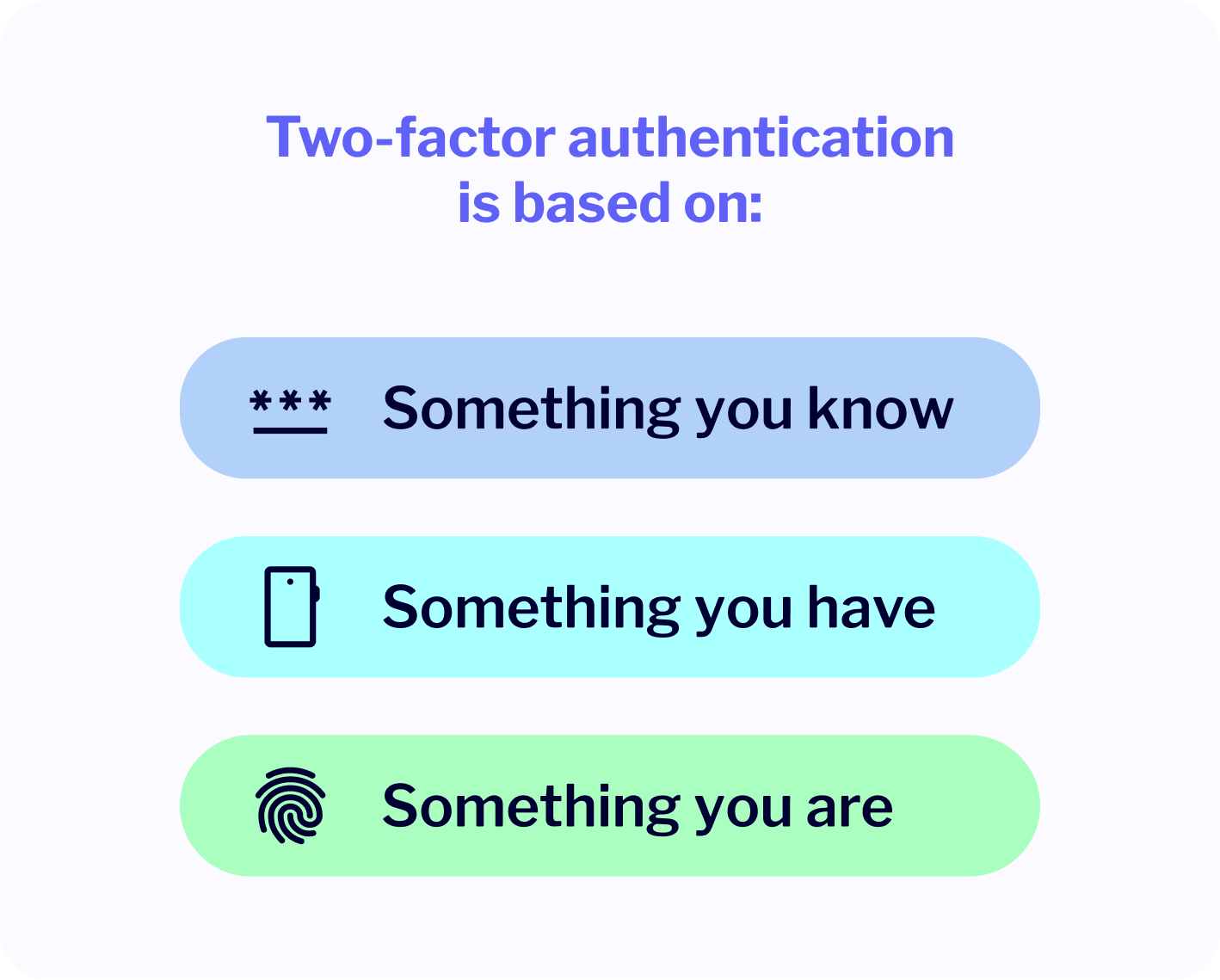
Authentication factors fall into three categories:
- Something you know (a password or PIN)
- Something you have (a phone, authenticator app, or hardware key)
- Something you are (a fingerprint or face scan)
If one factor is compromised, an attacker still needs the second to get in. That second step blocks the vast majority of automated and opportunistic attacks.
If a password is a key, 2FA adds a second lock that changes every 30 seconds.
How Does Two-Factor Authentication Work?
After entering a username and password, users are prompted for a second verification step. This could be a six-digit code from an authenticator app, a push approval on their phone, or a tap on a physical security key. Only after both steps does the system grant access.
Here’s what happens with a TOTP authenticator app:
- You enter your password as usual.
- The app generates a time-limited code using a shared secret seed, never transmitted over the network.
- You enter the code. The server verifies it independently using the same seed.
- Access is granted for this session only.
The code is generated locally on your device and valid for 30 seconds. Intercepting your password in transit doesn’t help an attacker without this second layer. That’s the point.
Why Use Two-Factor Authentication? The Security Case
Does Two-Factor Authentication Prevent Phishing?
Not entirely. But it raises the cost of a successful attack dramatically. Google’s mandatory 2FA rollout for over 150 million users cut account compromises by 50% almost immediately. More on advanced bypass attacks later, but SMS and TOTP still stop the majority of automated credential attacks.
Phishing has evolved. Attackers craft convincing emails that look like messages from internal departments or trusted tools. Without 2FA, a stolen password means immediate access. With 2FA, the attacker still hits a wall when prompted for a time-based code.
Does 2FA Block Credential Stuffing?
Yes, reliably. Credential stuffing attacks take username-password pairs from previous breaches and test them across other services using automated bots. It’s a numbers game: with enough leaked credentials, some will work somewhere.
With 2FA enabled, even a perfectly valid stolen password doesn’t get in. IBM’s Cost of a Data Breach 2024 report puts the average breach at $4.88 million. The average cost of implementing 2FA is around $15 per user per year. That math doesn’t require much explanation.
What Does 2FA Do for Compliance?
More than most teams realize. MFA is now the single most consistently required control across SOC 2, ISO 27001, HIPAA, PCI DSS 4.0, and GDPR. PCI DSS 4.0 mandates MFA for all access to cardholder data environments since March 31, 2025. Under GDPR, EU regulators now consider password-only authentication an “inappropriate” technical measure for any system handling personal data, which means real liability exposure in the event of a breach.
For email authentication infrastructure, SPF, DKIM, and DMARC protocols work alongside 2FA to protect your sending domain and prevent impersonation.
Two-Factor Authentication by the Numbers
The adoption gap is wide and closing slowly.
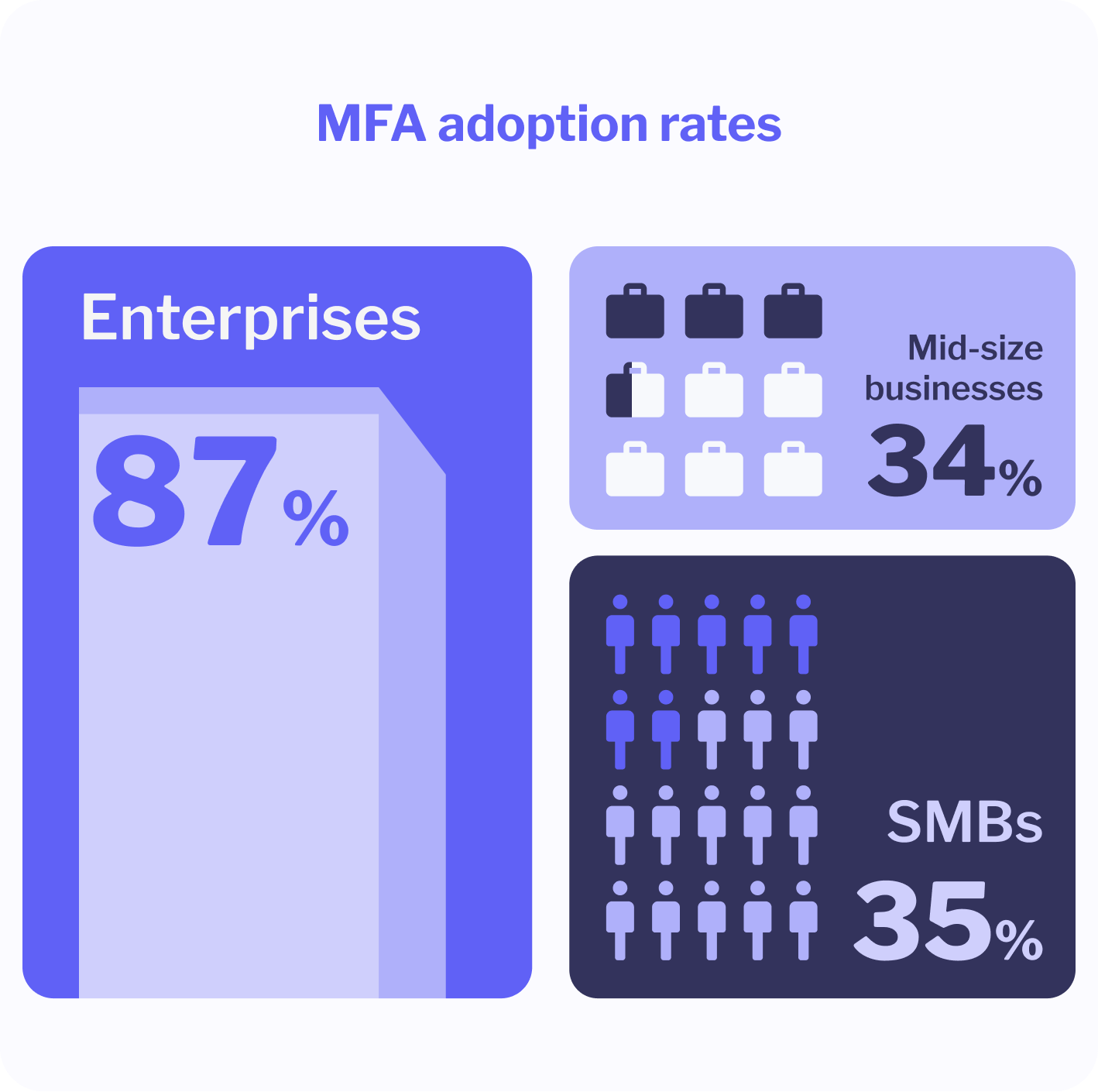
JumpCloud’s 2024 IT Trends Report shows 87% of enterprises with more than 10,000 employees have deployed MFA. Mid-sized firms (26 to 100 employees) sit at 34%. Small businesses under 25 employees: 27%.
Around 67% of companies had 2FA deployed across all systems in 2024, up from 56% in 2022. Progress, but the remaining third represents real risk concentration: smaller organizations often hold large amounts of customer data.
The consequence of not acting is quantifiable. 80% of security breaches could have been prevented with 2FA, yet 38% of large organizations still don’t enforce it. Microsoft reports that over 99.9% of compromised accounts had no MFA, and their systems absorb over 1,000 password attacks every second.
Types of Two-Factor Authentication: What’s Most Secure?
Not all 2FA methods protect equally. Here’s how they compare, from most accessible to most resistant.
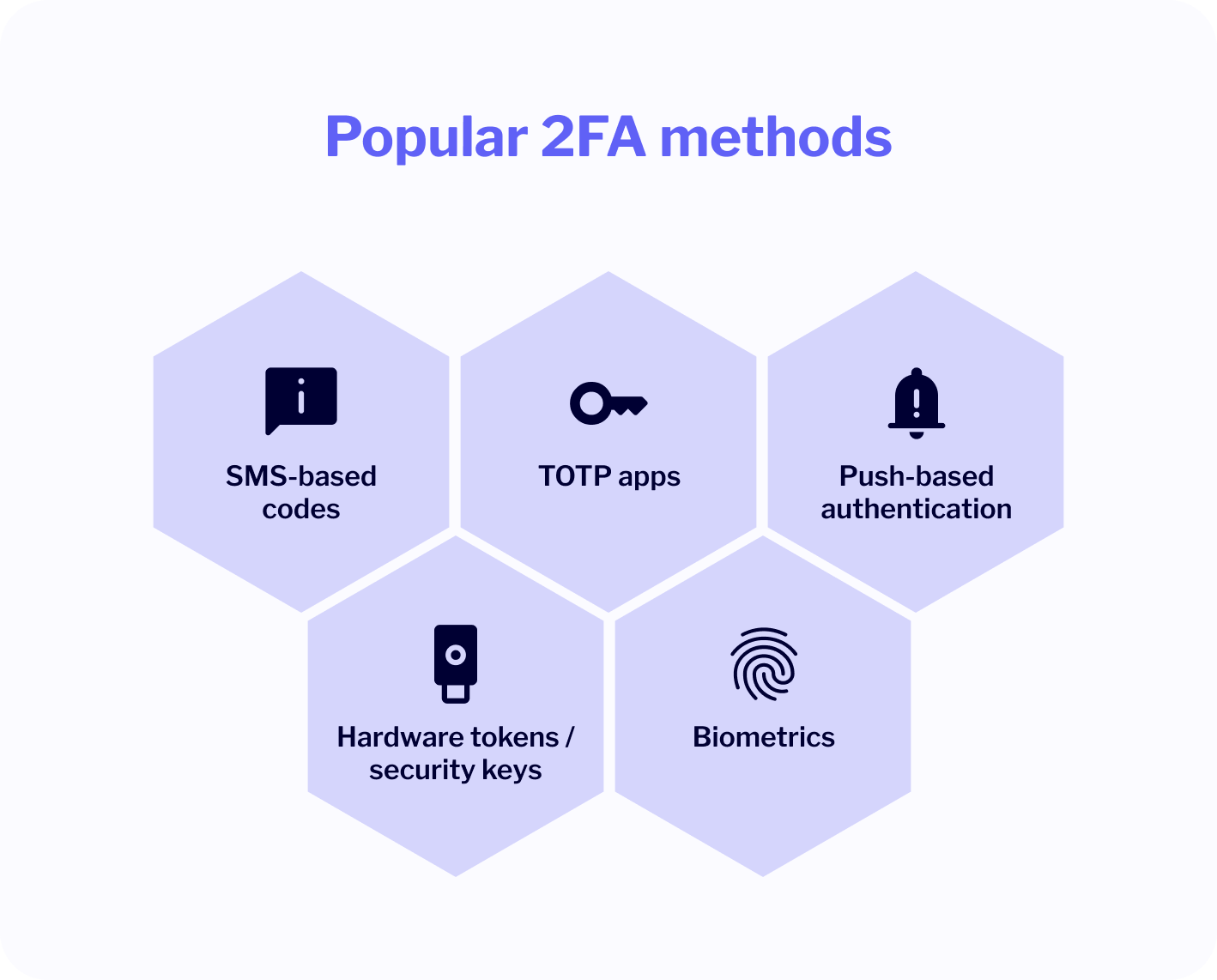
SMS-Based Codes (OTP via SMS)
An OTP arrives by text. Simple to set up, no app needed, works on any phone. Most users already know how it works.
The problem: SMS is vulnerable to SIM-swapping attacks, where attackers convince a mobile carrier to transfer the victim’s number to a device they control. It’s also susceptible to SS7 protocol weaknesses and real-time interception by adversary-in-the-middle phishing kits. NIST has significantly downgraded SMS authentication in its updated Digital Identity Guidelines. CISA explicitly recommends against it for high-risk accounts.
For platforms that deliver OTP codes at scale, delivery speed matters as much as security. MessageFlow’s Priority delivery for 2FA and OTP routes time-critical authentication messages through a separate server pool, so codes arrive before sessions expire.
Use it for: Fallback channel, low-risk accounts, or users who can’t use an app. Avoid it for: Admin access, developer accounts, or systems handling sensitive customer data.
Authenticator Apps / TOTP
Apps like Google Authenticator or Microsoft Authenticator generate Time-Based One-Time Passwords locally on the user’s device. Codes expire every 30 seconds and never travel over the network.
TOTP is the most widely deployed enterprise MFA method globally. Offline-capable, fast to set up via QR code, no carrier dependency.
Use it for: Standard enterprise users who need more than SMS without full enterprise infrastructure. Avoid it for: Users who struggle with app installation or management.
Push Notification Approval
A prompt appears on the user’s phone: approve or deny this login attempt. Apps like Duo or Okta Verify make this seamless. No code to copy. Some show login context (IP address, device, location) so users can spot anomalies.
Two caveats: push is vulnerable to MFA fatigue attacks (repeated prompts until the user accidentally approves), and to AiTM proxy attacks (more on that below). Enable Number Matching to address the fatigue risk.
Use it for: Teams that prioritize high adoption with good UX. Avoid it for: Systems requiring deliberate friction or maximum phishing resistance.
Hardware Security Keys and Passkeys (FIDO2 / WebAuthn)
This is where the security picture changes significantly.
Hardware keys like YubiKey and passkeys (the software equivalent stored in a device’s secure enclave) use FIDO2 and WebAuthn protocols. Authentication is cryptographically bound to the legitimate website’s domain. A proxy-based phishing site simply cannot intercept a valid response because it’s not the real domain. The device refuses to authenticate to a fake site.
Microsoft reports a 97% reduction in breach risk when any device is introduced into the authentication process. Passkey sign-ins are 14 times faster than password plus traditional MFA: 3 seconds versus 69 seconds on average.
Over 400 million Google accounts had used passkeys by end of 2024. Apple, Google, and Microsoft all support them natively now. Adoption is accelerating.
Use it for: Admins, developers, finance, anyone with elevated access. Avoid it for: Large rollouts where you can’t manage physical key distribution.
2FA Methods at a Glance
| Method | Phishing Resistance | SIM Swap Risk | Setup Effort | Best For |
|---|---|---|---|---|
| SMS OTP | Low | High | Minimal | Fallback, low-risk accounts |
| TOTP App | Medium | None | Low | Standard enterprise users |
| Push Notification | Medium | None | Low | High-adoption teams |
| FIDO2 / Passkeys | Very High | None | Medium | Admins, high-value systems |
Backup Codes and Recovery
Every 2FA system needs a fallback. During setup, generate one-time-use backup codes. Store them in a password manager, never alongside primary credentials.
Keep at least two registered devices per account. Build a recovery process that requires identity verification before restoring access: speed and security both matter here. A fast but insecure recovery flow defeats the point.
Can Two-Factor Authentication Be Bypassed?
Most 2FA guides skip this part. That’s a problem, because the answer is yes.
Modern attackers increasingly use adversary-in-the-middle (AiTM) phishing kits. These proxy the real login page in real time, capturing both your OTP and your authenticated session token before you realize anything happened. Standard SMS codes and TOTP are both vulnerable to this. You authenticate successfully. The attacker walks away with your session.
This is no longer a sophisticated nation-state technique. Microsoft reported a 146% increase in AiTM attacks in 2024. Xcitium Threat Labs recorded a 45% year-over-year rise in 2FA phishing attacks in 2025, with global damages of $1.2 billion. Over 70% of targeted corporate attacks now involve some form of 2FA bypass.
Why the jump? Sekoia.io identified the Tycoon 2FA phishing kit as the highest-threat kit in active use in early 2025, rated 4.8 out of 5. Subscriptions start at $100 per month. Running an MFA-bypassing campaign against Microsoft 365 now requires less technical skill than a traditional credential phishing attack did five years ago.
What does this mean for your security posture?
SMS and TOTP are still dramatically better than no 2FA. For general accounts, they stop the majority of attacks. But for high-risk accounts (admins, finance, production access), the threat model has shifted. Upgrade to FIDO2/passkeys for those roles. Enable Number Matching on push to defeat fatigue attacks. Monitor session behavior, not just login attempts.
FIDO2 and passkeys are immune to AiTM because authentication is domain-bound. A proxy can’t generate a valid cryptographic signature for the real site. There’s nothing to intercept.
When to Use 2FA: Implementation Scenarios for CPaaS
Protecting End-User Dashboards
Any self-service portal customers log into should enforce 2FA by default, not as an optional setting. An unauthorized session in a marketing account can launch spam campaigns, export contact lists, or damage sender reputation within minutes.
For transactional SMS and OTP delivery workflows, the same principle applies: secure the authentication layer, not just the messages it delivers.
Locking Down Developer and Admin Access
Admin panels, API configuration environments, and dev consoles are the highest-value targets on any CPaaS platform. A compromised developer account can redirect traffic, modify sender IDs, and exfiltrate customer metadata at scale.
Enforce TOTP or hardware keys for elevated access. Combine with IP whitelisting or device fingerprinting for layered protection. The access level justifies the additional friction.
Risk-Based Conditional Authentication
Not every login carries the same risk. Risk-based 2FA triggers the second factor only when specific conditions are met: a new device, an unusual geography, login outside normal hours, or multiple failed attempts.
Familiar logins proceed without friction. Anomalous ones get challenged immediately. It’s a practical balance for large user bases where blanket friction creates support overhead.
2FA in Messaging Flows
In a CPaaS environment, OTP delivery is often the 2FA product, not just a security setting. Transactional push notifications for login approvals and banking transaction confirmations operate on this same principle: a second factor delivered through a trusted channel.
Anyone with access to campaign builders or automation logic should be subject to 2FA, not just account admins. The risk isn’t only at login. It’s anywhere decisions are made or customer data is handled.
Overcoming Common 2FA Adoption Challenges
How Do You Handle Usability Friction?
Make setup take under 60 seconds. A QR code and three-step onboarding flow is achievable. Offer method choice: some users prefer app codes, others push approvals. Explain the “why” with a concrete example rather than a policy statement.
Frame it as a smart lock, not a speed bump. People accept small hurdles when they understand what’s behind the door.
What About Resistance to Change?
Teams outside security and IT often see 2FA as overkill, especially if they’ve never personally experienced a breach. That’s normal.
Make the risk specific, not abstract. Instead of “you could be hacked,” say “this could give someone access to your customer lists, your inboxes, and your campaign history.” Reframe it as protecting your customers and your team, not just your own account. Responsibility lands differently than vulnerability.
What Happens When Someone Loses Their Device?
Address this before it becomes a crisis. Offer backup codes during setup (not buried in settings). Support multiple registered devices per user. Build a recovery protocol that requires identity verification before access is restored.
Lockout fear is real. A well-designed recovery process neutralizes it. A fast but insecure recovery defeats the point of 2FA entirely. Both matter.
MessageFlow’s Mandatory Two-Factor Authentication Policy
We’re requiring 2FA for all MessageFlow users. Here’s what that means.
Why We’re Making It Mandatory
Account takeover (ATO) fraud caused nearly $13 billion in losses in 2023. Around 70% of ATO attacks involve password reuse. MessageFlow handles sensitive messaging workflows and customer data at scale. One compromised account creates downstream risk for your business and your customers.
“Passwords alone are no longer enough to protect against cyber threats. They can be stolen, guessed, or leaked during a data breach. 2FA adds an extra layer of security, making it significantly harder for attackers to gain access to accounts, even if they have the password.” Michał Błaszczak, Chief Information Security Officer at Vercom
Setup Steps and Deadline
Deadline: All accounts must have 2FA enabled by September 15, 2025. After that date, accounts without 2FA will be blocked from login.
To enable 2FA:
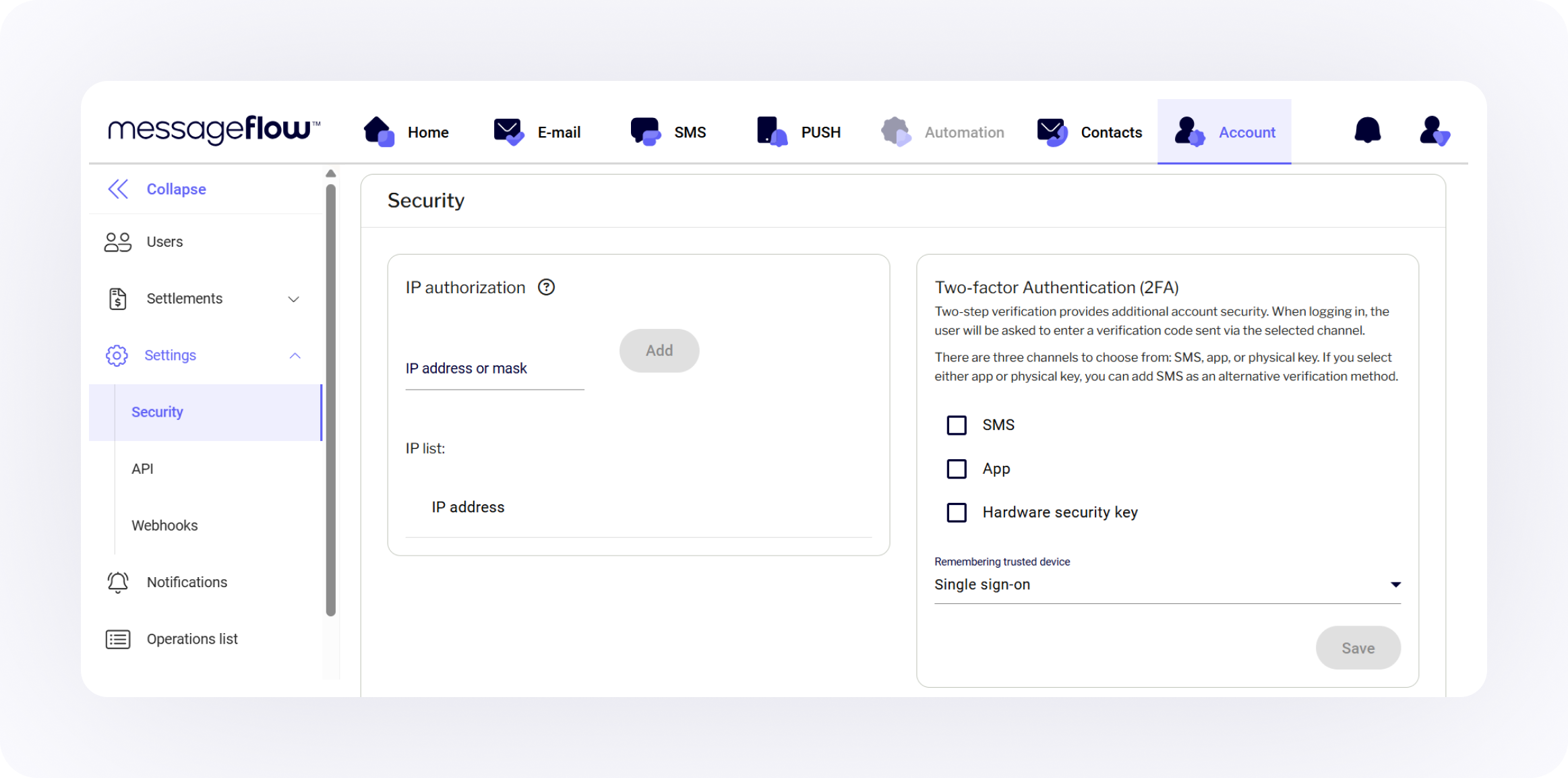
- Log in to your MessageFlow account.
- Go to Account > Settings > Security.
- Choose your preferred authentication method from the right-hand panel.
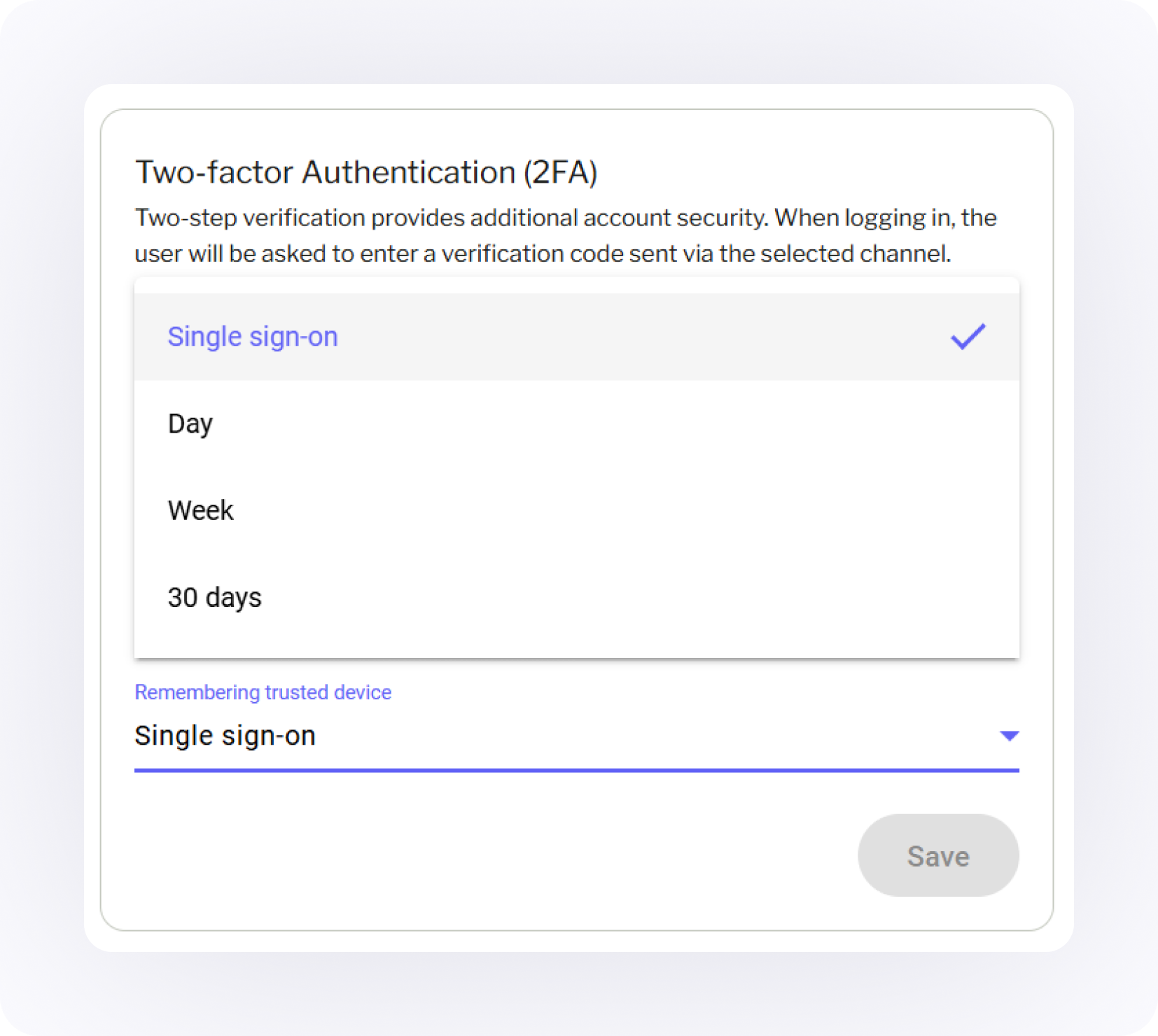
- Select how long the system should remember your device.
- Click Save. On your next login, you’ll be prompted for a verification code.
Supported methods: SMS verification (default and fallback), app-based authentication via Google Authenticator or Microsoft Authenticator, and hardware key support for maximum security.
Users who haven’t enabled 2FA before the deadline will receive in-app prompts and email reminders. From September 15 onward, login will be blocked until 2FA is active.
In Conclusion: Enable 2FA Today
Two-factor authentication is now the security baseline, not an advanced option.
MFA blocks over 99.9% of automated account compromise attempts. The average breach costs $4.88 million. Implementation costs around $15 per user per year. That’s not a close call.
But the threat landscape has shifted. Attackers in 2025 have tools specifically built to bypass standard 2FA in real time. That doesn’t make 2FA less important. It makes the choice of 2FA method more important. SMS and TOTP stop the majority of attacks. FIDO2 and passkeys stop all of them.
For CPaaS environments, one compromised account can disrupt campaign workflows, expose customer contact lists, and reach millions of recipients. The stakes justify the investment.
At MessageFlow, we require 2FA for all users because strong security can’t be optional when this much is at stake. If you haven’t enabled it yet, do it now. The deadline is September 15, 2025, and setup takes minutes.
Frequently Asked Questions: How Two-Factor Authentication Works
Find 2FA settings under your account security preferences. You’ll select a method (SMS, authenticator app, or hardware key), scan a QR code or register your device, then enter a verification code to confirm. In MessageFlow, go to Account > Settings > Security and follow the setup steps. Some platforms also allow admins to enforce 2FA organization-wide or by user role.
Your account is protected only by a password. Passwords can be weak, reused across services, or exposed in third-party data breaches without your knowledge. That creates real exposure: unauthorized access, potential data loss, and compliance risk. In B2B environments, skipping 2FA increasingly blocks vendor audits and enterprise contracts.
Authenticator apps (TOTP) are significantly more secure. SMS codes are vulnerable to SIM-swapping attacks and real-time interception by AiTM phishing kits. TOTP codes are generated locally on your device, never transmitted over the network, and expire every 30 seconds. NIST has officially downgraded SMS authentication in its Digital Identity Guidelines.
Yes, through adversary-in-the-middle (AiTM) phishing attacks that proxy a real login page and capture session tokens in real time. SMS and TOTP are both vulnerable to this technique. FIDO2 hardware keys and passkeys are not: authentication is cryptographically bound to the legitimate domain, so a proxy cannot generate a valid response. Microsoft reported a 146% increase in AiTM attacks in 2024.
Yes. This is called risk-based or adaptive 2FA. Platforms can trigger the second factor only when specific conditions are met: an unrecognized device, an unusual login location, or access outside normal hours. This approach challenges suspicious logins while letting familiar sessions proceed without added friction. Most enterprise identity platforms support this out of the box.
FIDO2 hardware security keys and passkeys offer the highest level of security available today. They use public-key cryptography bound to the legitimate domain, making them immune to phishing, SIM swapping, and AiTM attacks. For most organizations, a tiered approach works best: FIDO2/passkeys for admins and high-risk users, TOTP apps for general users, and SMS as a fallback only.