
TL;DR: Email address validation checks whether an address is correctly formatted, connected to a live domain, and capable of receiving messages. For high-volume senders, it is more than a list hygiene task – it’s a critical deliverability control that protects sender reputation, supports email bounce rate reduction, and helps campaigns reach the inbox instead of bouncing at the gateway.
If you’re sending campaigns to a list that hasn’t been validated in months, part of your marketing budget is likely being spent on contacts that no longer exist.
Email lists decay continuously. People change jobs, abandon inboxes, mistype addresses, switch providers, or leave companies. Over time, even a permission-based database becomes less reliable. For enterprise senders, this isn’t just a data quality issue—it directly affects bounce rates, sender reputation, inbox placement, campaign reporting, and ultimately revenue.
Effective email validation helps prevent these issues before a campaign is launched. By identifying malformed, inactive, disposable, risky, or undeliverable addresses, it enables proactive email list cleaning before poor-quality data impacts campaign performance.
In this guide, you’ll learn how to validate an email address, how modern email verification works, when to perform bulk email validation, and how to build email address validation into a scalable sending workflow.
What Is Email Address Validation?
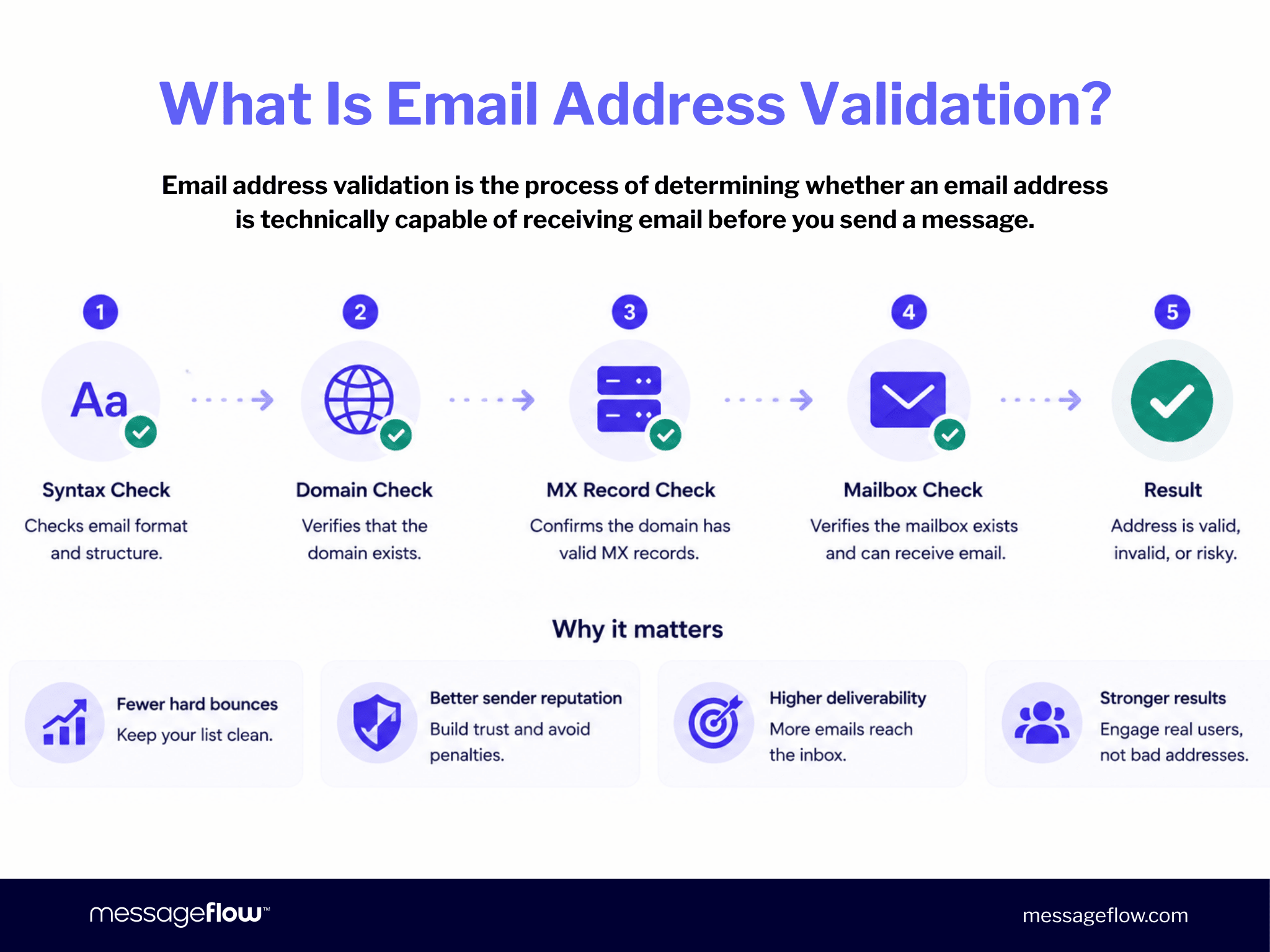
Email address validation is the process of determining whether an email address is technically capable of receiving email before you send a message.
Modern email validation goes far beyond checking whether an address is correctly formatted. It combines multiple layers of technical checks – including email syntax check, domain and MX record verification, and mailbox-level verification – to identify addresses that are invalid, inactive, or otherwise unlikely to accept email.
Each layer eliminates a different category of problematic addresses, helping reduce hard bounces, improve sender reputation, and increase overall deliverability. Together, these checks allow marketers to validate email addresses with significantly greater confidence before every campaign.
Email Validation vs. Email Verification: What’s the Difference?
The terms email validation and email verification are often used interchangeably, and most commercial platforms perform both as part of a single workflow. Technically, however, they describe different stages of the same process.
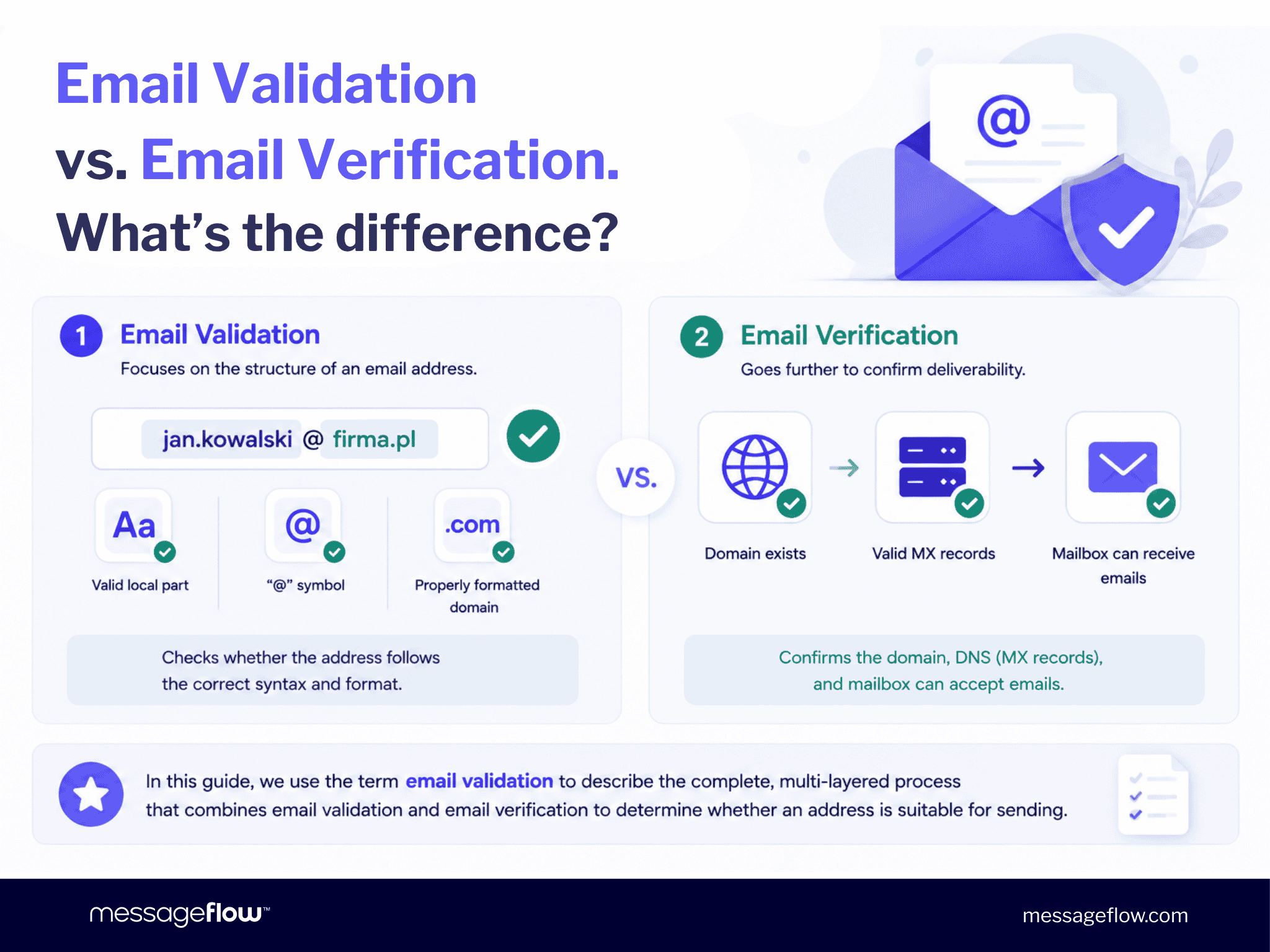
Email validation focuses on the structure of an email address. It checks whether the address follows the correct syntax – for example, whether it contains a valid local part, an “@” symbol, and a properly formatted domain. If you simply want to check if an email is valid from a formatting perspective, this is the first step.
Email verification goes further. It confirms that the domain exists, has valid MX records (the DNS records that specify where email should be delivered), and that the destination mailbox is capable of accepting incoming messages.
Throughout this guide, we use the term email validation to describe this complete, multi-layered process, which combines email validation and email verification to determine whether an address is suitable for sending.
Why You Should Validate Email Addresses Before Sending
Email validation is more than email list cleaning. It’s a fundamental deliverability practice that helps protect your sending infrastructure, support email bounce rate reduction, and improve inbox placement.
Every invalid address removed from your database improves list quality and reduces the risk of negative reputation signals. For organizations sending at scale, these incremental improvements compound over time, resulting in healthier sender reputation and more consistent campaign performance.
Invalid Addresses Damage Sender Reputation
Mailbox providers such as Gmail, Yahoo, and Microsoft continuously evaluate your sending reputation using signals such as bounce rates, spam complaints, engagement, authentication, and overall sending behavior. Those signals determine whether your emails reach the inbox, the promotions tab, the spam folder – or are rejected altogether.
According to Validity’s 2025 Email Deliverability Benchmark Report, the global average inbox placement rate is 83.5%, meaning roughly one in six marketing emails never reaches the primary inbox. Maintaining a healthy email list is one of the most effective ways to outperform that benchmark.
While Gmail and Yahoo’s bulk sender requirements recommend keeping spam complaint rates below 0.3%, consistently high bounce rates are also a strong indicator of poor list quality. Every hard bounce tells mailbox providers that your database may not be properly maintained.
💡 Visibility is just as important as prevention. Platforms that provide real-time SMTP logs and delivery analytics help teams identify unusual bounce patterns early, investigate their root cause, and resolve issues before they begin affecting deliverability. With MessageFlow’s email delivery analytics, these signals are visible as they emerge, making proactive list management significantly easier.
Email Lists Decay Faster Than Most Teams Expect
Even permission-based email lists deteriorate over time. People change jobs, abandon inboxes, switch providers, or deactivate accounts. This natural process – known as email list decay – typically affects 2–3% of contacts every month.
Over the course of a year, that translates into roughly 23% of a database becoming undeliverable. A list of 10,000 contacts, for example, may contain more than 2,000 invalid addresses after 12 months without regular email validation. Without ongoing email list cleaning, these outdated records increase bounce rates, distort campaign metrics, and generate unnecessary sending costs.
Despite this, many organizations still validate their databases infrequently. According to The Digital Bloom’s 2025 B2B Deliverability Report, only 23.6% of B2B marketers verify their email lists before launching campaigns, even though regular list validation is widely recognized as a core deliverability best practice.
The performance impact is measurable. The same report found that organizations maintaining high-quality email databases achieved conversion rates that were 76.9% higher than those with poor list hygiene. Clean data doesn’t simply reduce risk – it improves campaign efficiency, reporting accuracy, and overall marketing performance.
How to Validate an Email Address: 5 Methods Explained
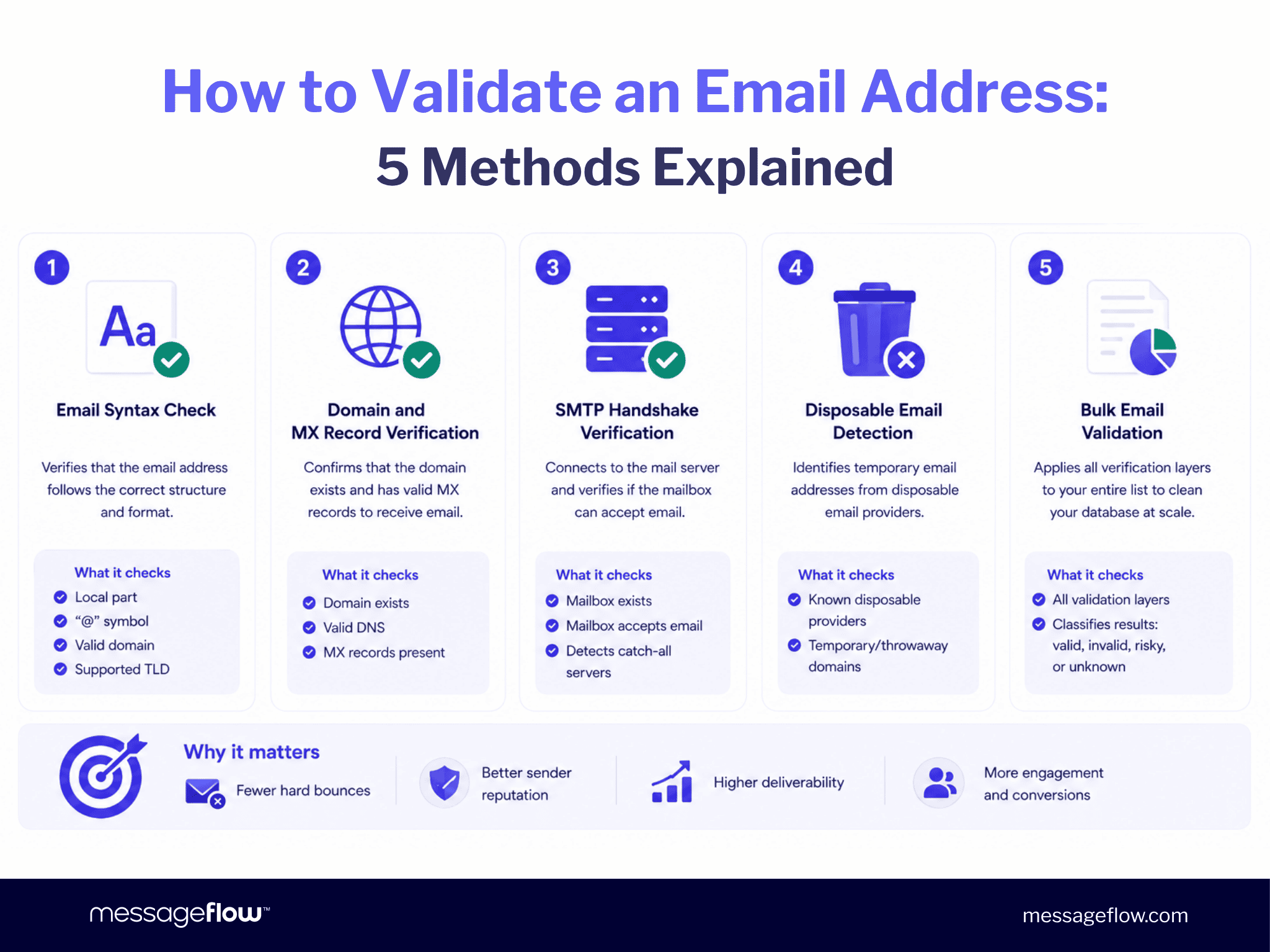
Modern email validation combines multiple verification techniques rather than relying on a single test. Each layer identifies a different category of invalid or risky addresses, helping organizations validate email addresses more accurately before a campaign is sent.
1. Email Syntax Check
An email syntax check is the first – and simplest – step when you validate an email address. It verifies that an address follows the correct structure, including a local part, an “@” symbol, a valid domain, and a supported top-level domain (TLD).
For example, is syntactically valid, whereas user@ or user.example.com fails immediately.
A basic syntax check can be implemented with a regular expression (regex):
function isValidEmailSyntax(email) { const regex = /^[^\s@]+@[^\s@]+\.[^\s@]+$/; return regex.test(email);}A lightweight regex catches most formatting mistakes entered on signup forms. Although the RFC 5322 specification allows for much more complex address formats, fully compliant regular expressions are impractical for most production environments.
An email syntax check has one important limitation: it verifies only the structure of an address, not whether the mailbox actually exists. An address such as is perfectly valid syntactically but may never receive email. That’s why syntax validation should always be combined with additional email verification layers.
2. Domain and MX Record Verification
Once an address passes syntax validation, the next step is to verify the domain.
This stage of email verification confirms that the domain exists and has valid Mail Exchange (MX) records – the DNS records that specify which mail servers are responsible for receiving email for that domain.
If a domain has no MX records, every email sent to that domain will fail regardless of whether the address itself appears correct.
Domain verification quickly identifies mistyped domains (such as gnail.com instead of gmail.com), expired domains, and domains that are no longer configured to receive email, eliminating addresses that would otherwise generate immediate hard bounces.
3. SMTP Handshake Verification
SMTP handshake verification performs the most accurate mailbox-level email verification available without sending an actual email.
Instead of relying solely on DNS records, the validation service establishes an SMTP session with the recipient’s mail server and checks whether the mailbox is willing to accept incoming mail. If the server reports that the mailbox doesn’t exist, the address can be classified as invalid.
This layer identifies addresses where the domain is valid but the individual mailbox has been deleted, disabled, or never existed.
Not every mail server behaves the same way, however. Some providers intentionally accept every SMTP verification request regardless of whether the mailbox exists. These catch-all domains cannot be fully verified and should be treated as higher-risk addresses rather than confirmed valid ones.
4. Disposable Email Detection
Disposable email addresses are temporary inboxes created to bypass registration forms, download gated content, or avoid long-term marketing communication.
Although these addresses often pass syntax, domain, and mailbox verification, they rarely represent genuine prospects or customers.
Validation platforms maintain continuously updated databases of disposable email providers and flag addresses originating from these services.
Filtering disposable addresses improves email list cleaning, protects engagement metrics, and prevents low-value contacts from entering your marketing database. This step is particularly valuable for organizations collecting leads through public forms, free trials, or promotional campaigns.
5. Bulk Email Validation
When validating an existing database, individual checks must be performed at scale. That’s where bulk email validation becomes essential.
Bulk email validation applies every verification layer – email syntax check, domain validation, MX record verification, SMTP verification, and disposable email detection – to every address in your database before a campaign is sent.
Each address is typically classified as valid, invalid, risky (such as catch-all domains), or unknown, allowing marketers to suppress problematic records before they affect deliverability.
Most enterprise email validation platforms support bulk processing through file uploads or APIs. For organizations sending large volumes of email, API-based validation enables automated email address validation as part of the campaign workflow instead of a separate manual task.
Bulk email validation complements real-time validation performed during signup. While point-of-entry validation prevents bad data from entering the database, scheduled validation removes addresses that become invalid through natural email list decay, helping maintain long-term deliverability.
When Should You Validate? A Practical Timing Guide
| Trigger | Recommended action | Why it matters |
|---|---|---|
| New signup | Real-time syntax and domain validation | Prevent invalid addresses from entering your database. |
| Before every campaign | Full bulk email validation | Remove addresses that have become invalid since the previous send and reduce unnecessary bounces. |
| After importing a list | Full bulk email validation | Imported data has an unknown history and should be verified before the first campaign. |
| Bounce rate increases unexpectedly | Validate the affected segment and investigate the source | Rising bounce rates often indicate deteriorating data quality, list decay, or acquisition issues. |
Knowing how to validate an email address is only part of the process. Equally important is knowing when to perform email validation. Real-time validation at the point of data collection is your first line of defense, but it isn’t enough on its own. Even well-maintained databases naturally degrade over time, making ongoing email verification and periodic revalidation essential.
For active marketing databases, a full bulk email validation every three to six months is generally considered the minimum. High-volume senders, organizations with frequent CRM imports, or businesses running continuous outbound campaigns should validate their email addresses monthly to maintain consistent deliverability, minimize hard bounces, and preserve sender reputation.
Catch-All Domains and Role-Based Addresses: The Grey Zone
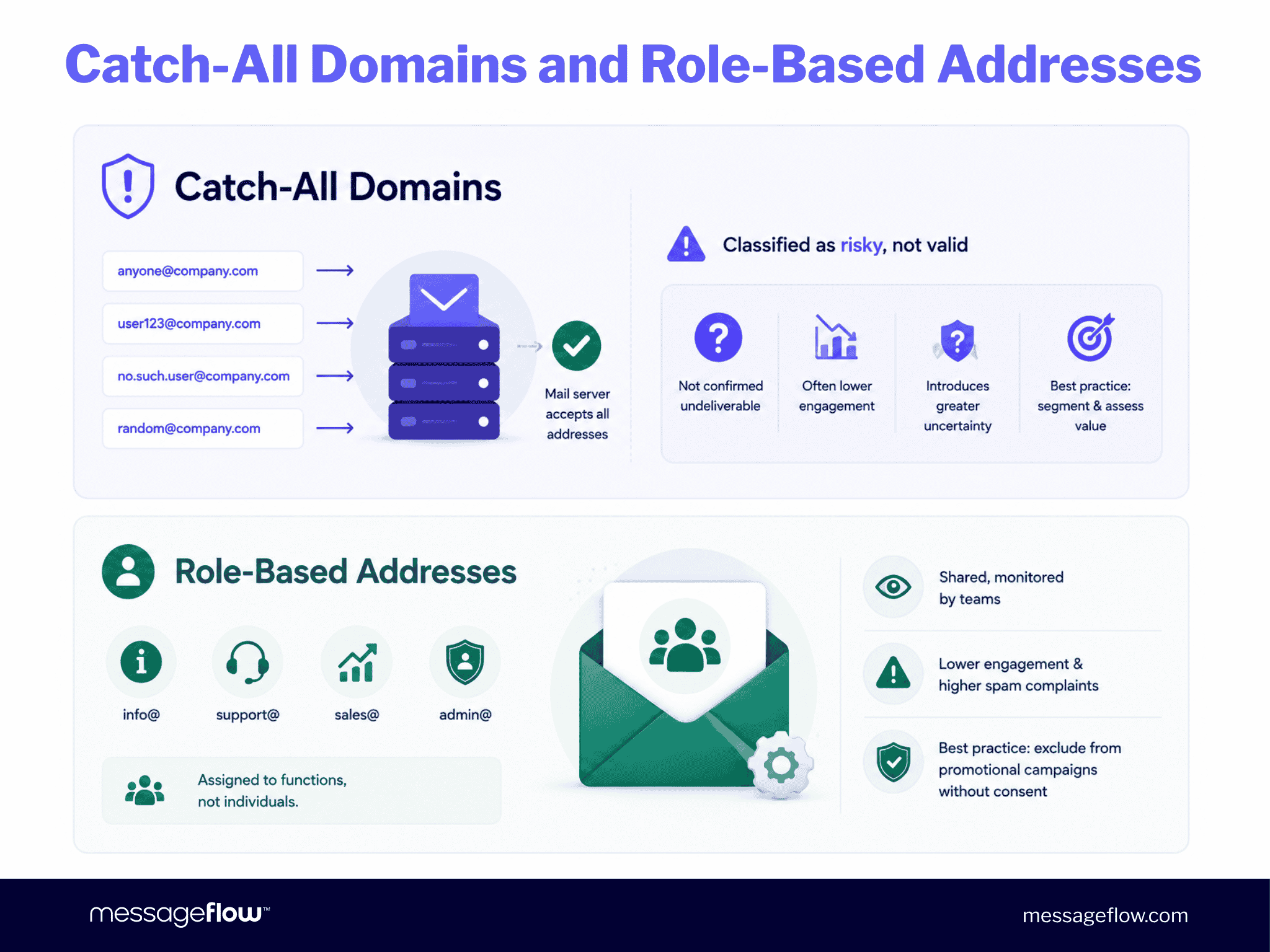
A catch-all domain is configured to accept email for any mailbox at that domain, regardless of whether the specific address actually exists. During SMTP verification, the mail server responds positively to every request, making definitive mailbox validation impossible.
For this reason, validation platforms classify catch-all addresses as risky rather than valid. They are not confirmed to be undeliverable, but they introduce greater uncertainty and often generate lower engagement.
Rather than excluding them entirely, many organizations place catch-all addresses in a separate segment and evaluate whether the potential business value justifies the additional deliverability risk.
Role-Based Addresses
Role-based addresses are assigned to functions rather than individuals—for example, info@, support@, sales@, or admin@.
Although these addresses typically pass all technical validation checks, they often behave differently from personal inboxes. They are frequently shared among multiple recipients, monitored by teams, or used for operational purposes, which can result in lower engagement and a higher likelihood of spam complaints.
Unless you have explicit marketing consent, role-based addresses are generally best excluded from promotional campaigns.
Email Validation and GDPR / CAN-SPAM Compliance
Email validation confirms whether an address is technically capable of receiving email. It does not establish that you have permission to send marketing communications.
Under GDPR, processing a contact’s data (including their email address) requires a lawful basis, most commonly explicit consent. GDPR penalties can reach EUR 20 million or 4% of global annual turnover, whichever is higher.
Under CAN-SPAM, commercial emails must meet specific requirements around identification, opt-out mechanisms, and physical address disclosure. Violations carry penalties up to $53,088 per email following FTC inflation adjustments in January 2025.
Validation improves deliverability. It doesn’t substitute for consent. A validated, non-consenting address is a compliance risk. Consult a legal professional for guidance specific to your jurisdiction and use case.
The cleanest approach combines both: use double opt-in at the point of signup (which simultaneously confirms the address works and records explicit consent), and validate your full list periodically to catch decay on existing contacts. Double opt-in is the most reliable point-of-entry validation available, and it’s the only method that proves both address validity and subscriber intent in a single step.
Email Validation Best Practices
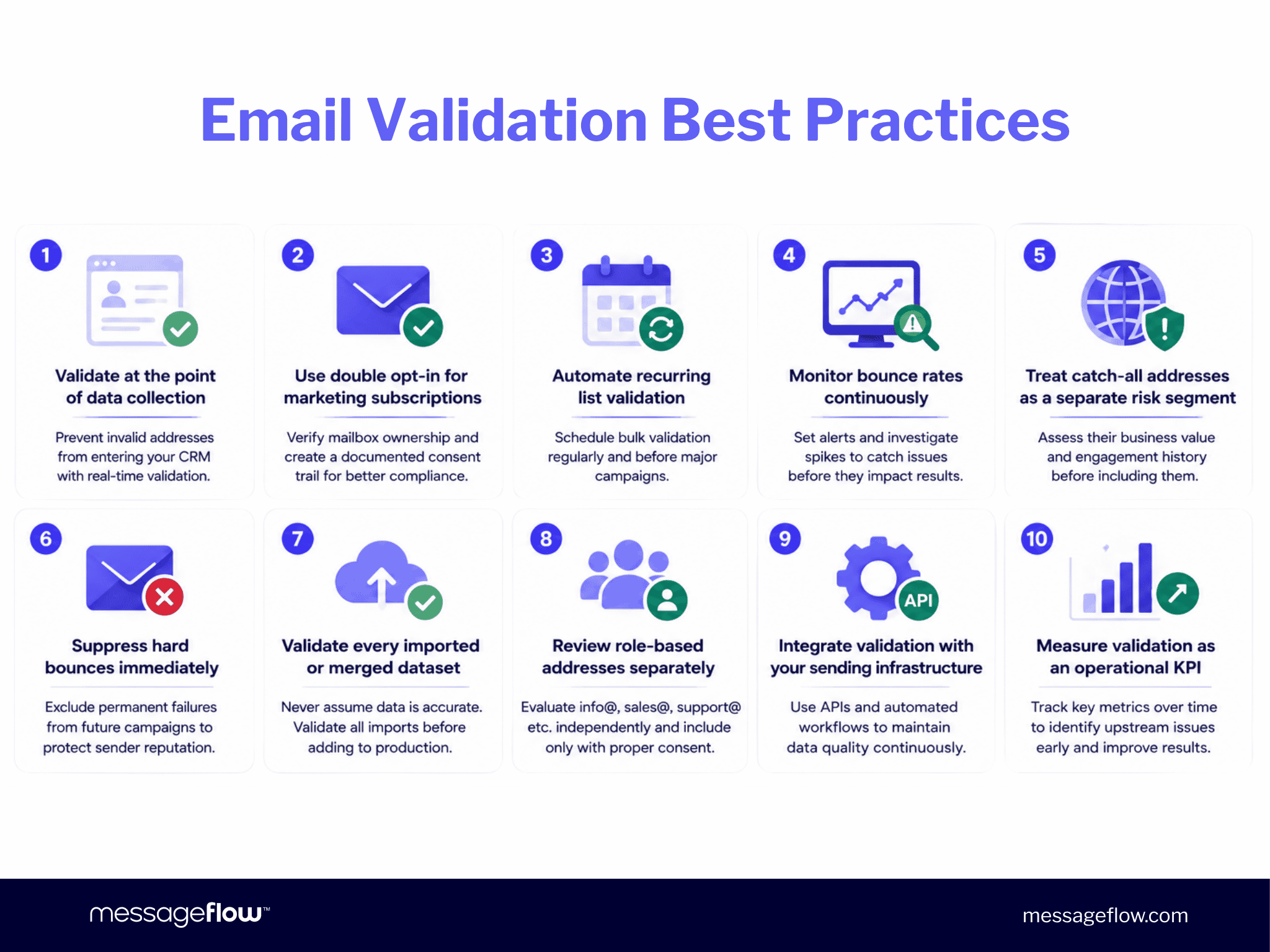
- Validate at the point of data collection. Implement real-time validation on every signup form, checkout flow, and lead capture process to prevent invalid addresses from entering your CRM.
- Use double opt-in for marketing subscriptions. Double opt-in verifies mailbox ownership while creating a documented consent trail, improving both data quality and compliance.
- Automate recurring list validation. Schedule bulk validation before major campaigns and periodically for your entire database. Validation should be part of your operational workflow—not a one-off maintenance task.
- Monitor bounce rates continuously. Set alerts for unusual increases in hard bounces and investigate affected segments immediately. Sudden spikes often indicate list degradation, acquisition issues, or integration errors.
- Treat catch-all addresses as a separate risk segment. Don’t remove them automatically, but avoid including them in high-volume campaigns without first assessing their business value and engagement history.
- Suppress hard bounces immediately. Once an address generates a permanent failure, exclude it from future campaigns to protect sender reputation and avoid unnecessary delivery attempts.
- Validate every imported or merged dataset. Never assume third-party, legacy, or CRM-imported data is accurate. Every imported list should pass through the same validation workflow before it enters production.
- Review role-based addresses separately. Evaluate addresses such as info@, sales@, or support@ independently and include them in marketing communications only when appropriate consent has been obtained.
- Integrate validation with your sending infrastructure. Connect validation directly to your ESP or customer communication platform through APIs and automated workflows. Eliminating manual exports and imports reduces operational risk and ensures list quality is maintained continuously.
- Measure validation as an operational KPI. Track invalid, risky, disposable, catch-all, and hard-bounce rates over time. Trends in these metrics often reveal upstream issues in acquisition channels, CRM integrations, or customer data management long before they affect campaign performance.
Validating your list is the first step. The second is sending to it with infrastructure that protects what you’ve built.
💡 MessageFlow delivers email with a 99.98% average delivery rate, real-time SMTP logs, dedicated IPs, and CSA certification, so clean data translates directly into inbox placement.
Frequently Asked Questions About Email Address Validation
Email address validation is the process of checking whether an email address is correctly formatted, belongs to a live domain with valid MX records, and can physically receive mail, without sending an actual message. It ranges from simple syntax checks to SMTP handshakes that ping the recipient’s mail server in real time. Modern validation services run all layers in a single pass.
Although the terms are often used interchangeably, they refer to different stages of the same process. Email validation checks whether an address is correctly formatted, while email verification confirms that the domain exists, has valid MX records, and that the mailbox can accept incoming email. Most enterprise email validation services perform both checks automatically.
The easiest way to check if an email address is valid is to use an email validation service. These tools perform an email syntax check, verify the domain and MX records, and, where possible, confirm mailbox availability using SMTP verification. If you need to validate an entire database, use bulk email validation before sending your next campaign.
For marketing lists, validate every 3-6 months at minimum, and always before a major campaign. For active outbound sequences, monthly. Industry data from 2026 shows email lists lose approximately 23% of valid addresses per year. At 2-3% monthly decay, a list untouched for six months has already lost 12-18% of its deliverable contacts.
No. Email validation significantly reduces hard bounces by identifying invalid, inactive, and disposable email addresses before sending, but it cannot eliminate every delivery failure. Soft bounces caused by temporary server issues, full inboxes, or mailbox provider policies may still occur. The goal is continuous email bounce rate reduction, not the complete elimination of bounces.
Bulk email validation is the process of validating an entire email database rather than individual addresses. Every address is checked for syntax, domain configuration, mailbox availability, disposable email providers, and other risk indicators. It’s an essential part of ongoing email list cleaning for organizations sending campaigns at scale.
A catch-all domain is configured to accept email for any mailbox at that domain, even if the individual address doesn’t exist. Because SMTP verification cannot reliably confirm whether a specific mailbox is valid, email validation platforms classify these addresses as risky rather than valid. Many organizations place catch-all addresses in a separate segment and evaluate them independently before including them in large-scale campaigns.