
Every email you send passes through an SMTP server, and every SMTP connection starts with a port number. If you pick the wrong one, your messages may fail with no warning or notification, get rejected, or travel unencrypted when they shouldn’t.
Three port numbers come up in virtually every SMTP configuration: 25, 587, and 465. Each exists for a specific reason, each behaves differently, and choosing between them isn’t a matter of preference but rather depends on what you’re connecting to and what role your system plays in the delivery chain.
Here’s what each SMTP port does, where it fits, and which one you should be using.
What SMTP ports do and why the number matters
SMTP (Simple Mail Transfer Protocol) is the protocol email servers use to send messages to each other. A port is the numbered endpoint on a server that listens for a specific type of connection. You can think of it as a door designated for a particular kind of traffic.
Different SMTP ports exist because email sending isn’t a single, unified action. There are two distinct operations that happen over SMTP, and they’ve been separated by design.
Email submission
Takes place when your email client or application hands a message to your outgoing mail server. It basically says “I want to send this” – the step involves authentication (proving you’re allowed to send through that server) and typically encryption. Ports 587 and 465 handle this.
Email relay
Happens when one mail server passes a message to another on its way to the recipient. Your outgoing server connects to the recipient’s mail server to deliver the message. Port 25 handles this.
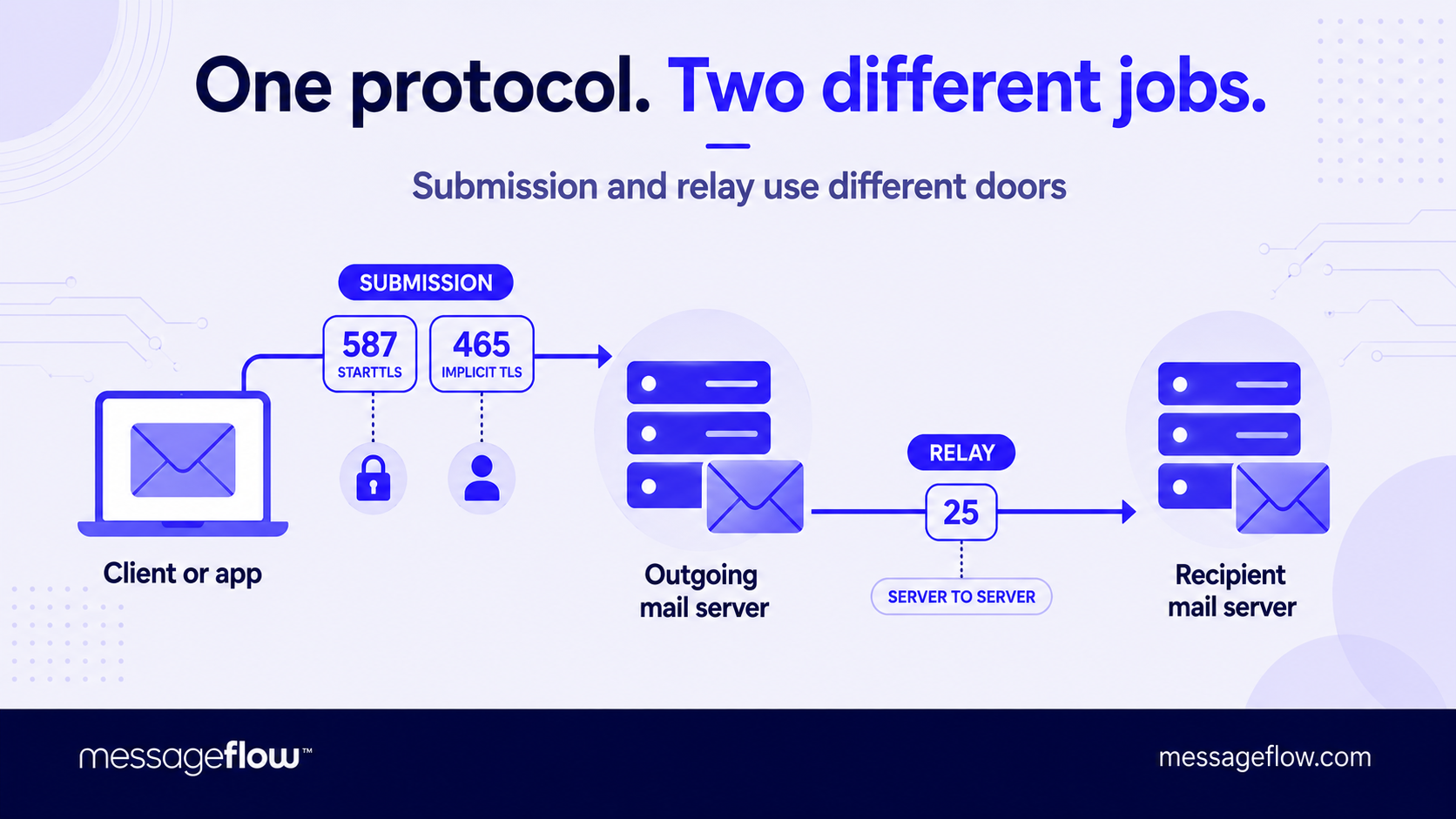
The split is necessary because the security requirements are different. Submission needs authentication and encryption – without them, anyone could send mail through your server. Relay between trusted servers has its own protections but they operate at the infrastructure level rather than the user level.
💡 Configuration errors often come from conflating these two roles: trying to use a relay port for submission, or pointing a mail client at a port the server doesn’t expect client connections on. Knowing which port serves which function prevents the majority of SMTP connection failures before they start.
Port 25: The original, now mostly off-limits
Port 25 is the oldest SMTP port, defined in RFC 821 back in 1982. For decades, it handled everything – client submission and server-to-server relay alike. That era is now over.
The problem with port 25 was openness. In its original design, any system could connect to any mail server on port 25 and send a message with no authentication required. That worked in a small, trusted internet. On today’s internet, it made port 25 the primary vehicle for spam. Open relays (servers that accepted and forwarded mail from anyone) became such a widespread abuse vector that the industry had to respond.
Port 25 is for server-to-server relay only
When your outgoing mail server delivers a message to the recipient’s mail server, that connection still happens on port 25. It remains the backbone of email delivery between infrastructure nodes, and it works because both sides are known mail servers with DNS records (MX records) that vouch for their role.
Port 25 is effectively blocked for other use cases
Most ISPs block outbound port 25 traffic from residential and business connections to prevent compromised machines from sending spam directly. Major cloud providers like AWS, Google Cloud, or Azure block it by default on new instances, and lifting that restriction requires an application with a stated justification.
💡 If you’re trying to configure an application or mail client to send email through port 25, you’ll almost certainly fail simply because the network won’t let the traffic through.
There’s one scenario where port 25 still matters for configuration: if you’re running your own mail server and need to receive inbound email from other servers. In that case, your server listens on port 25 for incoming relay connections. But for outbound sending from an application or client, port 25 is no longer the right choice.
Port 587: The standard for authenticated submission
Port 587 was designated for email submission in RFC 6409, specifically to separate client-to-server traffic from server-to-server relay. If you’re configuring an application, email client, or bulk sending service to send outbound email, this is almost certainly the port you should use.
Mandatory authentication on port 587
Unlike port 25, which was designed to accept connections from anyone, port 587 requires the sender to prove their identity, typically with a username and password, or an API key, before the server accepts a message. This prevents unauthorized senders from using your mail server as an open relay.
Encryption through STARTTLS
A connection to port 587 starts unencrypted, then upgrades to TLS through the STARTTLS command before any credentials are transmitted. The server advertises that it supports STARTTLS, the client initiates the upgrade, and from that point forward the session is encrypted. Virtually every modern mail server and email client supports this, and most servers configured on port 587 will reject connections that don’t upgrade, meaning encryption is effectively enforced even though the initial handshake is in plaintext.
Compatibility is the broadest of all three ports
Port 587 isn’t blocked by ISPs or cloud providers the way port 25 is, and it’s supported by every major email service – Gmail, Outlook, Yahoo, and every serious SMTP relay provider. When a hosting provider or email service documents their SMTP settings, port 587 with STARTTLS is almost always the primary recommendation.
For most use cases including configuring a CMS to send notification emails, connecting a transactional email service, routing marketing campaigns through an SMTP relay, or setting up a desktop mail client, port 587 is the correct and default answer. Unless you have a specific technical reason to use something else, start here.
Port 465: Implicit TLS and its second life
Port 465 has an unusual history. It was briefly assigned for SMTP over SSL in the mid-1990s, then revoked by IANA in 1998 when STARTTLS on port 587 became the preferred approach. For nearly two decades it existed in a gray zone – officially unrecognized but still supported by many providers because it worked and users kept configuring it.
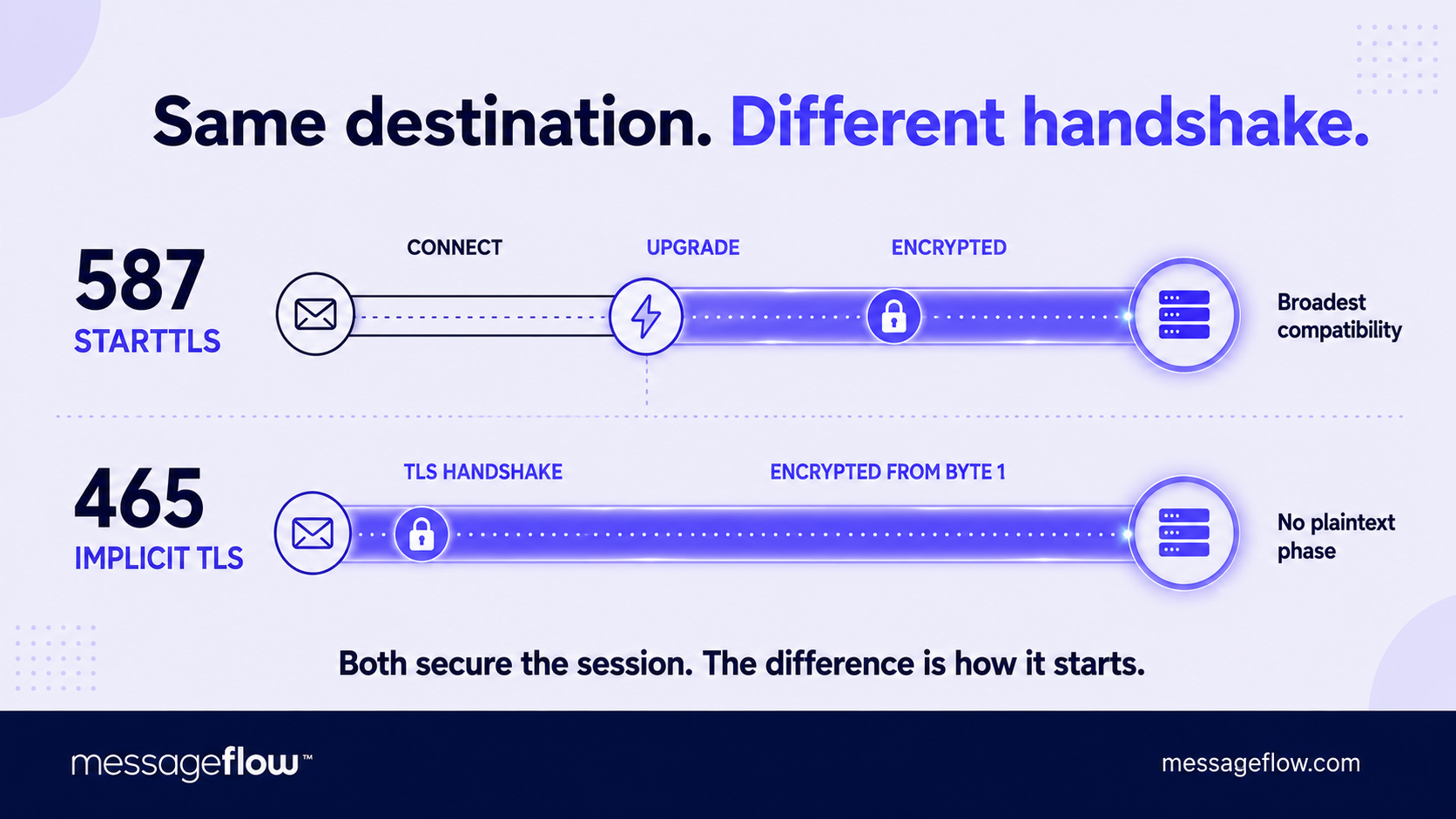
In 2018, RFC 8314 gave port 465 a new lease on life, recommending it for email submission with implicit TLS. The distinction from port 587 is in how encryption starts.
Port 587 upgrades to encryption
The connection begins unencrypted and switches to TLS via the STARTTLS command. This works reliably, but there’s a brief window before the upgrade where a misconfigured or malicious intermediary could theoretically interfere.
Port 465 starts encrypted
The TLS handshake happens immediately upon connection, with no plaintext phase or upgrade step. This is the same approach HTTPS uses for web traffic and it eliminates the theoretical downgrade risk that STARTTLS carries.
In practice, both ports deliver strong encryption for the actual session. The security difference is marginal for most use cases because well-configured servers on port 587 will reject connections that fail to upgrade. Where port 465 has a practical edge is in environments with strict firewall rules or network policies that inspect and interfere with STARTTLS negotiation – implicit TLS bypasses that problem entirely because the connection is encrypted from the first byte.
Widespread but not universal support
Gmail, Yahoo, and most major providers accept submissions on port 465. Some older or more conservatively maintained mail servers don’t. If you’re choosing between the two for a new setup and your provider supports both, port 465 is the slightly more modern choice. If you need maximum compatibility across providers, port 587 remains the safer bet.
Which port to use and how to configure it
The decision is simpler than the history suggests:
- Sending email from an application, client, or service → port 587 (STARTTLS) or port 465 (implicit TLS). Both require authentication, both encrypt the connection. Port 587 is the safer default for compatibility while port 465 is preferable if your environment has issues with STARTTLS negotiation or you want encryption from the get-go.
- Running a mail server that receives email from other servers → port 25 for inbound relay. This is the only remaining standard use case for port 25.
- Sending outbound email from a regular application or client → never port 25. It will be blocked by your ISP or cloud provider, and even if it isn’t, it lacks the authentication layer that legitimate sending requires.
Basic SMTP configuration
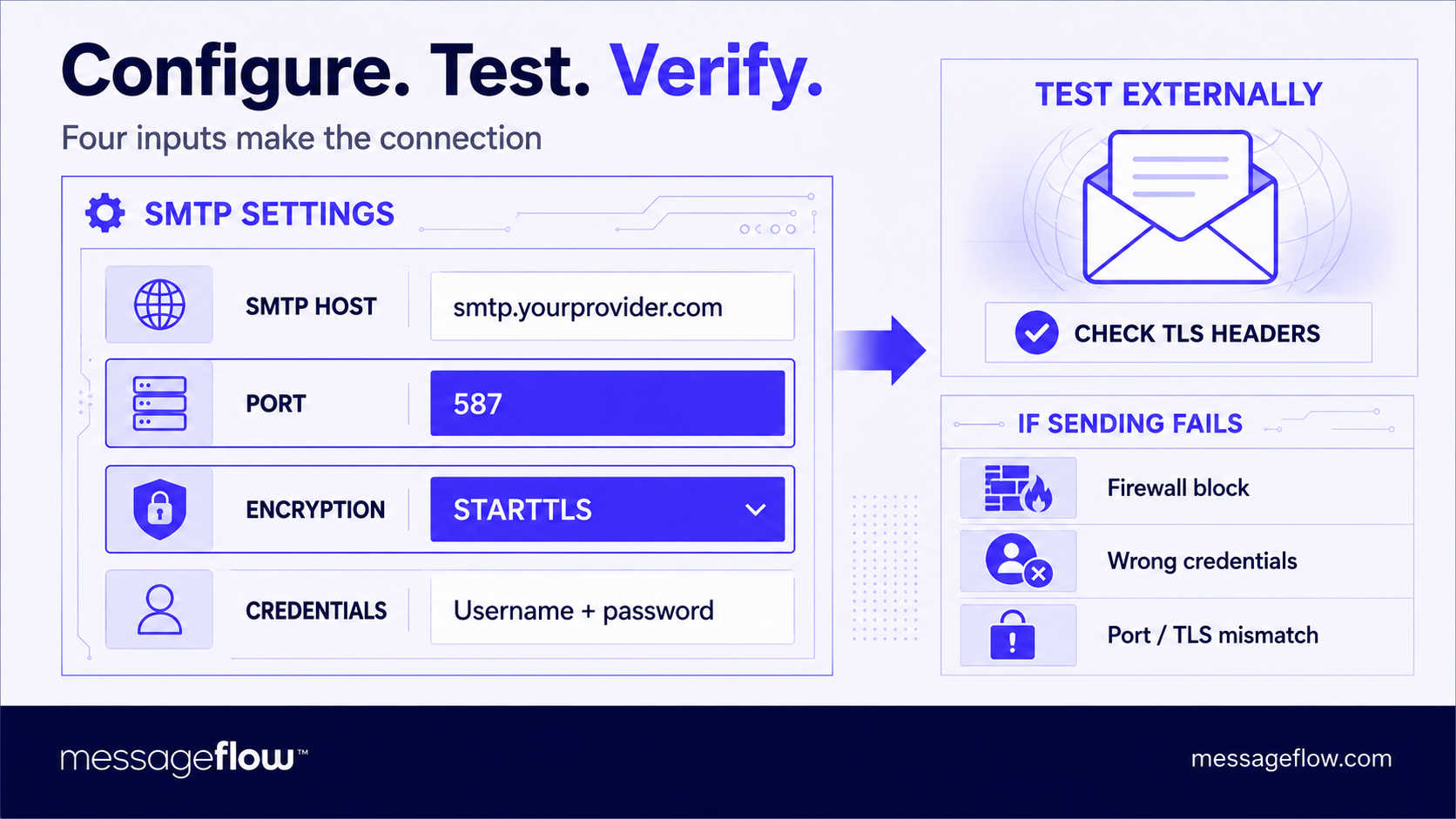
The process follows the same pattern regardless of provider. You need four values: the SMTP host (your provider’s server address), the port number, the encryption method (STARTTLS for 587, SSL/TLS for 465), and your authentication credentials. A typical setup looks like this:
- SMTP host: smtp.yourprovider.com
- Port: 587
- Encryption: STARTTLS
- Username: your account email or API key
- Password: your account password or API secret
After entering these, send a test message to an external address, not to yourself on the same domain, which may bypass the external delivery path entirely. Check the message headers for TLS or encrypted indicators to confirm the connection was secured.
If the send fails, the most common culprits are a firewall blocking the port, incorrect credentials, or a mismatch between the selected port and encryption method (STARTTLS on 465 or SSL/TLS on 587 will fail on most servers).
💡 One last thing worth noting: if you send through a third-party SMTP relay or bulk email service, make sure your SPF, DKIM, and DMARC records account for their sending infrastructure. The port gets your message to the relay but authentication records are what tell the recipient’s server to trust it once it arrives.
When your email outgrows a single SMTP connection
Getting the port and authentication right handles the mechanics of sending but as your volume scales into thousands of transactional messages, marketing campaigns hitting large segments, multi-channel flows that combine email with SMS or push, a single SMTP configuration stops being enough.
MessageFlow offers API and SMTP-based email delivery built for security, high throughput, deliverability monitoring, bounce handling, and the flexibility to add SMS, RCS, and mobile push when your messaging needs to expand.
Get in touch and together we’ll map the right infrastructure to your volume and use case.