TL;DR:
SMS filtering is the process by which carriers, routing systems, or messaging apps identify and block text messages that look suspicious, non-compliant, or spam-like. For businesses, filtering can happen at multiple layers, and a message may show “delivered” in your report while never appearing in the customer’s main inbox. This guide explains where filtering happens, why legitimate business messages get caught, and what you can do before and after a campaign.
Your campaign report says the SMS was delivered. The customer says they never saw it. In many cases the missing piece is SMS filtering: a carrier, routing system, or messaging app may have blocked, hidden, or flagged the message before the customer had a chance to read it.
SMS filtering is no longer just a carrier-side issue. According to Google, Google Messages blocks over two billion suspicious messages every month. For business senders, that means delivery status alone does not explain whether a customer actually saw the message.
This guide covers what SMS filtering is, where it happens, why legitimate messages get caught, and what practical steps you can take to reduce the risk.
What is SMS filtering?
SMS filtering is the process of identifying, blocking, hiding, or flagging text messages that may look unwanted, suspicious, non-compliant, or risky. For business senders, filtering can happen at different layers: carrier networks, messaging providers, routing systems, or the recipient’s messaging app, such as Google Messages.
A message may not appear in the main inbox even when the sender believes the campaign was successfully delivered. Delivery confirmation and inbox visibility are two different things, and understanding that gap helps you start troubleshooting.
SMS filtering vs. SMS delivery vs. SMS deliverability
These three terms are often used interchangeably but they describe different things. Getting them straight helps you ask the right questions when something goes wrong.
SMS delivery
SMS delivery refers to whether a message was accepted and delivered through the network path. When a platform shows “delivered,” it typically means the carrier acknowledged receipt of the message at the device level. It does not confirm that the message appeared in the recipient’s main inbox.
💡 For a detailed breakdown of delivery report statuses, including sent, delivered, failed, expired, and rejected, see our guide to SMS delivery status.
SMS deliverability
SMS deliverability is broader. It covers everything that affects whether a message is actually visible to the recipient: routing, carrier handling, sender identity, filtering, device and app behavior, and whether the end user sees the message.
A high delivery rate with a low open rate can be a signal that filtering is moving messages out of the main view.
Why “delivered” does not always mean “seen”
A message can be accepted at the device level and still end up in a spam folder, a filtered inbox, or a blocked conversation thread. This is most common with app-level filtering, where the recipient’s messaging application makes its own classification decision after the carrier has already processed the message.
If your customers are reporting missing messages despite clean delivery reports, filtering at the app level is a likely explanation. It can also be worth checking whether delayed text messages are involved, since delay and filtering can look similar from the customer’s perspective.
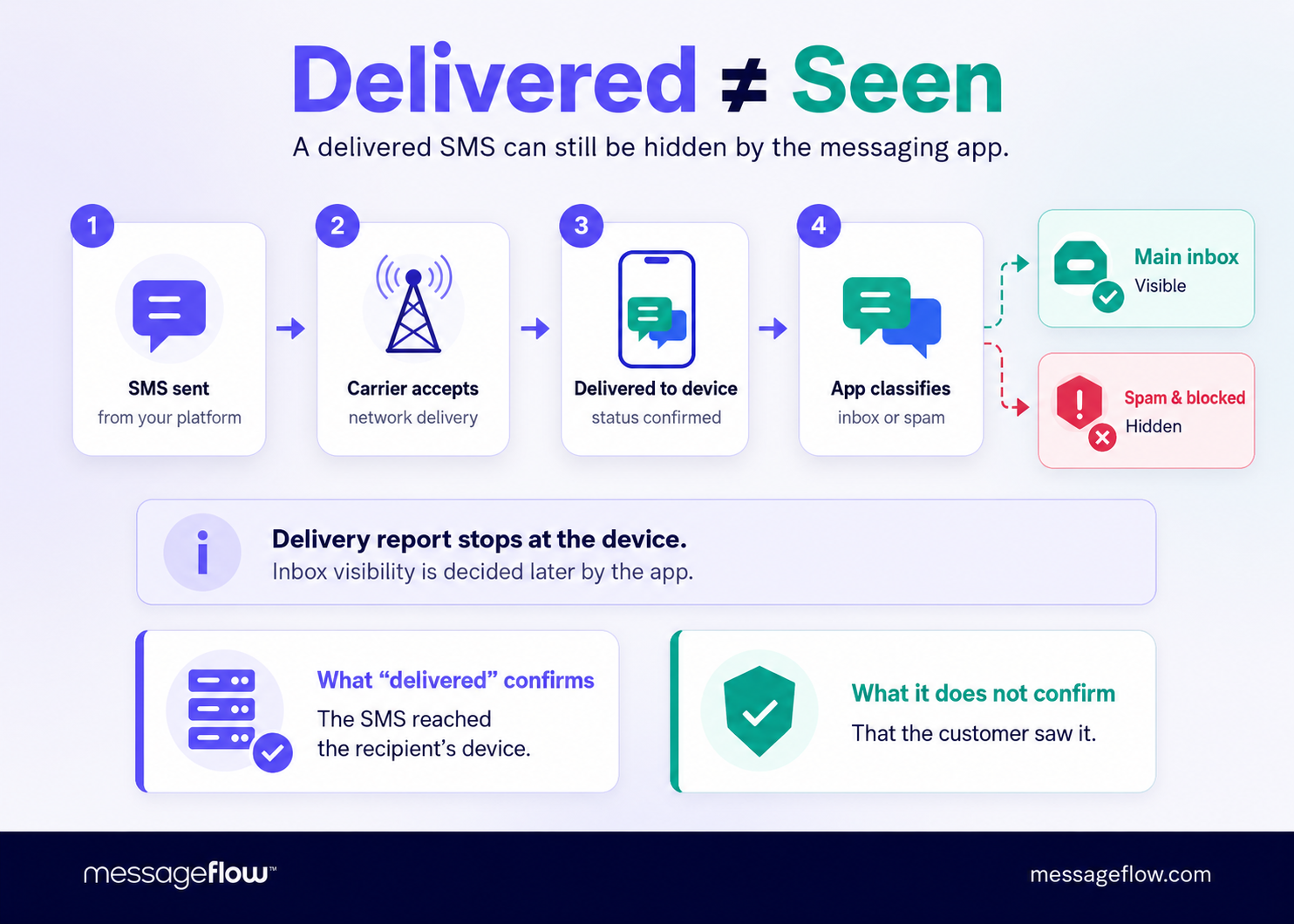
Where does SMS filtering happen?
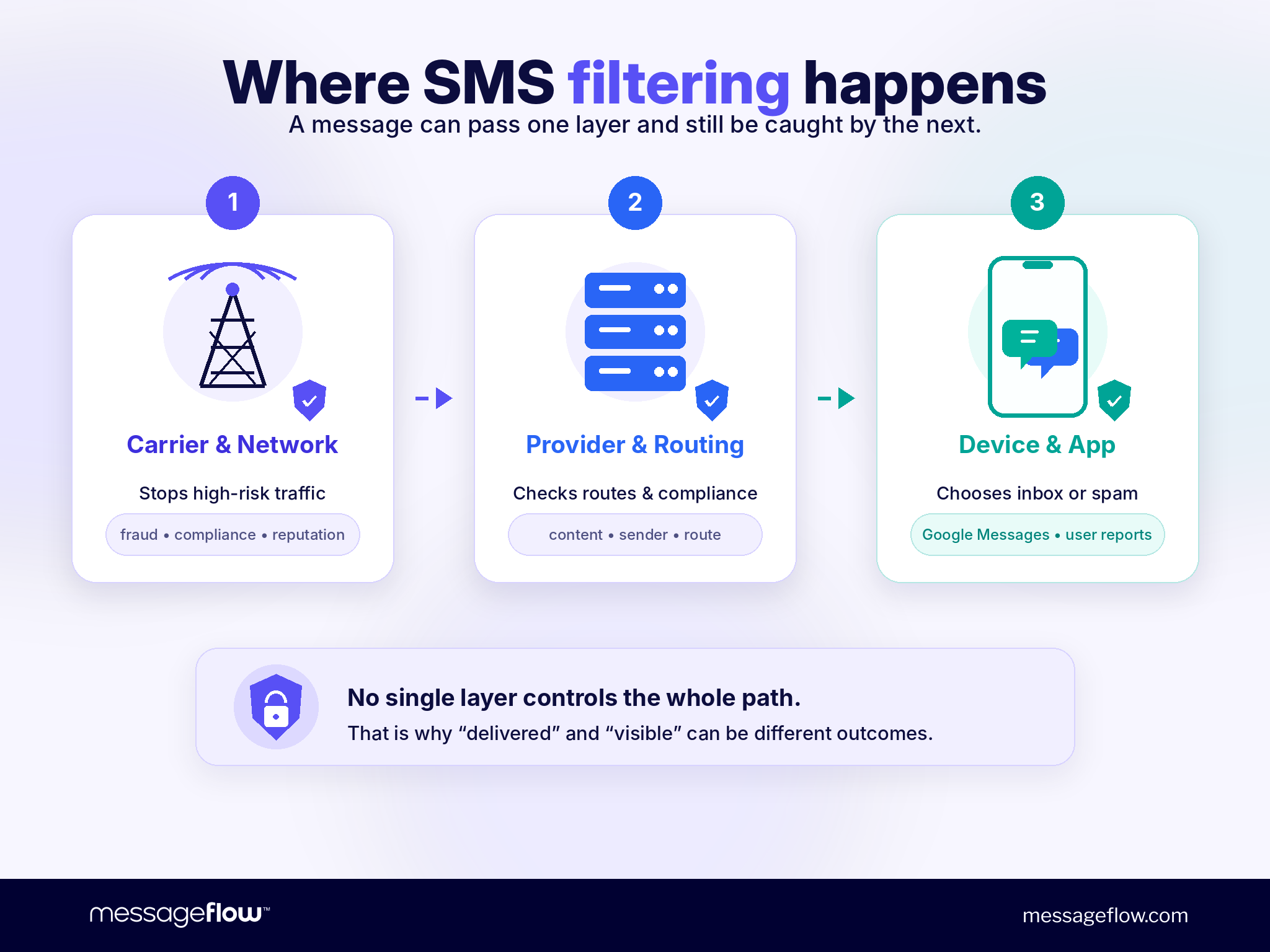
SMS filtering can occur at three distinct layers, each controlled by a different party. A message that passes one layer can still be caught at another.
Carrier and network-level filtering
Carriers and mobile service providers apply filtering to protect their networks from spam, fraud, and non-compliant traffic. This filtering uses machine learning, content analysis, sender reputation scoring, and registration checks.
In the US, the FCC introduced text-blocking rules that took effect on September 3, 2024, requiring providers to block certain texts that are highly likely to be illegal. The CTIA states that the wireless industry uses filtering software, machine learning tools, and analytics to curb unwanted or unlawful text messages.
10DLC registration and A2P compliance (US market)
In the US, all businesses sending application-to-person (A2P) messages over 10-digit local numbers must register their brand and campaign through The Campaign Registry (TCR). Since February 2025, unregistered A2P traffic is silently blocked by AT&T, Verizon, T-Mobile, and other major carriers. There is no error notification. The message is simply not delivered.
Registration establishes who you are (brand verification via EIN and legal name), what you’re sending (campaign use case with sample messages), and what throughput you need. Without it, your traffic looks identical to spam because spam senders also avoid registration.
For businesses targeting the US market, 10DLC registration is the baseline requirement for carrier delivery.
Outside the US, similar frameworks exist in other markets. Requirements vary by country, and routing through unverified or grey routes can result in filtering or unreliable delivery.
Messaging provider and routing-level controls
SMS platforms and aggregators apply abuse prevention, compliance checks, and routing controls before messages leave their network. These controls can include content scanning, volume monitoring, and sender reputation checks.
What providers cannot do is control every downstream carrier decision or app-level classification. Once the message leaves the provider’s infrastructure, the carrier and the recipient’s device make their own independent decisions.
Device and app-level filtering
The final layer is the recipient’s phone and messaging app. This is where many legitimate business messages get caught, often without any signal reaching the sender.
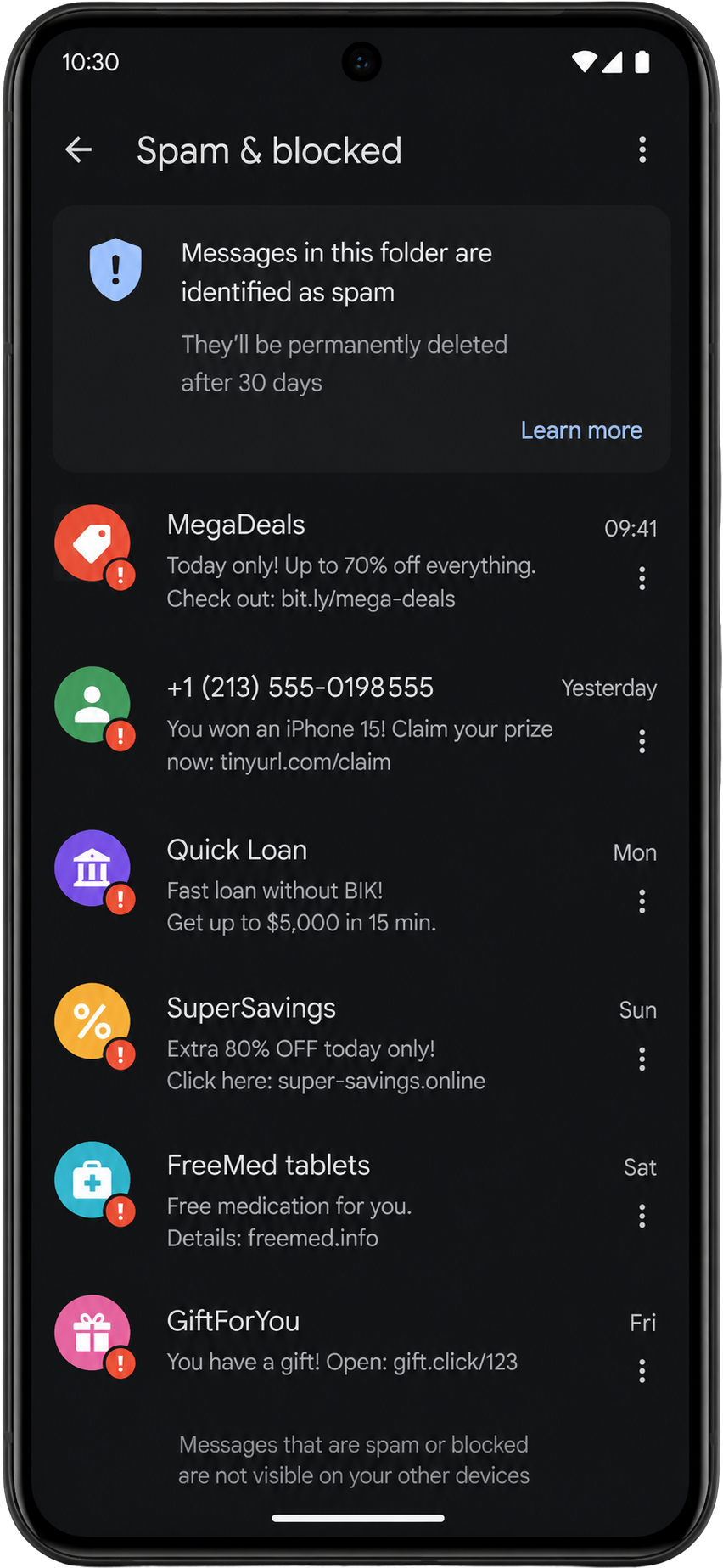
Google Messages, the default messaging app on most Android devices, includes a Spam Protection feature that is enabled by default. It can automatically move suspected spam to a “Spam & blocked” folder before the user sees it.
Apple also provides message filtering and screening options for iPhone users, allowing messages from unknown senders to be filtered into a separate view.
Android holds approximately 68% of the global mobile operating system market, according to StatCounter data from May 2026. That means Google Messages spam protection is relevant for a significant share of your recipients.
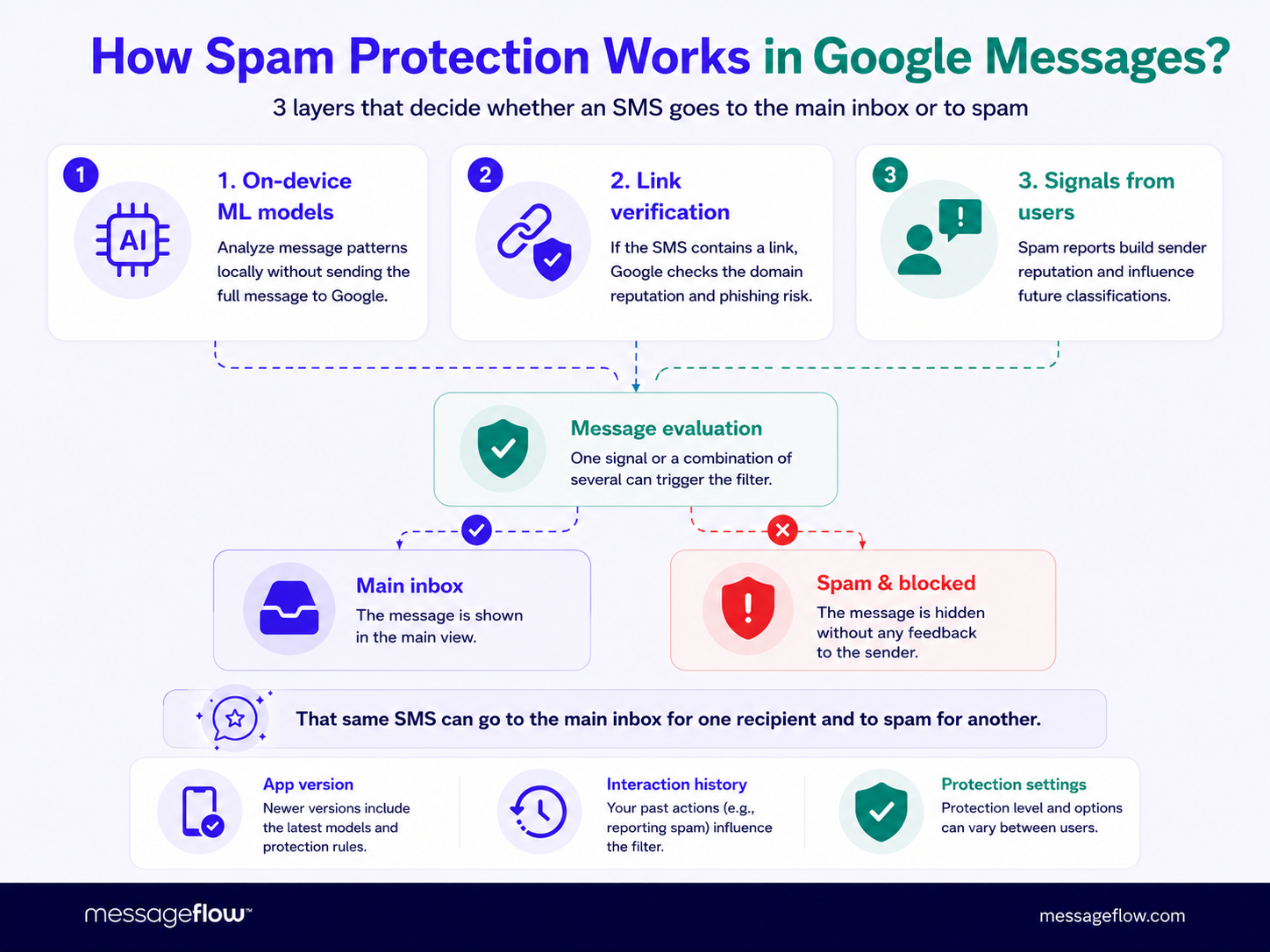
How Google Messages spam protection works
Understanding how Google Messages classifies your communication helps explain why clean, legitimate campaigns sometimes get filtered.
Google Messages can hide suspected spam
Google states that when Google Messages detects suspected spam, it can prevent the message from being delivered to the main inbox and hide it in the “Spam & blocked” folder. The sender receives no notification. The recipient may not notice unless they check that folder manually.
Google Messages uses on-device ML and URL checks
Spam protection works in two ways. First, Google Messages uses on-device machine learning models to detect patterns associated with known spam. This analysis happens locally on the device, without the message content being sent to Google’s servers.
Second, if the message contains a URL, Google Messages may upload that URL to Google to verify whether the link is malicious. This URL check is what makes public short links a meaningful risk factor for business senders.
User reports influence future classification
When a recipient manually reports a conversation as spam, the sender is blocked, the conversation moves to “Spam & blocked,” and Google receives a copy of the last ten messages from that sender. Reported conversations are also used to train AI models for spam and abuse protection.
This means a single wave of spam reports, even from unsubscribes who did not recognize your brand, can affect how your future messages are classified for other users.
Why this matters for legitimate business SMS
The problem is not malicious intent on Google’s part. The problem is pattern matching. A legitimate delivery notification with a public short link, a promotional message with aggressive capitalization, or a transactional alert from an unrecognized sender name can all match patterns that spam protection associates with risk.
The solution is to understand those patterns and design your messages to avoid them.
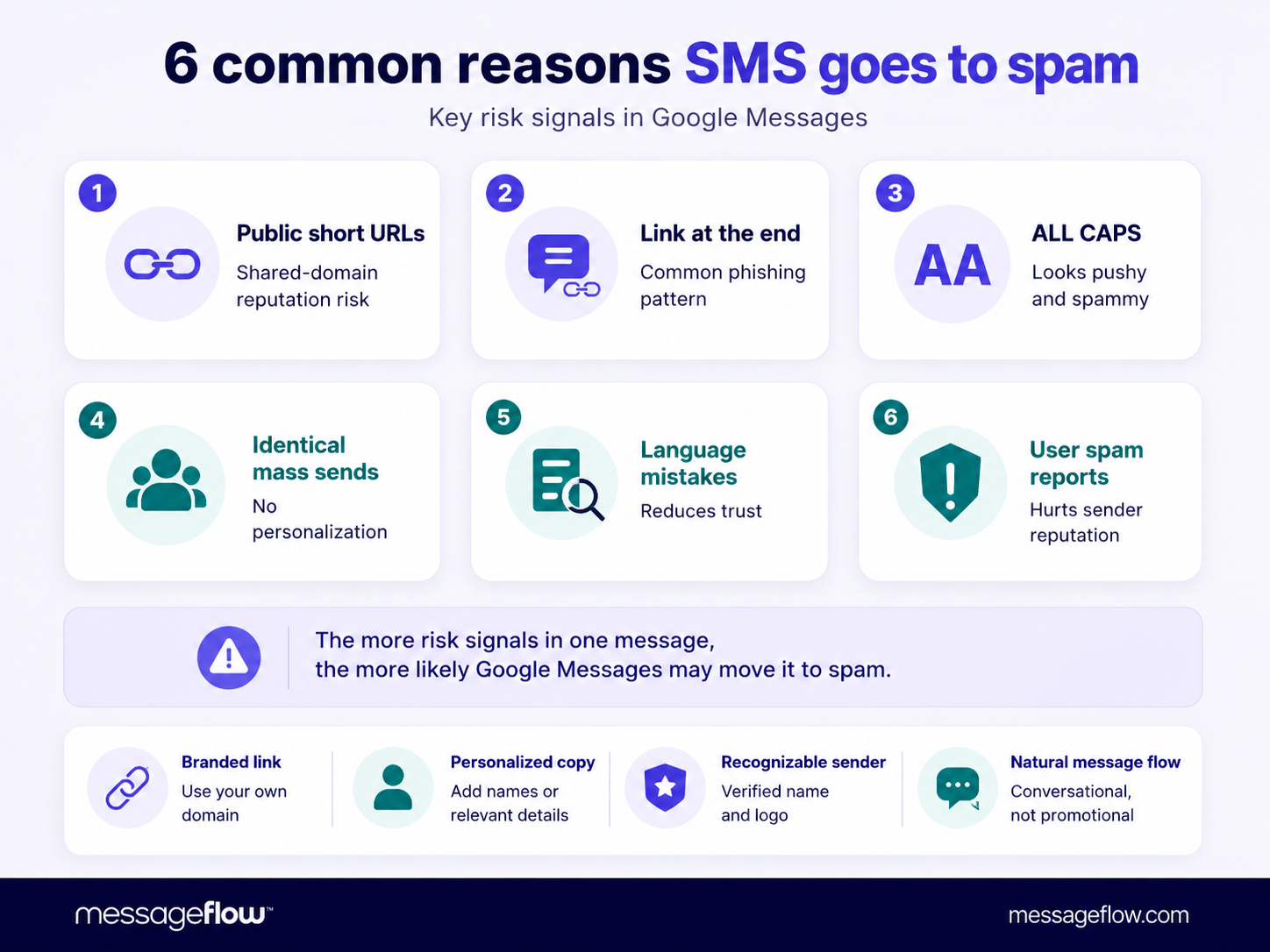
6 common reasons business SMS messages get filtered or marked as spam
1. Using public short URLs
Free public shorteners like bit.ly, tinyurl, and shorturl hide the final destination of a link. Because scam messages depend heavily on links, and because these domains are used by thousands of unrelated senders, they carry shared reputational risk.
hen Google Messages checks a URL, a link from a public shortener domain with a history of abuse can trigger filtering even if your specific destination is clean. Consumers reported losing $470 million to text message scams in 2024, according to the FTC, and the most commonly reported type was fake package delivery. That means delivery-style messages with short links are among the most scrutinized patterns in filtering systems.
Use branded domains or trusted link infrastructure instead. For more on the mechanics of how branded links work compared to public shorteners, see our guide on short links in SMS and how branded short links work.
2. Placing the link at the end without context
A message that ends with an unexplained link matches the template of phishing and delivery scams. Filters have learned this pattern.
Risky: “Your package is waiting. Click: short.ly/abc”
Better: “Your BrandName order #48291 is ready. Track it here: brand.com/track/48291”
The second version provides context before the link, includes a recognizable brand name, and uses a specific order reference. Each of those details reduces the likelihood of matching a spam pattern.
3. Overusing capital letters and urgency language
“LAST CHANCE,” “ACT NOW,” “URGENT,” “FREE,” “WIN” – these patterns trigger spam filters at both the carrier and app level. They are also common in phishing messages, which is why filtering systems treat them as risk signals.
This does not mean you cannot convey urgency. “Your offer ends Sunday” reads as legitimate. “LAST CHANCE EXPIRES TONIGHT CLICK NOW” does not.
4. Sending many identical messages without personalization
High-volume sends with identical content look like spam behavior from the outside, especially when combined with an unrecognized sender name. Filters check sending patterns alongside content, so a clean message can still be flagged if it arrives in a volume spike from a new sender identity.
Segmentation and basic personalization, even just an order number or first name, reduce this risk and improve engagement.
5. Grammar mistakes and unnatural copy
Phishing messages often contain awkward phrasing, missing context, and inconsistent formatting, partly by design, partly because they are drafted quickly at scale. Filtering systems have learned to flag these patterns.
Clean, specific, brand-consistent copy is great for your engagement and a signal that the message was written by a real organization for a real purpose.
6. A recipient manually reported the sender as spam
Once someone reports your message as spam, their device blocks future messages from that sender identity, and the report contributes to Google’s training data for spam detection. A customer who did not recognize your sender name, received too many messages, or simply wanted to opt out by marking spam rather than using STOP, all produce the same signal.
This is why consistent sender identity, clear opt-out instructions, and realistic message frequency matter beyond compliance. They protect your sender reputation in filtering systems.
Myths about SMS filtering
| Myth | Reality |
|---|---|
| If the SMS was delivered, the customer must have seen it | Delivery status confirms network acceptance. It does not confirm inbox visibility. |
| The SMS provider can remove the message from Google Messages spam | App-level classification is controlled by the recipient’s app and user settings. Providers cannot access or override it. |
| Only scammers get filtered | Legitimate business messages get filtered when content, links, or sending patterns match spam profiles. |
| Google Messages spam protection only works after user reports | Google also uses automated on-device ML and URL checks. User reports improve the system, but are not the only trigger. |
| A Sender ID solves every spam issue | Sender identity helps, but content, consent, link choice, and frequency all still matter. |
| 10DLC registration is optional for small senders | Any US-bound A2P SMS traffic must comply. Unregistered traffic is blocked regardless of volume. |
What to do when customers say your SMS went to spam
Step 1: Check the delivery report
Start with what the platform actually shows. Was the message delivered, sent, failed, expired, or rejected? Understanding the technical status tells you which layer to investigate. For a full breakdown of delivery status codes, see our SMS delivery status guide.
Step 2: Check the scale of the issue
Is this one customer on one device, or multiple customers across a campaign? A single report is probably a device-level issue. Multiple reports from the same campaign suggest a content or sender pattern problem that needs correcting before the next send.
Step 3: Ask the recipient to check Spam and blocked
In Google Messages, the recipient can open the app, tap the profile icon or the three-dot menu, and look for “Spam & blocked.” The exact navigation varies by app version and Android version, but the folder exists on most devices with Spam Protection enabled. If the message is there, it was filtered at the app level.
Step 4: Ask the recipient to mark the message as Not spam
If the message is legitimate, the recipient can mark it as “Not spam.” This moves it to the main inbox and sends a corrective signal to the app. Encourage customers to do this when they find missing messages.
Step 5: Review the message content
Go through the message with the filters in mind. Check every link (domain, not just destination), the sender name, any capitalization, grammar, personalization, and whether the content is specific enough to look legitimate.
Step 6: Test a safer variant
Before the next send, run a controlled test with a branded domain, a more recognizable sender name, cleaner copy, and improved personalization. Test with a small internal segment first if possible.
Step 7: Escalate only after isolating the likely layer
If the issue is clearly app-specific and content changes do not resolve it, the brand owner can report through Google’s help and feedback flow. If messages are being rejected or silently dropped before reaching the device, investigate carrier registration, routing, and sender identity with your SMS provider.
How to reduce SMS filtering risk before sending
Use recognizable sender identity
Consistent sender names give recipients a reason not to report you. Include your brand name directly in the message body if your sender number is not already recognizable. Registered sender IDs, where supported, add another layer of legitimacy.
Use branded or secure links
Public shorteners are a risk factor for both carrier filtering and Google Messages URL checks. Use a domain you control, or a dedicated short link infrastructure. For the full case for branded links and how to set them up, see secure links in SMS and short links in SMS.
Personalize the message
Customer-specific context, an order number, appointment date, loyalty points balance, or account reference, makes a message look like a real communication rather than a mass blast. It also reduces the chance of identical-content volume spikes triggering filters.
Avoid spam-like formatting
No excessive capitalization. No stacked exclamation marks. No urgency language that reads like a phishing template. Plain, direct, brand-consistent copy passes filters more reliably than anything that tries to create pressure.
Respect consent and opt-out expectations
For marketing SMS, consent is both a compliance requirement and a filtering defense. A subscriber who expected the message will not report it as spam. A subscriber who did not expect it might. See our SMS marketing benchmarks guide for best practices on frequency and consent management.
Match the message type to the use case
Transactional, informational, and promotional messages have different expectations, different consent requirements, and different filtering risk profiles. Mixing them in one message, for example adding a promotional offer to an order confirmation, creates classification ambiguity at the carrier level and confusion at the recipient level. For a breakdown of each type and when to use it, see types of SMS messages.
Risky vs safer SMS examples
| Scenario | Risky | Safer |
|---|---|---|
| Delivery update | “URGENT! Your parcel is waiting. Click short.ly/x91” | “BrandName: your order #48291 is ready. Track it here: brand.com/track/48291” |
| Promo campaign | “LAST CHANCE!!! 70% OFF CLICK NOW bit.ly/xyz” | “BrandName: your loyalty offer is active until Sunday. See details: brand.com/sale” |
| Appointment reminder | “Reminder: click here tinyurl.com/abc” | “BrandName: your appointment is tomorrow at 10:30. Manage it here: brand.com/appointments” |
| Payment notice | “PAY NOW to avoid block: short.ly/pay” | “BrandName: your invoice #2026-184 is due Friday. Pay securely: brand.com/login” |
💡 The pattern across all four scenarios: brand name in the message, specific reference (order number, date, invoice), link in context rather than at the end, no all-caps urgency, no public shortener.
SMS filtering troubleshooting checklist
| Check | What to review | Action |
|---|---|---|
| Delivery status | Was the SMS delivered, failed, expired, or rejected? | Review delivery report |
| Device and app | Is the issue mostly on Google Messages or Android? | Ask user to check Spam & blocked |
| Link | Is the link public, shortened, or from an unrecognized domain? | Switch to branded or secure links |
| Sender | Is the brand name recognizable in the message? | Improve Sender ID or add brand reference in body |
| Copy | Does it use caps, urgency language, or vague wording? | Rewrite in clear, specific language |
| Frequency | Were many identical messages sent in a short window? | Segment and personalize |
| Consent | Was the user expecting this message? | Review opt-in flow and message relevance |
| US compliance | Is 10DLC registration active for US-bound campaigns? | Register brand and campaign with TCR if not done |
| Scale | Is this one user or a pattern across a campaign? | Decide whether to fix content or escalate |
When should you contact Google, your carrier, or your SMS provider?
Contact Google when the issue is app-specific
If multiple customers on Google Messages report legitimate messages as hidden, and content and sender changes do not resolve it, the brand owner can report through the Google Messages Help Center. This is appropriate when the filtering pattern is clearly tied to the app rather than network delivery.
Contact your SMS provider when delivery reports look wrong
If messages are being rejected, silently dropped, or showing unexpected status codes across a country, carrier, or route, your provider can investigate the delivery and routing layer. They can also help with sender registration and compliance checks.
Contact carrier or compliance teams for network-level issues
If filtering appears to happen before messages reach the device, especially in the US, investigate 10DLC registration status first. In other markets, check local sender ID registration requirements and routing setup.
Summary
SMS filtering does not always mean the provider failed or the carrier blocked the message. Filtering happens at multiple independent layers: the carrier network, the routing infrastructure, and the recipient’s messaging app. A message can pass carrier delivery and still be hidden by Google Messages spam protection before the customer ever sees it.
For businesses, the practical response is to treat message design as a filtering variable. Sender identity, link choice, content quality, personalization, consent compliance, and US registration status all affect how filtering systems classify your messages. No platform can guarantee inbox placement, but these factors meaningfully shift the risk profile of any campaign.
Want to improve the reliability and performance of your business SMS campaigns? Explore MessageFlow’s SMS marketing platform and learn how to build clearer, safer, and more effective mobile messaging.
Frequently Asked Questions
SMS filtering is the process of detecting, blocking, hiding, or flagging text messages that look unwanted, suspicious, risky, or non-compliant. It can happen at carrier level, provider level, routing level, or at the recipient’s messaging app. For businesses, filtering matters because a message may not appear in the recipient’s main inbox even if the platform shows a delivered status.
Google Messages can mark an SMS as spam because of suspicious links, repetitive content, unclear sender identity, user reports, or patterns that match known spam. Google Messages spam protection uses on-device machine learning and URL verification to detect suspicious messages automatically, separate from any user reports.
Yes. A message can be processed as delivered at the network level and still be moved to a “Spam & blocked” folder by the recipient’s messaging app. Delivery status and inbox visibility are separate outcomes controlled by different layers. Treat them as independent checks when troubleshooting.
Yes, when they use public shortener domains like bit.ly or tinyurl. These domains have shared reputational history from millions of unrelated senders, including spam and phishing campaigns. Google Messages verifies URLs in incoming messages. A link from a flagged domain can trigger filtering even if your destination is legitimate. Use branded domains instead.
Yes. Google Messages spam protection is enabled by default and uses on-device machine learning to identify known spam patterns. It also checks URLs in messages by uploading them to Google’s servers. Users can manually report messages as spam or not spam, which contributes to improving the system over time.
No. Once a message reaches the recipient’s device, the SMS provider has no access to how the device’s messaging app classifies or displays it. Providers can investigate delivery, routing, and sender setup, but app-level spam decisions are made by the app itself and the user’s settings. The recipient needs to mark the message as not spam directly.
Ask them to open Google Messages, tap the profile icon or menu, and find “Spam & blocked.” If the message is there, they can open it and tap the option to mark it as not spam. This moves the message to the main inbox and sends a corrective signal to the app. Exact navigation may vary by app version and device.
Use a consistent, recognizable sender name. Avoid public short URL services. Add customer-specific context before any link. Write in clear, specific language without urgency formatting. Respect opt-in consent and message frequency expectations. In the US, ensure 10DLC registration is active for all A2P campaigns. Test message variants with a small group before large sends.
No. SMS filtering is one factor that can affect SMS deliverability. Deliverability covers the full picture: routing, carrier handling, sender identity, compliance, device behavior, and whether the message is actually visible to the recipient. A message can have high delivery rates and still suffer from filtering if app-level spam protection is moving it out of the main inbox.