
API scalability alone does not guarantee timely delivery: your messaging API can accept a Black Friday campaign successfully while customers are still waiting for the messages. Requests may enter a queue faster than the sending infrastructure can process them, creating a gap between a successful API response and actual delivery. Messaging providers document this distinction in their queueing guidance.
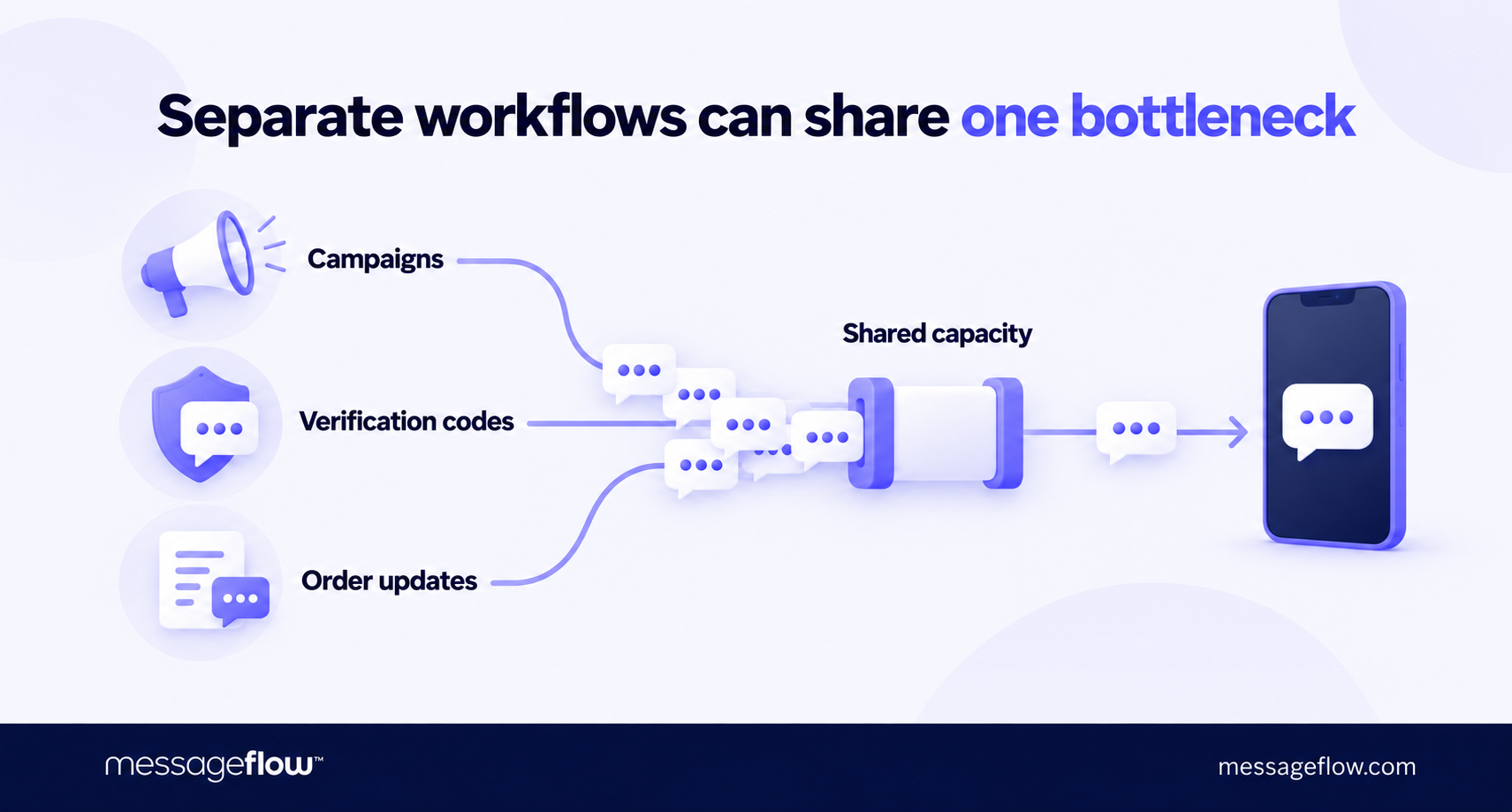
That gap becomes particularly prominent when several customer journeys depend on the same infrastructure. A promotion drives shoppers to your store. Their visits trigger verification codes, order confirmations, and delivery updates, piling time-sensitive traffic while the campaign is still sending. If those messages compete for limited capacity, a successful launch can put pressure on the communications needed to complete the purchase.
💡 For Black Friday, API scalability means handling that combined demand within the time each message remains useful. A verification code needs to arrive before it expires. An order confirmation should reassure a customer who has just paid. A promotional SMS, email or push notification needs to reach its recipient while the offer is still valid.
Start your readiness review with those deadlines. They determine how much capacity you need, which traffic deserves priority, and when your team should intervene.
What only becomes visible at peak traffic?
A messaging setup that handles a regular business day may have dependencies you have never tested under pressure. Black Friday exposes them when campaigns, customer activity, and automated notifications swell up all at once.
Three weaknesses deserve you particular attention:
- Separate workflows can compete for shared capacity. Your promotional and transactional messages may originate in different applications but share an account limit, sending route or processing resource. Check where those paths converge: separate campaign settings do not necessarily mean separate capacity.
- Retries can amplify the original spike. When requests fail or time out, applications may automatically try again. If several systems retry immediately, they add traffic while the service is already struggling. Microsoft’s retry guidance explains why aggressive retries can prolong overload.
- A short burst can outpace scaling. Additional resources take time to become available. A system may handle sustained high traffic, yet struggle with a sudden campaign launch before those resources are ready. This is why overload controls need to work during the scale-up period.
💡 Ask your infrastructure team to identify which shared component would reach its limit first and what the rest of the system would do next. That answer gives you a concrete failure scenario to test before the sales window depends on it.
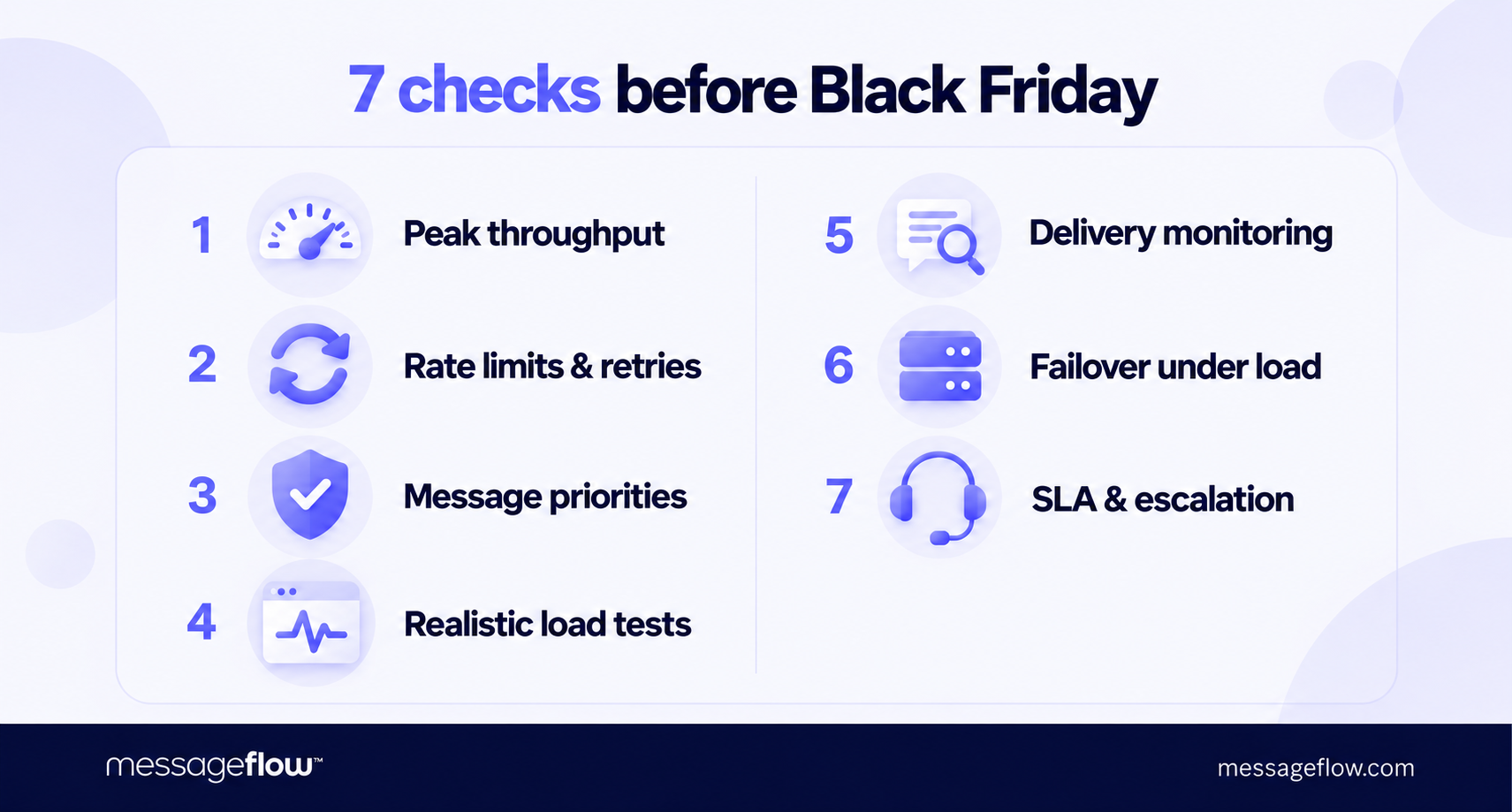
1. Match throughput to your busiest sending window
To assess API scalability, build your capacity forecast around the busiest minutes of Black Friday. A daily total can hide a concentrated burst: sending 180,000 messages over ten minutes requires a different setup from spreading them across ten hours.
Combine the campaign schedule with expected transactional demand. For each SMS, email and push flow, record the audience size, launch time, sending window, and traffic it may trigger. Include overlapping activity from other teams, such as a loyalty campaign launching while order confirmations are rising in volume.
Then check what each capacity figure actually measures:
| Measure | What to establish |
|---|---|
| API requests per second | How quickly your application can submit traffic, including whether one request contains multiple messages. |
| Messages or SMS segments per second | How quickly the provider can process or send that traffic, and at which stage it measures throughput. |
| Capacity by destination or sender | Whether particular markets, networks or sender types have limits below the overall account allowance. |
For SMS, message length affects the calculation. An illustrative campaign of 180,000 two-segment SMS messages contains 360,000 segments. Sending those segments within ten minutes requires an average outbound rate of 600 segments per second, before adding transactional traffic or allowing for variation. Keep in mind that that calculation describes the required sending rate – it does not guarantee handset delivery within ten minutes.
✅ Confirm with your provider: can the capacity available with your account support that traffic mix, on the intended routes, during the planned window? Ask whether any increase requires advance notice, configuration changes or a separate agreement.
A sudden increase in email volume can damage the sender’s domain and IP reputation, reducing deliverability. Plan larger sends in advance and work with your messaging provider to prepare for the spike. — Grzegorz Gorczyca, Solutions Architect & Team Lead, MessageFlow
2. Confirm API rate limits and retry behavior
Your application needs a defined response when it reaches an API rate limit. Otherwise, a temporary restriction can turn into a stalled campaign or a growing backlog of failed requests.
Ask your provider how limits apply: per account, endpoint, sender or time window. Confirm whether short bursts are allowed and what response signals that a limit has been reached. An HTTP 429 Too Many Requests response commonly indicates throttling. The provider’s documentation should explain how your integration should handle it.
Then have your engineering team verify three behaviors:
- Wait before retrying. Respect the provider’s Retry-After instruction when supplied. Otherwise, follow its documented retry policy, using progressively longer delays and a small random variation where appropriate, so applications do not retry simultaneously.
- Stop when another attempt will not help. Invalid credentials or malformed requests need correction. Temporary failures need a limited retry policy, with unresolved requests recorded for investigation.
- Check for overlapping retry mechanisms. Your application, client library, and background job processor may each retry independently. Confirm that their combined behavior stays within the intended limits.
Treat timeouts separately from explicit rejections. If your application receives no response, establish how it can determine whether the provider accepted the original send before submitting it again. Ask whether the API supports idempotency – a mechanism that prevents a repeated request from creating a second send – and how that protection works.
✅ Verify before peak season: a simulated rate-limit response should produce controlled retries and a visible recovery path, with safeguards against duplicate sends.
3. Protect time-sensitive messages from campaign backlogs
Decide which messages should retain capacity when demand exceeds what your infrastructure can handle. Make that decision before launch, with marketing, product, and engineering agreeing on what can wait.
Use the consequence of delay to assign priority:
- Authentication and security: verification codes, password resets, and urgent security alerts need a protected sending path.
- Routine transactional communication: order updates, receipts, and invoices need agreed delivery targets, but may not require the same urgency as a code blocking checkout.
- Promotional campaigns: decide which SMS, email or push sends you can slow or pause to release capacity for essential communication.
Ask engineering and your provider how they enforce those distinctions. A priority label needs a mechanism behind it, such as reserved capacity, separate processing resources or queues that serve urgent traffic first. Microsoft’s throttling guidance describes priority-based processing and deferring less critical work during overload.
💡 For critical SMS and email, MessageFlow Priority provides a dedicated processing path that bypasses standard queues within MessageFlow’s infrastructure. It is an additional service for time-sensitive communication, including OTP codes and security alerts, intended to make sure your critical messages arrive regardless of peak traffic.
Also define when a queued message should expire. Where supported, configure a sending validity period so an outdated offer or expired code does not continue waiting for dispatch. Confirm which queue that setting covers. Provider-side expiry does not necessarily control messages already handed downstream.
✅ Verify before peak season: run promotional and critical traffic together, then check whether critical messages meet their agreed timing targets as campaign load increases.
4. Run API load testing with a realistic traffic mix
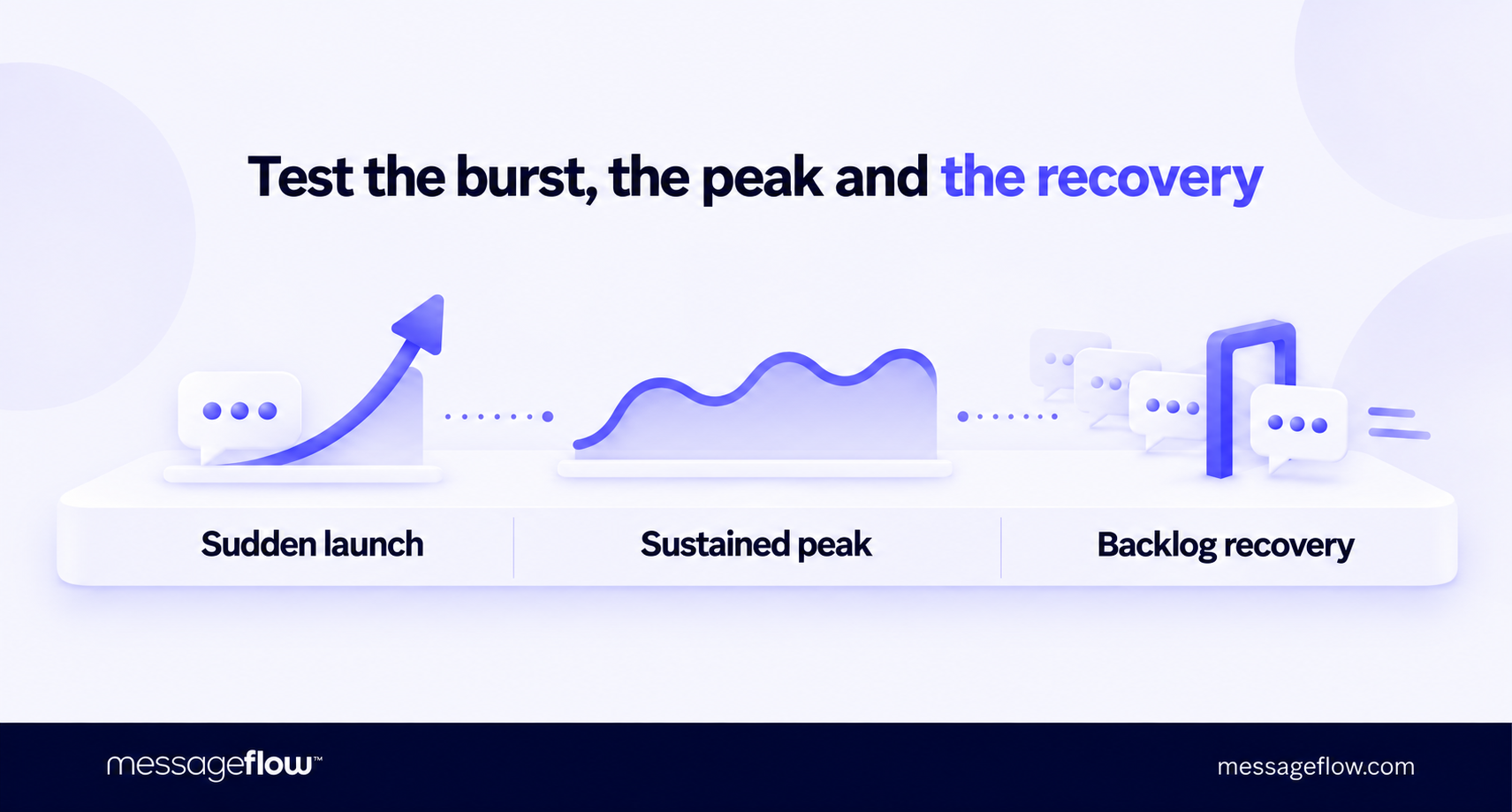
A useful load test should assess API scalability under your planned Black Friday traffic and show where changes are needed. Build the test from your forecast, including the mix of SMS, email, and push, typical message sizes, batch sizes and transactional requests.
Cover three conditions:
| Test condition | What it should establish |
|---|---|
| A sudden campaign launch | Whether the system handles the expected burst without breaching agreed timing or error thresholds. |
| Sustained peak activity | Whether performance remains stable throughout the busy period, rather than only during a short demonstration. |
| Recovery after the peak | Whether the backlog clears within an acceptable time while new messages continue arriving. |
Use a production-like environment and document any differences that limit what the results prove. Microsoft’s testing guidance recommends realistic workloads, explicit acceptance criteria, and test types matched to the risks being assessed.
Include the return path, too. Where your integration uses delivery-status webhooks, test whether your application can receive and process the resulting updates alongside new sends. A test that ends when the provider accepts a request leaves that part of the workflow unchecked.
Agree on the scope with your provider before generating load against its services. Use controlled test recipients for actual sends, and distinguish simulated provider responses from tests that exercise the real sending infrastructure.
✅ Set the pass criteria before running the test: required throughput, acceptable processing delays, error thresholds, and maximum backlog recovery time. Record which stages you measured so a fast API response cannot be mistaken for fast delivery. Schedule the exercise early enough to fix a bottleneck and repeat the affected test before Black Friday.
Reporting is the component most often overlooked in load testing, particularly the webhooks that receive message status updates. More messages mean more updates for the customer’s system to process.
Check in advance whether it can handle the expected load. If the webhook endpoint shares infrastructure with your online store, overloading it could also disrupt the store. — Grzegorz Gorczyca, Solutions Architect & Team Lead, MessageFlow
5. Monitor delays across the delivery path
Your monitoring should help the team locate a problem quickly: is traffic waiting in your application, inside the messaging platform or further downstream?
Connect API traffic monitoring with the sending and delivery signals available for each channel:
| Signal | What it helps you identify |
|---|---|
| Request volume, errors, and retries | Applications approaching limits, failing submissions or repeated attempts adding load. |
| API response times, including p95 or p99 | Slow requests that an average can hide. The p95 value is the response time within which 95% of requests complete. |
| Queue depth and oldest-message age, where available | Backlogs growing or messages approaching their useful sending deadline. |
| Sending and delivery-status events | Where messages stop progressing, with results separated by channel, destination, and traffic type. |
| Webhook processing delay | Status updates arriving faster than your application can process them. |
Treat status definitions carefully. Acceptance by an email server, an SMS delivery receipt, and a push delivery event describe different stages and provide different levels of visibility. Confirm what your provider reports before combining them into a single delivery rate.
Keep reporting delays separate from delivery delays, too. A missing status update is a reason to investigate. By itself, it does not establish that a message failed.
For critical flows, connect each alert to an owner and an action. For example, a rising queue age might trigger a campaign slowdown, while repeated authentication-message failures require immediate engineering attention. Set thresholds from your agreed service targets and load-test results. Microsoft’s monitoring guidance recommends linking alerts to user impact and tracking slow requests beyond averages.
✅ Verify before peak season: trigger a test alert and confirm that the responsible person receives enough context to act – affected flow, time window, symptoms, and relevant message or request IDs.
6. Test high availability and failover under load
A backup route is useful only if it can carry the traffic you need when the primary route fails. Confirm both the switch and the capacity available after it.
Start with API gateway high availability. If the gateway receiving your requests becomes unavailable, can your application reach a healthy alternative? Then follow the path through message processing, queues, and downstream connections. Redundancy at one layer leaves other dependencies to check.
Review four points with engineering and your provider:
- Failure detection: what triggers the switch, and can it detect a service that still responds but has become too slow?
- Backup capacity: can the remaining infrastructure support essential traffic at the expected peak, or will you need to pause campaigns?
- Message continuity: what happens to accepted messages still awaiting dispatch? Establish how the system preserves them and prevents duplicate processing.
- Shared dependencies: do primary and backup paths rely on the same gateway, region or downstream operator? Document which failures the arrangement can withstand.
Microsoft’s reliability guidance recommends measuring failover execution and confirming that backup infrastructure has enough capacity to absorb the transferred workload.
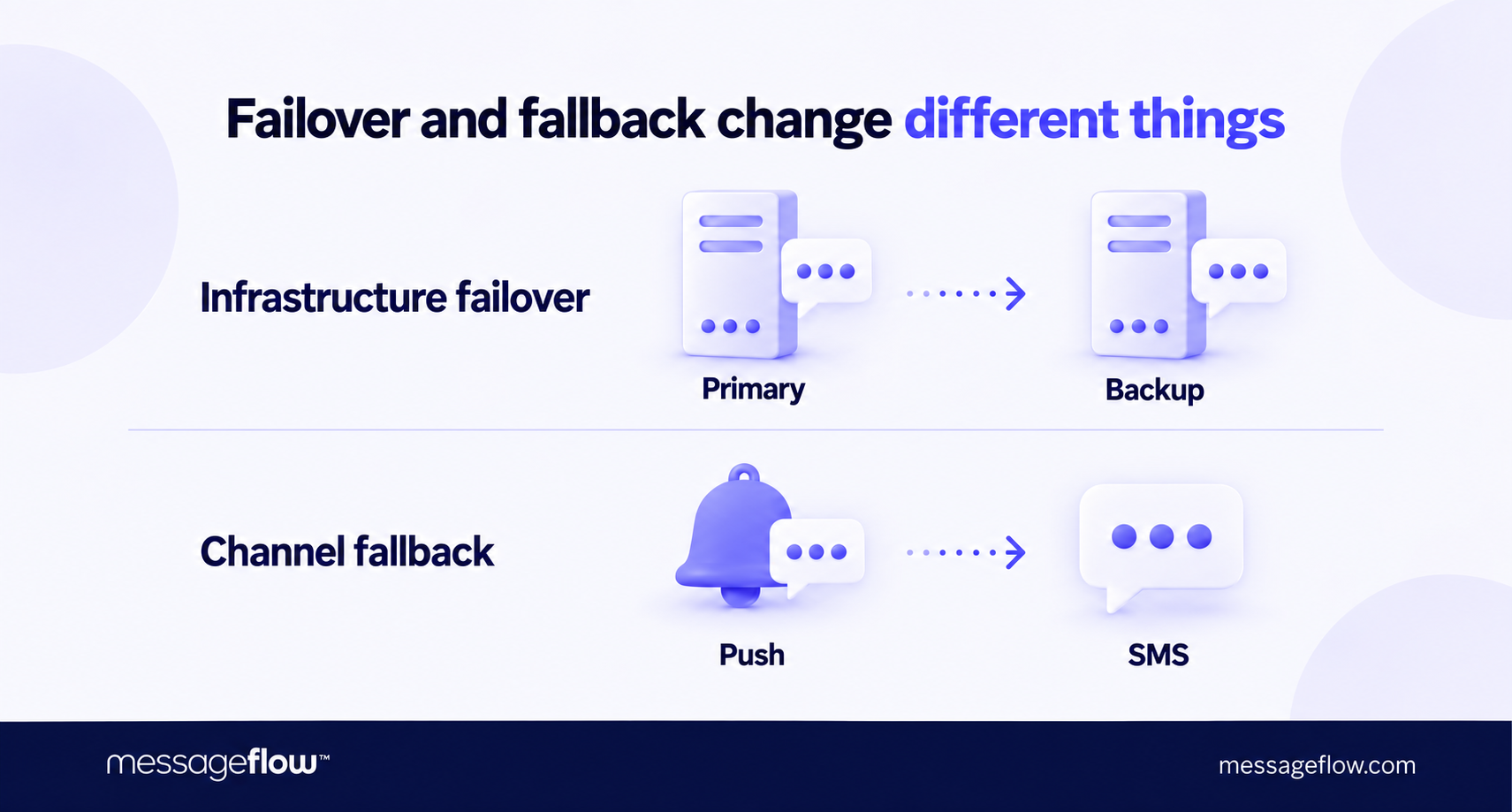
Keep infrastructure failover distinct from switching communication channels. Moving a push notification to SMS introduces a different sending path, cost, and capacity requirement. If that fallback is part of your plan, include the extra SMS demand in the failure scenario.
✅ Verify before peak season: run a controlled failover exercise with an agreed traffic level. Record the interruption, message outcomes, and any manual steps, then check that restoring the primary path does not create another disruption.
7. Confirm SLA coverage and rehearse escalation
Before Black Friday, establish what your provider commits to measuring and what happens when service deteriorates. Read the SLA alongside your operational requirements: check whether it covers API availability, message processing, delivery timing or only specific parts of the service.
Pay particular attention to the measurement period, exclusions, and support terms. Distinguish the time promised for an initial support response from any commitment to restore service. Your team needs to know when technical help will engage and how it will receive progress updates.
Turn those terms into a short incident procedure:
- Name the incident lead and backup. Give them authority to coordinate engineering, marketing, customer support, and the provider.
- Confirm the escalation route. Record the contact method, coverage hours, severity criteria, and next contact if the first route produces no response.
- Prepare the evidence. Include timestamps with time zones, affected channels, message or request IDs, error examples, and the estimated customer impact.
- Assign campaign decisions. Specify who can pause scheduled sends, activate an agreed fallback, and authorize a restart.
- Equip customer support. Give agents a way to check incident status and guidance on what to tell customers waiting for codes or confirmations.
Rehearse one scenario in which messages are delayed but the API remains available. This tests whether the team can recognize a customer-facing problem, assign severity, and escalate it without waiting for a complete outage.
✅ Verify before peak season: everyone involved can find the procedure, reach the right contact, and explain their first action. Resolve missing ownership or unclear support coverage before the campaign calendar becomes difficult to change.
During Black Friday, report sending issues primarily by email. You can also make initial contact via chat, while higher-tier support plans include phone escalation.
Provide your account login or registration email, a detailed problem description, and an example: a message ID or the recipient’s phone number or email address. For API or SMTP connection issues, include the IP address you are connecting from. These details help us identify whether the cause lies in configuration, connectivity, sending or delivery.
The standard SLA specifies 99.99% service availability. Support coverage and escalation procedures depend on your plan. – Aleksandra Szulecka-Szmyt, Customer Support Team Leader. MessageFlow
Three questions to ask your messaging provider before Black Friday
Send your provider the campaign forecast, critical message flows, and required sending windows. Use these three questions to turn the readiness review into concrete commitments:
- What capacity will be available to our account for this traffic mix during the planned peak?
Request confirmation of applicable limits, any capacity increases that need advance preparation, and the assumptions behind the provider’s assessment. - If demand exceeds that capacity or a sending path fails, what happens to our messages?
Ask the provider to explain which traffic receives priority, what waits or expires, and what the backup path can support. Request relevant test results or a joint validation exercise. - If service deteriorates during the sale, who takes ownership, and how do we reach them?
Confirm the escalation contact, support coverage, response commitments, and update process. Agree on the evidence your team should supply with the first report.
Record unresolved items with an owner and a completion date. Where capacity or recovery remains unverified, adjust the campaign schedule or sending volume before launch. The review should leave your team with a tested operating plan and clear decisions about what can safely go live.
Planning a Black Friday campaign? Talk to us!
Bring your expected SMS, email and push volumes, campaign schedule and time-sensitive message flows to the conversation. We can discuss API scalability, throughput requirements, where MessageFlow Priority could support critical SMS and email, and the support arrangements your team needs during peak traffic.
Talk to an expert to discuss your sending plan and identify what needs preparing before you go live.