
TL;DR:
- MessageFlow is a CPaaS (Communication Platform as a Service) that enables mobile applications to add SMS, email, push notifications, RCS, and OTT messaging channels without building their own communication infrastructure or maintaining separate integrations for every channel.
- The platform enables transactional messaging and operational communications triggered by events generated by mobile applications and backend systems.
- MessageFlow acts as an external communication layer within an event-driven architecture: the backend generates an event, sends a request through a REST API or SMTP, and the platform handles message routing, message delivery, fallback mechanisms, and reporting.
- A standard CPaaS integration typically takes around two days and, in most cases, requires no changes to the mobile application itself.
- The platform is designed to meet enterprise requirements, including omnichannel communication, scalability, infrastructure security, and compliance standards.
Integrating customer communication is one of those tasks that seems straightforward in theory but quickly turns into a separate infrastructure challenge in practice. SMS, email, push notifications, RCS, and OTT messaging platforms all differ in terms of APIs, delivery models, rate limits, status reporting, templates, compliance requirements, and error-handling mechanisms.
MessageFlow simplifies this model by serving as a dedicated communication layer within your mobile application architecture. Backend systems can send business events – such as user registration, payment confirmation, order status updates, or security alerts – to a single API ecosystem. Our CPaaS platform then handles routing, message delivery, fallback scenarios, and reporting across channels including SMS, email, push notifications, RCS, and OTT messaging.
In this article, we’ll explain exactly where a CPaaS platform fits into a mobile application architecture, which responsibilities it takes over from the backend, and why this approach is becoming increasingly common in modern enterprise systems and large-scale applications.
💡 Tip: You can also find a detailed overview of the platform’s capabilities on the dedicated MessageFlow developer page.
The Problem of Distributed Communication Logic
At first, it looks harmless.
An order management service includes a feature that sends an SMS purchase confirmation. Then the payments module adds push notifications. User registration introduces an email verification workflow.
Over time, different teams working on the mobile application add their own integrations, templates, error-handling logic, and retry mechanisms. Communication stops being a simple feature and gradually becomes a distributed infrastructure component.
The problem is that every channel and provider works differently. Each has its own API, credentials, rate limits, delivery status formats, webhooks, and error-handling requirements. This creates a significant operational burden.
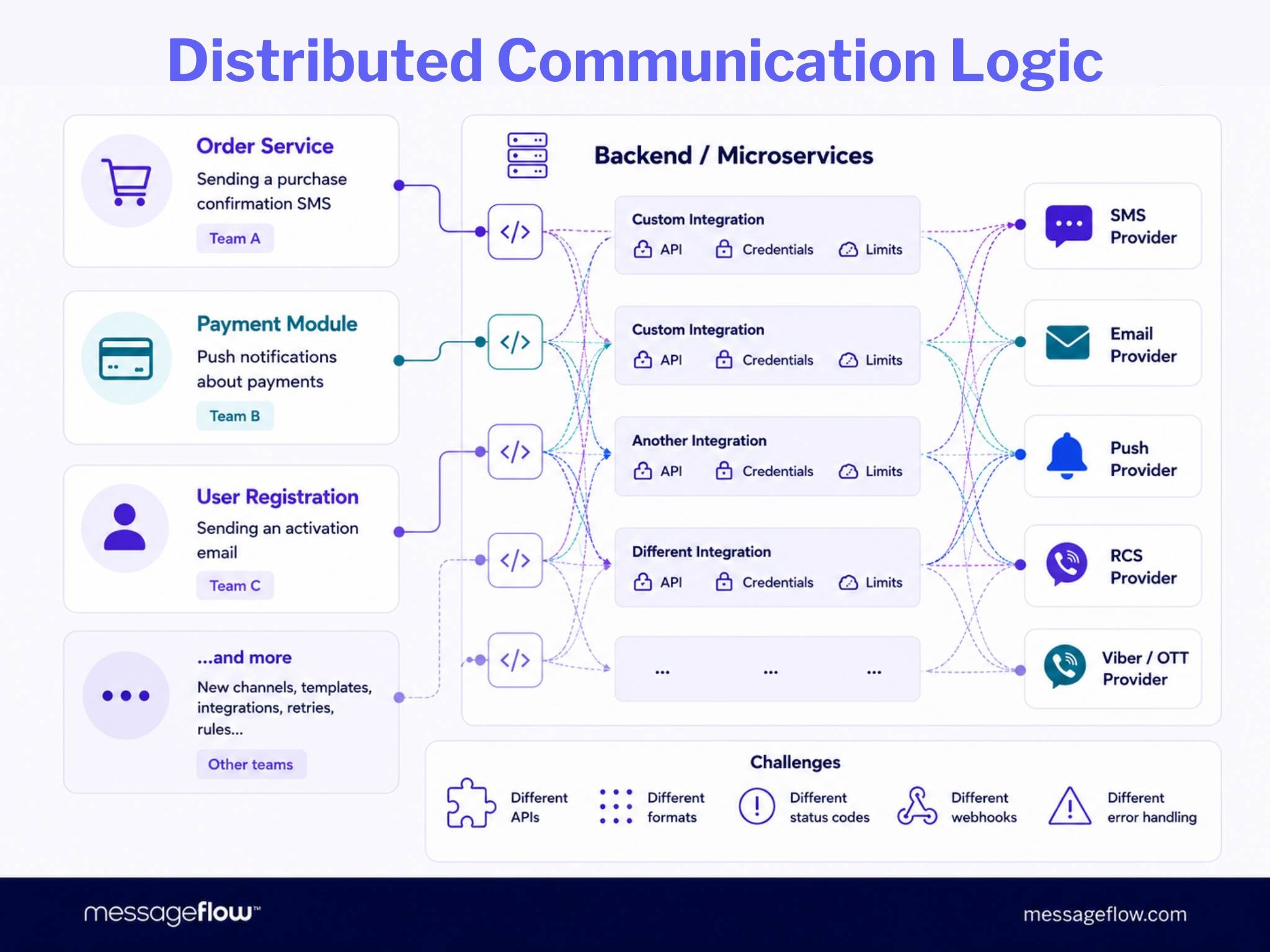
In a fragmented communication infrastructure, every undelivered email triggers a time-consuming search for retry logic hidden somewhere in the codebase. When the business wants to implement a push-to-SMS fallback strategy, it often turns out to be difficult because delivery rules are spread across multiple services.
Organizations also lack a single place to quickly answer critical business questions such as:
- How many messages are we sending every day?
- Which channels generate the highest costs?
- Where is deliverability declining?
- Which provider is experiencing issues?
- Which messages require retries?
- What messages has a specific user received?
- Are fallback rules and sending limits working as intended?
As a result, the team ends up maintaining not only a mobile application but also an unofficial communication platform – one that is distributed across backend services, difficult to monitor, and prone to failures whenever providers, channels, or business rules change.
What Is CPaaS?
A more effective approach is to separate communication into its own layer within the system.
Just as modern microservices architectures separate payments, invoicing, and logistics into dedicated services, communication should not be implemented as a collection of integrations scattered throughout multiple backend modules.
Fortunately, there is no need to build such a layer from scratch. Organizations can use a ready-made solution based on the CPaaS model.
💡CPaaS, or Communication Platform as a Service, is a cloud-based communication layer accessible through APIs that enables organizations to manage SMS, email, push notifications, RCS, and messaging platforms such as Viber from a single place. The backend sends requests through a REST API or SMTP, while the platform takes care of routing, message delivery, fallback mechanisms, and reporting.
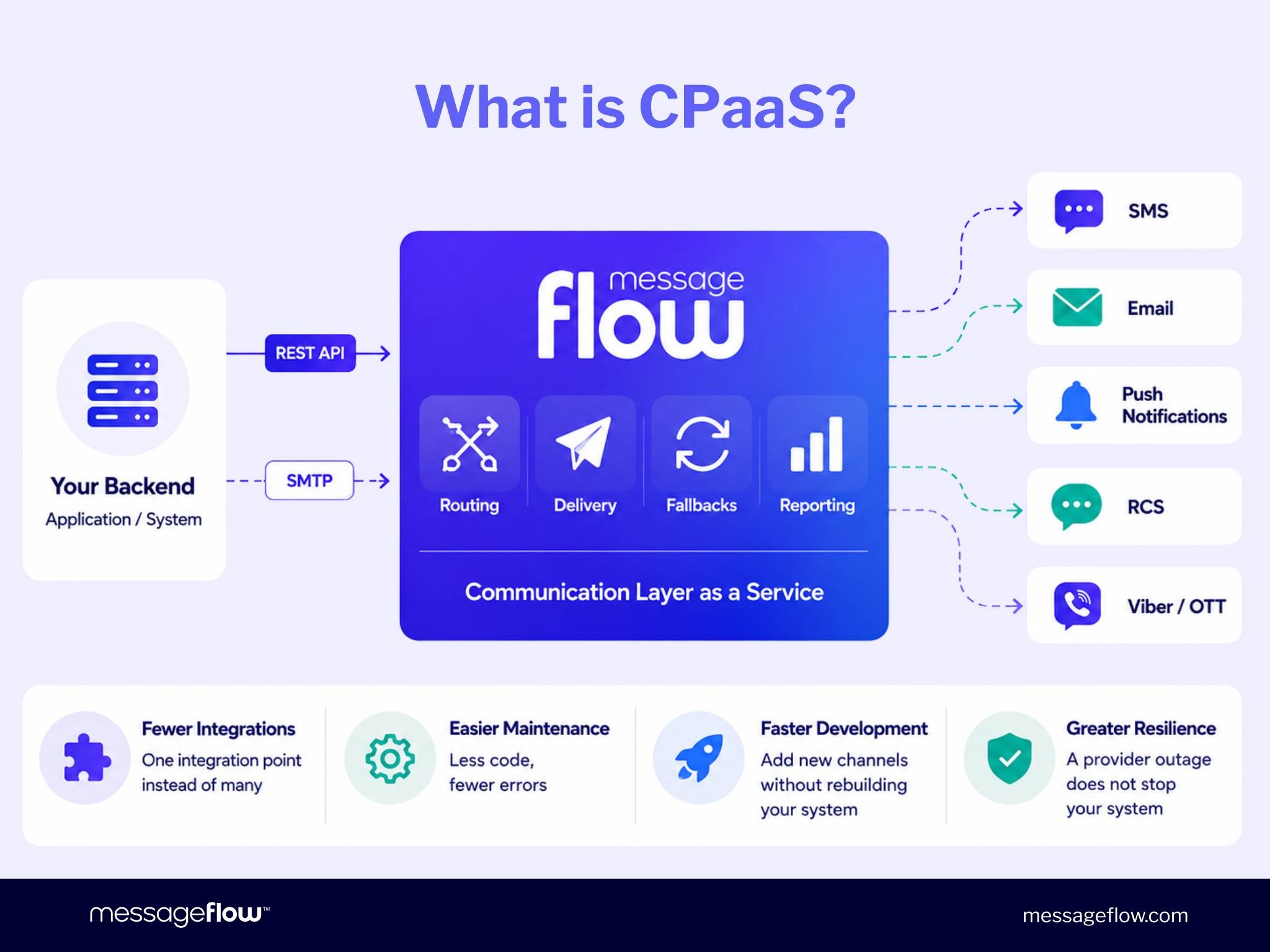
Applications no longer need to understand the technical specifics of every channel and provider.
Instead of maintaining separate integrations for SMS, email, push notifications, or OTT messaging platforms, the backend simply sends a message to a single CPaaS platform, which becomes responsible for processing and delivering it.
As a result, systems built around a dedicated Communication Platform as a Service are easier to maintain, simpler to extend, and more resilient to failures affecting individual providers.
How Does MessageFlow Work Within Your System?
MessageFlow acts as a centralized communication layer between a mobile application’s backend and the channels used to reach end users.
In an event-driven architecture, the flow typically looks like this:
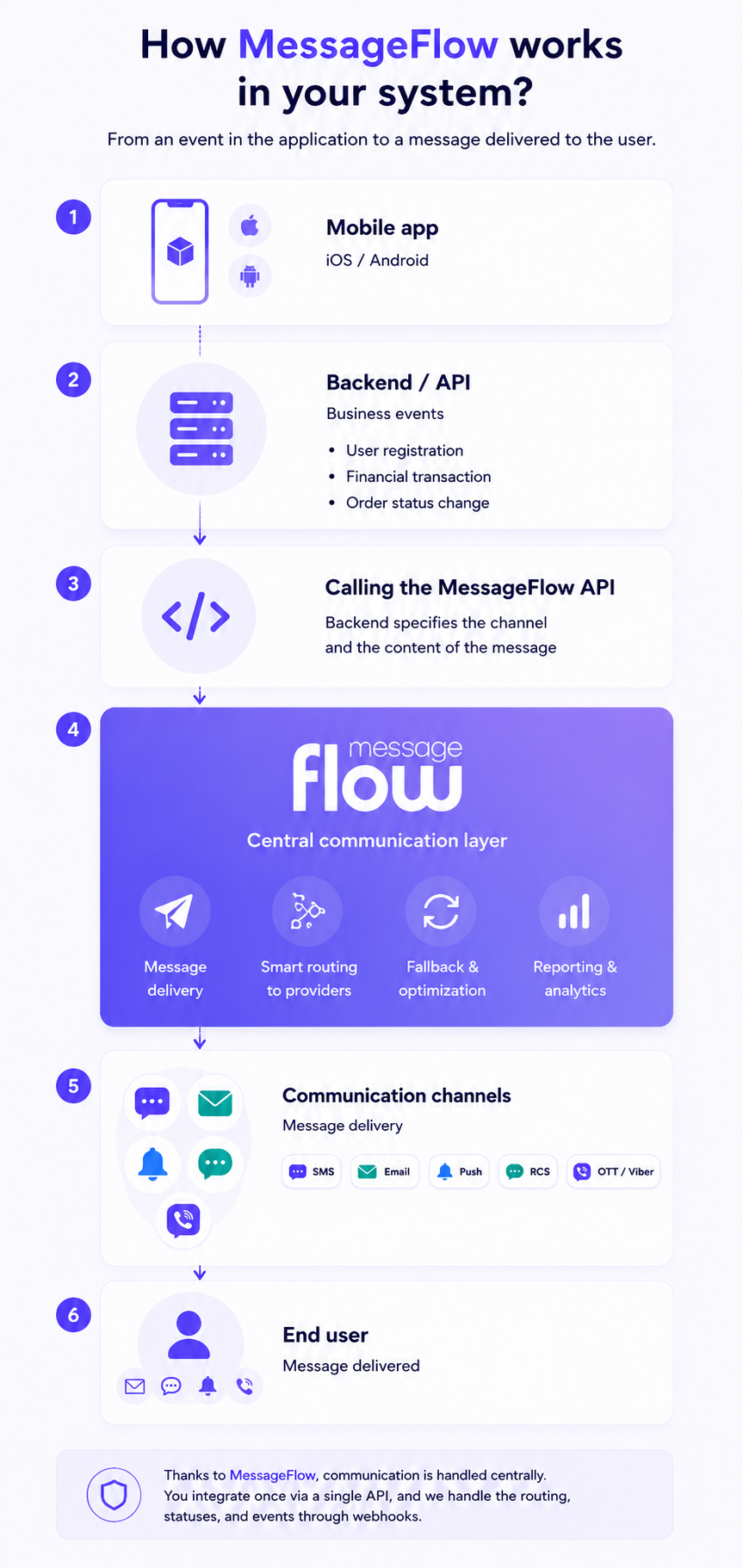
Thanks to MessageFlow, the backend no longer needs to manage every provider, channel, or delivery status independently. Instead, it communicates with a single communication API responsible for message delivery and reporting.
Fallback mechanisms and channel-selection logic can be implemented either within the backend or in a dedicated communication orchestration layer, depending on the architecture of the system.
Internally, MessageFlow handles communication across several functional areas:
- recipient and sender data management,
- processing delivery requests,
- integration with message delivery channels,
- collection of delivery statuses and response events.
This allows the backend to interact with a single messaging API, while delivery information and message statuses can be received through webhooks or retrieved directly from the platform.
Each stage of the communication process relies on one or more of these layers. Communication logic is no longer distributed across multiple backend services but managed centrally through MessageFlow.
In the next section, we’ll examine exactly what happens at every stage of this workflow – from the initial application event to the final message delivery.
Stage 1: Mobile App – User Action as the Event Source
The first stage begins with a user action within the mobile application. This could be account registration, placing an order, initiating a payment, or resetting a password.
Such an action generates a system event that is passed to the backend.
At this stage, MessageFlow is not yet involved in the process. The mobile application communicates exclusively with your backend, exactly as it always has.
This means the mobile layer remains entirely under your control. There is no need to modify application logic or move communication mechanisms into the mobile app itself.
Stage 2: Backend / API – Generating a Communication Trigger
The backend receives the event from the application and determines whether it should trigger communication with the user. It is at this stage that a standard system event becomes a communication trigger.
Example events might include:
- user.registered – send a verification email and an SMS containing an OTP code.
- order.status_changed – send a push notification informing the user about an order status update.
- payment.initiated – send an SMS containing a 2FA authorization code.
- loyalty.points_awarded – send a push notification informing the user about newly awarded loyalty points.
The backend then sends an HTTPS request to the appropriate MessageFlow API endpoint for the selected communication channel and passes the data required to deliver the message.
The communication channel is selected directly by the integrating application. In practice, this means the backend uses a dedicated endpoint for the chosen channel, such as SMS API, Email API, Push API, RCS API, or Viber API.
Example SMS API Integration Request:
const response = await fetch('https://api.messageflow.com/v2.1/sms', { method: 'POST', headers: { 'Authorization': 'YOUR_AUTHORIZATION_KEY', 'Application-Key': 'YOUR_APPLICATION_KEY', 'Content-Type': 'application/json' }, body: JSON.stringify({ sender: 'MessageFlow', message: 'Twój kod weryfikacyjny: 8472', phoneNumbers: [ '+48500000000' ] }) }); const data = await response.json();Every request requires two headers: Authorization and Application-Key. Both credentials are generated within the administration panel.
Additionally, API keys can be restricted to a predefined list of approved IP addresses, limiting access to the communication API exclusively to trusted infrastructure.
The API response includes information about the processing status of the request. In the event of an error, the response contains an errors object along with metadata such as the status code, error count, and a uniqId identifier that simplifies troubleshooting and communication with technical support.
💡MessageFlow also supports SMTP integration. This allows organizations to connect the platform to an existing email system, e-commerce platform, or CRM without redesigning the current sending infrastructure. You can learn more about available MessageFlow integrations on the dedicated integrations page.
Stage 3: MessageFlow API as a Centralized Communication Layer
The MessageFlow API receives requests from the backend and is responsible for executing communication through the selected channel. In this model, the platform acts as an intermediary layer between the application and communication service providers.
The backend specifies the communication channel by calling the appropriate API endpoint. However, it does not need to integrate directly with SMS operators, mail servers, APNs, RCS providers, or OTT messaging platforms. MessageFlow handles communication with all of these systems on your behalf.
The platform provides:
- Message delivery across multiple communication channels.
- Management of connections with communication service providers.
- Mechanisms that ensure stable traffic processing at high message volumes.
- Delivery reporting and message status tracking.
- Support for inbound and outbound webhooks.
From the backend perspective, this results in a much simpler integration model. Each channel has its own API endpoint, but all channels use a consistent authorization model and similar integration principles. As a result, development teams no longer need to maintain separate integrations with multiple external communication providers.
Webhooks are also a critical component of the platform.
MessageFlow allows you to configure two event delivery endpoints: a primary endpoint and a backup endpoint. If the primary endpoint fails to respond within the required timeframe, the platform automatically attempts to deliver the webhook to the backup endpoint.
As a result, failover for return communication is handled at the platform level, eliminating the need to implement additional failover logic within the integrating system itself.
Stage 4: Multi-Channel Message Delivery
At the final stage, MessageFlow is responsible for delivering messages to the end user. The platform processes the selected communication channel, forwards the message to the appropriate provider, and collects delivery status information.
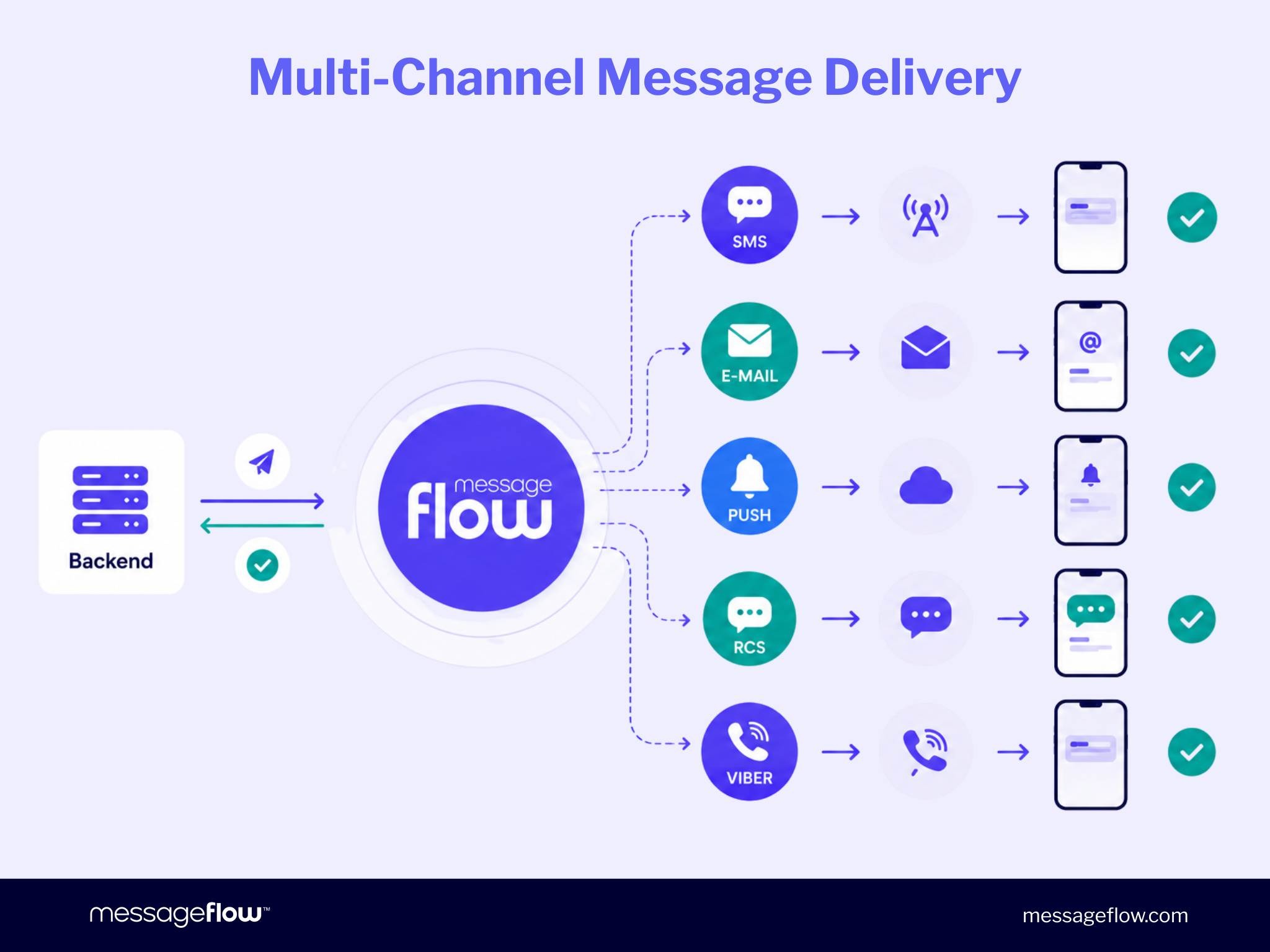
Each channel has its own delivery status model:
SMS
SMS supports the following delivery statuses:
- DELIVERED
- UNDELIVERED
- EXPIRED
- REJECTED
DLR (Delivery Receipt) statuses can be received asynchronously through webhooks or retrieved through a dedicated GET endpoint.
Email delivery uses the following statuses:
- injected
- ok
- hardbounce
- softbounce
- spambounce
- dropped
- deferred
The webhook payload includes the complete message status history, sender and recipient information, and a timestamp for each event.
Push Notifications
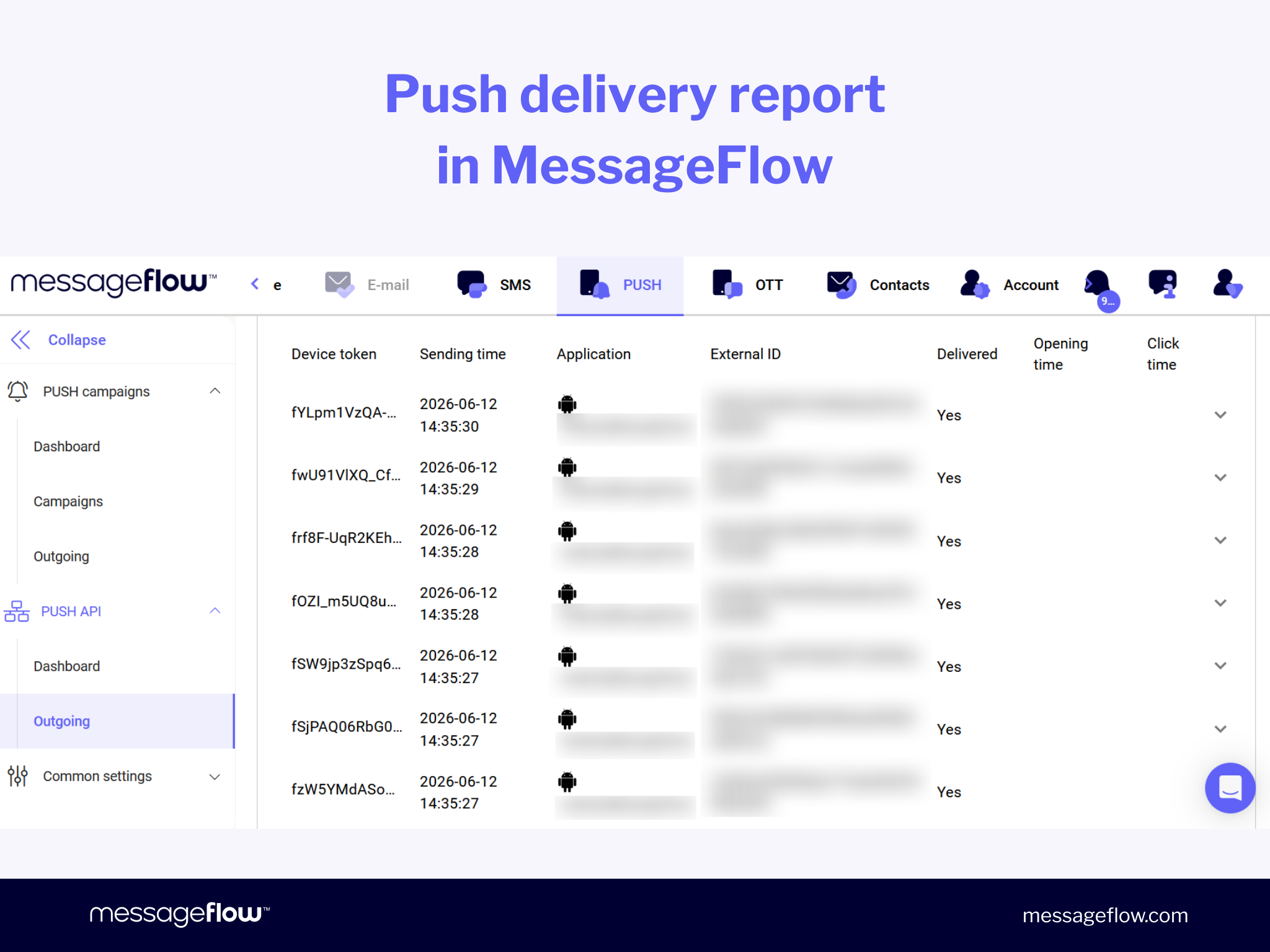
Push notifications support statuses ranging from:
- DISCARDED
- SENT
- RECEIVED
- REACTED_ON
The statusDetails field provides additional information about user interactions, such as whether the notification was clicked, dismissed, or swiped away.
This makes it possible to measure not only successful delivery but also actual user engagement.
Viber
Viber supports both delivery and interaction statuses, including:
- DELIVERED
- OPENED
- REJECTED
- EXPIRED
similar to other communication channels available within the platform.u zespół ma jeden punkt kontroli nad tym, co zostało wysłane, dostarczone, odrzucone lub wymaga dalszej reakcji.
💡Beyond channel fallback mechanisms (for example, SMS fallback for RCS messages), MessageFlow also provides additional capabilities designed to increase communication reach and engagement.
If a user does not respond to the initial message, MessageFlow Booster, an additional feature available within the platform, can automatically trigger a follow-up message or initiate communication through an alternative channel.
Key MessageFlow Use Cases in an Event-Driven Architecture
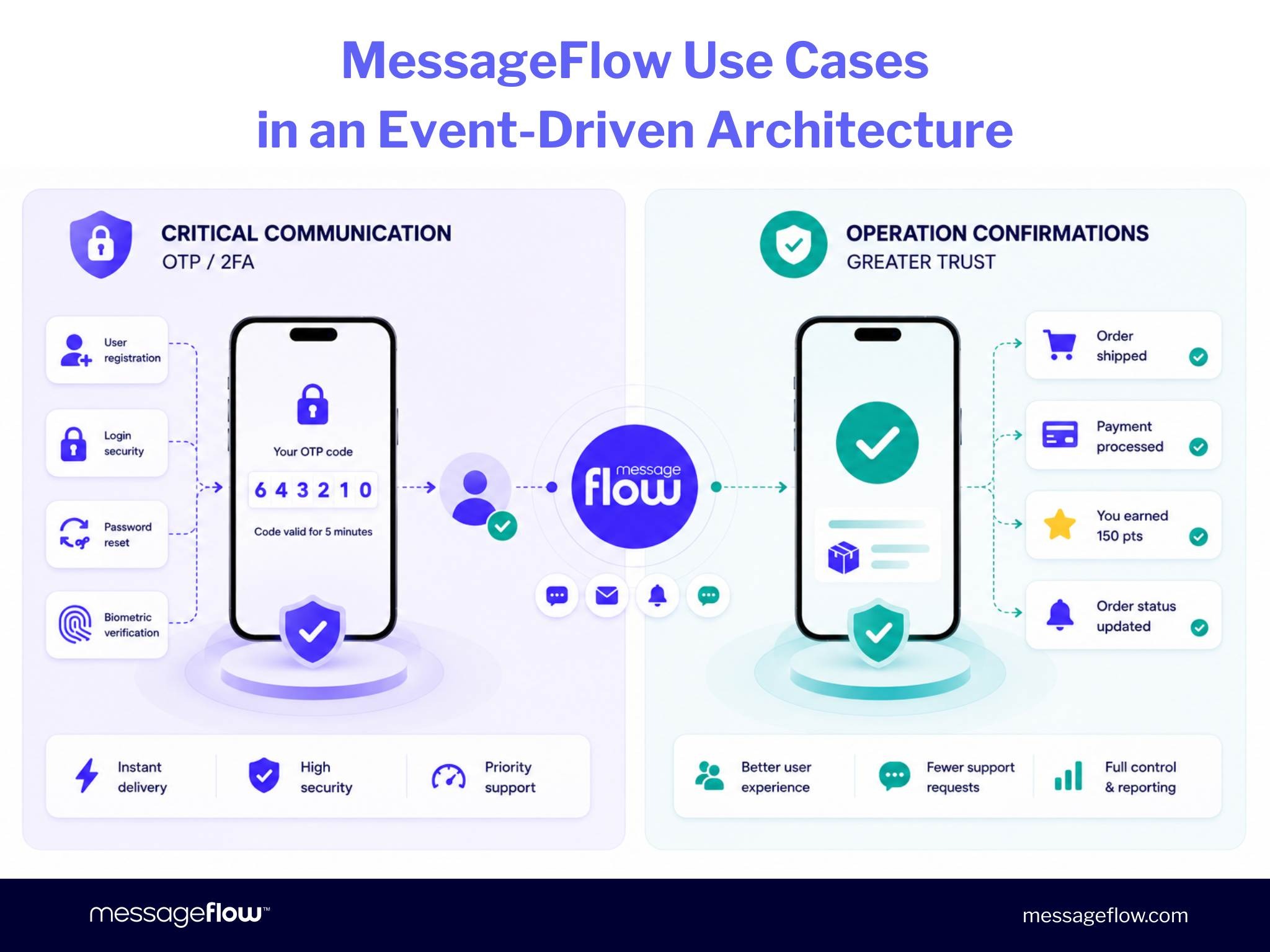
In modern mobile applications, communication is triggered automatically in response to specific system events. These may include user registration, password resets, order status changes, payment confirmations, loyalty point awards, or security alerts.
In such scenarios, communication must be fast, reliable, and predictable. Our CPaaS, designed specifically for critical communications, provides:
- high throughput and scalability for enterprise communication,
- deliverability of up to approximately 99.9% through direct connections with GSM operators and email providers,
- the ability to send millions of messages per hour,
- enterprise-grade security, validated by ISO/IEC 27001, ISO/IEC 27018, ISO 22301 certifications, and independent ICT audits.
💡MessageFlow is chosen by organizations operating in regulated environments as well as large enterprises that require reliable transactional and operational communication. Explore selected customer case studies to learn more.
Critical Communication and OTP: When Timing Matters
One of the most common use cases for MessageFlow is critical communication – situations in which users expect an immediate response from the system. This includes OTP codes, 2FA authentication, password resets, phone number verification, security alerts, and transaction confirmations.
In these scenarios, message delays can lead to process abandonment, lower conversion rates, or security risks. For this reason, critical messages should be processed with priority and independently of marketing traffic.
MessageFlow enables organizations to separate this type of communication within a stable infrastructure designed to support processes that require speed, reliability, and control over message delivery.
An additional feature, MessageFlow Priority, handles critical messages within a dedicated infrastructure that operates independently of marketing traffic and standard transactional communication. As a result, OTP messages can be processed with the highest priority, minimizing the risk of delays even during periods of high system load.
Transaction Confirmations: Greater Trust and Fewer Support Requests
Another important use case is operational communication that keeps users informed about the progress of a process. Examples include order status updates, payment confirmations, notifications that a payment has been posted, loyalty point awards, or the next step in an onboarding journey.
These messages give users a greater sense of control. Customers know what is happening with their order, payment, or account, while support teams receive fewer repetitive inquiries.
MessageFlow makes it possible to manage operational communication centrally: using data provided by the backend to build message content, handling large messaging volumes, and tracking delivery statuses from a single platform. As a result, operational communication becomes more consistent, scalable, and easier to maintain.
Summary: How Does MessageFlow Fit into Mobile Application Architecture?
MessageFlow can serve as a standard communication layer in mobile application projects, particularly those delivered by software houses for enterprise clients in industries such as retail, fintech, banking, marketplaces, and e-commerce.
Instead of designing a separate integration for every channel, the development team connects to a single API that supports SMS, email, push notifications, RCS, and Viber communication. As a result, transactional communication and operational communication become an integral part of the application architecture rather than a distributed set of dependencies across the backend.
For software houses, this means faster implementation, a simpler project scope, and fewer integration-related technical risks. For enterprise clients, it means stable, scalable, and secure communication that is ready to support high message volumes and critical processes such as OTP, 2FA, security alerts, transaction confirmations, and order status updates.
Want to see how MessageFlow fits into your technology stack? Explore the developer documentation or contact our team directly to discuss your requirements.
Frequently Asked Questions about CPaaS
CPaaS (Communication Platform as a Service) is a communication platform accessible through APIs that enables developers to add channels such as SMS, email, push notifications, RCS, and Viber to applications without building their own communication infrastructure. Instead of integrating directly with multiple providers, the application uses a single platform that offers a consistent integration, authentication, and reporting model.
MessageFlow provides both REST API and SMTP integration options. With REST API integration, every request requires Authorization and Application-Key headers. Each communication channel uses a dedicated API endpoint while following a consistent integration model. A standard implementation typically takes approximately 1–2 business days and does not require changes to the mobile application logic.
In an event-driven architecture, communication with users is triggered by system events such as registration, transactions, or order status changes. The backend publishes an event, and a dedicated communication layer (for example, MessageFlow) responds by sending the appropriate message. This approach separates business logic from communication channel logic and simplifies system maintenance.
Yes. MessageFlow supports OTP delivery through SMS, email, and push notifications with priority message processing. MessageFlow Priority ensures that OTP messages bypass marketing traffic queues, minimizing delays and improving the user experience during login and transaction authorization processes.
Each channel has its own delivery status model. SMS reports four DLR statuses: DELIVERED, UNDELIVERED, REJECTED, and EXPIRED. Email reports seven statuses, ranging from injected and ok to hardbounce and dropped. Push notifications report multiple statuses, including user interaction types such as clicks, dismissals, and swipes. Status updates can be received through webhooks in real time or retrieved through dedicated API endpoints.
No. The mobile application continues to communicate exclusively with its own backend, just as before. Integration with MessageFlow takes place entirely at the backend level. The backend sends a single HTTPS request to the MessageFlow API (or uses SMTP) in response to a system event. No changes are required on the client side (iOS or Android application).
When selecting a CPaaS solution for enterprise environments, it is worth evaluating supported communication channels, integration methods (REST API and SMTP), SLA commitments, global reach, DLR reporting, ISO 27001, ISO 27018, and ISO 22301 certifications, NIS2 and DORA compliance, data residency within the EEA, access control mechanisms (RBAC, 2FA, IP Whitelisting), and compliance documentation. MessageFlow meets these requirements and has been validated through independent ICT audits.
CPaaS is a developer-focused, API-first solution. It enables organizations to embed communication channels such as SMS, email, push notifications, RCS, and Viber directly into applications and backend processes.
UCaaS (Unified Communications as a Service) provides ready-to-use communication tools for end users, such as video conferencing, team chat, and business telephony.
CPaaS requires integration with an application, whereas UCaaS is typically deployed as a ready-made product for internal teams.