
The verification code you last typed into an app or a service probably didn’t arrive from that app’s own servers. It came from a CPaaS – a communication platform the company rented so it wouldn’t have to wire itself into every mobile carrier on the planet.
CPaaS is the layer that owns those connections. It gives your software programmable access to reach – the ability to send and receive messages across channels through code – while the provider runs the carrier relationships, routing, deliverability, and uptime underneath. One integration can replace several, and a channel your customers suddenly expect becomes a configuration change rather than a multi-month project.
That trade – rent the connectivity, own the use case – is also what separates CPaaS from the other communication acronyms it gets confused with, and what makes provider choice matter more than it first looks. Both are worth getting right but let’s start with what the term actually means.
What is CPaaS?
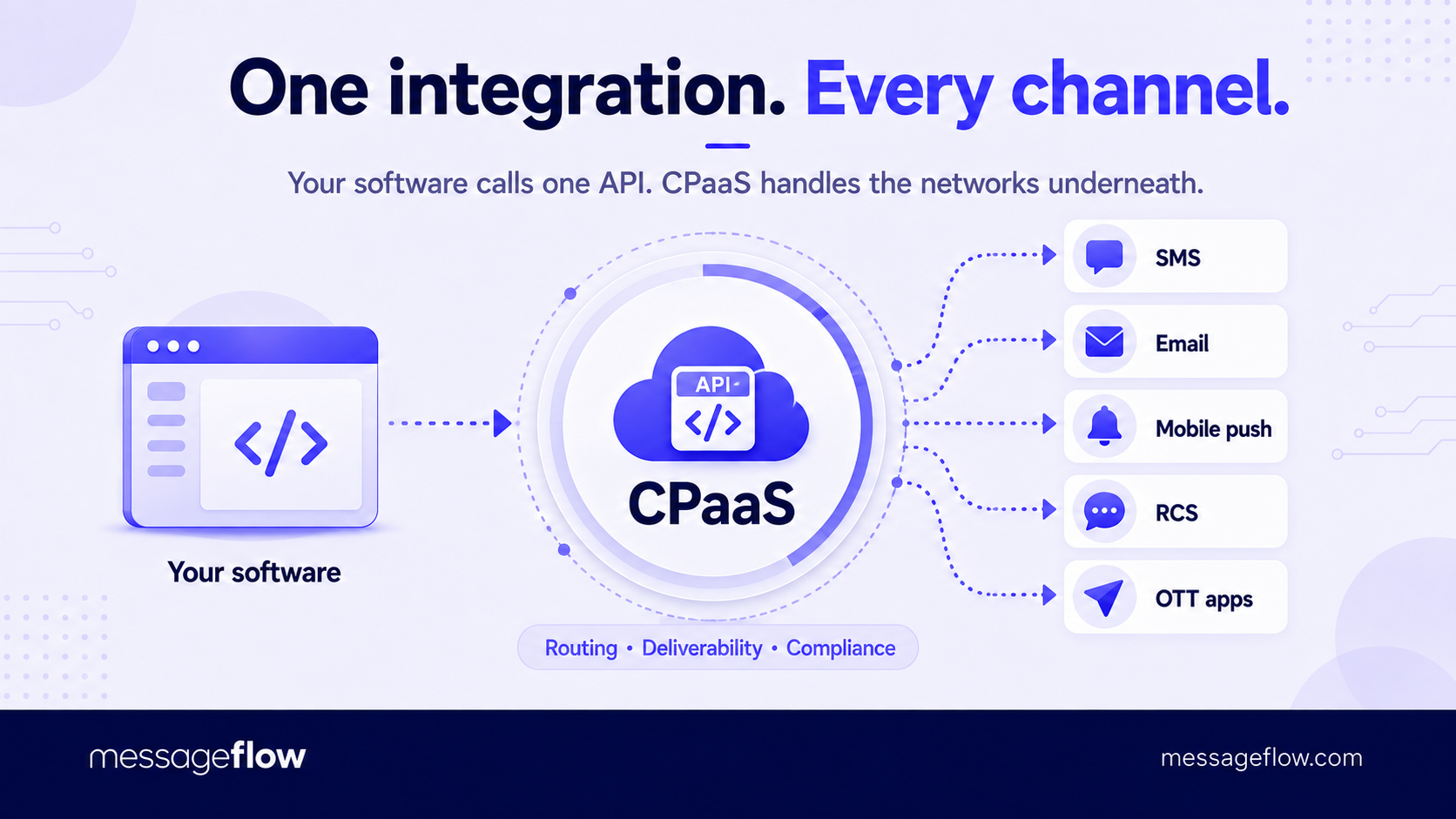
CPaaS stands for Communications Platform as a Service. It’s a cloud service that offers communication channels such as SMS, email, mobile push, RCS, and OTT apps such as WhatsApp and Viber through a user panel, APIs, and SDKs, so you can send, receive, and manage messages directly from your own application and workflows.
The “as a service” part of the name carries as much weight as the platform part. You consume each capability, often over an API, and pay for what you actually send or receive, while the provider operates everything underneath it: the carrier and mailbox-provider connections, message routing, phone-number and sender provisioning, and the constant deliverability work that keeps messages arriving instead of bouncing or landing in spam. You inherit that reach the day you integrate, rather than assembling it channel by channel and carrier by carrier.
What comes back through the API are building blocks, not a finished product. A CPaaS gives you programmable primitives – send this message, verify this phone number, check whether it can even receive an SMS, fall back to another channel when the first one fails – and leaves the surrounding logic to you.
💡 That is the source of both its flexibility and its demands. It will send a message the instant your code tells it to, but it won’t decide what to send, to whom, or when. You supply the use case, it supplies the reach and the reliability.
Reading the term this way should clear up most of the confusion around it. A finished marketing or customer service product gives you dashboards, campaigns, and reports you can use on their own. A CPaaS gives you an endpoint and a set of guarantees about what happens after you call it. Which of the two you actually need comes down to how much you intend to build, but either way, it helps to see what happens between your API call and a message arriving on someone’s phone.
How CPaaS works
A CPaaS sits between your application and the outside networks that actually carry a message – mobile carriers, mailbox providers, Google’s and Apple’s messaging systems, and the operators behind apps like WhatsApp. You integrate once, against a single API and SDKs, and the platform translates each request into whatever the destination channel and provider expect, hands it off, and reports back what happened.
Sending the request is the easy part – an HTTP call is an HTTP call. The real value sits in everything the platform does around it. Each channel has its own rules, formats, authentication, and failure modes, and each carrier or provider behaves a little differently from the next.
💡 A CPaaS absorbs that variation behind one consistent interface, so your code asks for the same thing every time while the platform handles the per-destination detail like formatting the payload, choosing a route, provisioning the sender or number, tracking status, retrying, and applying the compliance controls a given channel or country demands.
Most applications never call that API by hand. They emit an event – an order ships, a login is attempted, a cart sits abandoned – and a rule turns that event into a message, then listens for the delivery receipt or reply the platform sends back through a webhook.
Two questions decide whether the whole arrangement works: which channels the platform can speak, and how well it delivers on each.
The channels it speaks
Reach is only as useful as the channels behind it, and each one gives up something the others keep. A CPaaS earns its place by offering all of them through the same interface, so the decision becomes per message rather than per vendor.
SMS is the closest thing to universal reach. It needs no additional app, works on any phone, and gets read within minutes, which makes it the default for one-time codes, delivery updates, and anything time-critical. The costs are its limits: 160-character segments, plain text, a per-message price that adds up at volume, and rules that shift sharply from one country to the next.
Email is the workhorse for anything with substance, think receipts, statements, onboarding sequences, newsletters – used whenever you want formatting, attachments, and effectively unlimited length at a low cost per send. Its difficulty isn’t sending, but arriving. Inbox placement rides on sender reputation and authentication (SPF, DKIM, DMARC), and a single misconfigured domain can quietly route a whole campaign to spam.
Mobile push reaches people inside an app that already has a place on their phone. There’s no per-message fee, and you have a direct line to users who opted in. That’s also its ceiling. It only works for people who installed the app and kept notifications on, which makes it strong for engagement and re-engagement and useless for reaching anyone who hasn’t.
RCS is the modern upgrade to SMS: a verified, branded sender, rich cards and images, suggested-reply buttons, and read receipts, all delivered through the phone’s native messaging app rather than a separate download. Support now spans Android and, since Apple adopted the standard, iOS, though real reach still depends on the recipient’s device, carrier, and country. Where it lands, it turns a plain alert into something closer to a conversation.
OTT apps such as WhatsApp and Viber put you where large audiences already spend the day, with rich two-way conversation and, in some markets, close to universal penetration. The price is control: you send inside the app operator’s rules, template approvals, and pricing rather than your own.
💡 No single channel wins on every axis – reach, cost, richness, and immediacy all pull against one another – so the more useful question isn’t “which channel” but “what happens when the one you picked doesn’t get through”. That’s the job of the layer underneath.
The layer underneath: Routing, deliverability, and fallback
Between your request and the recipient sits a routing decision most people never see. A capable CPaaS holds more than one path to a given destination – several upstream carrier connections for a country – and chooses among them per message based on price, speed, and how reliably each one delivers.
That choice is where CPaaS providers actually differ. A direct connection to a carrier behaves predictably. A cheap, aggregated route can shave the per-message cost and then drop a fraction of traffic without telling you, or return a “delivered” receipt that never reached a handset. Route quality is invisible on a pricing page and obvious in a delivery report, which is why it deserves more weight in a provider decision than it usually gets.
Deliverability isn’t a setting you switch on once. It’s maintenance the provider does continuously on your behalf. Carriers throttle unfamiliar senders, rate-limit throughput, and filter anything that looks like spam, and the rules keep tightening.
Getting through means registered senders and numbers – A2P 10DLC in the United States, approved sender IDs and message templates elsewhere plus a sending reputation that has to be earned and protected message by message. Much of what separates a mature CPaaS from a thin API wrapper is this unglamorous, standing work: watching delivery signals, rerouting when a carrier changes its filters, and keeping registrations current so your traffic stays on the trusted side of the line.
💡 This is what makes multi-channel through a single platform worth more than several single-channel vendors bolted together.
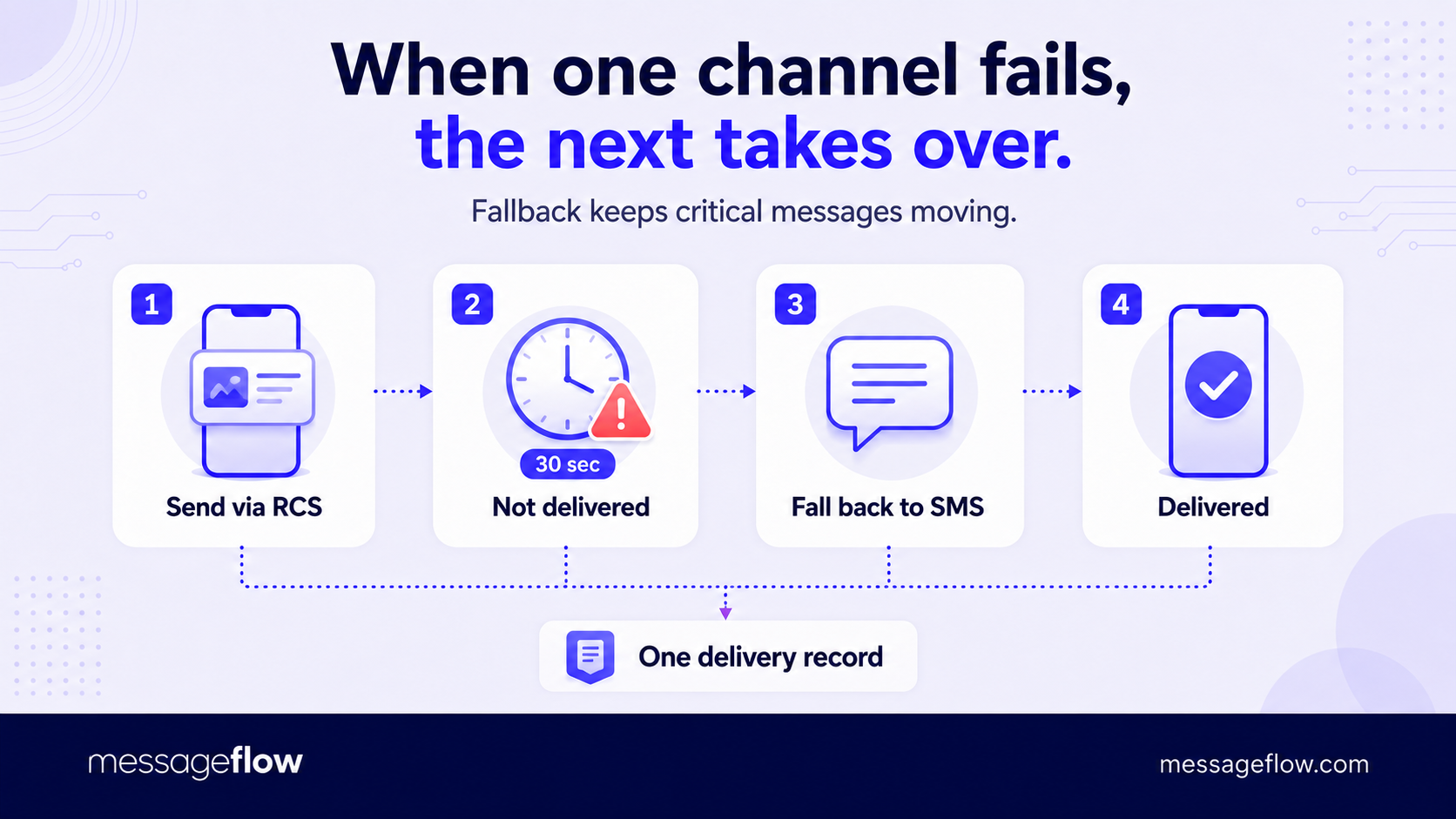
Such a platform sees whether each message was delivered, and on some channels, whether it was read, and it can act on that signal. Send a one-time code by RCS. If it isn’t delivered within thirty seconds, fall back to SMS. Stitch separate vendors together and that logic becomes your problem spread across multiple dashboards with no shared view of what happened. Keep it in one place and a message that has to arrive gets a second and third route automatically, with a single record of the outcome.
CPaaS integrations
None of this counts for much until the platform connects to the systems that know who to message and why.
A CPaaS rarely originates that context – it consumes it. The order status lives in your ecommerce platform, the customer record in your CRM or CDP, the ticket in your help desk.
Prebuilt integrations and webhooks let those systems trigger messages and receive results without custom glue code for each one, which is often the difference between a first message going out this sprint and a project that stalls in engineering. With the machinery in view – channels on top, routing and delivery underneath, the rest of the stack feeding it – the natural question is what teams actually build on it.
What companies use CPaaS for
The clearest way to make sense of CPaaS use cases is to sort them by the job the message does, not the industry it runs in. A bank, a retailer, and a logistics company send rather different messages, but the underlying jobs repeat: confirm who someone is, tell them what just happened, hold a conversation, or earn a response. Each job sets its own bar for speed, reliability, and channel, and that bar, more than any feature list, is what a platform has to clear.
Verifying identity
The first job is proving identity. One-time codes, two-factor prompts, login approvals, and the step-up check before a payment or a password change all share one trait: the message is part of the security flow, not a note about it.
If it’s slow or lost, the user can’t get in, so these messages demand the shortest delivery time and the highest success rate a platform can offer, usually with a fallback route on standby.
They also can’t sensibly run from a marketing dashboard – they fire from inside authentication code, in the moment, which is precisely the embedded, event-driven sending CPaaS exists for. Identity and KYC flows that confirm a phone number or send a verification link belong to this group too.
Confirming what just happened
The second job is telling people what just happened. Order and shipping updates, booking and payment confirmations, appointment reminders, and back-in-stock or price-drop alerts are all triggered by an event in a system of record and sent because the recipient is waiting for them.
Their defining feature is trust. People open transactional messages at rates promotional ones rarely match because the message is expected and genuinely useful. Keeping these flows on their own sending reputation, separate from marketing traffic, is what protects that reliability.
💡 Learn more about MessageFlow Priority and how it helps ensure your critical communication arrives on time regardless of other campaigns.
Holding a conversation
The third job is holding a conversation. Support handled over WhatsApp or RCS, click-to-chat from an ad or a product page, and post-purchase questions answered in the same thread all depend on the platform routing inbound messages back to the right place and keeping the session coherent.
A quieter but telling example is masked communication: a delivery or ride-hailing app connecting a driver and a customer through a temporary number, so a real call or text happens without either party ever seeing the other’s details. Two-way messaging is where the “receive” half of the API stops being a footnote.
Earning a response
The fourth job is earning a response. Promotions, re-engagement and win-back sequences, cart recovery, and review or feedback requests are the messages you start in order to move someone toward an action, and they live or die on relevance, timing, and consent.
This is also the job where CPaaS overlaps most with purpose-built marketing tools and where the two get mistaken for each other. A CPaaS can send every one of these, but it hands you the sending capability, not the audience segmentation, campaign builder, and reporting a marketing platform wraps around it.
💡 That overlap is the root of most of the acronym confusion. CPaaS, UCaaS, and CCaaS can all end up sending a similar-looking message, which makes them easy to mix up until you look at what each is actually built to do.
CPaaS vs. UCaaS vs. CCaaS
These three acronyms describe different jobs, not competing versions of the same one. The fastest way to keep them straight is to ask who is doing the communicating:
- UCaaS helps your employees communicate with each other.
- CCaaS helps your support agents communicate with your customers.
- CPaaS helps your software communicate with your customers.
UCaaS, Unified Communications as a Service, is the cloud replacement for the office phone system and the tools clustered around it like business calling, video meetings, team chat, voicemail, shared presence, delivered as one hosted service instead of on-premise hardware and a stack of separate vendors.
IT buys it for the whole workforce, and employees log into a finished application to use it. Microsoft Teams Phone, Zoom, RingCentral, and Webex sit in this category. The problem it solves is internal: how a company talks to itself.
CCaaS, Contact Center as a Service, runs a customer-facing support or sales operation staffed by people. It routes inbound and outbound interactions – calls, chat, email, social – to the right agent, adds the machinery a contact center needs (IVR menus, queues, agent desktops, quality monitoring, analytics), and does it without on-premise contact-center infrastructure.
Support and CX leaders buy it, and agents work inside it all day. Genesys Cloud, NICE CXone, and Five9 are typical examples. The defining trait is a human in the loop: CCaaS exists to make staffed conversations scale.
CPaaS is the odd one out because it isn’t an application at all. Where UCaaS and CCaaS hand your people a product to sign into, CPaaS hands your product an engine to call. Nobody logs into a CPaaS to do their job. Your software does, on your customers’ behalf, from inside the flows you already run.
That’s why its buyer is the product or engineering team rather than a department head, and why it turns up wherever communication has to happen automatically rather than person-to-person.
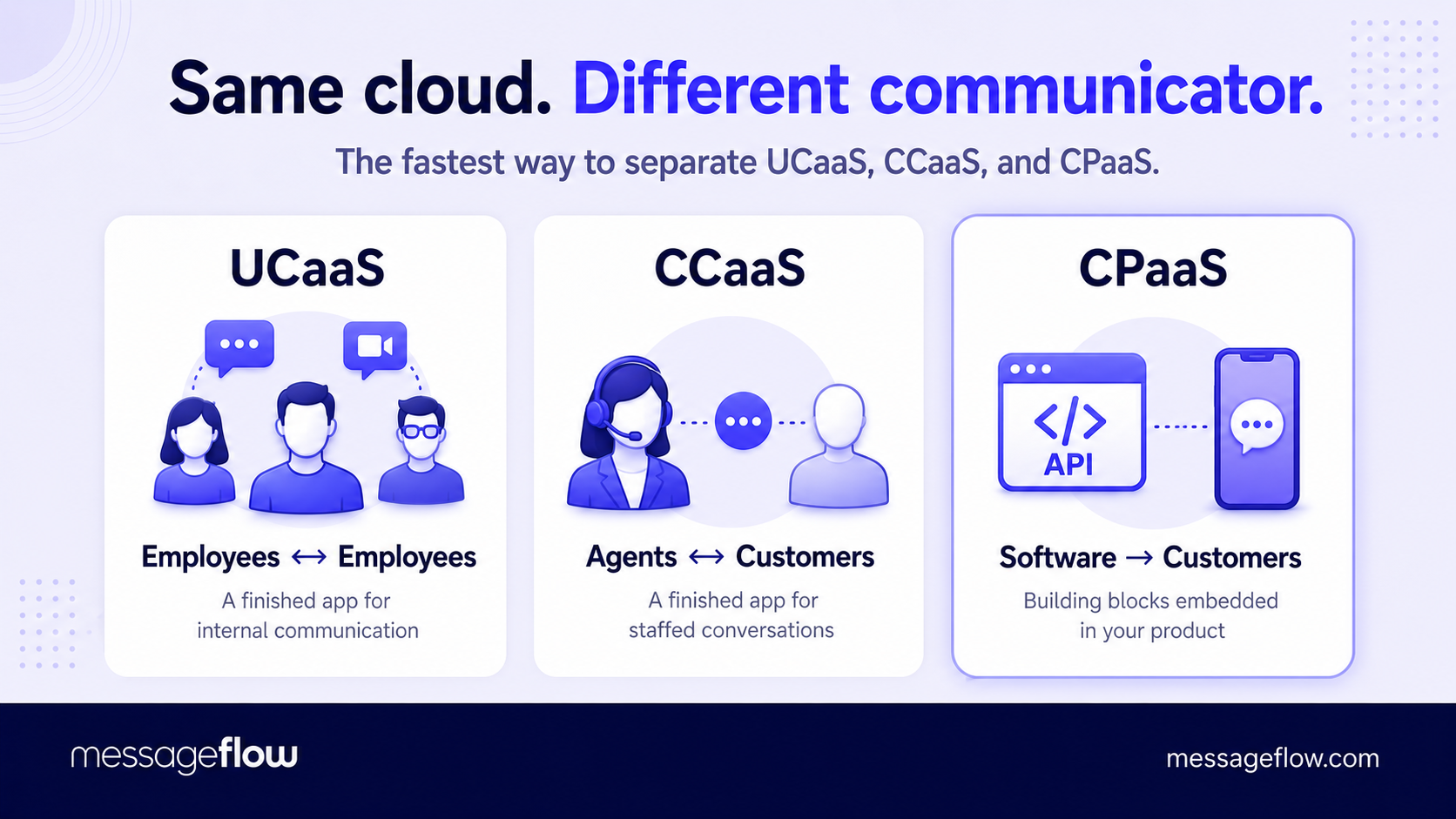
The categories compose more than they compete, which is the source of most of the confusion. A single company can run all three at once – UCaaS for the staff, CCaaS for the help desk, CPaaS behind the app’s alerts and verification codes – and they overlap under the hood: a contact-center product often relies on the same programmable channels a CPaaS exposes, sometimes sourced from a CPaaS provider directly, and some vendors sell across more than one category.
💡 So the real decision isn’t which acronym to pick. It’s a single question: do you need a finished application your staff signs into, or an engine your own product calls?
If people are communicating, look at UCaaS or CCaaS. If your software is, you want CPaaS. And if a support or marketing app is missing one capability you need, CPaaS is frequently what fills the gap.
| UCaaS | CCaaS | CPaaS | |
|---|---|---|---|
| What it is | Hosted internal communications suite | Cloud contact center for agents | Programmable communication APIs |
| Who uses it | Your employees | Your agents (customers on the other end) | Your software, on customers’ behalf |
| What you get | A finished app to log into | A finished agent app to log into | Building blocks to embed in your own product |
| Typically bought by | IT | Support & CX leaders | Product & engineering |
| Example vendors | Microsoft Teams, Zoom, RingCentral | Genesys, NICE, Five9 | MessageFlow |
Once you’ve established that you need CPaaS specifically, a new problem appears: on a pricing page providers may look nearly identical. They diverge in the exact places that only show up later like a delivery report, a compliance review, or a support ticket at 2 a.m. Knowing where to look separates a provider you’ll keep from one you’ll be migrating off in a year.
How to choose a CPaaS provider
Many CPaaS shortlists get decided on the two things easiest to compare – headline price per message and the length of the channel list, and those two predict the least about whether you’ll be happy a year in.
The criteria that actually decide it are harder to read off a website, because they only surface once your real traffic is running through the platform. Six are worth pressing on before you commit.
Delivery quality, proven rather than promised
The single biggest difference between providers is how reliably messages arrive, and it never shows on a pricing page. Ask for country-level delivery rates in the markets you care about, whether the routes to those countries are direct or aggregated, and exactly what a “delivered” receipt confirms – handoff to the carrier, or arrival on the handset.
Then stop taking answers on faith and run a short paid pilot with your own traffic to your own recipients, and read the delivery report. A provider confident in its routes will let you.
Coverage where you actually operate
Channel count is close to a vanity metric. What counts is strong routes and local number or sender support in the specific countries you message, plus the registration work – A2P 10DLC, sender IDs, template approvals – handled for you rather than dropped in your lap.
A platform advertising ten channels but thin in your one important market won’t serve you as well as you may expect. If your use cases need replies, confirm two-way support on those channels too.
Compliance, security, and where the data lives
For regulated or EU traffic, look past a marketing claim of “secure” to the specifics: data residency and processing location, GDPR posture, and independent certifications such as ISO 27001. Read the shared-responsibility line carefully. A CPaaS provider’s certifications and compliance features support your own compliance work, they don’t transfer the obligation.
The platform can give you the controls and the audit trail, keeping your program compliant stays with you. Finance, healthcare, and similar sectors raise that bar further.
What the SLA actually commits to
This is where slow, careful reading pays off. A published uptime figure is often an operational statistic rather than a contractual guarantee, unless the contract states it and attaches a remedy for missing it. Separate those two, then separate response from resolution: a 30-minute response promises someone replies within thirty minutes, not that the problem is solved by then.
Ask which support tier the SLA covers, what qualifies as a priority-one incident, and what you’re owed when a commitment is missed. Vague reliability language is a signal in itself.
Total cost, not the headline number
The per-message price on the pricing page is rarely the price you pay. Add carrier and network surcharges, number rental, inbound-message fees, and how the rate shifts across volume tiers and countries, then weigh the cost of a cheap route that underdelivers, where you pay for messages that never land and lose the conversions behind them.
The cheapest send can be the most expensive outcome. Model your real traffic mix rather than a single blended rate.
Time from signup to first message
The best-priced platform is worthless if it stalls in engineering. Judge the developer experience before you buy: clear documentation, real SDKs in your stack’s language, a sandbox you can send a test message from in an afternoon, and the prebuilt integrations and webhooks for the systems that will trigger your messages.
A short path to a first working message tends to signal a platform that respects your engineers’ time everywhere else too.
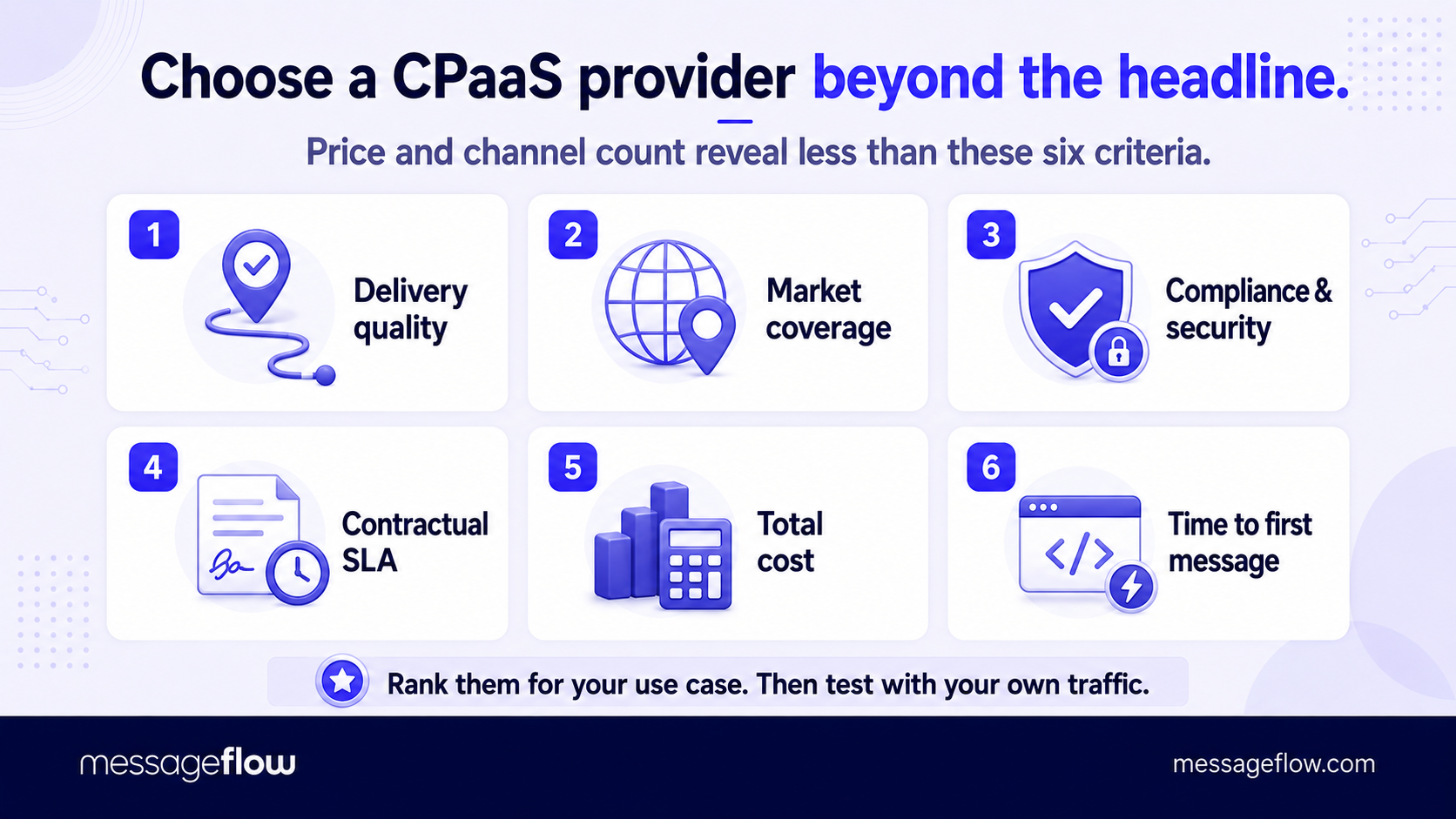
None of these carries the same weight for every team. A fintech leads with compliance and delivery quality, an early-stage product leads with time-to-first-message and price.
Rank the six against your own use case, then test the top two or three with a pilot instead of a demo. The gap between a provider you’ll keep and one you’ll be migrating off next year lives in exactly the places a polished demo is designed to skip.
Bottom line
Strip away the acronyms and CPaaS comes down to one trade: you rent the connectivity – the carrier relationships, the routing, the deliverability, the uptime – and keep the use case, the logic, and the customer relationship.
That’s what lets a single platform sit behind a verification code, a shipping alert, and a support conversation at the same time, and it’s why the buying decision turns on two questions rather than a feature list.
First: do you need building blocks for your own product, or a finished app for your staff to sign into – the line between CPaaS and everything it gets mistaken for. Second: among the providers that clear that bar, which one actually delivers your messages, in your markets, at a total cost you can predict.
Answer those honestly, test the finalists with your own traffic instead of a demo, and the rest is detail.
Test it on your own traffic
MessageFlow brings the channels covered in this guide – email, SMS, RCS, mobile push, and Viber – together under one API, with the routing, deliverability, and compliance work running underneath it. Set it up once, trigger messages from the systems you already run, and see how well your campaigns land.
Held against the criteria this guide keeps coming back to, it earns its place: direct carrier routes with fallback across channels, EU data processing with the certifications regulated senders look for, and a developer experience built to get a first message out fast.
Sign up today and start sending.
FAQ on CPaaS
CPaaS stands for Communications Platform as a Service – a cloud platform that lets your software send and receive messages across channels such as SMS, email, push, and RCS through APIs and user panel, while the provider runs the connectivity and delivery underneath.
A single-channel API sends one channel and stops there. A CPaaS brings several of those APIs together under one integration and adds the layer around them: routing across channels, fallback when one fails, delivery tracking, and compliance handling. If you only ever need one channel, a standalone API may be enough. The moment you need more than one to work together, that coordination is the CPaaS job.
Usage-based, almost always: you pay per message sent or received, or per email, rather than a flat per-seat subscription. The headline per-message rate rarely equals the final bill once carrier surcharges, number rental, and country-specific fees are added, so compare providers on the total cost for your real traffic rather than the sticker price.
For the core capability, yes. A CPaaS is built to be called from code, so getting full value from it involves your engineering team. Many providers also offer prebuilt integrations, low-code tools, and no-code builders for common tasks, which let non-technical teams send and automate messages without writing code. The platform’s real strength, though, is what developers can build on top of it.
Not on its own. A CPaaS can send every message a marketing platform sends, but it gives you the sending capability, not the audience segmentation, campaign builder, and reporting a marketing tool wraps around it. Teams usually pair the two – the marketing platform to plan and target, the CPaaS underneath for reach and deliverability – or reach for a CPaaS to add a channel their marketing tool doesn’t cover.