Push notifications for ecommerce are short clickable messages sent directly to a user’s phone or browser – no inbox involved, no spam folder risk, no waiting. Unlike email, a push lands on-screen within seconds. Unlike SMS, it costs nothing per message once a user opts in.
The speed and cost combo makes push a strong channel for time-sensitive ecommerce messages: flash sales, abandoned carts, back-in-stock alerts, price drops. And the data backs it up. Automated push sequences account for roughly 5% of total push sends in ecommerce but they drive 28% of all push-attributed orders, according to an analysis of over 800 brands.
In this article I cover six automated flows that generate most of that revenue, the benchmarks you should measure against, and the opt-in and copy decisions that determine whether your push strategy performs or gets muted.
Why push notifications outperform email for time-sensitive ecommerce messages
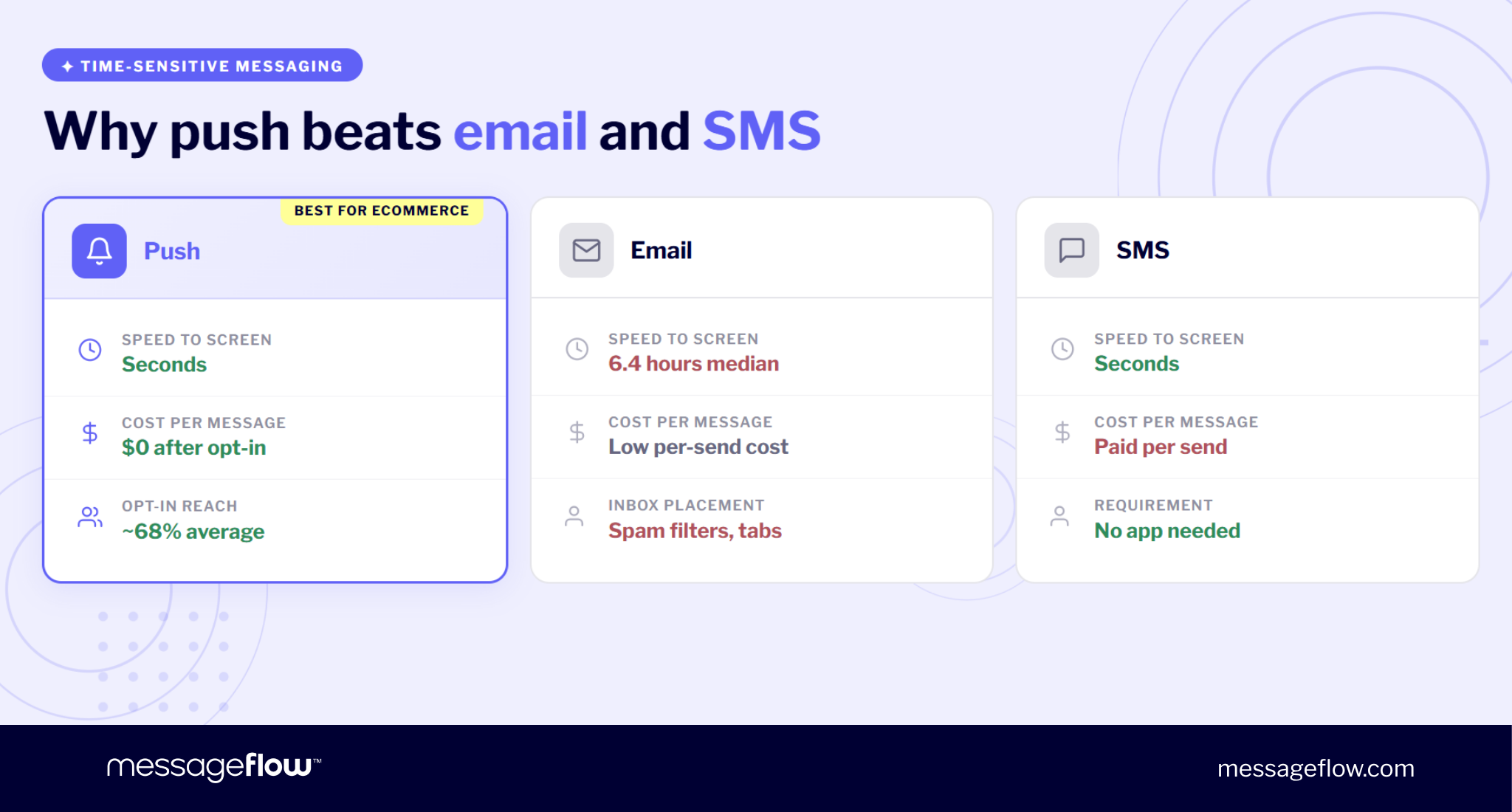
Push, email, and SMS can all deliver your message but they do it at different speed, cost, and reach. For ecommerce communication where timing directly affects conversion, those differences matter more than channel preference or habit. Here’s where push may have an edge.
Speed advantage
When a customer abandons a cart or a product comes back in stock, you only have a narrow window to bring them back. Email doesn’t fit that frame well. The median time to open an email is 6.4 hours. By then, the shopper may have moved on, found the product elsewhere, or simply lost the impulse.
Push arrives in seconds. For any message where timing is the variable that determines conversion like cart recovery, flash sales or low-stock alerts that difference is huge.
Cost per message vs. SMS
SMS is fast too but every message carries a per-send cost that scales linearly with your audience. Push notifications have no per-message fee after opt-in. For a store sending tens of thousands of automated messages per month across cart recovery, shipping updates, and promotional campaigns, the cost gap compounds quickly.
This doesn’t null SMS which still is the stronger channel for reaching users who haven’t installed your app or opted in. For those who did though, push gives you the same immediacy at a fraction of the cost.
Ecommerce opt-in benchmarks
The common objection is reach: “not enough users opt in to make push worthwhile”. The data begs to differ. Average opt-in rates in ecommerce sit around 68%, with Android skewing higher and iOS retail closer to 51%.
That’s a larger addressable audience than most brands’ email open rates, and every user who opts in is reachable instantly, not subject to deliverability filters or inbox placement algorithms.
For a deeper look at why push outperforms email for re-engagement, we covered the full case in a separate piece.
The 6 highest-ROI push notification flows for ecommerce
What follows are automated sequences that account for the outsized revenue share of push. Each one is behavior-triggered (except flash sales), which is a major reason why they outperform broadcasts by a wide margin – the message arrives when the user’s intent is already high.
For a broader look at how these fit into a push notification marketing strategy, we’ve covered the strategic layer separately.
💡 Keep in mind the important nuance: what triggers the send, how to time the sequence, what the copy should say, and what CTR to expect all play a crucial role.
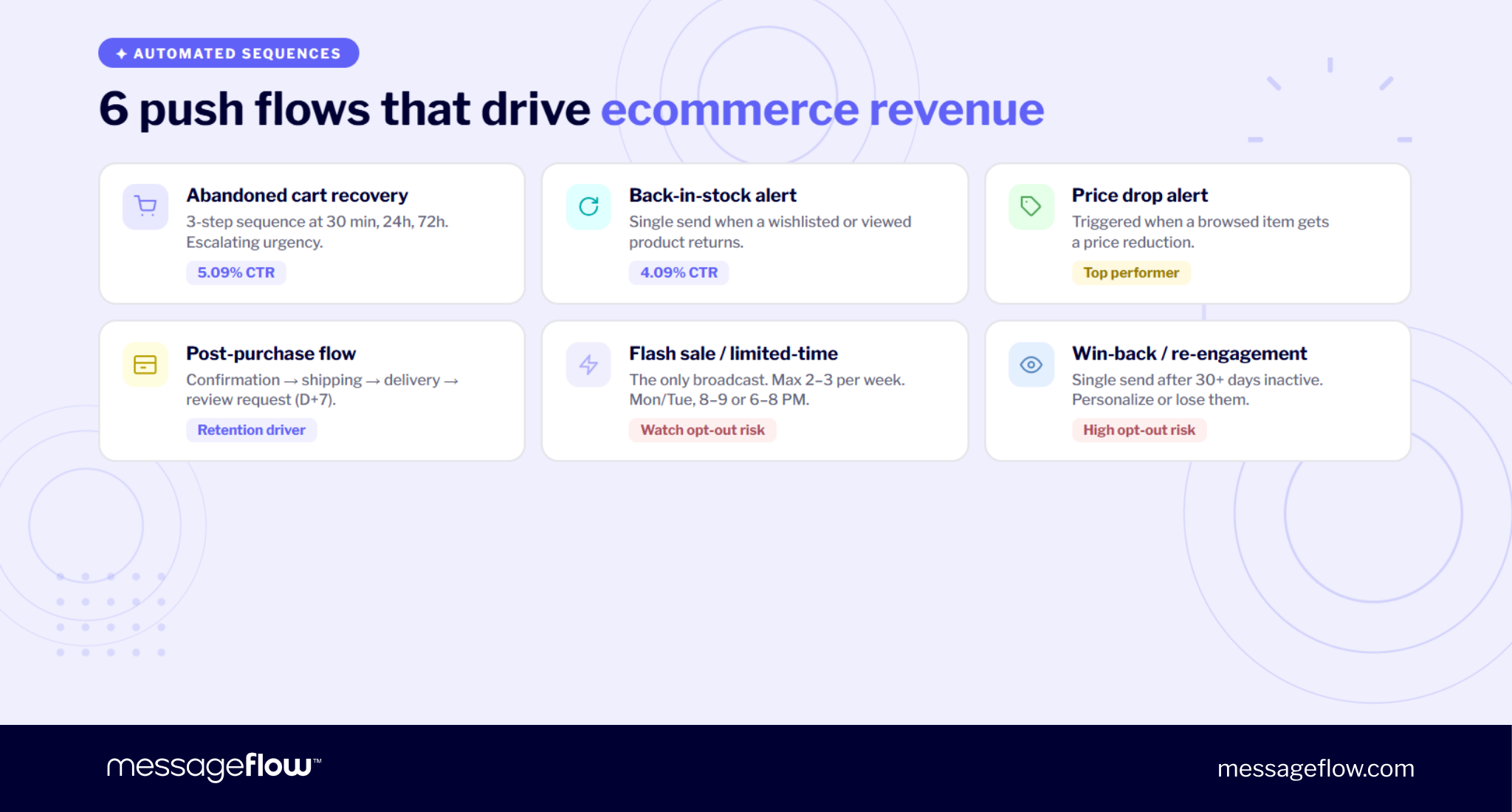
1. Abandoned cart recovery
Trigger: User adds items to cart but doesn’t complete the purchase within 30-60 minutes.
This is the highest-volume automated flow in most ecommerce push setups and the one with the clearest ROI attribution. The sequence works in three steps, with escalating urgency:
- Push 1 (30 min) – A neutral reminder. No discount, no pressure. Many carts are abandoned by distraction, not by decision.
- Push 2 (24h) – Add scarcity or social proof. Mention low stock or popularity if the data supports it.
- Push 3 (72h) – Introduce an incentive. A small discount or free shipping offer for users who didn’t respond to the first two.
Copy example: Title: Your cart is waiting 🛒 Body: Only 3 left in stock. Don’t wait too long.
📈 Automated cart recovery pushes achieve a 5.09% CTR on average – well above any broadcast campaign.
2. Back-in-stock alert
Trigger: A product returns to inventory and the user has previously viewed it or added it to a wishlist.
This is a single-send flow, not a sequence – the urgency is built into the situation itself. The user already wanted this product and couldn’t get it. Your only job is to tell them it’s available before it sells out again.
Copy example: Title: It’s back ✅ Body: White hoodie, size M, back in stock. Might not last long…
📈 Back-in-stock pushes average 4.09% CTR. The high engagement makes sense: there’s not much persuasion needed. The user already made the decision, you’re just removing the obstacle.
3. Price drop alert
Trigger: Price reduction on a product the user wishlisted or recently browsed.
This is the flow that feels least like marketing and most like a service. The user expressed interest at a higher price point, you’re telling them the barrier just got lower. That framing matters for copy – lead with the new price and the saving instead of promotional language.
Copy example: Title: Price dropped 25% 🏷 Body: Those sneakers you viewed are now $149 instead of $199.
🔎 No public benchmark exists specifically for price drop push CTR, but these campaigns consistently rank among the highest-performing automated flows because the trigger is inherently personal.
4. Post-purchase flow
Trigger: Order placed.
This is the only sequence in the list that’s fully transactional, which has an important operational implication: transactional messages don’t count against promotional frequency limits. Send as many as the customer journey requires.
A standard sequence:
- Order confirmation – immediately after purchase.
- Shipping update – when the carrier picks up or scans the package.
- Delivery confirmation – when delivered.
- Review request (D+7) – a week after delivery, when the customer has had time to use the product.
Copy examples: Order: “Order confirmed ✓” / “Your order #4821 is being prepared. We’ll notify you when it ships.” Shipping: “Your package is on its way 📦” / “Estimated delivery: Thursday, May 22.” Review: “How are you liking it?” / “Your feedback helps other shoppers (and us). Leave a quick review.”
📊 The revenue here isn’t direct, it’s in repeat purchase rate and review volume. Stores that run a complete post-purchase sequence see measurably higher retention than those that stop at order confirmation.
5. Flash sale / limited-time offer
Trigger: None. This is the one broadcast campaign on the list.
Since it’s not behavior-triggered, the timing and frequency rules matter more. Data suggests Monday or Tuesday sends between 8-9 AM or 6-8 PM produce the best CTR for retail apps. Keep promotional pushes to a maximum of 2-3 per week – 46% of users opt out after receiving 2-5 pushes per week, and the number climbs steeply from there.
Copy example: Title: Flash sale: 30% off for 6 hours ⚡ Body: Thousands of items on sale. Ends at 10 PM tonight.
💡 Flash sales are the easiest push to write but also the easiest to overuse. The moment your promotional sends start to feel routine, opt-out rates spike.
6. Win-back / re-engagement
Trigger: User has been inactive for 30+ days.
This is a single-send flow with a higher opt-out risk than any other. The user hasn’t opened your app in a month – if the message doesn’t land, you may lose the subscriber entirely. This means personalization matters more here than anywhere else: reference the user’s last purchased category or a specific product, don’t go with a generic “we miss you”.
Copy example: Title: It’s been a while 👋 Body: New arrivals in the collection you last browsed. Worth a look.
🎯 One send. Make it specific. If it doesn’t re-engage, a second push is more likely to trigger an unsubscribe than a return visit.
Ecommerce push notification benchmarks (2026)
The flows above will make the most sense if you can measure them against something. This section consolidates the most current benchmark data available. Use it to evaluate how your campaigns are performing and make relevant adjustments.
CTR by campaign type
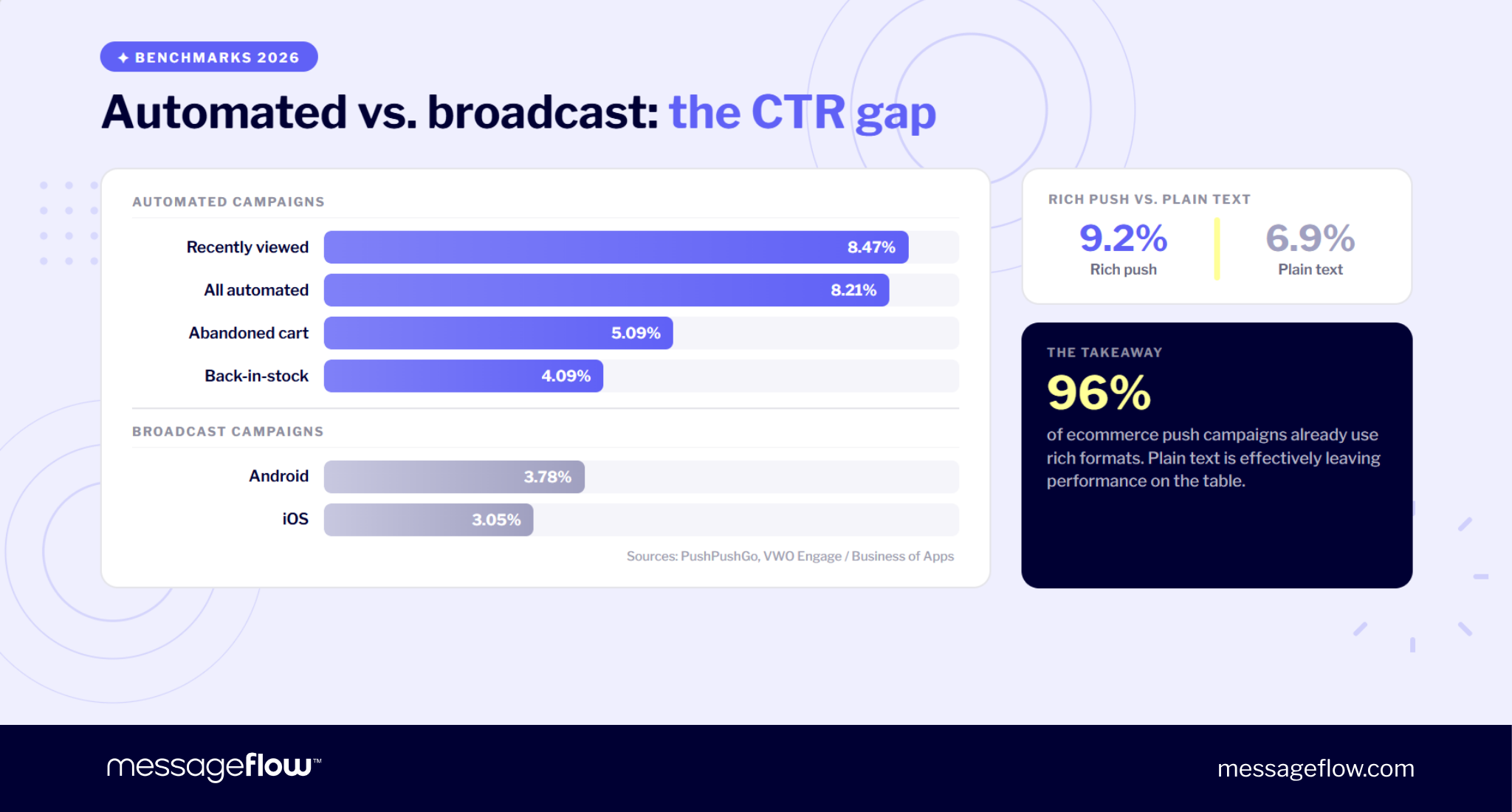
The gap between automated and broadcast campaigns is the single most important number in this table. It’s what justifies investing in behavioral triggers rather than relying on manual sends.
| Campaign type | CTR |
|---|---|
| Automated campaigns (all) | 8.21% |
| Recently viewed items | 8.47% |
| Abandoned cart | 5.09% |
| Back-in-stock | 4.09% |
| Rich push (all) | 9.2% |
| Standard broadcast (Android) | 3.78% |
| Standard broadcast (iOS) | 3.05% |
Sources: PushPushGo, Business of Apps
Rich push – notifications that include images, buttons, or other media – outperforms plain text consistently: 9.2% vs. 6.9% CTR. Given that over 96% of ecommerce push campaigns already use rich formats, plain-text sends are effectively leaving performance on the table.
For a closer look at rich push notifications and how media-enhanced formats perform across both channels, we’ve covered that separately.
Frequency benchmarks
More sends don’t mean more revenue. They may lead to more opt-outs though. The data is clear on where the limits sit:
- App pushes: 1-2 per day maximum for ecommerce apps.
- Promotional broadcasts: 2-3 per week. Beyond that 46% of users opt out.
- Transactional messages: No cap. Order confirmations, shipping updates, and delivery alerts are expected by users and don’t erode tolerance.
Clear distinction between promotional and transactional is the reason post-purchase sequences can run four or five messages deep without damaging your opt-in base.
Best send days and times for ecommerce
Timing varies by channel. For mobile app push, Monday and Tuesday consistently show the highest CTR in retail, with Saturday at the bottom. The best send windows are 8-9 AM and 6-8 PM – early morning, when users check their phones, and early evening when they’re browsing after work. The lowest-performing slot is 4-5 PM, likely because users are still in work mode.
For browser push, the pattern differs: Thursday drives the highest engagement in ecommerce. If you’re running both mobile and web push, don’t assume the same schedule works for both.
For a deeper breakdown, see our guide on best send times for ecommerce push.
Mobile app push vs. web push for ecommerce – when to use which
One isn’t necessarily better than the other.
Mobile app push delivers higher CTR across every campaign type (3-9% depending on the flow), supports richer personalization through in-app behavioral data, and benefits from persistent opt-in on Android. The tradeoff is obvious: it requires the user to have your app installed. For most ecommerce stores, that’s only a portion of the total traffic.
Web push works in the browser, requires no app install, and reaches the audience that mobile push structurally can’t: guest visitors, users who browse on desktop, and anyone who landed on your site through an ad or search but never downloaded anything. The CTR is lower – around 0.84% for broadcast campaigns – but automated web push sequences hit a similar 8.21% average as their mobile counterparts.
The most important use case for web push is abandoned cart recovery from guest users. These are shoppers who added items, didn’t purchase, and never installed your app. Without web push you have no way to reach them with a timely, cost-free message – email requires an address they may not have provided, and SMS requires a phone number plus per-message cost. Web push is the only channel that can close this gap at scale.
When to prioritize web push:
- Less than 30% of your traffic comes from your app.
- You’re running flash sales to your full subscriber base, including users outside your email list.
- Your store doesn’t have a mobile app at all – web push is the entire push channel.
When mobile push is the stronger bet:
- Your app has significant adoption and you can leverage in-app behavior for targeting.
- You need deep linking into specific app screens (product pages, checkout, loyalty dashboard).
💡 Many stores will find both useful. The question is which one to invest in first, which can be answered directly by your traffic split.
Opt-in strategy – The variable many ecommerce brands get wrong
A typical implementation at a store looks like this: user opens the app for the first time, a system prompt asks “Allow notifications?”, the user taps “Don’t allow” because they have no reason to say yes yet. On iOS, that’s it – you get one native prompt. Once the user declines, you can’t ask again unless they manually reverse the setting, which rarely ever happens.
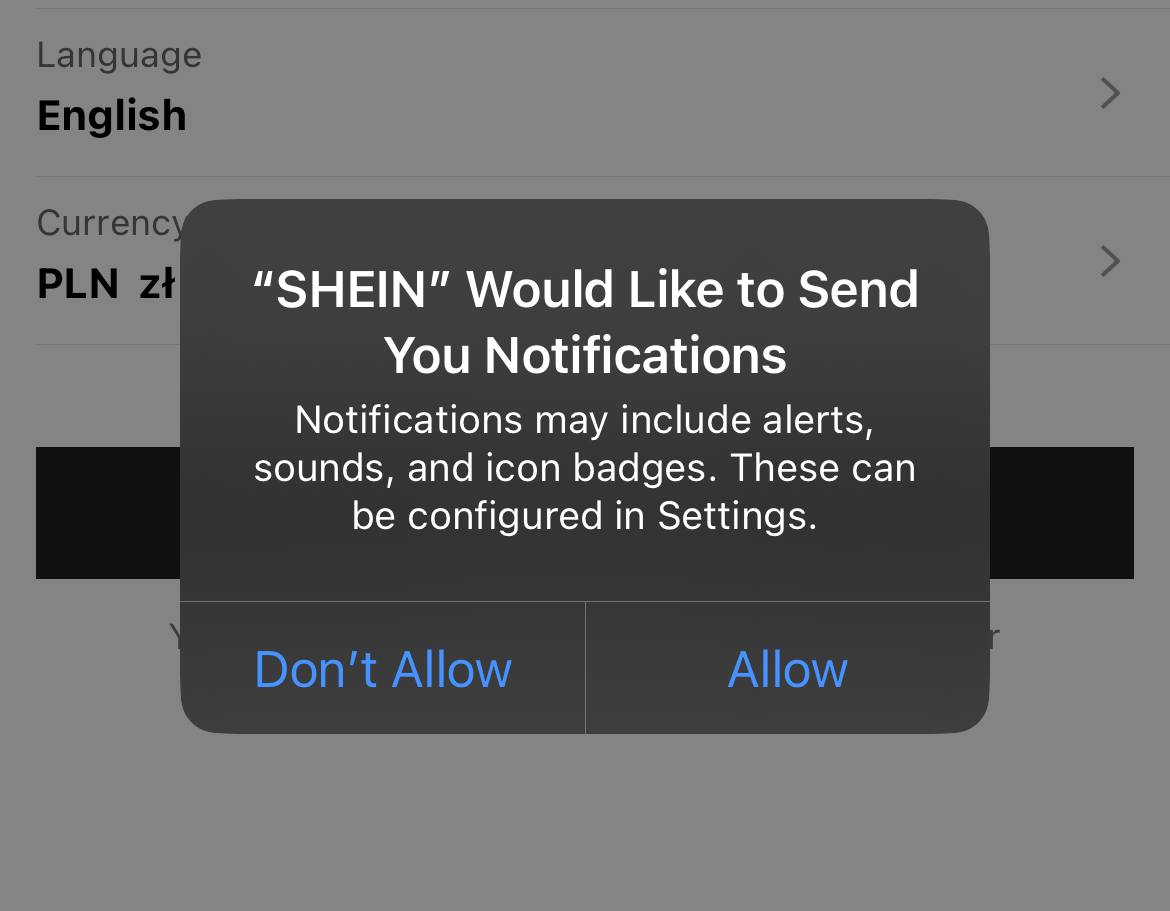
This is why ecommerce iOS opt-in rates sit at roughly 51%, below the 57% industry average. The gap doesn’t step from the dislike of push. The reason for it is that stores ask at the worst possible moment.
When to show the prompt
The fix is pretty straightforward: delay the prompt until the user has done something that gives the notification value a clear context. Effective trigger points include:
- After browsing a product – “Want to know if this drops in price?”
- After a first purchase – “Get shipping updates and delivery alerts?”
- After adding to a wishlist – “We’ll notify you when this comes back in stock.”
💡 Each of these ties the opt-in to a specific benefit the user already cares about. Compare that to a generic “Allow notifications?” on first open – no context, no value proposition, no reason to say yes.
The iOS soft pre-prompt
Because iOS gives you only one shot at the native system dialog, the standard practice is to show a soft pre-prompt first in the form of a custom in-app screen that explains what the user will receive and why. If they say no to the soft prompt, you haven’t burned the native one. You can try again later, after more engagement, with a different value proposition.
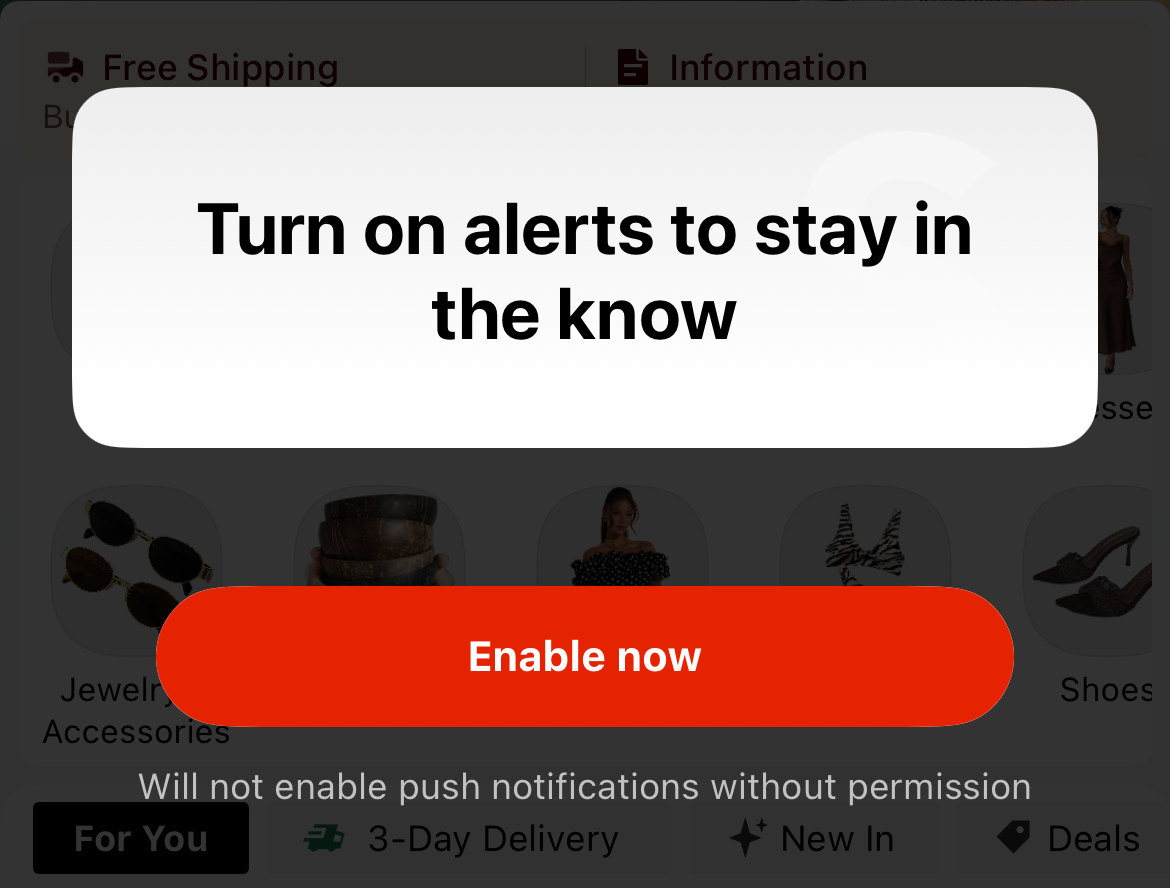
The goal here is to ask when the answer is most likely to be genuine. A user who opts in after wishlisting a product is far more likely to stay subscribed than one who tapped “Allow” reflexively on day one.
To find what works best for your store, A/B test your opt-in prompt timing and copy systematically. Small changes in when and how you ask can move opt-in rates significantly.
Copy principles for ecommerce push notifications
Push copy operates under tighter constraints than any other marketing channel. The title truncates around 40 characters on most devices. The body gets one or two lines before it’s cut off. You have roughly even less space than with a tweet to earn a tap, and the user decides in under two seconds.
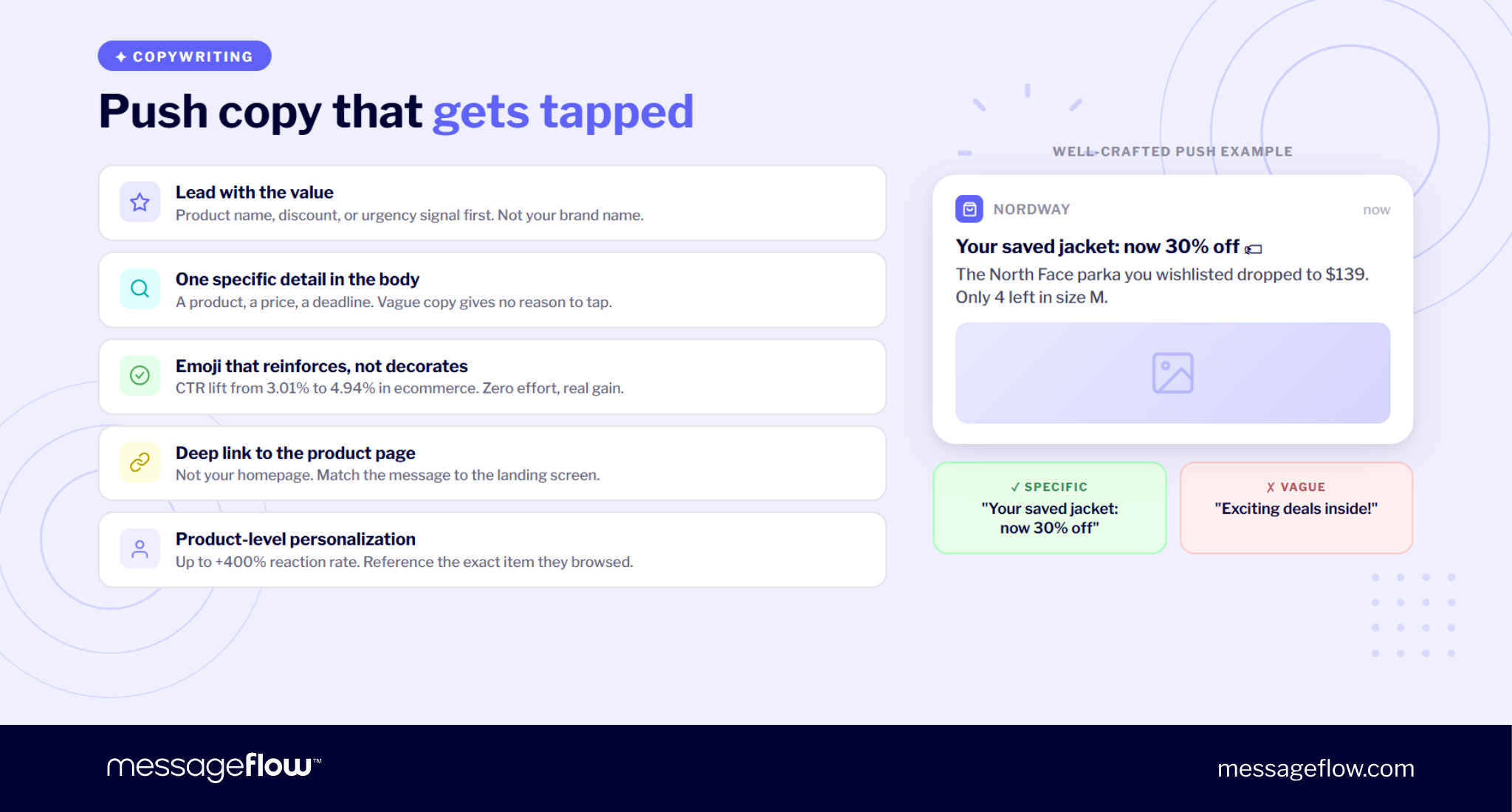
Lead with the value
The title should open with the thing the user cares about: the product name, the discount amount, or the urgency signal. Not your brand name, not a greeting, not “Great news!” A user scanning their lock screen isn’t mostly pattern-matching for relevance.
“Your saved jacket: now 30% off” works. “Exciting deals inside!” doesn’t.
One specific detail in the body
The body’s job is to add one concrete piece of information the title didn’t cover. A specific product, a specific price, a specific deadline. Vague copy (“Check out our latest offers”) gives the user nothing to act on and no reason to tap.
Emoji and rich media
Emoji in push titles lifts CTR from 3.01% to 4.94% in ecommerce. That’s a meaningful gain for zero effort but the emoji needs to reinforce the message, not decorate it. 🛒 for cart reminders, 🏷 for price drops, 📦 for shipping. Skip the confetti.
Deep links, not homepages
Every push should link to the specific product page, category, or checkout screen it references. Sending a user to your homepage after a cart recovery push is the equivalent of handing someone a store map when they asked where the fitting room is.
Personalization that matters
First-name tokens are low-lift and low-impact on their own. The real performance gains come from product-level personalization – referencing the specific item the user browsed, wishlisted, or left in their cart.Personalization at this level can improve reaction rates by up to 400% (Business of Apps).
For more on writing effective push messages, see our collection of creative push notification copy examples.
Setting up ecommerce push with MessageFlow
Everything described in this article – cart recovery sequences, back-in-stock alerts, price drop triggers, post-purchase flows – requires infrastructure that handles three things reliably: delivery across both FCM and APNs, behavioral trigger logic, and campaign-level analytics.
MessageFlow’s Mobile Push platform handles all three. The campaign builder supports various flows, with configurable triggers, timing intervals, and audience segmentation. Rich push is supported natively, which matters given the 9.2% vs. 6.9% CTR gap between rich and plain-text notifications.
On top of that, there’s a smart customer segmentation feature, allowing you to precisely target customers in real-time, based on both behavioral and declarative data for even greater ROI.Ready to set up your first abandoned cart sequence?Start today →
Push notifications for ecommerce – People also ask
Yes. Automated push notifications in ecommerce account for 5% of total sends but drive 28% of all push-attributed orders. Abandoned cart push sequences achieve a median CTR of 5.09% – significantly above broadcast campaigns.
Behavior-triggered flows consistently outperform broadcasts: abandoned cart recovery (5.09% CTR), back-in-stock alerts (4.09%), and price drop notifications. Transactional messages (order confirmation, shipping updates) have the highest open rates because users expect them.
1-2 promotional push notifications per day is the upper reasonable limit for ecommerce apps. For broadcast campaigns, 2-3 per week tops. Transactional messages (order, delivery updates) can be sent as needed. Users expect them and they don’t count against promotional frequency.
Automated campaigns average 8.21% CTR, abandoned cart specifically achieves 5.09%. Broadcast campaigns on Android average 3.78% and on iOS 3.05% for ecommerce. Rich push consistently outperforms plain text – 9.2% vs. 6.9% CTR.
Show the opt-in prompt after a meaningful action (product browse, first purchase) rather than at first app open. Use a soft pre-permission screen before the native OS prompt. Frame the value exchange clearly: “Get notified when this item drops in price” converts better than a generic permission request. For iOS, where you get one native prompt, the pre-permission screen is critical.
Mobile push requires app installation and delivers higher CTR (3-9% depending on campaign type). Web push works in the browser without an app install, reaching guest visitors and non-app users. It’s critical for abandoned cart recovery from users who never downloaded the app. Web push CTR averages around 0.84% for broadcasts but 8.21% for automated flows.