
The best time to send push notifications depends on your industry, audience, and what the notification is asking users to do. There’s no universal answer, but there is data on when users are most receptive and when a notification is most likely to get dismissed or trigger an opt-out.
This guide covers the time windows that consistently perform best, how patterns differ by industry, why behavior-based timing beats fixed schedules, and how to find the optimal send time for your specific audience.
Why push notification timing matters
Timing a notification right without changing the message can increase reaction rates by 40% (Business of Apps, 2025). That’s a significant lift from a scheduling decision alone.
Poorly timed notifications have the opposite effect. 46% of users will disable push notifications after receiving 2–5 messages per week. That number climbs to 32% at 6–10 per week (Localytics). Frequency and timing compound each other. Too many messages at inconvenient moments is the fastest way to lose opt-in access to your most engaged users.
Best time of day to send push notifications
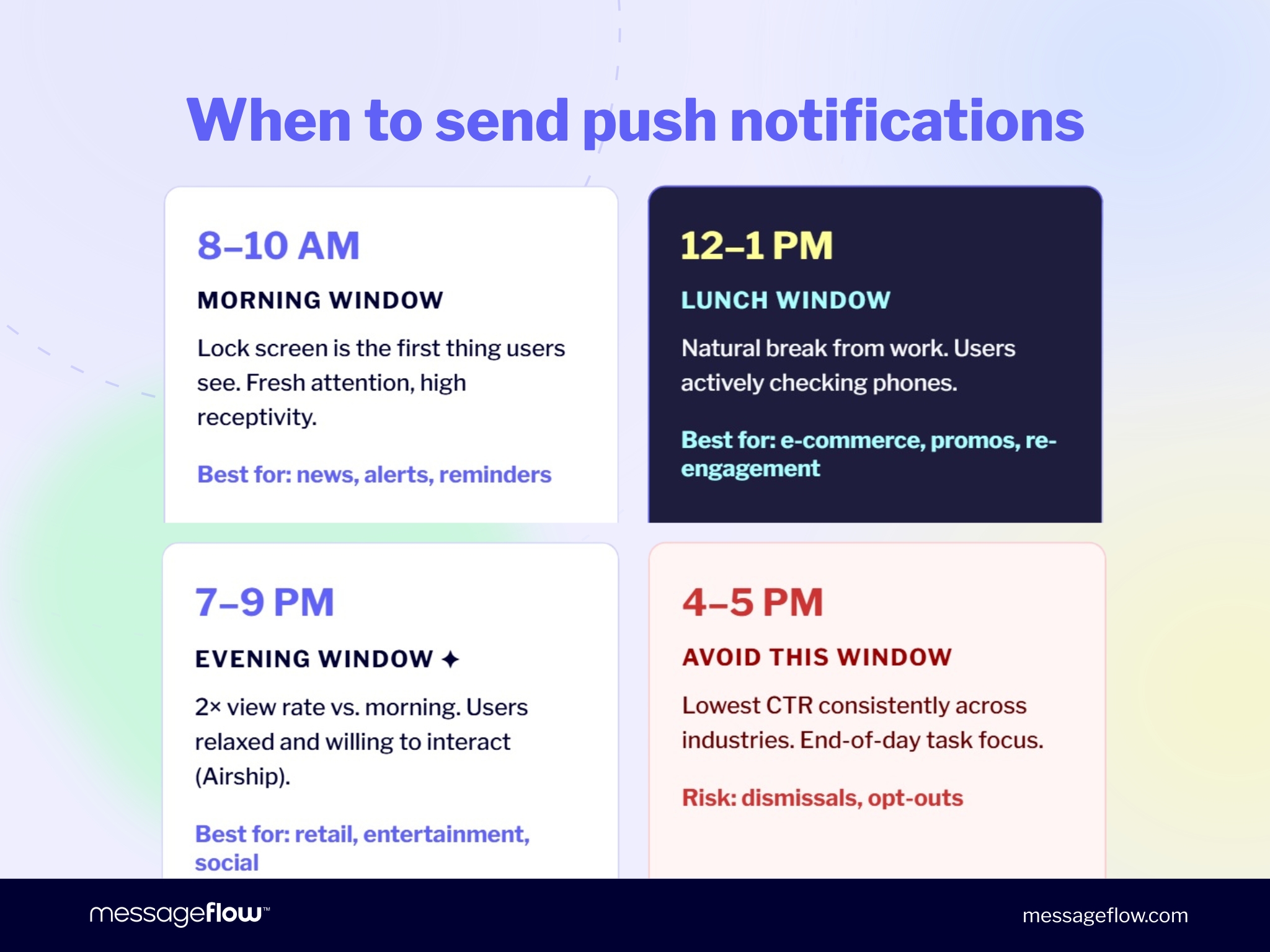
Three windows consistently outperform the rest across industries:
Morning: 8–10 AM The lock screen is the first thing most users see when they wake up. Notifications arriving during morning routines (commute, coffee, first scroll) catch users when they’re fresh and actively checking their phones. Best for: news and content apps, transactional alerts, productivity reminders.
Midday: 12–1 PM Lunch breaks create a natural engagement window. Users step away from work and check their phones. This window performs well for promotional messages and re-engagement. Best for: e-commerce, food delivery, social apps.
Evening: 7–9 PM (extending to 11 PM) Evening campaigns get 2x the view rate of morning sends (Airship, CleverTap). Users are relaxed and more willing to interact. Evening is the strongest window for re-engagement and promotional push, particularly for retail and entertainment.
The window to avoid: 4–5 PM consistently shows the lowest CTR across most industries. End-of-day work focus means users are less receptive to anything non-urgent.
Best day of the week
Tuesday has the highest global push reaction rate at 8.4% (Business of Apps, 2025). Sunday comes second at 8.1%. Monday tends to underperform. Users are back in task-mode and less likely to act on promotional messages.
77% of push notifications are sent Monday through Friday (CleverTap, 301 billion notifications). Saturday and Sunday are lower-competition windows. Weekend sends often achieve above-average open rates for consumer apps, even though most brands skip them.
Industry-specific day patterns:
- E-commerce: Monday and Tuesday highest CTR; Saturday lowest (MobiLoud, 2025)
- E-commerce browser push: Thursday sees the highest engagement (PushPushGo 2025)
- Digital publishing: Sundays and Mondays outperform (PushPushGo 2025)
Industry-specific push notification timing
| Industry | Best time of day | Best days | Notes |
|---|---|---|---|
| E-commerce / Retail | 8–9 AM or 6–8 PM | Mon, Tue | Avoid 4–5 PM; Saturday lowest CTR |
| News / Publishing | 7–9 AM | Sun, Mon | Aligns with morning news-checking habit |
| Food delivery | 11 AM–1 PM, 5–7 PM | Thu–Sun | Pre-meal decision windows |
| Travel | 8 AM–10 AM, 7–9 PM | Tue, Wed | Planning sessions and evening browsing |
| Finance / Fintech | 8–10 AM, 6–8 PM | Mon–Fri | Work-hours context; avoid weekends |
| Gaming / Entertainment | 6–10 PM | Fri, Sat | Leisure time; weekend engagement |
| Health / Fitness | 6–8 AM, 6–8 PM | Mon, Wed | Pre and post-workout windows |
These are starting points, not rules. The only reliable way to know what works for your specific audience is to test against your own data.
How often to send push notifications
Frequency and timing are the same problem. Even a well-timed notification damages engagement if it’s the sixth one this week.
Research puts the practical ceiling at 2–5 notifications per week for most use cases. 64% of users say they would stop using an app that sends more than five per week (Rankmyapp). The data is consistent:
- 1 per week: 10% of users disable notifications (Upland)
- 2–5 per week: 46% opt-out risk (Localytics)
- 6–10 per week: 32% actively opt out (Localytics)
Most high-performing apps send 1–3 per week for promotional messages. Transactional notifications (delivery updates, payment confirmations) are a different category. Users expect them and won’t count them against you, even at higher frequency.
Behavior-based timing vs. fixed schedules
A fixed send time (“we always go out at 10 AM on Tuesday”) is population-level scheduling applied to individuals. It works better than random timing, but it doesn’t account for the fact that your 10 AM is a different person’s gym session, school run, or work meeting.
Behavior-based timing does it differently. The system tracks when each user opens your app or taps notifications, then delivers at that person’s peak engagement window. The same notification goes out at 8 AM for one user and 9 PM for another, because those are when those specific users respond.
This requires a push platform with intelligent delivery built in, plus enough historical data per user to make reliable predictions. MessageFlow’s Mobile Push platform includes this. The timing adjusts automatically as usage patterns change, without manual intervention.
Time zones: the most commonly missed variable
A notification scheduled at 8 AM server time arrives at 2 AM for users in a different region. For apps with international audiences, this is one of the most common sources of elevated opt-out rates, and one of the easiest to fix.
Schedule by local time, not server time. Any push platform worth using supports time-zone-aware delivery. If yours doesn’t, that’s a reason to switch before investing further in timing optimization.
How to find your optimal send time
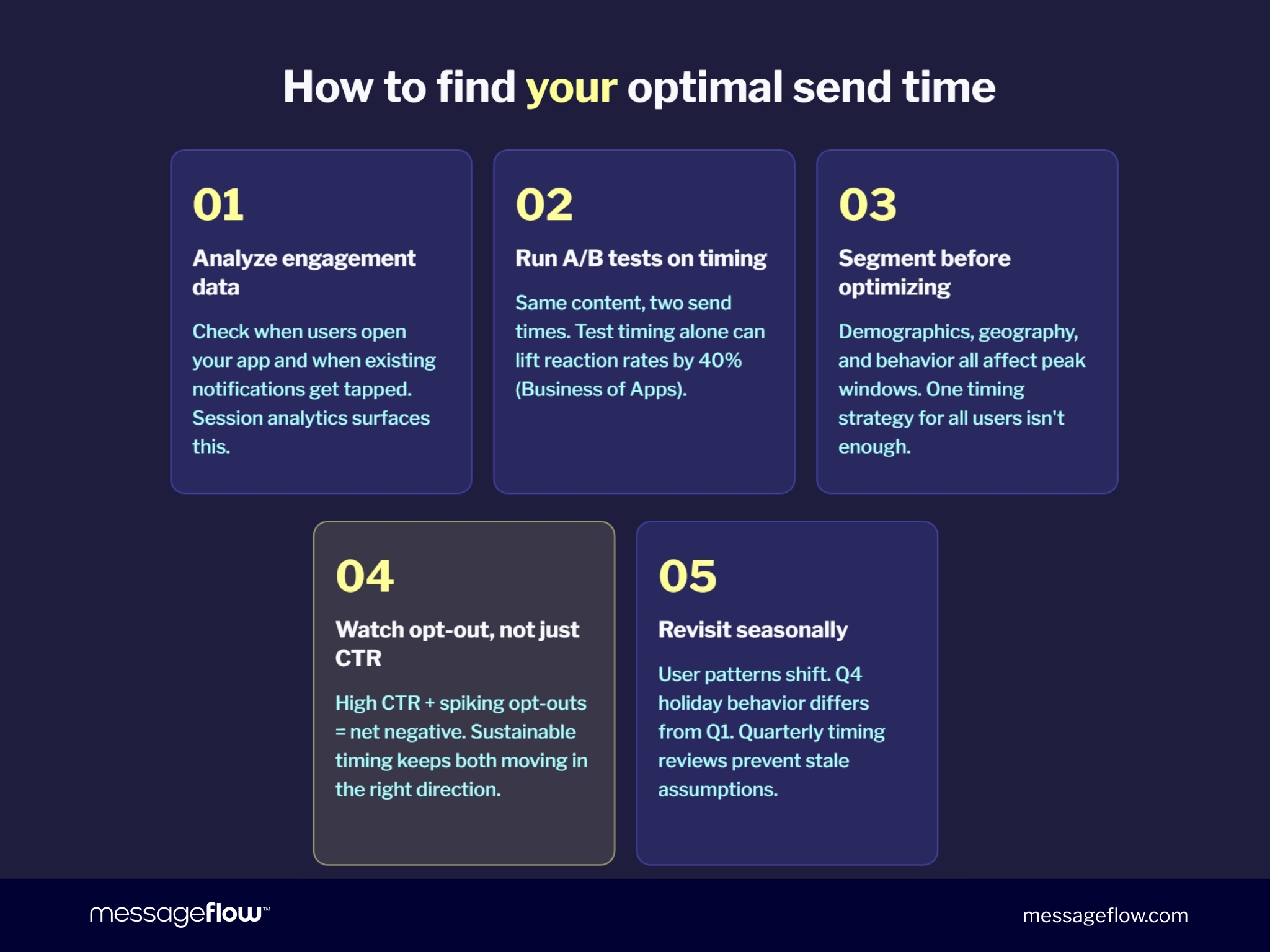
Industry benchmarks tell you where to start. Here’s how to move from those starting points to timing that’s tuned to your audience:
1. Analyze your existing engagement data Look at when users typically open the app, when they tap existing notifications, and which days produce the most conversions. Most analytics platforms show this in session data. Check before setting any schedule.
2. Run A/B tests on send time Keep the notification content identical. Split your audience and send the same message at two different times. Measure reaction rate, CTR, and opt-out rate per variant. This is where the 40% uplift number comes from. Same message, different time.
3. Segment before you optimize A 45-year-old user in New York and a 22-year-old in London have different peak engagement windows. Timing at the segment level (by demographics, behavior, or geography) produces better results than one schedule applied to your entire list.
4. Watch opt-out rates, not just CTR A send time that generates high CTR but spikes opt-outs is a net loss. The goal is a time that keeps both numbers healthy, not one that trades short-term clicks for long-term list erosion.
5. Revisit seasonally User behavior shifts. Q1 engagement patterns don’t predict Q4 behavior during holiday season. A quick timing review each quarter prevents a successful test from becoming a stale assumption.
Common timing mistakes
Sending at the same time as everyone else. Most brands default to 10 AM or 2 PM. Those are exactly when notification trays are fullest. Sending slightly off-peak (9:15 AM, 1:30 PM) can improve visibility without sacrificing the time window.
Ignoring opt-out data. Rising opt-outs after a timing change are a clear signal. Most teams track open rate and miss the users who are quietly revoking access.
Applying one schedule to global audiences. Time-zone-aware delivery isn’t optional for international apps. The alternative is waking users up at 3 AM, which is a fast way to lose them.
Treating transactional and promotional timing the same. A payment confirmation should go out immediately. A promotional offer should respect engagement windows. Running both categories on the same schedule reduces the effectiveness of each.
Push timing in MessageFlow
MessageFlow’s Mobile Push platform supports intelligent send-time optimization, time-zone-aware scheduling, and A/B testing on send time from the campaign builder.
For what to test beyond timing, see our push notification A/B testing guide and creative push notification ideas with 12 formats and copy examples.
Building a broader push strategy? Our mobile push notification marketing guide covers segmentation, frequency, and campaign structure.
Get in touch to talk through timing configuration for your app.
Have questions or want to see how our platform fits your communication strategy? Contact us.
FAQ: Push notification timing
The three consistently high-performing windows are 8–10 AM (morning routine), 12–1 PM (lunch break), and 7–9 PM (evening relaxation). Afternoon (4–5 PM) consistently underperforms. A/B testing against your own audience data is the only reliable way to confirm optimal timing.
Tuesday has the highest global reaction rate at 8.4%, followed by Sunday at 8.1% (Business of Apps, 2025). Saturday is the weakest day for most retail and e-commerce apps.
Most high-performing apps send 1–3 promotional notifications per week. 46% of users disable notifications after receiving 2–5 per week. Transactional messages can run at higher frequency because users expect them.
Yes. Notifications at inconvenient times trigger opt-outs even when the content is relevant. Opt-out rate is a more reliable signal of timing problems than open rate alone.
Intelligent delivery uses each user’s historical behavior to calculate their individual optimal send time. Rather than sending everyone a notification at 10 AM, the system staggers delivery so each user receives it when they’re most likely to respond.
A notification scheduled at 8 AM server time may arrive at 2 AM for users in another region. Time-zone-aware scheduling ensures the notification arrives at 8 AM local time for each user, preventing opt-outs from poorly timed interruptions.