
With WhatsApp marketing, customers can act on an offer or ask a question before they buy. Someone browsing a new collection can tap through to a product page or reply to ask how a jacket fits, whether their size is in stock, or what the return policy covers. When you plan a campaign, think through what happens after you send the message. Where will the link take customers? Who will answer their questions? How will you measure success?
Suppose you’re launching that collection. You select customers who’ve shown interest in the category, put together an offer, and link to the relevant products. Before launch, check whether those customers have agreed to receive marketing messages on WhatsApp. Choose a message template, estimate the cost of the send, and decide how you’ll track orders that come from the campaign.
Start with one campaign, one clearly defined goal, and a specific audience. A pilot lets you see how customers respond and whether your team can manage the channel before you reach a larger audience or automate more messages.
What is WhatsApp marketing, and how does the WhatsApp Business Platform work?
Businesses use WhatsApp marketing to promote products and services, help customers make purchase decisions, and encourage repeat purchases. You can schedule WhatsApp marketing campaigns for a specific audience or trigger a message when a customer takes an action, such as adding an item to their cart and leaving without checking out. Photos and videos let you show the product, while buttons give customers a way to shop or choose a reply.
Should you use the WhatsApp Business app or the WhatsApp Business Platform?
The WhatsApp Business app is designed primarily for small businesses that use chat for day-to-day customer communication. It includes a business profile, a product catalog, and automated greetings and away messages. If your team handles conversations and sales directly in the app, it may already have the tools you need.
The WhatsApp Business Platform lets you connect WhatsApp to your business systems through an API. By integrating it with your CRM, online store, or marketing automation software, you can use customer data to select an audience, trigger messages automatically, and route replies to an agent. You can build the integration yourself or work with a provider that offers tools for managing WhatsApp business messaging.
Consider how your team will run a campaign. If you want to select customers based on past purchases, send a message when something happens in your store, and have your support team handle replies, the platform is worth considering. Before you commit, check which features your chosen tool includes and which require additional integration.
What types of messages can you send on the platform?
Businesses use the WhatsApp Business Platform for several purposes.
- Marketing messages promote offers, introduce new products, recommend items, and encourage repeat purchases.
- Transactional and informational messages confirm orders, provide delivery updates, and remind customers about appointments.
- Authentication messages deliver one-time codes to help verify a user’s identity.
- Customer support messages answer questions and help customers resolve problems.
💡 A customer who asks about an order has started a support conversation. Sending that customer a promotion is a separate use of the channel. Before including them in a campaign, check that their consent covers the content and purpose of the message you plan to send.
How do you choose a goal and an audience for a WhatsApp marketing campaign?
Define your campaign goal in terms of an action you want the customer to take. That could be buying a product, placing a repeat order, booking an appointment, or sharing the details you need to prepare a quote. “Increase engagement” leaves too much room for interpretation. A customer can reply to a message and still be no closer to making a purchase.
Match the message to the customer’s decision
Choose one primary goal and make sure the copy, the button, and what happens after the click all support it. If you’re promoting a service that requires a consultation, invite customers to book a call and link to the booking page. If they already know the product and can order it right away, link directly to the offer.
Consider why the message would matter to the customer now. A registration deadline might be approaching, an item they want might be back in stock, or they might be due for a reorder. An opening in your marketing calendar gives you time to send a message, but it gives the customer little reason to act.
💡 WhatsApp is especially useful when a reply can move the decision forward. A customer might tell you which version they prefer, explain what they need, or ask a question before buying. Decide how your team will follow up on those replies.
Build audience segments around customer needs
Start with customers whose consent covers the WhatsApp marketing messages you plan to send. Within that group, use four criteria to identify who should receive the offer.
- Interest in the offer. Use customers’ stated preferences or purchase history to identify product categories they care about.
- Timing. Consider where customers are in the buying process, when their appointment is coming up, or how long they typically wait between orders.
- Ability to use the offer. Check that the offer is available where the customer lives or shops and that they meet its terms.
- Reasons to exclude someone. Leave out customers who have already taken the intended action. Consider excluding anyone with an unresolved support issue or who recently received a similar offer through another channel.
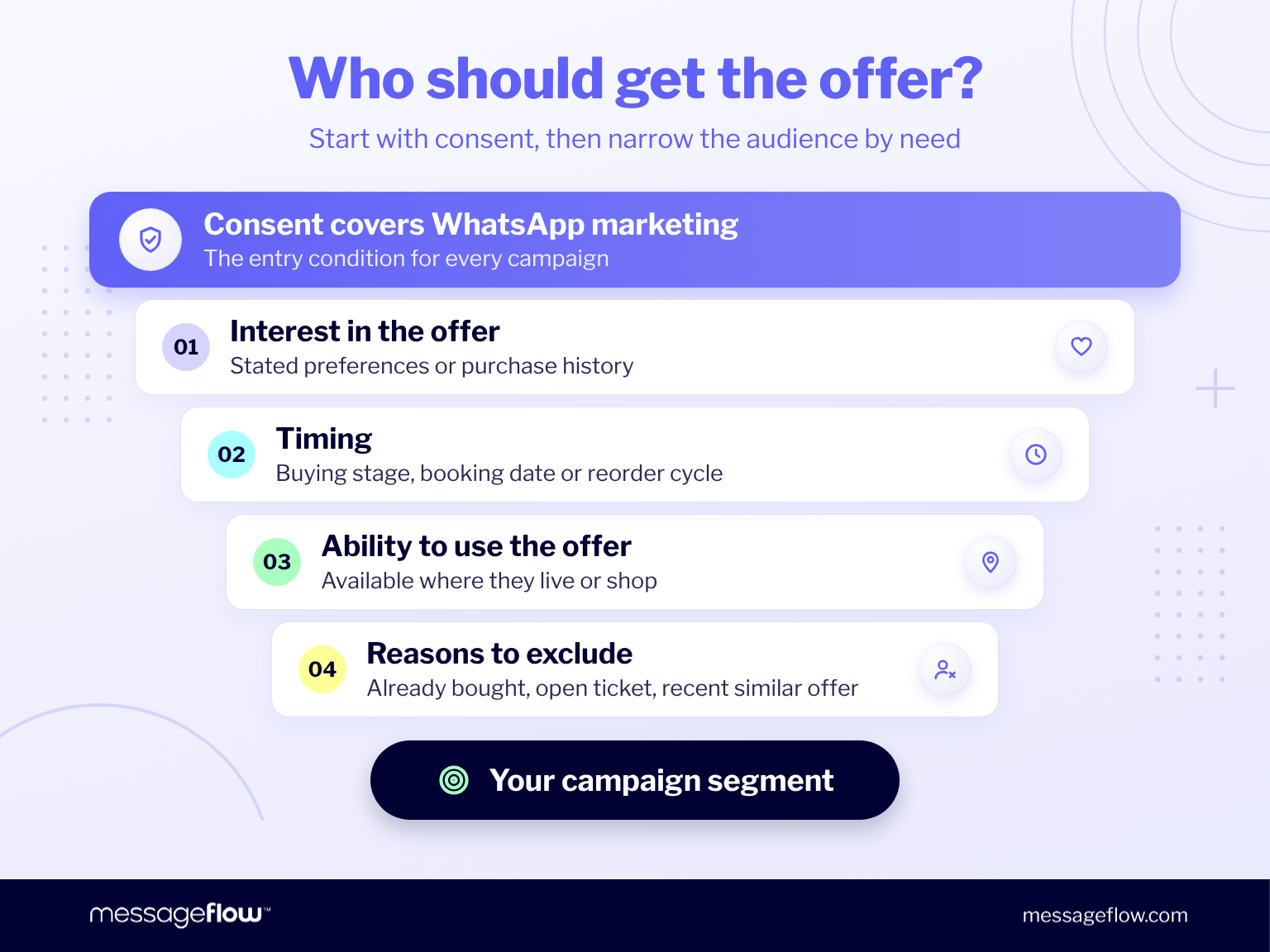
Suppose a nationwide electronics retailer is planning a campaign for smartphone accessories. The team matches in-store and online purchase records with current WhatsApp marketing opt-in records. It then groups eligible customers by phone model so each group sees compatible cases, chargers, or headphones. The team excludes customers who have already bought the featured accessory and checks whether each item is available online or at the customer’s selected store.
Across a large customer base, this approach lets the retailer run one campaign with several versions of the offer, saving each store the work of preparing a separate send. The personalization is practical. Customers see accessories that fit their phones and that they can buy where they shop. If you can’t reliably match purchases to individual customer profiles, start with the interests customers have shared with you.
WhatsApp marketing opt-in: Who can you include in a campaign?
Before adding a contact to a campaign, check what they agreed to receive. A “Marketing: Yes” field in your CRM leaves a crucial question unanswered. Did the customer sign up for offers on WhatsApp or just for your email newsletter? If their existing consent doesn’t cover the messages you plan to send, ask them to opt in before including them in the campaign.
Make it clear what customers are signing up for
Customers should be able to tell who will message them, that the messages will be promotional, and that they’ll arrive on WhatsApp. Give customers enough information to make that choice for themselves.
Use the sign-up form or checkbox label to describe what they’ll receive, such as new collection announcements, promotions, or subscriber-only offers. Leave the box unchecked and let customers complete their purchase whether or not they sign up.
“Asking customers to opt in specifically to WhatsApp is the best way to build a list of people who want to hear from you. Customers who make that choice are far more likely to respond to offers and complete a purchase. Over time, they also start conversations themselves, asking about products and seeking advice directly in the chat.” – Radosław Knesz, Growth Messaging Manager at MessageFlow
💡 For examples of how to collect opt-ins on your website, at checkout, through QR codes, or in a chat, see our guide to collecting WhatsApp marketing consent.
Keep proof of consent and track its current status
Your campaign team should be able to establish when each customer opted in and what they agreed to receive. Link each customer’s phone number to these details:
- The exact wording the customer saw when they signed up
- The date and source of the opt-in
- A record of how they confirmed their choice, such as a form submission or an explicit request to sign up in a chat
- Their current consent status and, if they opted out, the date they did so
If the EU’s General Data Protection Regulation (GDPR) applies and you rely on consent to process personal data, Article 7 requires you to be able to demonstrate that the customer gave consent. These records help you do that.
Apply opt-outs to scheduled messages, too
Give customers a simple way to opt out, such as replying “STOP.” Honor plain-language requests like “Please stop sending me offers,” too. Meta requires businesses to honor opt-out requests whether customers make them on WhatsApp or through another channel.
If a customer asks a support agent to stop sending offers, update their status in the campaign system before the next message goes out. Check consent again before each send, including for customers already enrolled in an automated sequence. Someone who was eligible when you built the list on Monday may have opted out by Friday.
How do you create WhatsApp message templates?
A WhatsApp message template is a reusable message format that Meta reviews before you can use it. It can include fixed text, variables for customer or offer details, media, and buttons. Once Meta approves the template, you can reuse its structure and tailor specific elements to each campaign.
When do you need an approved template?
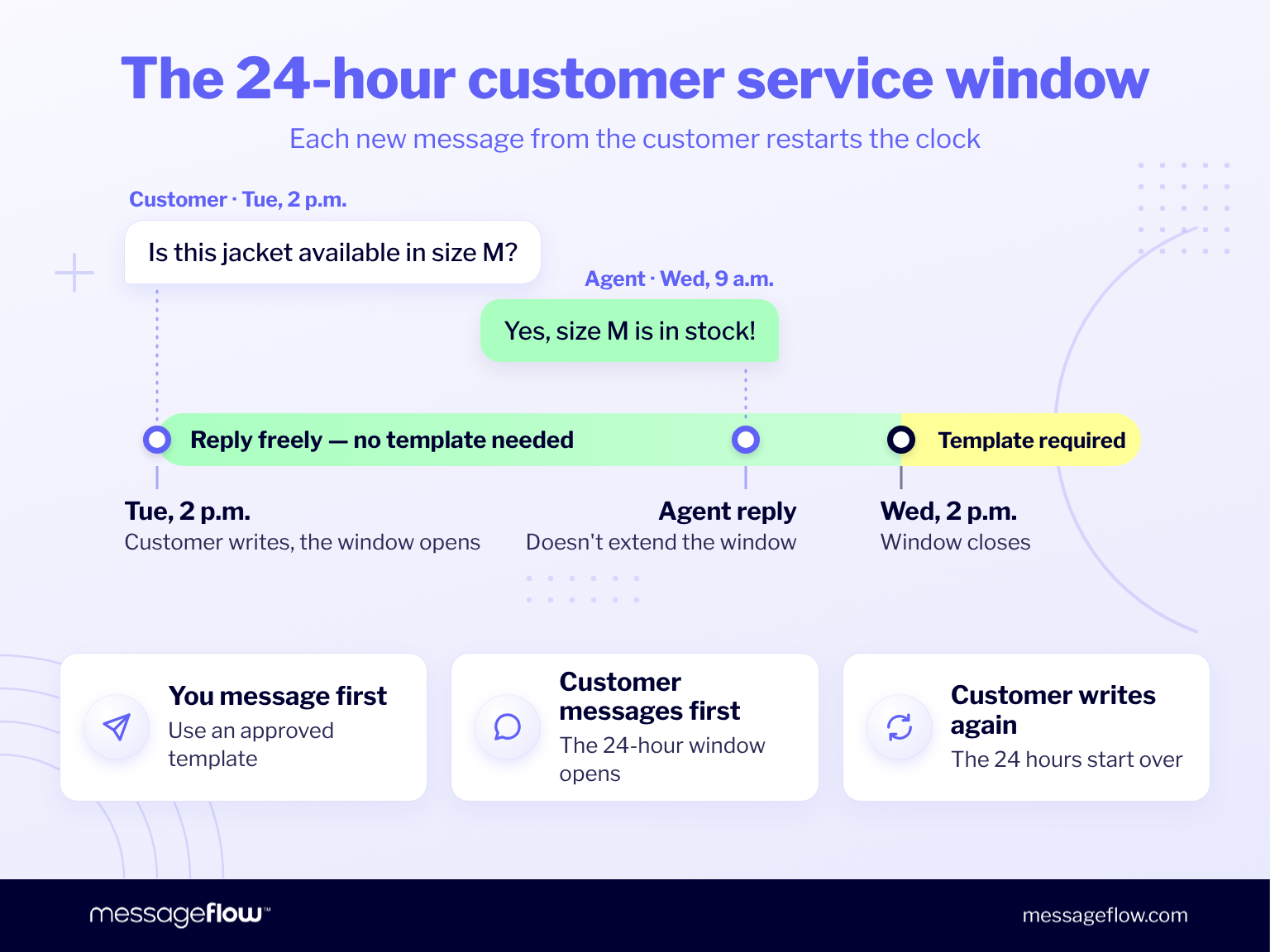
When you start a conversation through the WhatsApp Business Platform, you must use an approved template. If a customer messages you first, a 24-hour customer service window opens, during which you can reply without a template. Each new message from the customer restarts the 24-hour window. Once it closes, you need an approved template to contact them again.
Suppose a customer asks about a product at 2 p.m. on Tuesday. If they don’t send another message, the window closes at 2 p.m. on Wednesday. An agent’s reply on Wednesday morning does not extend it.
“The customer service window opens only when the customer messages first or asks a question. The business’s replies within that window are billed per message, but each business number receives a monthly allowance of 1,000 free service messages, which in most campaigns fully covers the cost of providing advice and closing sales.” – Radosław Knesz, Growth Messaging Manager at MessageFlow
Choose the category that fits the message
Use the marketing category for offers, product recommendations, and messages that encourage a purchase. This includes abandoned cart reminders. A message triggered by a customer’s action doesn’t automatically qualify as transactional. Meta classifies cart recovery messages as marketing.
Use utility for updates about orders or customer accounts, and authentication for messages that verify a user’s identity. Meta reviews your category selection, so the anticipated cost of sending the message should be only one consideration.
Write the copy, define the variables, and choose the buttons
Keep the message short. Explain what you’re offering, include any terms that matter to the customer, and make the next step clear. A button labeled “View available appointments” tells customers more than “Check now.”
Here’s an example you can adapt and submit for approval:
Browse cases that fit your Samsung Galaxy S24. Order online for home delivery or check availability at your preferred store.
Button: Browse cases
If the product name or another part of the message will vary, identify the data source for each variable and preview the message with those values in place. When you submit a template with variables, include the sample values Meta requires.
Test how the template handles missing data and long product names, and check that the link works on a phone. If a required value is missing, your system should skip the send or use a previously prepared version that works without it.
💡 Allow time for Meta to review the template and for your team to make any revisions. Check the template’s status again before the campaign launches. Meta can pause or disable a template even after approving it.
How do you connect WhatsApp campaigns to your CRM and manage replies?
Your integration should move information in both directions. Data from your CRM or store helps trigger the right message. Customer replies and delivery results flow back to the systems your team uses. The WhatsApp Business Platform integrates with CRM and marketing automation tools, so you can automate conversations and hand them over to an agent when needed.
Identify the source for each piece of data
Before you build the integration, list the information your campaign needs and identify where each piece comes from. Here’s how that might work in practice:
| Information | Example source | How you’ll use it |
|---|---|---|
| Customer ID and phone number | CRM | Match outgoing messages and replies to the right customer |
| Consent scope and current status | Consent management system | Check whether you can send the planned message |
| Order or booking status | Online store or booking system | Start or stop the messaging sequence |
| Product availability and current price | Inventory system or online store | Show the customer an accurate offer |
Choose one authoritative source for each piece of information. If your store and CRM show different statuses for the same order, the team building the integration should know which status determines whether the message goes out.
Define when the automation starts and stops
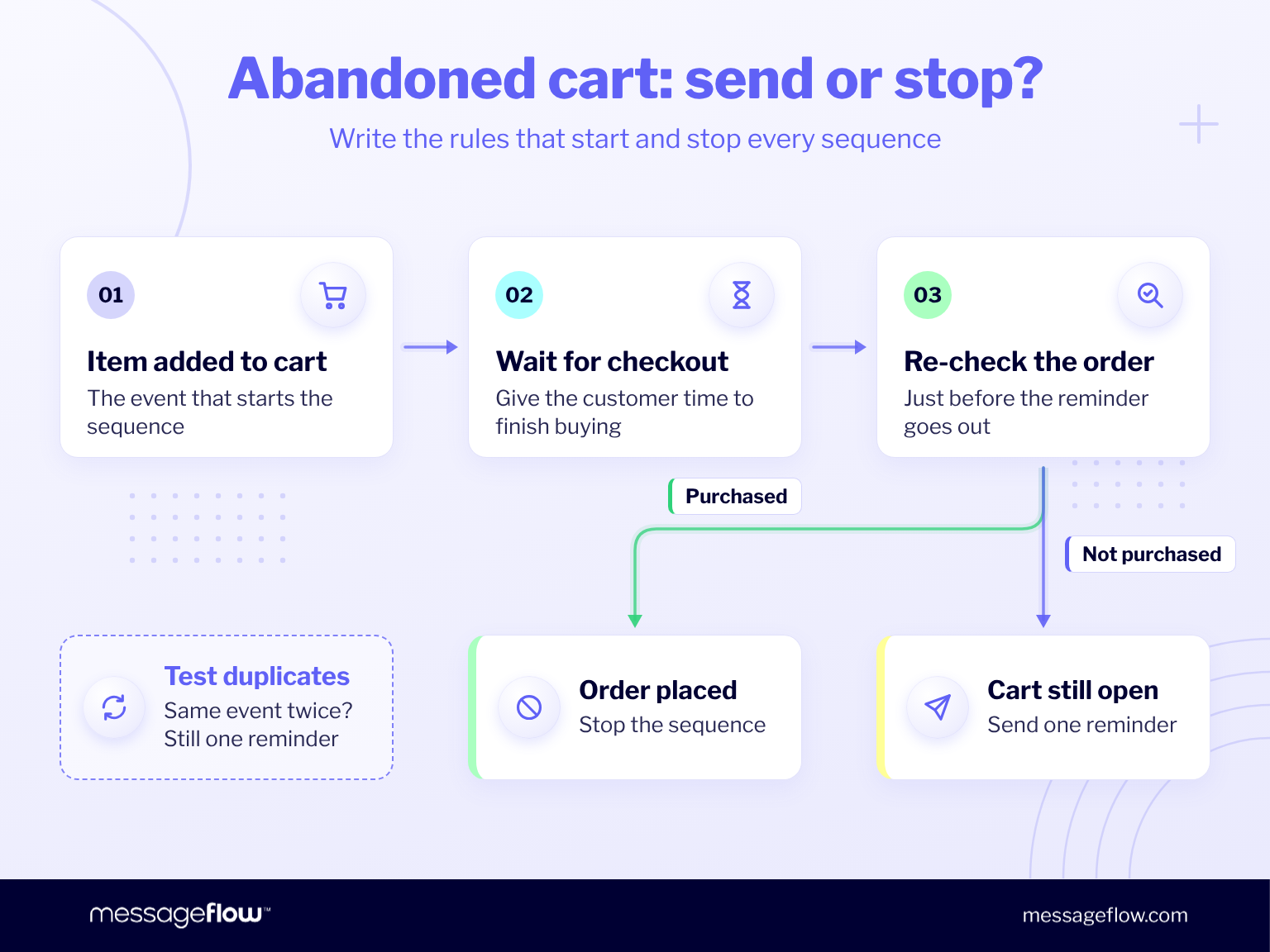
Write down the rules for each sequence. What event starts it? How long should the system wait? What should it check before sending? Which event should stop further messages?
For an abandoned cart reminder, adding an item to the cart is only the starting point. Decide how long to allow for checkout, then check the order status again just before sending the reminder. Test what happens if the system receives the same event twice. The customer should receive the reminder only once.
Log the outcome of each send attempt against both the campaign and the recipient. Your team can then distinguish a delivery failure from a delivered message that received no reply and check what went wrong before trying again.
Assign a team to handle replies
Decide where replies will go, which team will handle them, and when that team will be available. Agents should be able to see the campaign message the customer is replying to and the details they need to answer the question.
Automation can recognize common replies and handle straightforward requests. For questions it can’t resolve, give customers a clear way to reach support. When you automate replies during the 24-hour customer service window, Meta requires an accessible way to escalate the conversation, such as a handoff to an agent, a support phone number, or an email address.
Before launch, test the full sequence. Trigger the event in the source system, check that the message arrives, reply as a customer, and have an agent pick up the conversation. The test is complete when the right person can handle the reply and the system your team relies on records the outcome.
How much does a WhatsApp campaign cost, and how do you measure its performance?
Your WhatsApp campaign budget should cover message fees, the platform you use to send messages, and your team’s time to prepare the campaign and handle replies. To judge whether the campaign pays off, you also need to know what customers did after receiving the message and how much revenue those actions generated.
Separate Meta’s fees from provider and implementation costs
Meta charges for billable messages when they’re delivered. The rate depends on the message category and the recipient’s market. When planning your budget, check Meta’s current pricing for each country your campaign will reach.
Check whether your provider’s quoted rate includes Meta’s fee or whether the provider adds it separately. Account for any subscription fees, agent seats, automation, and integration work. This helps you capture the full cost without counting the same fee twice.
For a campaign with a single rate, use this formula:
Messaging cost = number of billable messages delivered × rate per message
If rates vary by market or message category, calculate each group separately and add the totals. Include every reminder you plan to send. One customer may receive several billable messages.
“The biggest opportunity to reduce costs on WhatsApp is Click-to-WhatsApp (CTWA) ads. When a user clicks through from one of these ads, a free 72-hour chat window opens. For three full days, the business can hold any kind of conversation, send offers, and share updates completely free of charge, with no Meta fees. It’s the simplest way to lower the average cost of acquiring a lead.” – Radosław Knesz, Growth Messaging Manager at MessageFlow
For budgeting purposes, the 72-hour window opens when a customer sends a message through the ad and your business replies within 24 hours. Meta waives its messaging fees during that window. Ad spend and any provider fees still count toward your cost per lead. If the 24-hour customer service window closes, further messages require an approved template.
Track WhatsApp campaign metrics from delivery to conversion
Before you send, define each metric and decide how long after delivery you’ll attribute a result to the campaign. For a single message sent to one audience segment, you can use the following measures:
| Metric | How to calculate it | What it tells you |
|---|---|---|
| Delivery rate | (Messages delivered ÷ messages sent) × 100% | How reliably your message reaches recipients |
| Click-through rate | (Unique recipients who clicked ÷ recipients who received the message) × 100% | Whether the offer prompts customers to take the next step |
| Conversion rate | (Recipients who completed the target action ÷ recipients who received the message) × 100% | How often recipients take the action the campaign was designed to encourage |
| Cost per conversion | Total campaign cost ÷ conversions attributed to the campaign | How much you spent per attributed conversion |
Check which figures your messaging platform provides and which you’ll need from your online store, CRM, or web analytics. UTM parameters help identify visits from the campaign. To track orders in your analytics, you also need purchase events configured correctly. If a customer completes a purchase in a chat, record the sale in your CRM.
Check whether the campaign generates additional sales
Suppose a campaign costs PLN 1,000 and you attribute 50 orders to it. That gives you a cost of PLN 20 per attributed order. Compare that figure with your margin per order after discounts and returns.
Some customers might have bought anyway. If your audience is large enough, randomly set aside a control group that won’t receive the WhatsApp campaign, and keep other conditions comparable. Compare orders per customer and margin per customer across the two groups. The difference helps you estimate whether the additional sales generated enough margin to cover the campaign cost.
Alongside sales, track how many customers opt out of marketing and how much work replies create for your team. Use those figures to decide whether to expand the campaign, adjust how often you message customers, or revise the offer.
How do you prepare for your first WhatsApp campaign?
Before you launch, decide what would justify a second send. Write down the result you expect, the most you’re willing to spend, and the conditions that would prompt you to pause messaging. That gives your team a clear set of criteria for evaluating the pilot.
Use this checklist before launch:
- Choose a pilot group. Select customers who represent your target audience. Keep the group small enough for your team to handle replies and resolve any issues.
- Check that the campaign is ready to send. Review the current recipient list, confirm that the template is approved and active, and preview the message with customer and product details filled in. Make sure the offer is still available.
- Test the customer journey on a phone. Open the message, tap the button, complete the intended action, and send a reply. Test the opt-out process, too.
- Confirm who’s responsible and where results are tracked. Agree on who will monitor delivery, who will handle conversations, and where the team can see conversions and costs.
- Set a review date. Give customers time to decide. Early clicks can show interest, but wait until the end of your measurement period to assess sales.
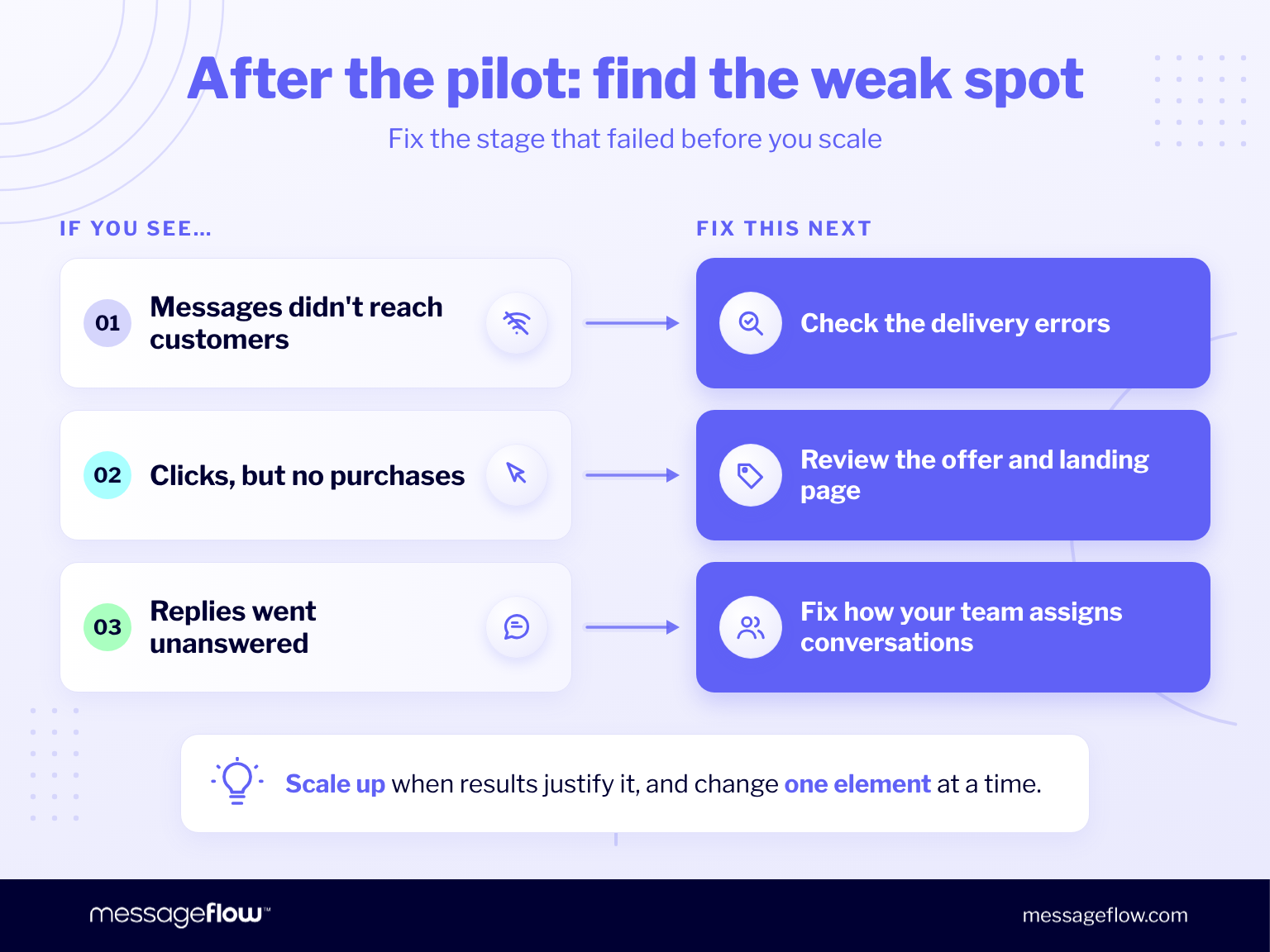
After the pilot, let the results guide your next step. If messages failed to reach customers, check the delivery errors. If customers clicked but didn’t buy, review the offer and the landing page. If replies went unanswered, address how your team assigns and handles conversations before the next campaign.
Expand the campaign when the business results justify it and your team can handle the additional replies. In each subsequent test, change one significant element at a time, such as the offer, the timing, or the wording, so you can tell what influenced the result.
Plan your WhatsApp marketing campaigns with MessageFlow
Want to reach more customers on WhatsApp? Talk to the MessageFlow team about connecting WhatsApp to your existing systems, choosing what to automate, and estimating messaging costs. Together, we’ll define the scope of your first campaign and what you’ll need to launch it.