Text “JOIN” to 12345 and you’ve already used an SMS keyword. The word you send – JOIN – is the keyword. The number you send it to – 12345 – is the short code. They may seem confusingly similar, but their jobs differ. One is the instruction, the other is the address that instruction travels to.
The appeal of SMS keywords is how little it asks of the person using it. A customer texts one word and something happens – they join a list, they leave one, they get an answer. No app to install, no form to complete, no account to create.
That low bar is why SMS keywords still anchor offline-to-online campaigns: the “Text COFFEE to 12345” printed on a receipt, the sign-up code on event signage, the auto-reply that sends back store hours. The phone number becomes a self-service interface, and the keyword is the command that runs on it.
In the piece that follows, I discuss how each part behaves: how text-to-join turns a single word into a subscription, why STOP and HELP follow rules you don’t get to write, how automated replies extend a keyword into a full workflow, and where keyword campaigns still earn their place in a channel mix that now includes push, email, and RCS.
What an SMS keyword is, and what it isn’t
An SMS keyword is a word or short phrase your messaging platform watches for on incoming texts and maps to an action. A message arrives, the platform reads the first word, checks it against the keywords you’ve registered, and fires whatever you attached to it: add this number to a list, send this reply, start this workflow. The keyword itself does nothing. The rule sitting behind it does the work.
Platforms match SMS keywords loosely on purpose. Case rarely matters, so JOIN, join, and Join all land the same way, and stray spaces or a trailing emoji usually get ignored.
The point is to catch whatever a distracted person thumbs in at a bus stop, not to enforce exact syntax. Underneath, the platform is pattern-matching inbound content against a table of triggers and routing each match to its action.
SMS keyword types
Keywords come in two kinds, and the difference matters significantly. The first kind you invent, like COFFEE, VIP, or SAVE20, and wire to whatever behavior you want. The second kind you inherit: STOP, HELP, and a handful of others that carriers and industry bodies have standardized, with behavior you’re required to honor rather than free to design. Most of this article deals with the first kind, the rules governing the second come later.
💡 Two things a keyword is not. It isn’t the number it’s sent to – that’s a separate decision with its own trade-offs. And it isn’t consent – a word that triggers a sign-up is the mechanism, not the permission that makes the sign-up lawful.
Keyword vs. short code, long code, and toll-free number
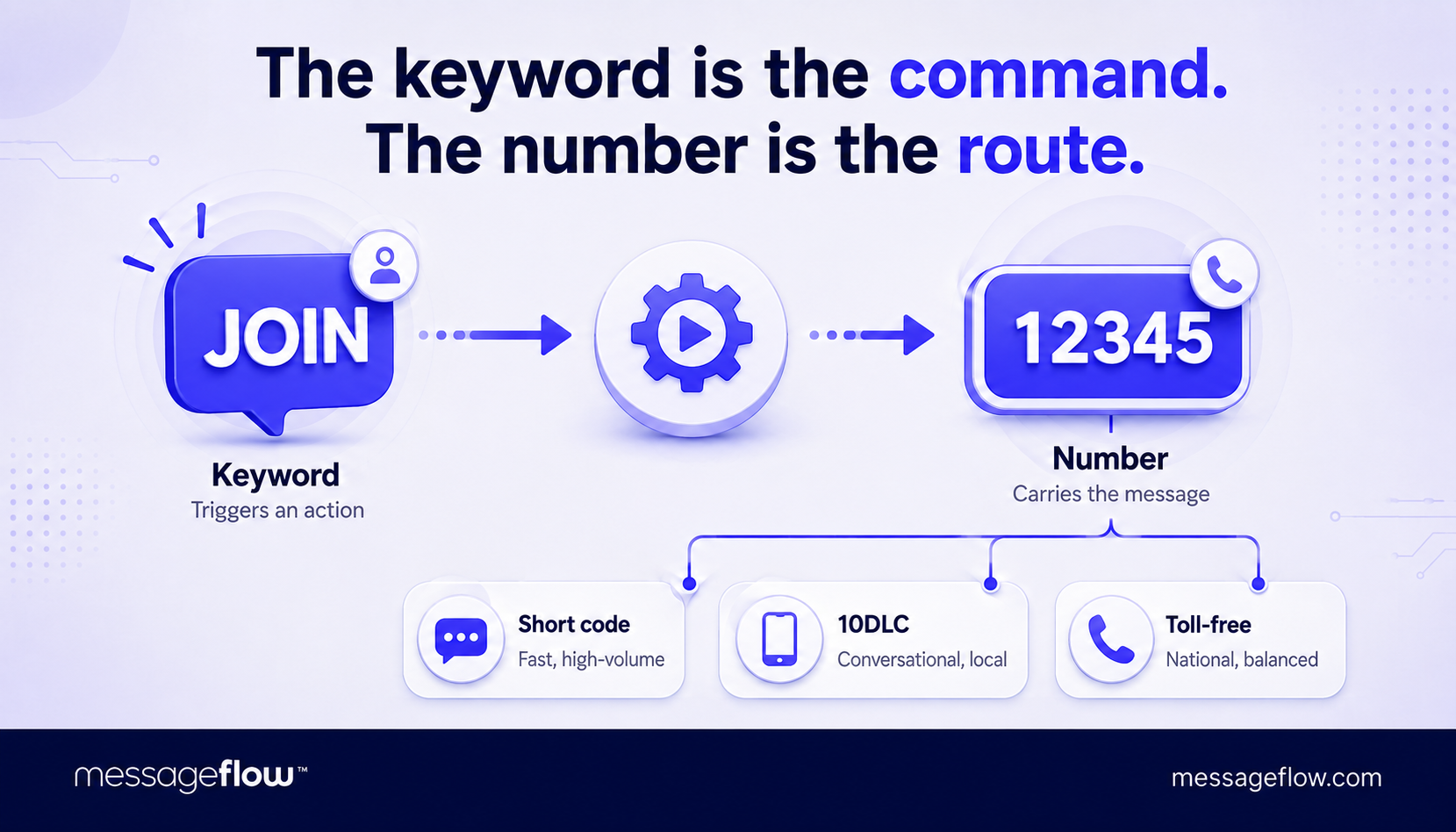
Here’s a clean way to hold the two apart: the keyword is what the person types, the number is where it goes. Change the keyword and you change the action. Change the number and you change the route – the sending speed, the cost, and how the campaign reads on a given medium.
A keyword can live on three kinds of numbers, and the choice shapes a campaign more than the keyword does:
- Short code is a five- or six-digit number built for high-volume application-to-person (A2P) messaging. It sends fast, carriers vet it before it goes live, and “Text JOIN to 12345” reads cleanly anywhere it’s placed. It’s usually the priciest option and the slowest to provision, which is the trade for that speed and trust.
- 10-digit long code (10DLC) is an ordinary US-local mobile number registered for business messaging. It costs less, reads like a person rather than a brand, and suits conversational or regional campaigns. Throughput is lower than a short code’s, so it handles steady two-way exchanges better than a stadium-sized sign-up spike.
- Toll-free number is a 1-8xx number that carries business SMS once it’s verified. It sits between the other two on both cost and throughput, and it’s a common starting point for teams that want national reach without committing to a short code.
SMS keywords work on all three. The number type decides how fast and how much, not whether a keyword fires at all.
One number, many keywords
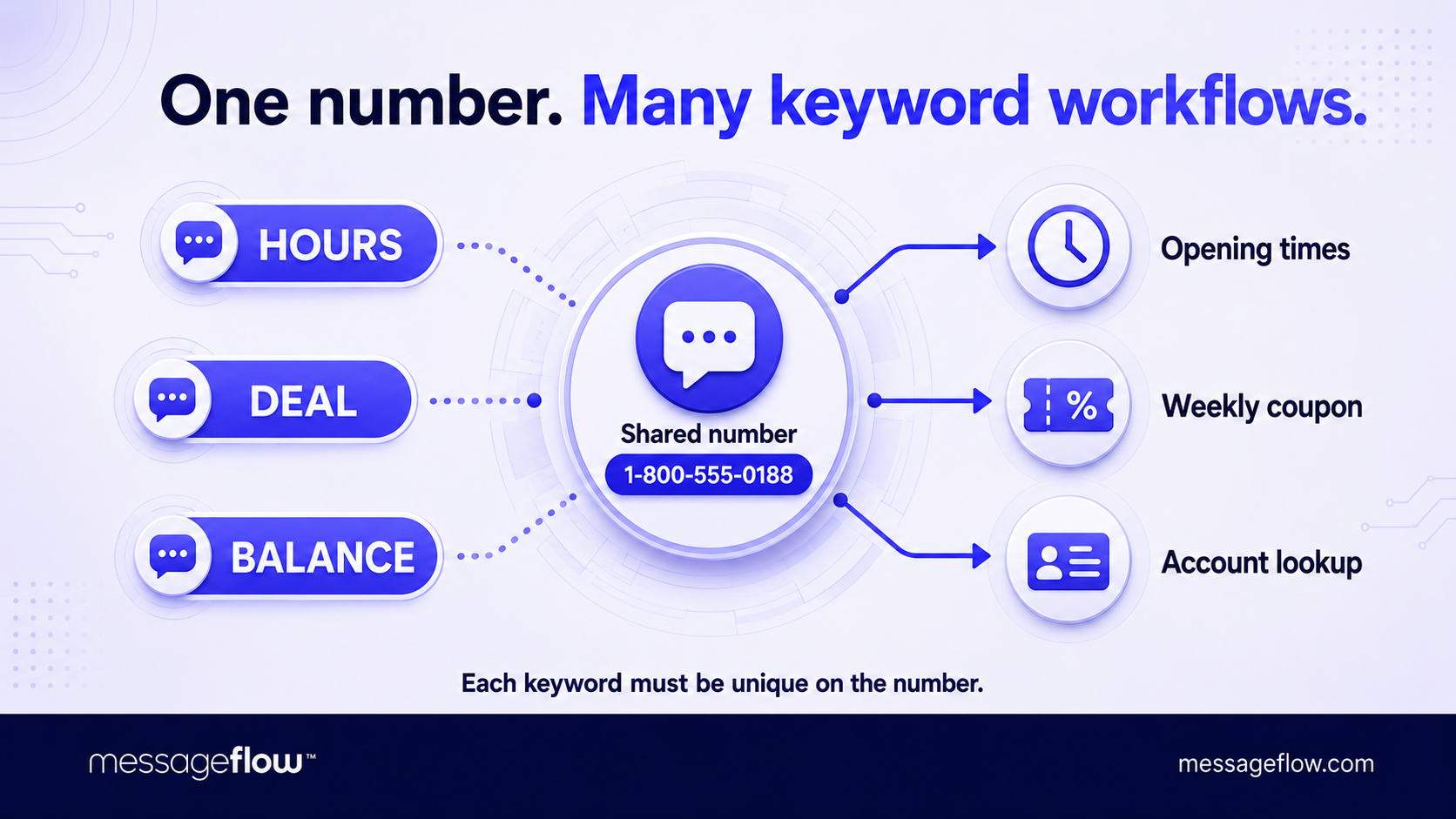
Separating the keyword from the number pays off the moment you run more than one campaign. A single number can hold dozens of keywords at once, each routing to its own action. You provision the number once – with its vetting, cost, and throughput – and then spin up keywords against it as fast as you can think of campaigns. The number is standing infrastructure, the keyword is the disposable, campaign-level part you swap in and out.
This structure is what makes a keyword menu possible. One toll-free number can answer HOURS with your opening times, DEAL with this week’s coupon, and BALANCE with an account lookup. Three keywords, three workflows, one number for the customer to use. Retailers run the same pattern across locations, giving each store its own keyword on a single shared code.
💡 The constraint is that a keyword has to be unique on the number it lives on. Two campaigns can’t both claim SAVE on the same short code. Whichever rule matches first wins, and the other never really fires. And since platforms match on the first word, SAVE and “SAVE NOW” resolve to the same trigger, so near-duplicates collide too. On a busy number, keeping a keyword map is insurance against a launch that actually does nothing.
Reserved keywords sit on top of all this. STOP and HELP hold their slot on every number automatically, so you can’t repurpose them for a promotion no matter how much the wordplay tempts you.
And in the US, the days of several brands sharing one short code and telling themselves apart by keyword are over. Carriers retired shared short codes, so a dedicated short code now serves a single brand, with its full keyword namespace to itself.
Text-to-join: How a keyword starts a subscription
Text-to-join is the keyword doing its most common job: adding a subscriber. Someone sends your join word – SUBSCRIBE, VIP, whatever you’ve chosen – and the platform records the number, adds it to the program, and sends back a confirmation. That round trip, inbound word to outbound reply, is the whole subscription in a nutshell.
The confirmation message carries more weight than its length suggests. Past the greeting, it’s where you name the program, state how often you’ll message, note that message and data rates may apply, and spell out that HELP gets support and STOP ends everything.
Carriers and industry guidelines expect those elements, and leaving them out is a common reason a campaign gets flagged. It also does some retention work: a person who knows what they signed up for, and how to leave, is much less likely to bail with an immediate STOP keyword.
SMS list hygiene
You can treat the join text as the entire opt-in or add a confirmation step. Single opt-in enrolls the person the moment they text in. Double opt-in replies with a “reply YES to confirm” and waits for it before enrolling them. Double opt-in costs you a little friction and a few sign-ups, but buys a cleaner list and a stronger consent record. It’s usually worth it for recurring programs and for anything where a mistaken enrollment is expensive to unwind.
The keyword captures intent, but it isn’t the whole consent story. What makes a subscription defensible is the record around it: the timestamp, the number, the keyword used, and the disclosures the person saw at the point of sign-up.
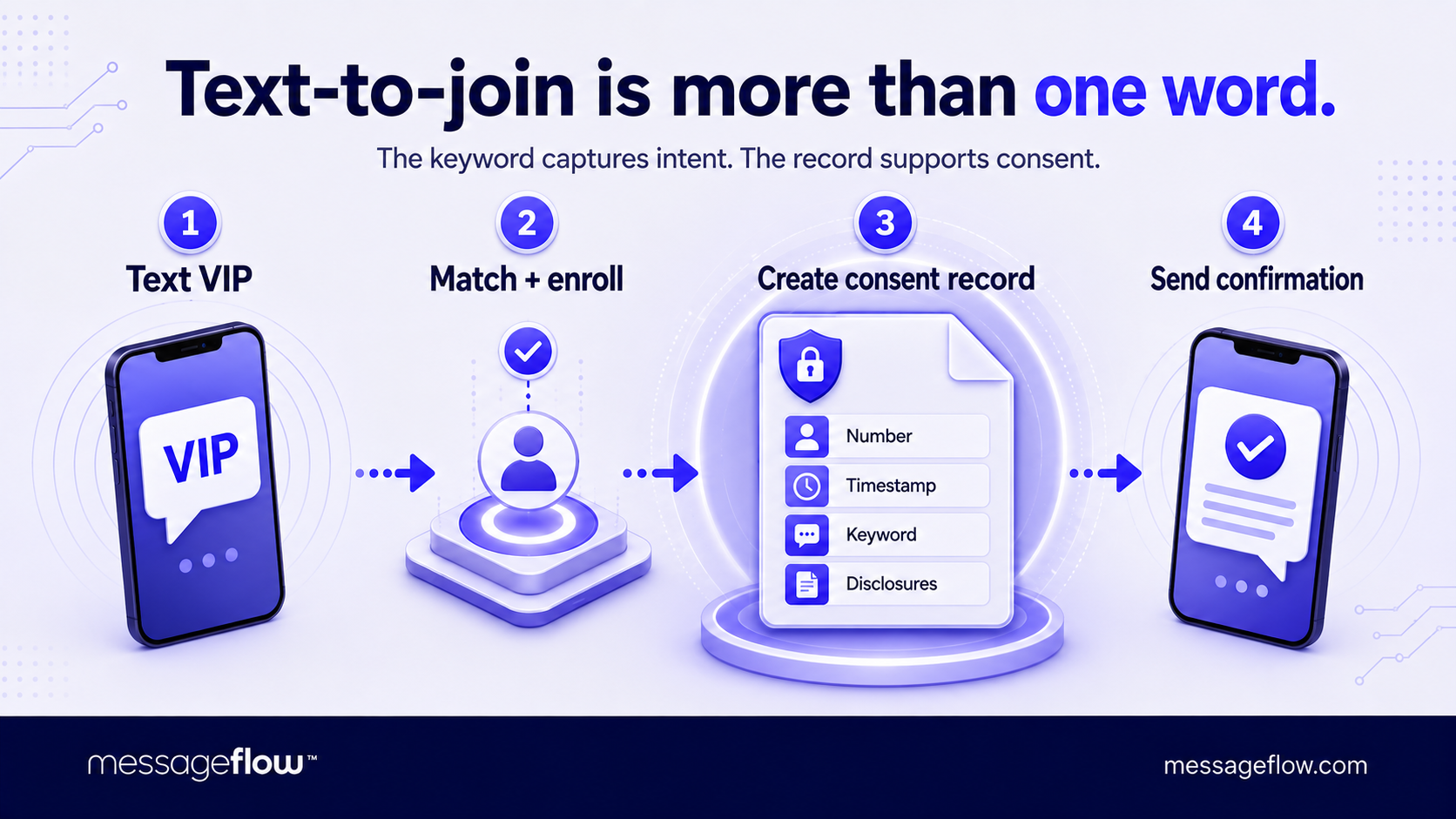
That last part gets the least attention and matters most. The “Text JOIN to 12345” line on a poster or checkout screen has to sit beside the program name, the message frequency, the rates disclaimer, and a link to terms, clearly stating the terms the person is agreeing to.
💡 Our guide to SMS opt-in and opt-out goes deeper on building consent records that hold up.
STOP, HELP, START: The command keywords carriers expect
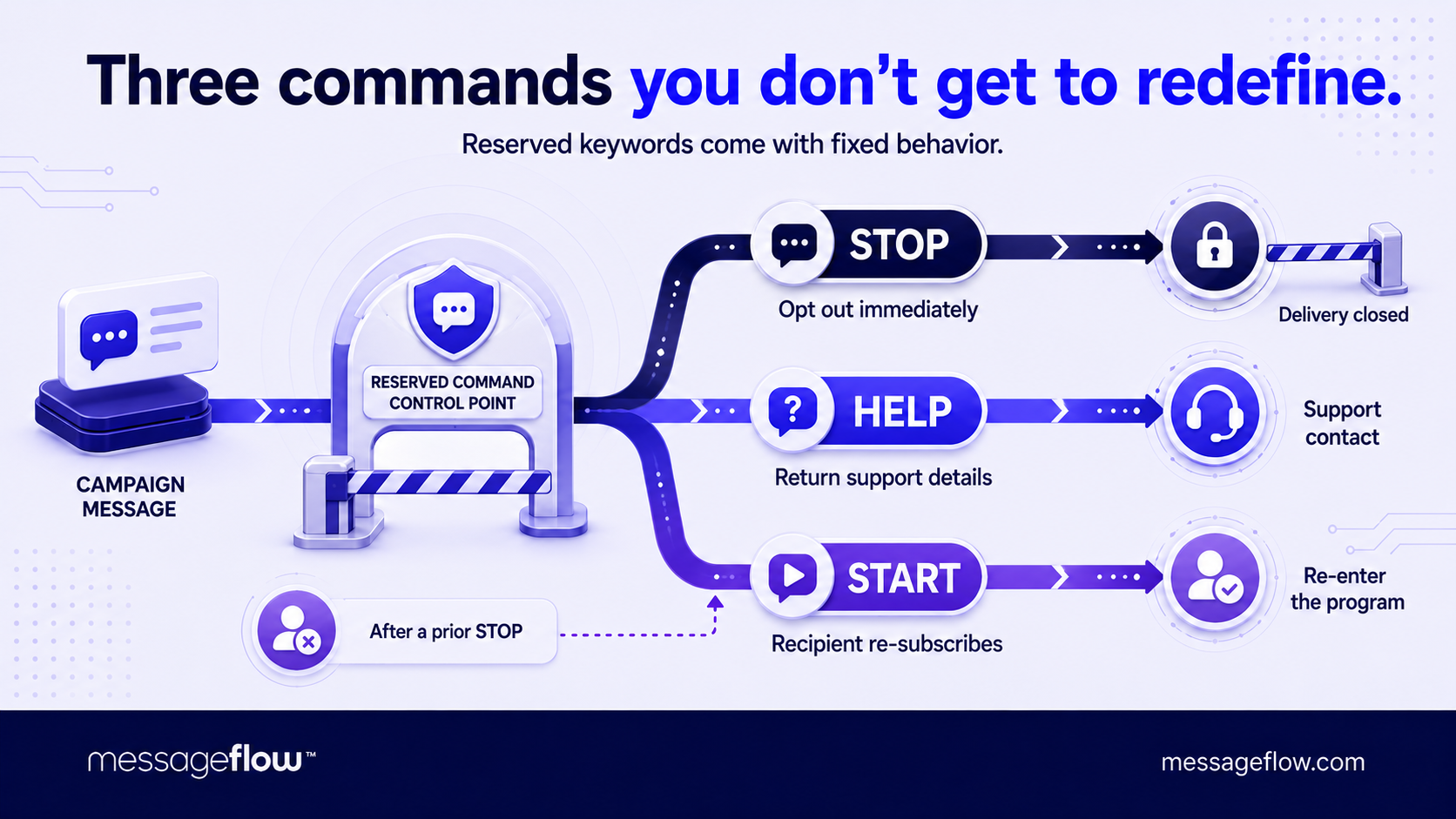
SMS keywords like COFFEE and VIP do whatever you wire them to. STOP, HELP, and START come with behavior already defined by carriers and industry guidelines, and your job is to honor it. Treating these as regular keywords you can repurpose or ignore is a fast route to getting your campaign shut down.
STOP is the one that carries legal weight. When a subscriber texts it, the opt-out is immediate and the obligation is yours: stop sending. On many networks the carrier enforces this above your platform. It blocks further messages to that number whether or not your system registered the request.
You’re permitted a single confirmation reply (“You’re unsubscribed and won’t receive more messages”), and that’s that. The recognized opt-out words extend past STOP itself to END, CANCEL, UNSUBSCRIBE, and QUIT, and a compliant program treats all of them the same way.
HELP is the support obligation. A subscriber who texts it should get back your program name and a real contact route – a phone number, an email, a support URL – so they’re never stuck in a program with no way to reach a human.
Like STOP, HELP is expected on every campaign, which is part of why both texting keywords hold their slot on every number and can’t be reassigned.
START (also seen as UNSTOP or YES) is the reverse of STOP – it re-subscribes someone who previously opted out. It matters because a prior STOP is sticky. Once carriers or your platform have flagged a number as opted out, you can’t simply add it back from your side.
The person has to re-initiate, and START is the word that lets them, which is why it’s worth surfacing in the same confirmation message that explains STOP.
None of this is an optional cost. The command keywords are what let regulators, carriers, and recipients trust the channel enough to keep application-to-person SMS working at all. A program that handles them cleanly earns better carrier standing. One that fights them tends to find its throughput throttled or its number blocked.
Automated replies: Turning a keyword into a workflow
You’ve already seen automated replies at their simplest. The confirmation that lands after a join text, the one-line acknowledgement after STOP keyword – each is a keyword matched to a fixed response, sent the instant the inbound message arrives. That pattern, one word in, one message out, covers a lot of ground. It’s also the floor, not the ceiling.
Two-way SMS
The capability under the hood is two-way (or inbound) SMS: your platform receives messages, not only sends them, and can act on what it reads. Once inbound is in play, a keyword stops being a one-shot trigger and becomes the entry point to a sequence.
Text DEAL and the first reply delivers a code, but a second message can follow with the fine print, and a third a day later can nudge redemption.
Text STATUS and the reply isn’t canned at all. The platform looks up the sender’s number, pulls their order, and returns a delivery date that’s true only for them.
There’s the line between a static reply that’s identical for everyone and a dynamic one that depends on who texted, what they texted, or what your systems already know about them. Static replies are quick to stand up and fine for broadcast-style answers – hours, address, a coupon. Dynamic replies cost integration work, because the platform has to reach a back-end system to answer, and they’re where SMS keywords start to feel like self-service rather than a mailing list.
Two-way also means the exchange can continue past the first word. A flow can ask a question and branch on the reply. Text VOTE, get “Reply 1 for Team A or 2 for Team B,” and the follow-up number routes to the right tally. Each later message runs through the same matching logic, so a keyword can open a short structured exchange rather than a single round trip.
💡 The practical limit is expectation. People who text a keyword want the first reply fast, so the opening response should be instant even when the rest of the workflow paces itself out over hours or days.
One rule doesn’t pause for any of this. STOP still ends the program mid-flow: a subscriber three messages into a sequence who texts STOP is out, and the workflow stops with them. Building automated replies means building that exit into every branch instead of only the entry point.
On the orchestration side – sequencing, branching, and tying texting keywords to broader triggers – our SMS automation guide goes further.
When to use SMS keywords, and when not to
A keyword earns its place wherever you can reach someone but can’t put a tappable link in front of them. That’s a major decision rule behind every good use case.
On a webpage you’d use a form or a subscribe button because tapping beats typing. On a billboard, a radio spot, a printed receipt, or a product label, there’s nothing to tap. “Text COFFEE to 12345” becomes the shortest bridge from that offline moment to a digital list.
The strongest fits include:
- Print, broadcast, and packaging – anywhere a URL would force the audience to switch devices or memorize a link. A keyword survives being heard on the radio or glimpsed on a poster in a way a URL doesn’t.
- In-store and point of sale – a cashier prompt or a table card turns a live customer into a subscriber without hardware or a second screen.
- Live events and audience participation – text-to-vote, text-to-win, and text-to-enter scale to a room or a broadcast because the only tool required is one nearly everyone already holds.
- Self-service answers – a keyword that returns hours, a balance, or an order status deflects a call or a support ticket, and reaches any phone, not just smartphones.
The thread running through all of them: the audience is offline, the ask is a single action, and the phone is the one device you can count on them holding.
The tool stops fitting when those conditions break. If you’re already in a digital context like a website, an app, a checkout screen, asking someone to open their SMS app and type a word adds friction rather than removing it – a tap-to-subscribe control wins. If you already hold the number and consent from another channel, a keyword is a step you don’t need.
And a keyword makes a poor intake form. It captures one signal well, so the moment you need a name, an email, and three preferences, you’re better off capturing the number and moving the conversation to a link or a richer channel. QR codes now compete for some of the offline jobs too, though they lose it the instant the audience is listening rather than looking, or holding a phone without a camera ready.
Worth separating the trigger from the payload here.
A keyword is a good way to start an interaction. It says nothing about what comes back. If your reply needs an image, a carousel, or a branded card, that’s a question about message type – MMS or RCS – not about the keyword, which fires the same either way.
Fit the keyword to the moment of capture, and fit the response format to what you actually need to send.
Setting up a keyword campaign: What you need to get right
Most of the work in a keyword campaign happens before a single text goes out. The keyword is the easy part. The decisions around it – which word, which number, what the reply does, how you’ll know it worked – are what separate a launch that fills a list from one that stays empty.
Several of these can’t be changed once the campaign is live and the posters are printed, so they’re worth getting right from the get-go.
Start with the word itself, and pick one that survives the place it lives. A keyword printed on a receipt can be almost anything. One read aloud on the radio has to survive being heard, which rules out homophones. A listener won’t know whether to text FOUR or 4, and anything a person might spell two ways.
💡 Short, concrete, and unambiguous beats clever: BREW is safer than BREWHAUS. Avoid the reserved words, since STOP, HELP, and their variants are off the table, and avoid near-neighbors that collide with a keyword already live on the same number.
Since one number can hold many SMS keywords, you can spend a few of them on measurement. Give each placement its own join word – RADIO, POSTER, RECEIPT – all pointing at the same list, and the inbound keyword tells you which channel drove the sign-up with no tracking link or UTM involved. It’s the closest SMS gets to source attribution, and it costs nothing but a slightly longer keyword map.
Provision the number before you commit the media. A short code can take weeks to vet and approve, and a keyword can’t fire on a number that isn’t live yet. Booking the radio spot or sending the print run before the code clears is how your launch date slips. Treat provisioning as the primary task.
Write the call to action once and reuse it everywhere. Every placement needs the same block: the keyword, the number, and the disclosures your opt-in already requires. A placement that drops the frequency or rates line is the one that turns a compliant program into a flagged one, so consistency here is more of a compliance concern, and not a design preference.
Then test the whole path before anyone else does. Send the keyword yourself and confirm four things:
- the auto-reply arrives quickly and reads correctly
- STOP removes you and HELP returns real contact details
- the number is provisioned and the keyword is actually mapped to its action
- it works with multiple carriers and handsets
Once it’s running, watch a short list of metrics instead of a crowded dashboard: inbound volume per keyword, opt-in completion (where double opt-in drop-off surfaces), the STOP rate in the first day or two, and how fast the first reply actually goes out. A STOP rate that spikes right after sign-up usually points back at the confirmation message – an expectation set wrong at the join, not a fault in the messages that followed.
Keywords are a small mechanism with strict edges
A keyword campaign is almost boringly simple at the mechanism level: a word, a number, and a rule connecting them. What makes one work well isn’t sophistication in any particular part – it’s respecting where each part’s edges sit.
The word is yours to choose, but it has to survive every medium. The number is standing infrastructure you provision once and reuse. And the rule is only partly yours: the moment STOP, HELP, and consent enter, you’re honoring behavior already defined elsewhere
That mix is why keywords have outlasted repeated predictions of their retirement. They ask very little of the person using them, they reach any phone rather than only the newest ones, and they turn an offline moment into a digital one with a single thumbed-in word.
Richer channels allow you to say more once someone is through the door, but the door itself, opened by a word texted to a number, is a primitive that keeps earning its place. Get the keyword-versus-number split right, honor the command words, and set expectations at the join, and much of what goes wrong with SMS keywords never gets the chance to.
FAQ on SMS Keywords
The keyword is the word the recipient types, the short code is the number they send it to. The keyword triggers an action, the number carries the message. A keyword doesn’t even require a short code – it can run just as well on a 10-digit long code or a toll-free number.
The keyword is the cheap part, the number and the traffic are where cost arises. A dedicated short code carries a recurring fee, long codes and toll-free numbers cost less, and every inbound and outbound message is billed on top. Budget for the number and the volume, not the word.
The keyword itself is quick to create, the number is the long pole. Long codes and toll-free numbers provision relatively fast, but a short code can take several weeks to vet and approve, so provisioning, not copywriting, usually sets your earliest realistic launch date.
Yes. Both are expected on every application-to-person SMS program. STOP because opting out is a subscriber’s right, HELP because people need a way to reach support, and carriers enforce them regardless of what your own system does. Both words are reserved on every number, so you can’t reassign them to a promotion.