
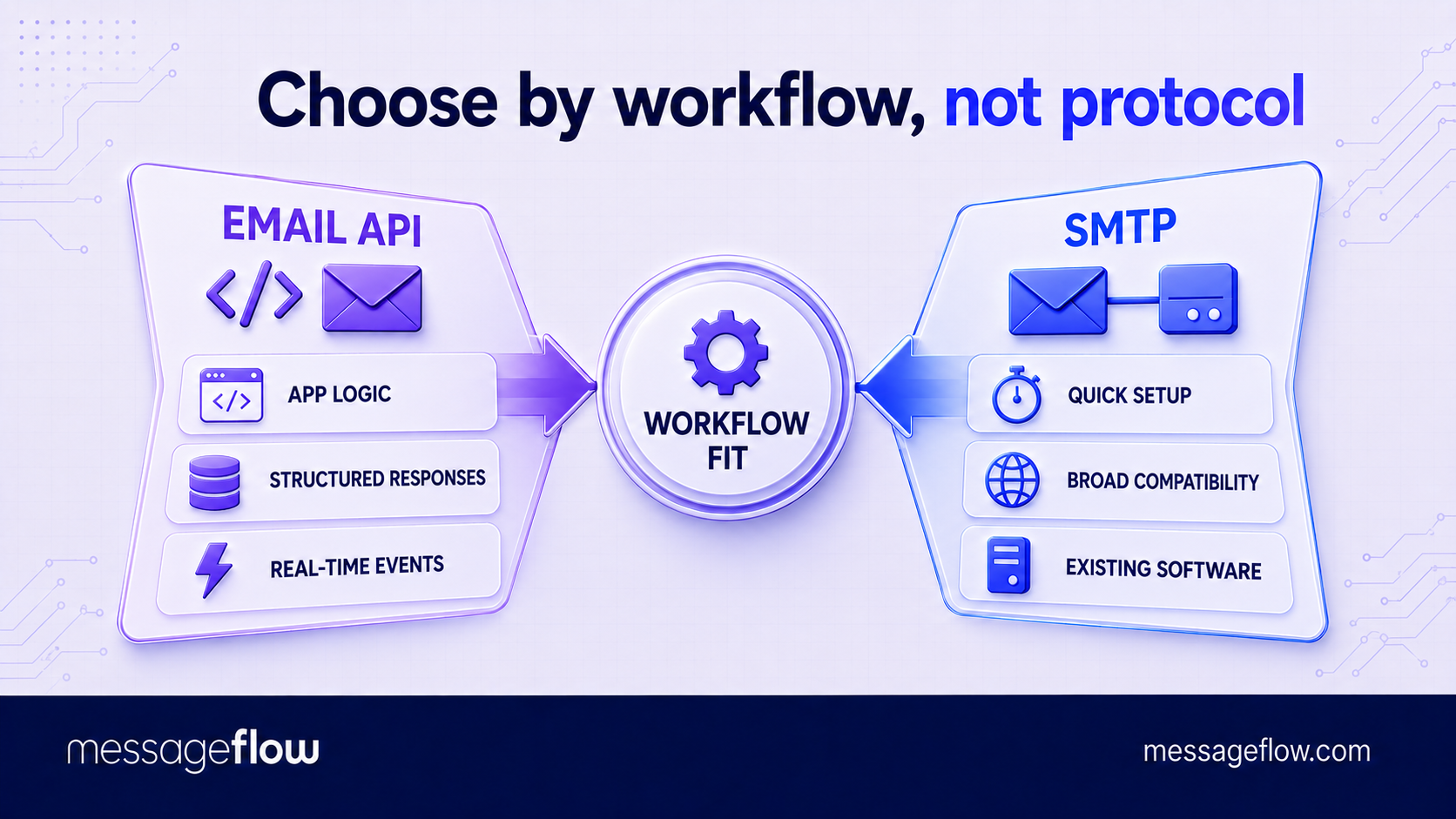
Choose an email API when email is part of your application logic and you need granular control, structured error handling, or real-time event data. Choose SMTP when your software already supports it and you want to start sending with minimal development work.
Both methods can handle transactional messages such as password resets, order confirmations, and account alerts. The difference lies in how your system submits them. An email API accepts an HTTPS request, while SMTP establishes an authenticated connection and transfers the message through a sequence of protocol commands.
Once the provider accepts the message, the same underlying infrastructure may handle routing and delivery. The integration method alone therefore does not determine inbox placement. Sender authentication, reputation, message quality, a history of recipient engagement, and the provider’s infrastructure still matter more. Here’s the email API vs. SMTP breakdown.
Email API or SMTP? The short answer
Use an email API when:
- email is tightly connected to product events or customer data
- your application needs immediate, structured responses
- developers need webhooks, message metadata, and detailed logs
- sending volume or workflow complexity is expected to grow
Use SMTP when:
- your CMS, CRM, ecommerce platform, or legacy system already supports it
- configuring server credentials is preferable to building a custom integration
- email is a supporting function rather than a core product workflow
- broad compatibility matters more than granular application-level control
💡 A practical rule: use an API when your application needs to understand and react to what happens after each send. Use SMTP when the main requirement is to hand messages to a trusted relay with as little integration work as possible. If you choose SMTP, the correct SMTP port depends on whether your system is submitting or relaying mail.
Email API vs. SMTP: The differences that affect implementation
The actual difference between email API and SMTP becomes clearer once you consider how each method behaves beyond the initial setup. Integration effort, response handling, access to data, and scaling requirements all affect how well each option fits a particular sending system.
| Criterion | Email API | SMTP |
|---|---|---|
| Integration effort | Requires API calls, authentication, and response handling. SDKs can reduce the workload. | Often requires only a host, port, username, and password. Usually faster to configure in existing software. |
| Speed | Submits each message through an HTTP request, which suits event-driven application workflows. | Uses a command-and-response session. Reusing connections can substantially reduce the additional overhead. |
| Error handling | Returns structured status codes and response data that applications can process immediately. | Returns SMTP response codes. These identify failures, but may provide less context to the application. |
| Analytics | Metadata, tags, webhooks, and request IDs make it easier to connect delivery events with specific users or transactions. | Providers can still supply logs and analytics, but correlating events with application data may require additional configuration. |
| Scale | Supports concurrent requests and fits naturally into queue-based or distributed architectures. | Can also support high volumes, provided the sender manages connection pooling, queues, timeouts, and provider limits correctly. |
| Deliverability | Does not improve inbox placement solely because the message enters through an API. | Does not reduce inbox placement solely because the message enters through SMTP. |
The sharpest distinction is operational control. An API gives the application a direct way to submit a message, interpret the response, and react to later events through webhooks. SMTP focuses on transferring the message to a relay.
💡 This makes API integration particularly useful when delivery data needs to feed other processes. A failed payment email might trigger a support task, for example, while a hard bounce could suppress an address automatically. Dedicated email API analytics can then aggregate both API and SMTP activity, but the API usually gives developers a cleaner way to connect individual events with application records.
When an email API is the better choice
An email API is the stronger option when sending forms part of an application workflow rather than a standalone software feature. Password resets, payment receipts, security alerts, and account notifications all depend on data and events generated inside the product.
Through an API request, the application can pass template variables, message tags, recipient data, and identifiers that connect the email with a specific customer or transaction. Webhooks can then return delivery, bounce, or engagement events to the same system. This allows the application to suppress an invalid address, alert a support team, or continue an automated workflow without relying on manual log checks.
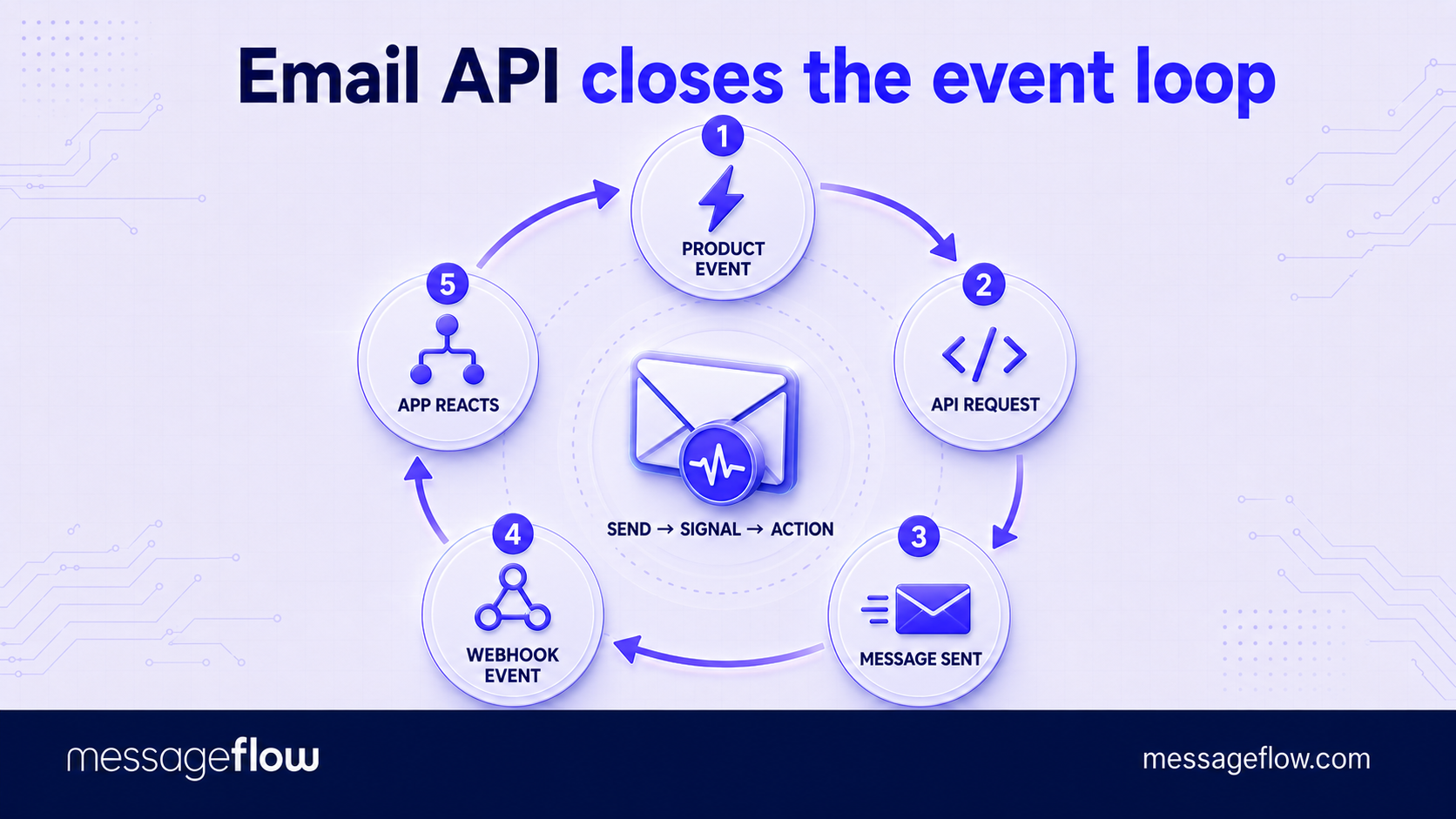
API integration also suits systems that need to process many sends concurrently. Developers can place requests in queues, control retry logic, monitor rate limits, and distribute sending across multiple workers. The API does not remove the need for those controls, but it fits them more naturally than an SMTP connection does.
The trade-off is greater initial development effort and some dependence on the provider’s request format, authentication model, and event schema. Moving to another provider may require code changes. If your platform already includes an SMTP configuration screen and only needs a dependable relay, an API integration may add complexity without producing a meaningful operational benefit.
When SMTP is the better choice
SMTP is usually the practical choice when your system already knows how to send mail but needs an external relay to handle delivery. Many CMSs, ecommerce platforms, CRMs, monitoring tools, and older business applications include native fields for an SMTP host, port, username, and password. Connecting them may take minutes and require no custom code.
Compatibility is SMTP’s main advantage. The protocol is widely supported, which makes it useful when several unrelated systems need to send through the same provider. It also reduces dependence on a proprietary API: changing providers may require little more than replacing credentials and server settings.
SMTP should not be treated as a low-volume method by definition. A properly designed integration can support substantial traffic through persistent connections, connection pools, queues, and controlled retry rules. The provider’s throughput limits and infrastructure matter more than the protocol label.
Its limitations become clearer when the sending application needs detailed control over individual messages. SMTP response codes confirm whether the relay accepted or rejected a submission, but connecting later delivery events with a specific order, account, or workflow can require extra metadata and processing. For systems that need to react automatically to every bounce, complaint, or delivery update, an API will usually provide a cleaner integration model.
SMTP relay vs. API: One business can use both
The choice does not need to apply across the entire company. A business can use REST API email sending for its customer-facing application while connecting its CRM, CMS, or monitoring software through an SMTP relay.
Both methods can lead into the same provider infrastructure and reporting environment. This gives each system the integration it supports without forcing the engineering team to build adapters purely for consistency. It can also centralize sender authentication, suppression lists, logs, and account management.
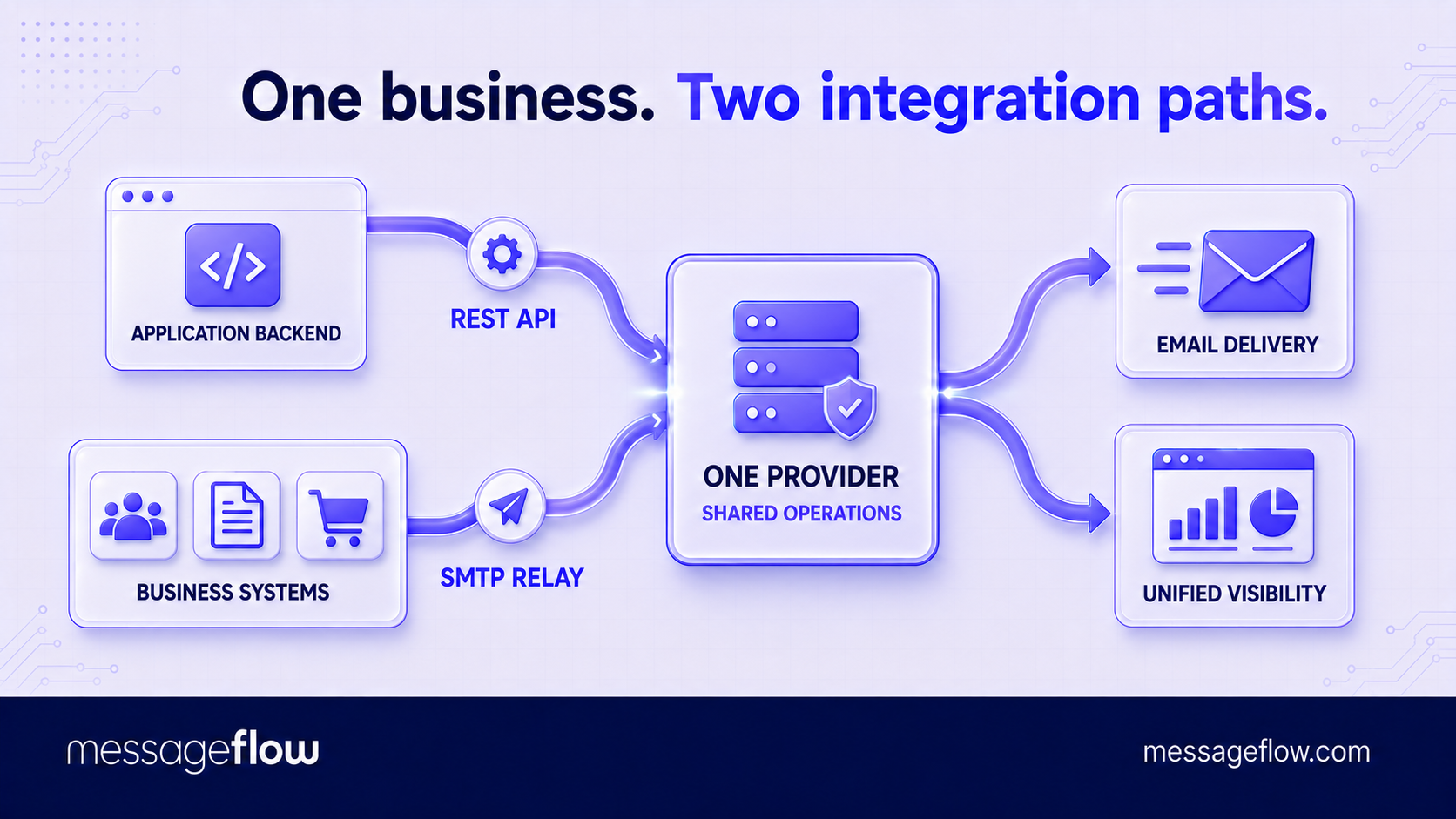
Choose the method separately for each sending source:
- Use an API when developers control the application and email events must interact with business logic.
- Use SMTP when the source system already supports it and only needs to submit messages to a relay.
- Use both when different systems have different technical requirements but the organization wants one email provider and a shared operational view.
💡 The best architecture is therefore not necessarily API-only or SMTP-only. It is the one that introduces the least unnecessary integration work while preserving the control and visibility each email workflow requires.
Email API vs. SMTP security: Configuration matters more than the method
Email APIs typically protect message submission through HTTPS and API keys, while SMTP integrations use encrypted connections and SMTP credentials. Both can provide strong security, but neither is safe when credentials are exposed, shared too broadly, or left unchanged indefinitely.
API keys should have only the permissions the application needs, be stored outside the source code, and be rotated regularly. Where supported, teams can also restrict access by IP address. Applications receiving delivery events should verify webhook signatures before accepting the data.
SMTP connections should use the provider’s approved TLS configuration. Relay access must require authentication, and each system should receive separate credentials where possible. This limits the damage if one integration becomes compromised and makes access easier to revoke.
Common security and implementation mistakes
- Using the same credentials in testing and production.
- Treating API acceptance or an SMTP 250 response as proof of final delivery.
- Retrying permanent failures instead of suppressing invalid recipients.
- Opening a new SMTP connection for every message at higher volumes.
- Failing to retain message or request identifiers for monitoring and troubleshooting.
- Accepting webhook events without verifying their source and authenticity.
Email API vs. SMTP: The final recommendation
For a new application with event-driven transactional email, an API is usually the better starting point. It gives developers structured responses, richer message metadata, and a direct way to connect delivery events with application logic.
For an existing CMS, CRM, ecommerce platform, or business system with built-in SMTP support, use an SMTP relay unless the current integration creates a specific limitation. Replacing a working standard connection with custom API code needs a clear operational benefit.
When comparing providers, look beyond whether they offer an email API or SMTP. Check rate limits, webhook coverage, retry behavior, log retention, analytics, credential management, and support for separating different sending streams. These capabilities determine how effectively your team can operate the service after integration.
The simplest decision rule is also the most useful: match the sending method to the system producing the email, then choose a provider capable of supporting the required volume, visibility, and control.
Use REST API and SMTP with MessageFlow
MessageFlow supports both REST API and SMTP integration, so you can use the method that fits your setup best. Connect application backends through the API for structured responses, webhooks, dynamic templates, and detailed delivery tracking, or use SMTP Relay to connect ecommerce platforms and existing business systems without building a custom integration. Both methods operate within the same platform, giving your team one place to manage sending activity and maintain visibility as volumes grow.
Email API vs. SMTP FAQ
No. An API replaces SMTP only between your application and the email provider. The provider and receiving mail servers still generally use SMTP to transfer the message to its destination.
No. A hosted SMTP relay accepts messages from your systems and handles queueing, routing, and delivery infrastructure. Running your own SMTP server makes your team responsible for maintaining that infrastructure and managing its security and reputation.
Usually, yes. If you remain with the same provider and keep the sending domain authenticated, the visible sender address can stay unchanged. You will still need to replace the submission logic, configure API credentials, and test how the application processes responses and delivery events.
A REST email API is generally easier to use in serverless environments because it works through short-lived HTTPS requests. SMTP can also work, but the application must account for connection limits, timeouts, and the runtime’s networking restrictions.
That depends on the provider. Platforms supporting both methods may combine their logs and delivery data in one dashboard, but teams should confirm whether message identifiers, event reporting, and suppression handling remain consistent across both integration paths.