


Push notifications for mobile apps are short messages delivered directly to a device, appearing on the lock screen, in the notification center, or as a banner whether or not the app is currently open. For marketers, they’re one of the few channels that capture a user’s attention without per-message cost and without depending on a social platform’s algorithm.
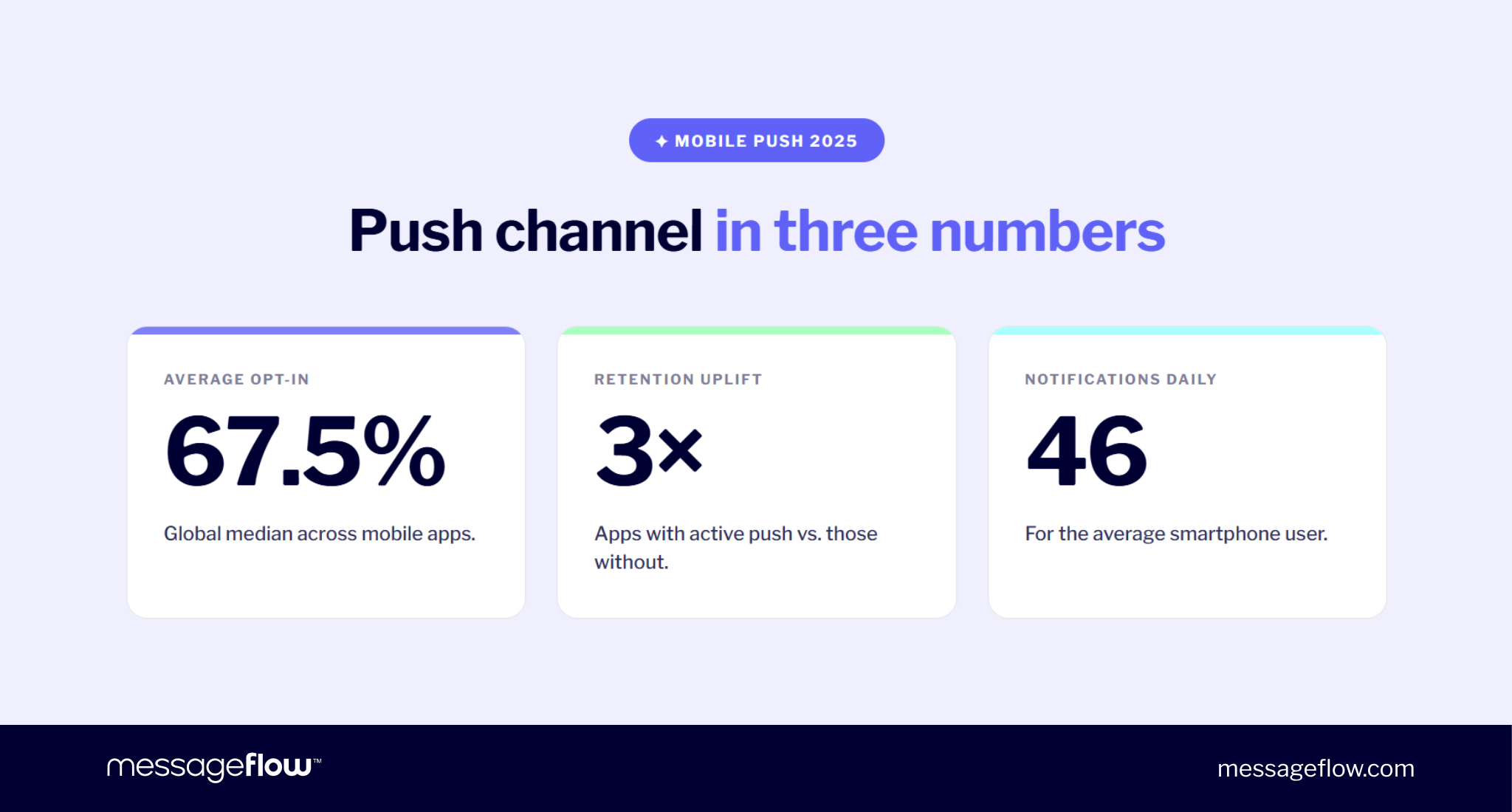
The scale is significant. Global mobile push opt-in sits around 67.5%, apps that actively use push seeup to 3x higher retention than those that don’t, and the average smartphone user receivesaround 46 push notifications per day. On paper, push is the fastest path to a user. In reality, it’s also a channel where a single mistimed message can move someone from engaged to uninstalled in one tap.
This guide covers how push notifications work technically (FCM, APNs, device tokens), how to implement them in your app step by step, how to build a strategy around opt-in, segmentation, frequency, as well as which KPIs are worth tracking in 2026.
What are push notifications in mobile apps?
From the user’s side, a push notification is a message that simply shows up. From the system’s side, it’s a structured payload sent through a delivery service (FCM for Android, APNs for iOS) and rendered by the device’s operating system. We covered the full technical definition separately in our piece on how push notifications work. Here we focus on what’s worth knowing when you’re designing a strategy.
Definition and anatomy
A push notification is a small container with a few clearly bounded elements:
- Title – the first line a user sees. Usually the app name or the message’s hook, ideally 6-8 words.
- Body – one or two sentences, around 10 words. Longer text gets truncated by the OS.
- Icon and badge – the app icon sits next to the message, the badge is the unread-count indicator on the home screen (standard on iOS, launcher-dependent on Android).
- CTA / action – a tap opens the app by default. Push can also include action buttons or deep links into a specific screen.
- Rich media – optional image, GIF, or short video (Notification Service Extension on iOS, BigPictureStyle on Android).
What makes push different from in-app banners or display ads is structural: the notification is a server-side event, signed for a device token, rendered by the OS rather than the app. The app doesn’t have to be running for it to appear.
Push vs. in-app messages vs. SMS
These three channels often get lumped together as phone messages but they differ in fundamental ways: who they reach, what they cost, and when they can appear.
| Channel | Requires app install | Requires consent | Cost per message | Reaches user when app is closed | Typical reach |
|---|---|---|---|---|---|
| Push notification | Yes | Yes (OS opt-in) | None (beyond platform fees) | Yes | App users with active opt-in |
| In-app message | Yes | No | None | No – only during active session | Active app users, regardless of push consent |
| SMS | No | Yes (TCPA / GDPR) | Yes – paid per message | Yes | Any phone number, regardless of device or app |
Push reaches users who already have your app, fastest and at lowest cost, in-app messaging reaches anyone currently in the app (including those who declined push), SMS is the only option when you need to reach someone independent of the app and the only one with a per-message cost.
How mobile push notifications work – tech architecture
A push notification looks instant from the user’s side: the screen lights up, a message appears. Underneath, an organized sequence involves at least three parties – your backend, Google’s or Apple’s relay service, and the specific device. Understanding the flow matters when picking a push platform, designing error handling, or figuring out why some messages don’t arrive.
FCM / APNs flow
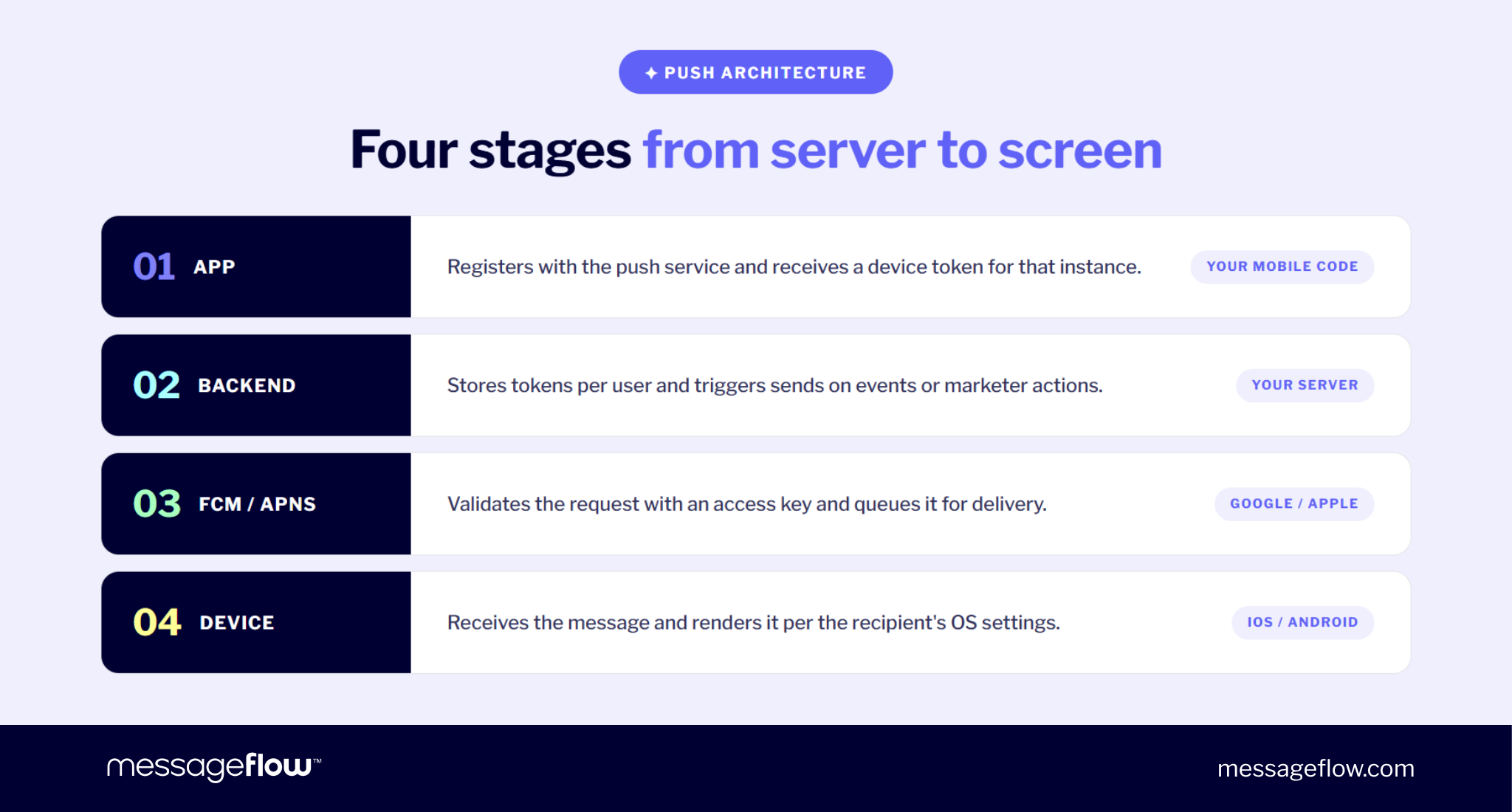
A remote push follows the same four-step path:
- App registers with FCM (Android) or APNs (iOS) on first launch and receives a device token – the unique address for that app instance on that device.
- Backend (your server or a push platform like MessageFlow) stores tokens linked to user accounts and triggers sends from database events, dashboard actions, or automation triggers.
- FCM / APNs validates the request signed with your access key (Server Key for FCM, authorization key for APNs) and queues delivery.
- Device receives over the OS-maintained connection and renders the message according to user settings – banner, sound, badge, or silently in the background.
If anything fails – expired token, invalid certificate, device offline beyond message TTL – push won’t deliver. That’s why delivery rate stays in its own analytics column.
Device tokens – registration, storage, expiration & refresh
A device token is the only address for a specific app instance. Its lifecycle determines whether you reach your base or fire into the void.
Registration happens client-side after the user grants permission. The SDK returns a token, which the app sends to your backend linked to a user account, not a device. One user often has several active devices and as many tokens.
Storage is a one-to-many table between user_id and tokens, with fields for platform, app_version, last_seen_at, and status.
Expiration and invalidation may happen when a user uninstalls, clears app data, restores from backup, lets the app go unopened for long stretches, or changes OS permissions. Sending to a dead token returns NotRegistered, Unregistered, or Invalid token. Mark it inactive immediately, or delivery rate degrades quietly.
Refresh runs in the SDK. The app handles the callback (onNewToken for FCM, didRegisterForRemoteNotificationsWithDeviceToken on iOS) and sends the new token to the backend, mapped to the same user_id.
💡 Periodic housekeeping: auditing last_seen_at and pruning 90+ day inactive tokens protects deliverability over time.
Local vs. remote notifications
The two terms get used interchangeably but they’re different mechanisms and conflating them costs design time.
Remote push is what we’ve described so far: backend → FCM/APNs → device. It needs an internet connection and server infrastructure, and it’s the only type that works for marketing campaigns, transactional confirmations, or alerts from external events.
Local notification is scheduled and triggered by the app itself, with no backend or FCM/APNs involvement. The app uses a local OS API (UNUserNotificationCenter on iOS, NotificationManager on Android) to schedule a message for a specific time or local event.
| Remote | Local | |
|---|---|---|
| Trigger | Server / backend | The app itself |
| Internet required at send | Yes | No |
| Requires FCM/APNs | Yes | No |
| Useful for marketing campaigns | Yes | No |
| Useful for local reminders | Sometimes | Yes |
| Counts toward platform send limits | Yes | No |
Production apps usually use both. The heuristic is if the trigger can be predicted in the app without server contact, it’s local, if it depends on a server-side event, it’s remote.
iOS vs. Android – permission models
The difference used to be simple: iOS asked for consent on first launch, Android enabled notifications by default. Since Android 13 (October 2022) the two models have converged and that changes opt-in strategy in ways still routinely underestimated.
iOS has required explicit consent from day one. If the user denies the first system prompt, it won’t show again. iOS also offers provisional authorization (iOS 12+), which delivers quiet notifications without a prompt.
Android auto-enabled notifications through version 12. From Android 13, apps must request POST_NOTIFICATIONS permission. Per Batch’s data, Android opt-in dropped from ~85% to around 67% in the year after the change.
Strategic implications:
- Prompt timing beats copy. Triggering the system dialog right after install is the fastest path to permanent denial. Delay it until the user touches the app’s value (first order, saved workout, followed product).
- Pre-permission prompt – a custom in-app screen explaining what push delivers is standard on both platforms. Plotline data shows it can lift opt-in 2-3x.
- There is no second prompt. Denial is functionally permanent at the OS level.
Types of mobile push notifications
In production, push notifications fall into four distinct categories – marketing, transactional, rich, and silent. The same content can technically go through any of them, but the difference shapes regulation, user expectations, and realistic CTR.
Marketing push
Marketing push promotes a product, offer, or discount, or tries to win back an inactive user. Common patterns:
- Promotions and offers – flash sale, seasonal markdown, 24-hour coupon, exclusive offer for active users.
- Re-engagement – message to users inactive for X days, often with a personalized hook (new products in a category they previously browsed).
- Abandoned cart – reminder of products left in cart, optionally with a discount or free shipping incentive.
Marketing push requires double consent – system OS opt-in plus marketing consent under GDPR or local equivalents. Of the four categories, this one carries the highest retention risk: over-sending is a fast path to uninstall.
Transactional push
Transactional pushes respond to a specific event in the user’s transaction lifecycle like order confirmation, payment authorization, shipping status, fraud alert, 2FA code. Users expect them, which translates to consistently higher open rates – aggregated benchmarks put transactional around 69%, versus 3-5% for marketing.
A different legal basis applies: contract performance or legitimate interest under GDPR (Art. 6(1)(b) or 6(1)(f)), not marketing consent. You can send a payment confirmation to a user who didn’t tick the marketing checkbox as long as the message genuinely concerns the transaction.
💡 The line matters. The moment “Your order has shipped” tags on “and check out our new collection,” the message changes legal category. We cover specific copy patterns and triggers in our post on transactional push notification examples.
“Users learn very quickly whether mobile pushes are useful to them or purely sales-driven. In practice, the biggest mistake is mixing intentions in a single message. Well-designed communication in this channel should have a clear goal: either inform the user about an event they’re expecting, or try to influence their purchasing decision.” – says Piotr Kudzior, Product Manager – Conversational Messaging at MessageFlow.
Rich push
Standard push is plain text. Rich push adds an image, GIF, video, or action buttons and does it without app intervention, since media is fetched by the OS at delivery. iOS uses Notification Service Extension, Android uses BigPictureStyle.
Airship’s analysis of 50B notifications shows rich push averages 25% higher click rates than text-only, with visual personalization (the actual product from a cart) widening the gap. It works hardest where the image carries information like courier photo in food delivery, thumbnail of an abandoned product, frame from a new episode. Full formats and examples in our rich push notifications post.
Silent / background push
The fourth type doesn’t show to the user at all. Silent push (iOS) or data-only message (Android) reaches the app in the background and handles technical orchestration – refreshing local data, updating badge counts, syncing geofences, fetching new feed content.
iOS uses the content-available: 1 flag in the APNs payload. The app gets ~30 seconds of background runtime, and Apple throttles aggressive senders. Android handles it via data-only messages routed through onMessageReceived() in the FCM SDK.
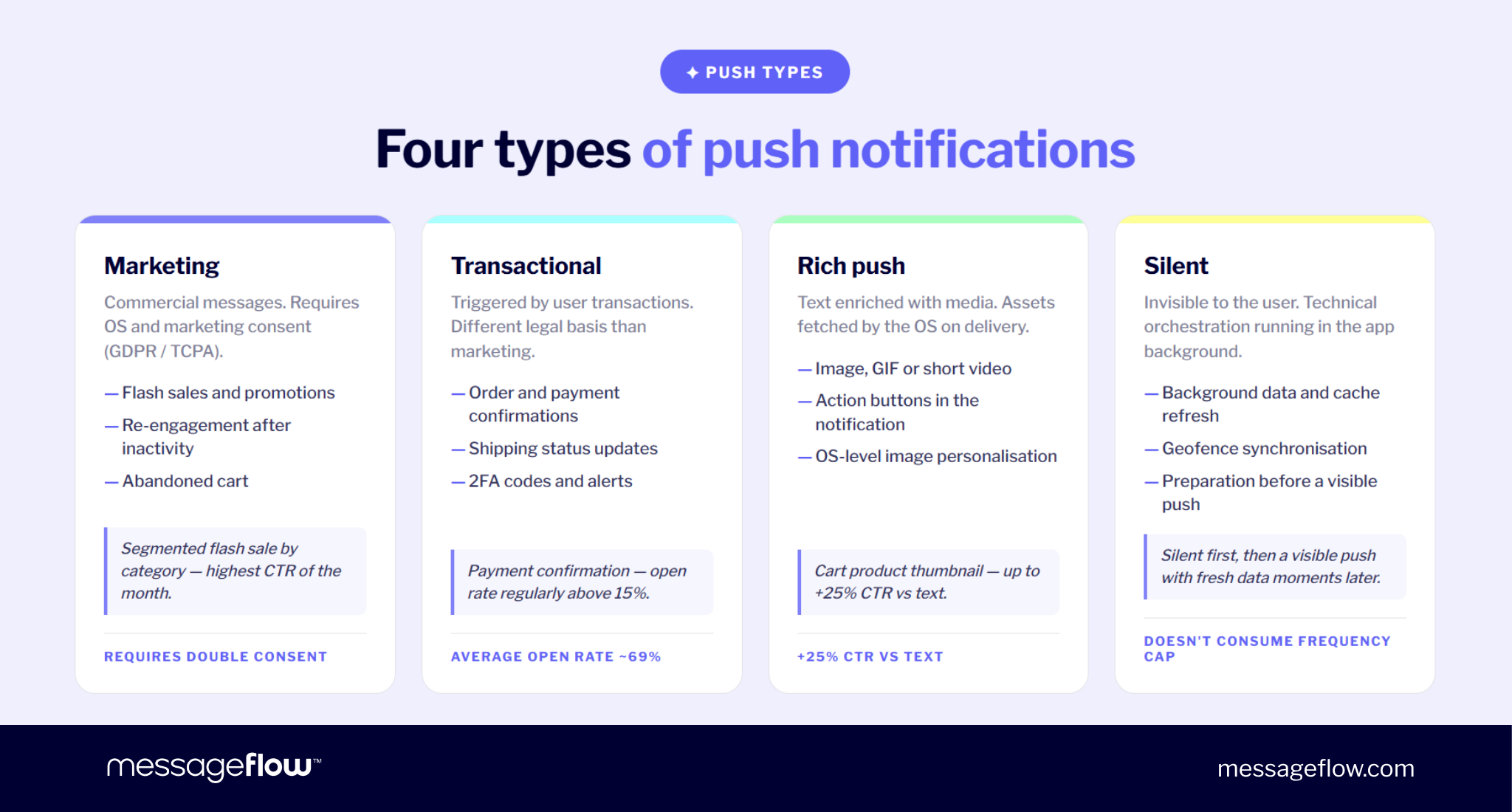
💡 Common pattern: silent push as a “tap on the shoulder” before a visible message. First refresh local data quietly, then send the visible notification with the updated state. Silent push doesn’t count as a marketing contact and doesn’t consume frequency budget.
Why your mobile app needs push notifications – ROI & stats
The full business analysis of push – CAC impact, LTV, recovered revenue – is in our why mobile apps need push notifications piece. Here we focus on three numbers that decide investment priority fastest: retention impact, engagement benchmarks by industry, and current opt-in rates by platform.
Retention impact
The 3x retention figure from our intro comes from Airship’s analysis of 63 million app users. Less cited but equally important: from the same cohort, 95% of users who formally opted in to notifications but received zero pushes in their first 90 days eventually churned.
Two uncomfortable conclusions in one. The absence of push limits retention, but silence after opt-in is worse. A user who gave permission and received nothing for two weeks loses both the reason to open the app and the signal that anyone’s home on the other side.
💡 Practical implication: the first push should reach the user within days of opt-in, ideally a welcome flow or confirmation of their first valuable action. Apps that skip this step often see permission revocation rates exceed their opt-in rates.
Engagement rates by industry
Aggregate push CTR is a misleading metric – variance between industries is so wide that the average carries little meaning. Pushwoosh 2025 data on 600+ apps shows median CTR of 3.78% for e-commerce on Android, below 1% for action games, and several times higher for fintech, media, and travel.
CTR in isolation isn’t as important as its ratio to your category and message type. Transactional fintech push (payment alert, 2FA) routinely clears 10-15%, a number action games couldn’t hit with a perfect campaign. Cart abandonment in ecommerce regularly pushes 10%+ and remains one of mobile’s most efficient conversion formats.
Benchmark against your category median, not the global average. Full breakdown by industry and platform appears later in this guide.
Opt-in rates: Android vs iOS 2025
Global mobile opt-in stabilized around 61% (Batch 2025, 800B messages), Android 67%, iOS 56%, with the platform gap traceable to legacy defaults rather than current consent architecture. The platform average isn’t the most useful part of the benchmark, the spread across industries is.
- Fintech and utility apps – regularly above 70%, sometimes 85%+. Users want payment alerts, so consent is rational on their side.
- Travel and e-commerce – 65-72%, stable with a well-positioned pre-permission prompt.
- Media and entertainment – 60–65%, users decline quickly if value isn’t apparent in the first session.
- Gaming – 21-28%, the lowest of any category, demanding dedicated re-permission strategy.
If you’re inside your category’s range, the opt-in mechanic works. Below it, the issue is usually prompt timing or a missing pre-permission screen, not the system dialog copy.
Setting up push notifications step-by-step
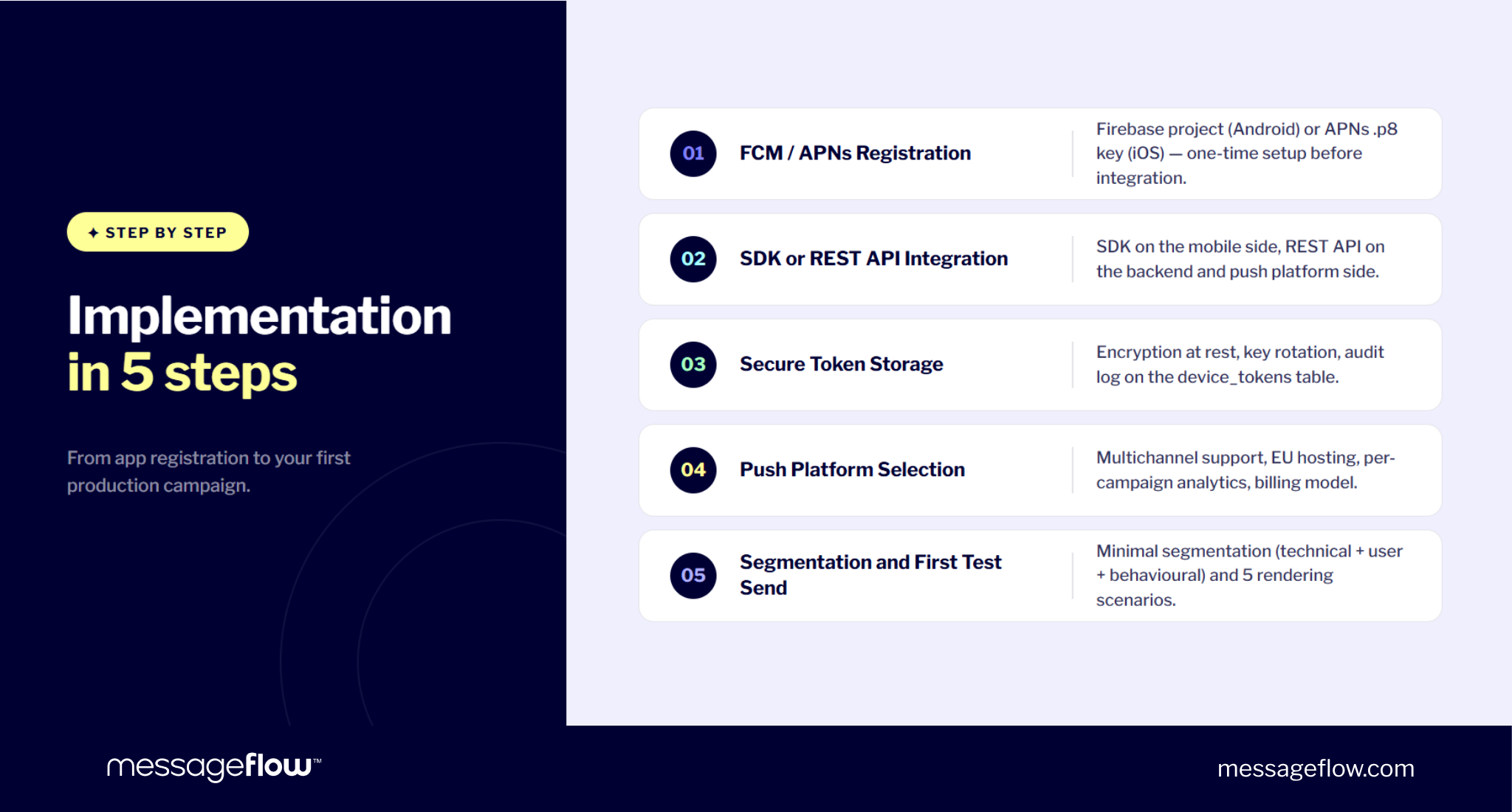
Implementing push in a production app isn’t one big project. It involves five steps best done in this order. The first three are technical and one-time. Step four is an architectural decision with longer consequences. Step five is when the channel becomes useful for marketing and product.
Step 1 – Register with FCM (Android) or APNs (iOS)
Sending remote push starts with registering your app in the platform’s relay service.
Android – FCM:
- Create a project in Firebase Console.
- Add your Android app with the package name (matching applicationId in build.gradle).
- Download google-services.json into app/.
- Add FCM SDK dependencies to build.gradle.
- Use HTTP v1 API from Project Settings → Cloud Messaging (legacy Server Key deprecated June 2024).
iOS – APNs:
- Apple Developer Program account ($99/year) required.
- Create an App ID with Push Notifications enabled.
- Generate an APNs authorization key (.p8) – better than .p12 certificates, doesn’t expire, works for both environments.
- Save Key ID, Team ID, and the .p8 file.
- Enable Push Notifications capability in Xcode under Signing & Capabilities.
Common error: identifier mismatch between google-services.json and applicationId, or between Bundle ID in Apple Developer and Xcode. Push goes silent, logs say nothing useful. Audit config files right after registration.
Step 2 – Integrate SDK or REST API
After registration, you have two paths with organizational consequences, not just technical ones.
SDK path (Firebase SDK / Apple UserNotifications, plus your push platform’s SDK) ships fastest and handles routine mechanics: token registration, refresh after reinstall, retry, local buffering, sometimes analytics. A few dozen lines of code and it works.
REST API path (HTTP calls to FCM v1 / APNs, or to a platform’s API) gives more control and avoids vendor lock-in. It fits architectures where push is part of a broader messaging system (email, SMS, in-app) called from one orchestration service. The cost is engineering hours – you handle token lifecycle, retry policy, batching, and rate limiting yourself.
A production app typically uses a hybrid:
- Mobile side – Firebase Messaging SDK (Android) and UserNotifications framework (iOS), since you already have them after Step 1.
- Backend / marketing side – REST API of your push platform (e.g., MessageFlow), which handles token lifecycle, segmentation, scheduling, and analytics.
The split lets mobile stay in native technology while backend uses one multichannel API instead of building separate FCM and APNs integrations.
Step 3 – Store device tokens securely
The device_tokens schema we covered earlier handles the data model. This step is about securing that data.
Three rules from day one:
1. Tokens are personal data. A device token paired with user_id qualifies as personal data under GDPR. That means encryption at rest in your production database and backups. Standard managed databases (Postgres TDE, MySQL transparent encryption, RDS) handle this without code changes.
2. FCM Server Key and APNs .p8 are production secrets. Don’t keep them in the repo or in environment variables visible to the whole team. Use AWS Secrets Manager, HashiCorp Vault, or Google Secret Manager. Rotate every 6-12 months. .p8 keys don’t formally expire, but rotation is good practice.
3. Dev / staging / prod must have separate tokens and keys. Same Bundle ID + same APNs key across three environments = test pushes hitting production devices. APNs has supported sandbox vs production for years. FCM HTTP v1 is flexible but requires conscious project separation per environment.
A basic audit log on device_tokens (insert, mark inactive, delete) turns a GDPR deletion request into a five-minute task instead of forensics.
Step 4 – Choose a push platform
You can theoretically stop at direct FCM and APNs and build the logic layer yourself including segmentation, scheduling, A/B tests, analytics, channel fallback. Few teams take this on, because building it is months of work and the maintenance scales with send volume.
Things worth evaluating:
- Multichannel. Push rarely operates alone. A platform combining push, email, SMS, and in-app in one API and one user view saves operational time and gives a cleaner view of conversion than three separate tools.
- Data location and GDPR fit. EU hosting, signed DPA, SOC 2 / ISO 27001, CSA membership – all in support of compliance audits.
- Analytics depth. Delivery rate and CTR are the floor. You also need per-campaign and per-user reporting, in-app conversion attribution, opt-out trends, cross-channel user paths.
- API and SDK quality. Webhooks, batch sending, idempotency keys, rate limit headers, OpenAPI docs.
- Pricing model. Per device, per send, flat tier – fit depends on volume, not on the cheapest line in the price list.
MessageFlow Mobile Push platform fits this profile: one API for push, email, SMS, and RCS, EU hosting with CSA certification, segmentation by user attributes, sending and conversion metrics in one dashboard. Worth evaluating if you’re rolling out push alongside other communication channels in parallel.
Step 5 – Configure segmentation and send a test notification
Configure minimal segmentation first, then send your first test push. Testing without segmentation breaks the moment a real campaign goes live.
Day-one segmentation runs on three dimensions:
- Technical – platform, app version, device language. Lets you exclude old app versions or target rich push to supporting platforms.
- User – user_id, plan, registration date, last activity, marketing opt-in status. The base for promotional targeting, lifecycle, and transactional messaging.
- Behavioral – in-app events (added to cart, completed onboarding, last purchase). Without these, you can’t build triggered pushes that drive above-average CTR.
Send your test push to your own user_id with a known device token. Verify four rendering scenarios, OS behavior varies by app state:
- App closed – banner shows and lands in notification center. Check icon, badge, sound.
- App in background – same plus tap behavior (deep link, preserved context).
- App in foreground – iOS and Android suppress the banner by default, the app decides whether to show an in-app message.
- Lock screen – verify preview (no private data exposed if user disables previews).
- Rich push – confirm image delivery, GIF rendering, action buttons routing.
Once this passes, the channel is ready for first production – small, 5–10% test segment, metrics through the dashboard.
Building a push notification strategy
Push that works isn’t a configured platform but a coherent communication practice where segmentation, personalization, timing, and opt-in strategy reinforce each other. The full editorial framework lives in our mobile push in your marketing strategy post. Below is a condensed view of the four pillars that decide whether push works or wears users out.
Audience segmentation and behavioral targeting
Technical and attribute-based segmentation from Step 5 is the baseline. Real difference comes from behavioral targeting – triggers based on specific in-app events or activity patterns instead of static traits.
Four behavioral segment types that work across common app categories:
- Product event triggers – abandoned cart at 30 minutes, completed onboarding, purchase above threshold, product added to wishlist.
- Activity patterns– inactive 7 / 14 / 30 days, steady engagement, declining session frequency.
- Lifecycle stage – new user (first 7 days), active regular, at-risk, lost.
- Attribute combinations – e.g., “inactive 14 days + premium user + last session in category X”. The segments where push delivers the highest ROI, because audience and message both match.
Behavioral segmentation needs one thing: the app must emit events consistently to the push platform. Without a clean event stream, segments are fiction. A meaningful share of strategic push work is keeping event tracking accurate, not creating campaign creative.
Personalization (triggered events, lifecycle stage)
Personalization picks up where segmentation ends. Segmentation decides who gets the message, personalization decides what the message actually says. That distinction avoids the standard push trap of assuming “Hi {first_name}” is enough.
Production personalization works on three layers:
- Event triggers – message follows from a specific action and references it directly: “Your package {order_id} was just picked up by the courier”, “You added {product_name} to your wishlist — price dropped 12%”.
- User attributes – context from what you know: location, plan tier, language, last category browsed.
- Lifecycle stage – same theme, different message for a new user vs a customer with 18 months of history.
Layered together, these produce a push that reads like a message to a specific person, not a corporate update on a lock screen. Airship’s data shows personalized notifications run up to 4x higher reaction rates than generic broadcasts.
Optimal timing and frequency
Full timing and frequency optimization is its own subject – see our best time to send push notifications post. Three rules lose value fastest if violated.
Frequency. High-performing apps send 1-3 marketing pushes per user per week. Past that, risk grows nonlinearly: users receiving more than 6 pushes per week from a single brand are 3.4x more likely to uninstall within 30 days. Transactional and critical alerts don’t count.
Timezone. Send by recipient’s local time, not by a marketing hour in your office. A push sent 10 AM from Warsaw lands at 4 AM for a New York user. Decent platforms support local-time scheduling out of the box, the open rate gap is double-digit percent.
User activity window. Strong platforms send to per-user activity windows (smart timing). Where unavailable, fall back to industry benchmarks: ecommerce gains on 8-9 AM and 6-8 PM sends, media on mornings, food delivery around lunch and dinner.
Opt-in prompt strategy – the “value exchange” principle
A pre-permission prompt isn’t asking for permission so much as proposing a contract: in return for opt-in, you’ll deliver something specific, predictable, and relevant. Without that, the deal is one-sided and the user declines.
An effective value exchange meets three conditions:
- A specific promise, not a category. “Turn on notifications to stay updated” is one-sided. “Notify me when {product_name} from my cart is back in stock at this price” is a deal. The user knows exactly what they’ll get.
- User-side value, not brand-side. “News from our team” is about the brand. “Order status alerts” is about the user. The latter converts noticeably better.
- Context that matches the moment. Prompt after adding to wishlist should mention price and availability, prompt after a first workout should reference the next session. Aligning the ask with the action just taken beats sophisticated copy in the wrong moment.
The anti-pattern you may see: a prompt with three buzzwords and a bell icon. “Don’t miss anything important, turn on notifications.” Not a value exchange, but a request for trust without a reason to grant it.
Push notification best practices – do’s & don’ts
The strategy section answered “to whom and with what message.” These practices answer the operational question – how to actually configure a campaign that doesn’t fail on execution.
Copywriting
Main rule of push copy: the point fits in 10 words. Past that, iOS and Android start truncating, and a user glancing for half a second can’t read it anyway.
A few specific rules:
- Title = brand or short hook. Body carries information. Combining both makes both lose.
- Tokens where they earn weight. First name in the title rarely works;,product name or price in body works noticeably better.
- Emoji as an accent, not decoration. Airship found emoji lifts reaction rate ~20% but only when it fits context.
- CTA direct. “Check it” works, “Pop in if you have time” doesn’t.
Copy patterns and examples in our creative push notification ideas post.
Frequency rules
The numerical limits are in the strategy section (1-3/week; 6+ = 3.4x uninstall risk). What separates apps that hold those numbers from apps that trip them is operational control:
- Per-user frequency cap. Hard limit on marketing pushes per time window. The platform drops excess sends regardless of campaigns running.
- Non-transactional exclusion. 2FA, payment alerts, order status don’t count toward marketing limits. Capping differentiates by campaign tag, not sender.
- Quiet hours. Default block on marketing sends during recipient’s nighttime (10 PM-8 AM local).
- Multichannel contact budget. A user gets emails + SMS + push from you in the same week. Caps belong at the cross-channel level.
A/B testing push campaigns
A/B testing in push differs from email in one specific way: users react within the first hour instead of days. Significance that takes a week in email shows up in an afternoon which tempts teams into testing too many things at once.
Four rules that separate useful tests from coin flips:
- One variable per test. Testing title, body, and send time in one experiment is gambling.
- Random, representative sample. “iOS gets A, Android gets B” breaks the test.
- Minimum 1,000-2,000 per variant. For typical push CTRs, the floor where a 0.5 p.p. lift becomes meaningful.
- Hypothesis before experiment. “Let’s see which wins” isn’t a hypothesis.
Setup examples, sample size calculator, and common pitfalls in our A/B testing push notifications post.
“Push campaigns rarely fail because of a bad idea. More often the culprit is strategic chaos: a message that’s too long, wrong timing, overlapping campaigns, or a test that yields little insight. That’s why push should be treated as a long-term channel. The notification copy itself is just the final step. Underneath it you need audience segmentation, appropriate frequency, a clear distinction between message types, and tests that are planned with a real interpretation strategy in mind. Only then does copy actually have a chance to drive results. In a well-managed push channel, success isn’t a one-off spike in CTR, it’s sustaining meaningful engagement over the long run.” – adds Piotr Kudzior, Product Manager – Conversational Messaging at MessageFlow.
Handling permission denial – fallback to in-app or email
A portion of your user base won’t grant push permission declining the prompt or revoking later. Apps that ignore the segment lose a meaningful communication layer, apps with fallback continue contact without bending consent.
Three mechanisms that cover the gap:
- In-app messaging. Active session required, not system permission. Often the only channel for push-less users. Rhythm: one contextual message per session, matched to screen and lifecycle.
- Email fallback. Separate marketing consent under GDPR, but reaches users independent of push. Trigger fires → check push consent → if absent, route to email.
- SMS as critical fallback. Costly per message but for transactional cases (payment alert, 2FA) reaches where push and email don’t.
What not to do:
- Don’t reclassify messages to bypass consent. “New products” sent as transactional email is regulatory and sender reputation risk.
- Don’t flood in-app messages. Frequency caps apply to in-app too.
- Don’t work around denial with creative re-prompts. Apple and Google notice, extreme cases get pulled from the store.
Push notification analytics – KPIs you must track
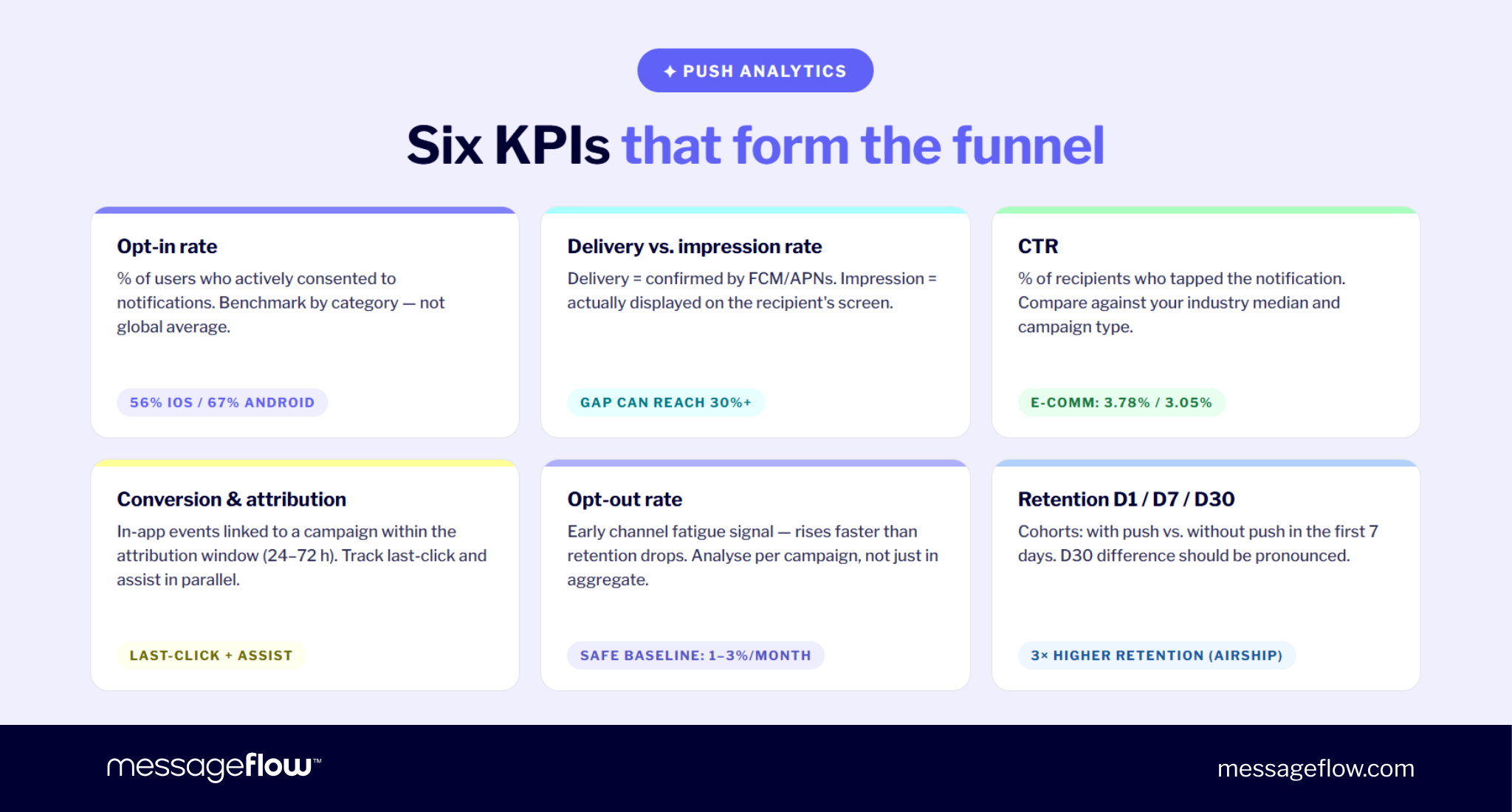
Six metrics that together reveal whether the channel works. In isolation, each tells you only a fragment. Arranged in sequence, they form a funnel where each stage answers a different diagnostic question.
Opt-in rate
Share of users who actively granted permission relative to those who saw the prompt. Global benchmark sits at 61% (iOS 56%, Android 67%, Batch 2025). Useful as reference but real diagnostic value lives in industry comparison.
| Industry | Opt-in iOS | Opt-in Android |
|---|---|---|
| Fintech | 50-60% | 70-93% |
| Travel | 55-60% | 70-80% |
| E-commerce / Retail | 50-55% | 65-72% |
| Media & entertainment | 40-50% | 60-65% |
| Gaming | 21-28% | 25-35% |
Below your category’s lower bound, the issue is pre-permission timing or copy, not the OS dialog itself.
Delivery rate vs. impression rate
Delivery rate = share confirmed as delivered by FCM/APNs. Impression rate = share actually displayed on a user’s screen. The gap can be wide: 95% delivery with 60% impression means a third of sends land on muted notifications, DND mode, or apps the OS deprioritizes.
Tracking only delivery rate hides the channel’s real reach. Serious push platforms report both separately per campaign.
CTR by industry
Pushwoosh 2025 benchmarks from 600+ apps:
| Industry | CTR Android | CTR iOS |
|---|---|---|
| Ecommerce / Retail | 3.78% | 3.05% |
| Fintech | 2.84% | 2.09% |
| Action gaming | 0.82% | 0.46% |
Transactional and behavior-triggered push runs several times higher – abandoned cart routinely over 10%, fintech alerts over 15%. Aggregate medians hide much stronger results at the campaign-type level.
Conversion rate and revenue attribution
CTR shows that someone tapped, not what you earned. Attribution requires linking in-app events (purchase, sign-up, completed action) to a specific campaign within an attribution window (typically 24-72 hours).
Two models worth tracking in parallel:
- Last-click – campaign whose tap was the final touch gets full credit. Clean to measure, blind to campaigns that prepared the conversion earlier.
- Assist – campaign whose tap appeared in the path, not necessarily last. Surfaces push contribution to conversions formally credited to other channels.
Without attribution, you can only answer how many tapped, not how much revenue this produced.
Opt-out rate – the early churn signal
Share of users who turned off notifications during a campaign or period (in-app or at the OS level). Leading indicator of channel fatigue: rises faster than retention drops, so it’s the first signal worth watching.
Safe baseline in a typical app: 1-3% monthly. A jump to 8-10% in a single week after a big campaign means copy, frequency, or segmentation didn’t land. Per-campaign opt-out matters too: a send producing 5x the average revocations is an artifact to analyze, not noise.
Retention (Day 1 / Day 7 / Day 30)
The strongest diagnostic of push strategy is cohort comparison: D1, D7, and D30 retention for users who received at least one notification in the first 7 days vs. those who didn’t. D7 difference should be visible, D30 dramatic. If it isn’t, push is reaching a segment that doesn’t see real value in it and optimizing individual campaigns won’t fix that.
Push notification use cases by industry
Four industries where push delivers most measurable communication value, plus a fifth slice – proximity marketing – that bridges push with offline location.
Ecommerce
- Abandoned cart – push 30 minutes after session interruption, with product name and optional incentive. One of mobile’s highest-ROI single use cases.
- Back-in-stock – alert to users who added an out-of-stock product to wishlist. Tap goes straight to the product page with the available variant.
- Flash sale – segment by category preferences, send within a 1-2 hour window. Without segmentation it converts poorly;-, with segmentation, often the highest CTR of the month.
- Post-purchase + shipping status – transactional push that maintains engagement after conversion and reduces “where is my order” support tickets.
Fintech
- Real-time payment confirmation – value to user is obvious, CTR and open rates stay above 15%.
- Suspicious transaction alert – push with authorize/decline action buttons. Used operationally in fraud prevention.
- Balance update and spending thresholds – informational message (“you’ve passed this month’s budget”), triggered on a financial product rule.
- 2FA / login authorization – utility push that raises security perception and lowers friction.
Media and entertainment
- Breaking news – push that demands the highest editorial discipline. A false alarm erodes long-term opt-in faster than any other campaign.
- New episode / new content – alert to subscribers of a publication, new season, or favorite creator. High relevance, low frequency.
- Personalized feed – push with new content matched to consumption history. Different segments receive different messages in the same time window.
Travel and logistics
- Booking confirmation – instant push after ticket or accommodation purchase, with deep link to details.
- Check-in or delay alert – real-time push at the highest priority for the user, CTR routinely over 20%.
- Delivery tracking – push sequence across the order cycle (received → packed → shipped → courier en route → delivered). The strongest use case in e-commerce logistics.
- In-trip assistant – check-in reminder, route suggestion to the gate, gate change notice.
Retail and proximity marketing
Location-based push (geofencing) fires a message when a user physically nears a store or enters a defined area – a special offer at the entrance, an in-app product map, a coupon valid only at that location.
It adds an offline layer to digital communication and works wherever geographic context carries its own value. Full architecture, regulations, and implementation examples in our piece on push notifications in retail and location-based marketing.
Ready to add push notifications to your mobile app? MessageFlow platform handles FCM, APNs, segmentation, and analytics in one dashboard — no server infrastructure required. Get started free →
FAQ – Push for mobile apps
A push notification is triggered server-side, routed through Firebase Cloud Messaging (Android) or Apple’s APNs (iOS), and delivered to the device token registered by the user’s app. The OS displays the message as a banner, sound, or notification center entry whether or not the app is currently open.
Push notifications are OS-level messages delivered even when the app isn’t open and require user opt-in. In-app messages appear only during an active session, reach users currently in the app regardless of push permission, and don’t need OS consent. Push drives re-engagement, in-app messaging drives in-session behavior.
Register your app with FCM (Android) or APNs (iOS), integrate the relevant SDK, store device tokens securely on your backend, and connect to a push platform that handles sending, segmentation, and analytics without building proprietary server infrastructure for each delivery channel.
Median push CTR sits at 3.78% on Android and 3.05% on iOS for e-commerce. Fintech runs higher, gaming sits below 1%. Personalization, behavioral triggers, and rich media consistently lift CTR several percentage points above these averages.
High-performing apps send 1-3 marketing notifications per user per week, focused on triggered behavioral messages over broadcast campaigns. Users receiving more than 6 pushes per week from a single brand are 3.4 times more likely to uninstall within 30 days. Transactional and critical alerts don’t count toward this limit.
Global mobile opt-in averages around 61%-56% on iOS and 67% on Android. Android rates declined from ~85% after Android 13’s permission changes but remain higher than iOS. Fintech and utility apps consistently achieve the highest opt-in rates.