
TL;DR: An RCS Brand Agent is your brand’s verified identity in the RCS ecosystem. It shows your logo, verified name, and contact details natively inside the recipient’s messaging app. Before you can send any RCS business campaign, you need to create and verify a Brand Agent through a certified Verification Authority. This guide explains what an RCS Brand Agent is, how RCS sender verification works step by step, and exactly what you need to prepare.
Before RCS Business Messaging existed, the only thing identifying a business in an SMS thread was a phone number. That number told recipients almost nothing about who was actually reaching out.
So messages got ignored. Or worse, deleted and marked as spam. Consumers had no reliable way to tell a legitimate business text from a fraudulent one.
Smishing made the problem worse. Scammers impersonating real brands sent fake texts with convincing names and no way for recipients to verify them. Trust in SMS took a hit it still hasn’t fully recovered from.
RCS Business Messaging (RBM) was introduced in 2018 to fix this. It gave brands a secure, modern channel for mobile communication: verified sender identity, rich media, and interactive elements, all inside the recipient’s default messaging app.
The RCS Brand Agent sits at the center of that experience. It’s the foundation every verified RCS business conversation is built on.
💡 This article focuses specifically on the RCS Brand Agent and the RCS sender verification process. If you want a broader overview of RCS as a protocol, we cover that in a complete guide to RCS Messaging.
What is an RCS Brand Agent?
An RCS Brand Agent is the verified business identity within the RCS ecosystem. It stores your brand name, logo, colors, and business information, and displays them natively inside the recipient’s default messaging app. Every business must create and verify a Brand Agent through a certified Verification Authority before sending RCS messages.
You may have also seen the terms “Brand Bot,” “RBM Agent,” or simply “RCS Agent” used in documentation. They all refer to the same thing: your brand’s official, verified presence in the RCS channel.
RCS Agent vs. Brand Chatbot: What’s the difference?
These two terms are often used interchangeably. They shouldn’t be.
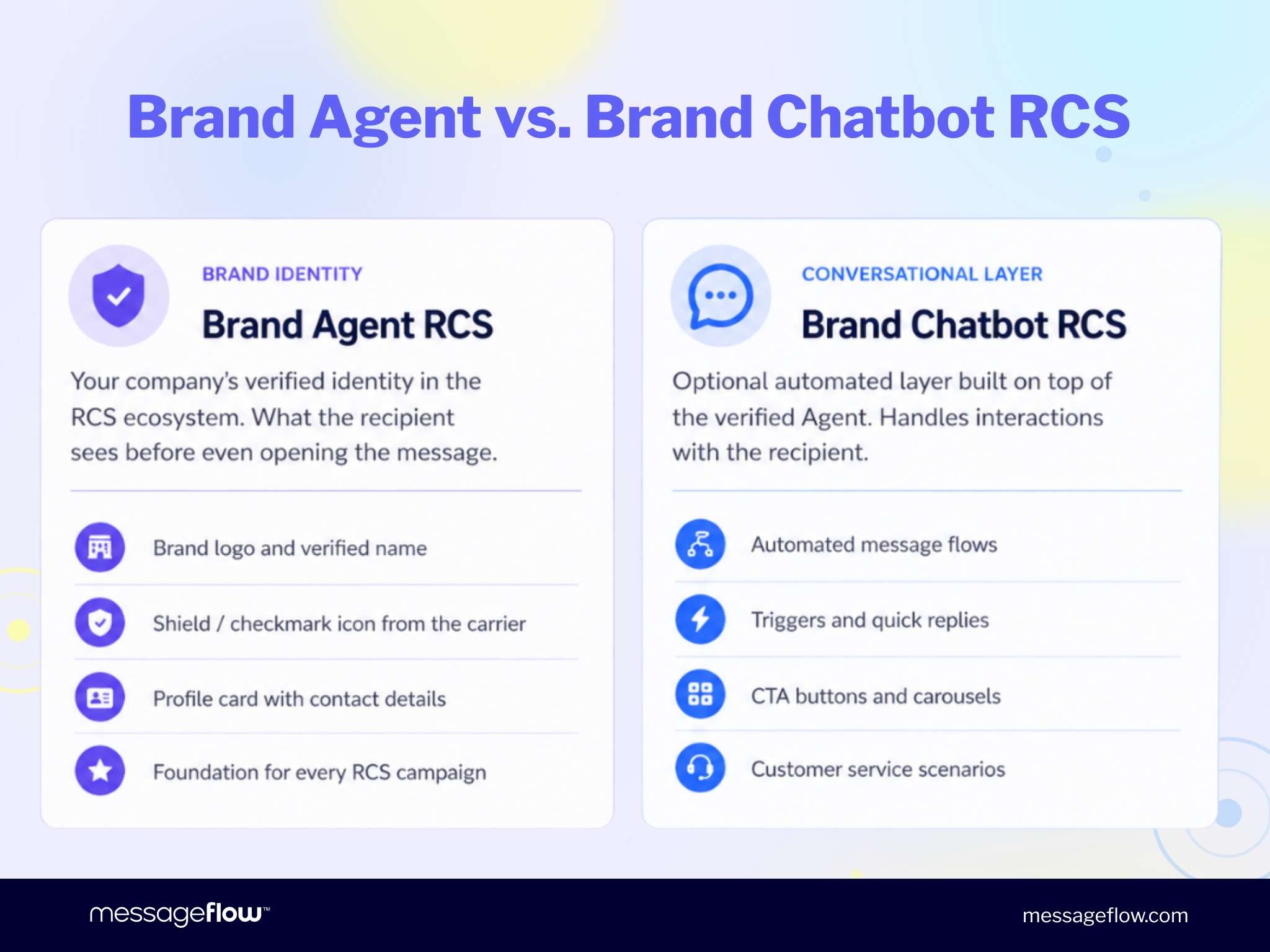
The RCS Brand Agent is your brand identity. It controls how your business appears in the messaging thread: logo, verified name, verification badge, and contact details. Think of it as your brand’s digital storefront inside the recipient’s inbox.
The RCS Brand Chatbot is the conversational layer built on top of that identity. It handles automated message flows, triggers, suggested replies, and CTA buttons. It’s the staff member working inside the storefront.
💡 At MessageFlow, we refer to this conversational layer as the Brand Chatbot. Google’s official technical term for the same functionality is RCS Agent. Both descriptions point to the same concept: automation built on top of a verified Brand Agent.
You can’t run a Brand Chatbot without a verified RCS Brand Agent. RCS sender verification is the first step, and there are no shortcuts.
The components of an RCS Brand Agent
A verified RCS Brand Agent is made up of several elements that together create a consistent, recognizable brand presence in any messaging thread.
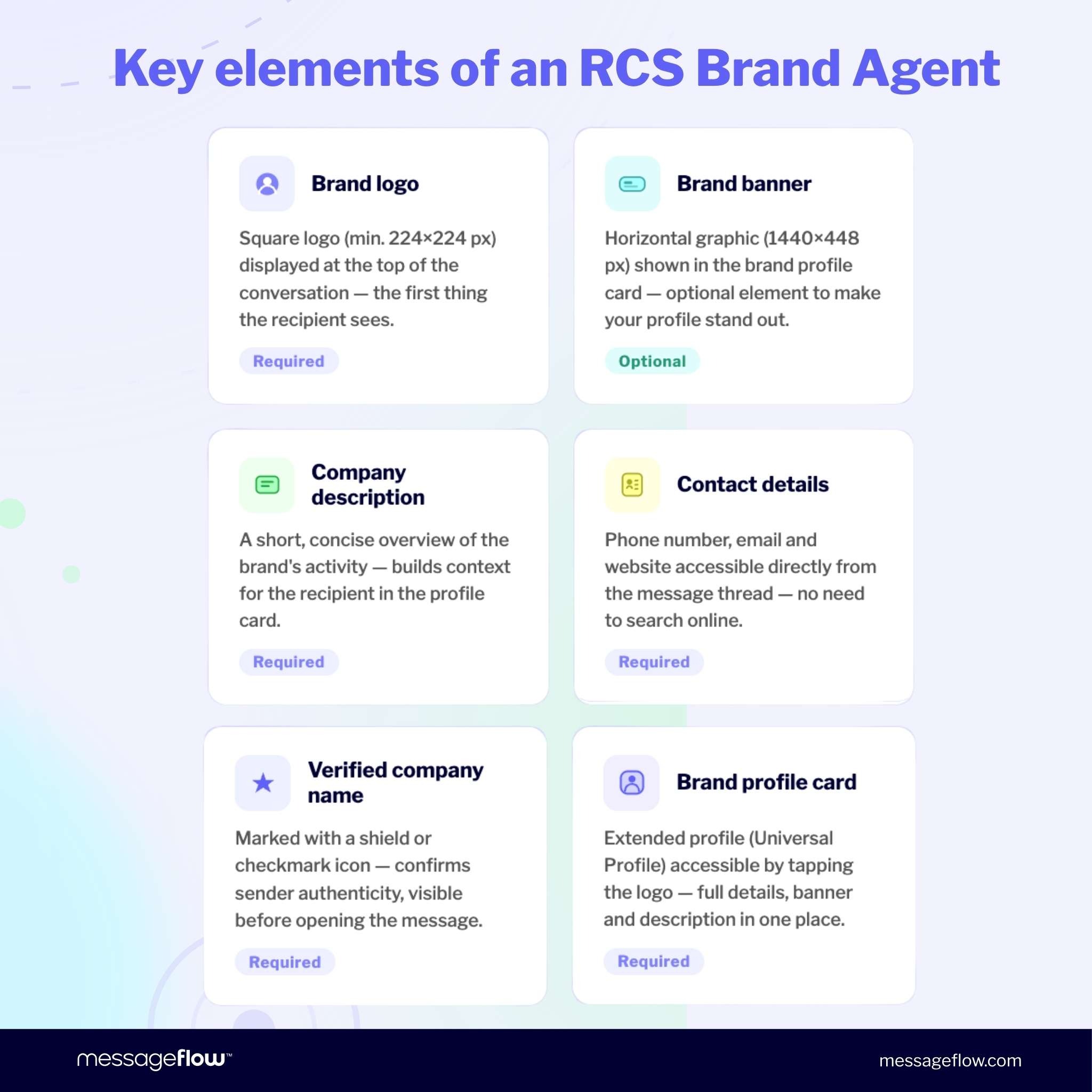
Those elements include:
- Brand logo: Square format, minimum 224 x 224 px, displayed at the top of the conversation,
- Brand banner (optional): A horizontal image shown in the business card view,
- Verified business name: Displayed with a shield icon or checkmark confirming the sender’s authenticity,
- Business description: A short overview of what your company does,
- Contact details: Phone number, email address, and website URL,
- Business card (Universal Profile): An expanded profile the recipient can open by tapping the brand logo in the thread.
These elements give recipients an immediate trust signal before they even open the message.
Why RCS sender verification matters for B2C communication
In mobile messaging, the first impression forms before a single word is read. Who sent the message often matters more than what it says. And in a landscape where mobile fraud is accelerating, that first impression is everything.
The smishing problem
Smishing (phishing carried out through mobile messages) is growing at an alarming rate. Smishing volumes increased by 157% year over year in 2024, according to Proofpoint’s State of the Phish report. The method is effective precisely because SMS has no sender verification layer.
A recipient who sees a message from “Bank XYZ” has no way to confirm whether the real bank sent it or a scammer did. The name field in SMS is free to set by anyone.
A verified RCS Brand Agent removes that vulnerability. Its identity is confirmed by Google and the mobile carriers, making impersonation technically impossible. For more on how RCS handles security and message integrity, we cover the full picture in a dedicated article.
How verified sender profiles build customer trust
Verification isn’t just about security. It’s a direct trust signal to your customers.
Research shows that nearly 80% of consumers say that seeing a brand logo and a verification checkmark in a message thread makes them more confident in the sender. That confidence translates into higher open rates, more clicks, and stronger conversion across RCS campaigns.
RCS messages are visually richer than SMS by design. But it’s the verified identity that makes them genuinely trustworthy. Visual engagement and sender trust together are what drive the RCS engagement statistics that make the channel worth investing in.
RCS verified sender vs. SMS sender ID
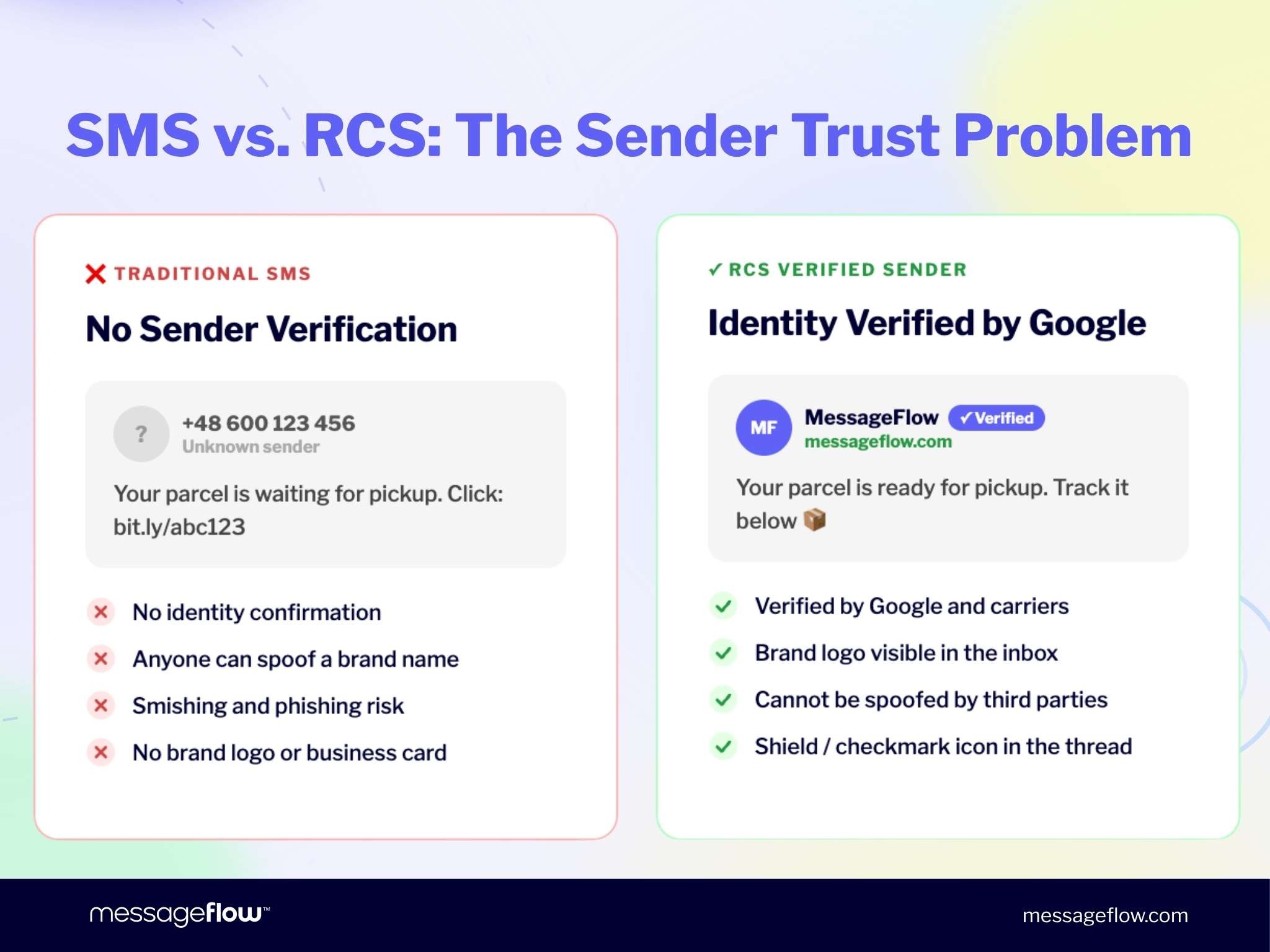
RCS and SMS might feel like two versions of the same channel. At the sender identity level, they’re fundamentally different.
| Feature | RCS Verified Sender | SMS Sender ID |
| Identity verification | Yes (Google + carriers) | No |
| Brand logo in thread | Yes | No |
| Verification badge | Yes (shield / checkmark) | No |
| Can be spoofed | No | Yes |
| Rich media (carousels, CTA buttons) | Yes | No |
| Business card (Universal Profile) | Yes | No |
| Automatic SMS fallback | Yes | N/A |
| Registration required | Yes (via Verification Authority) | Carrier-dependent |
How RCS Brand Agent verification works: step by step
RCS Brand Agent registration follows a clear, structured process. One key difference from SMS: you don’t need to buy a 10-digit phone number or a short code. Your Verification Authority registers your brand profile with mobile carriers on your behalf.
Here’s what the process looks like from start to finish.
Step 1: Choose a verification authority
A Verification Authority is a certified messaging service provider responsible for registering your RCS Brand Agent with mobile carriers. Its role is to confirm that the business name, logo, and domain you submit genuinely belong to your organization.
Step 2: Prepare your brand assets
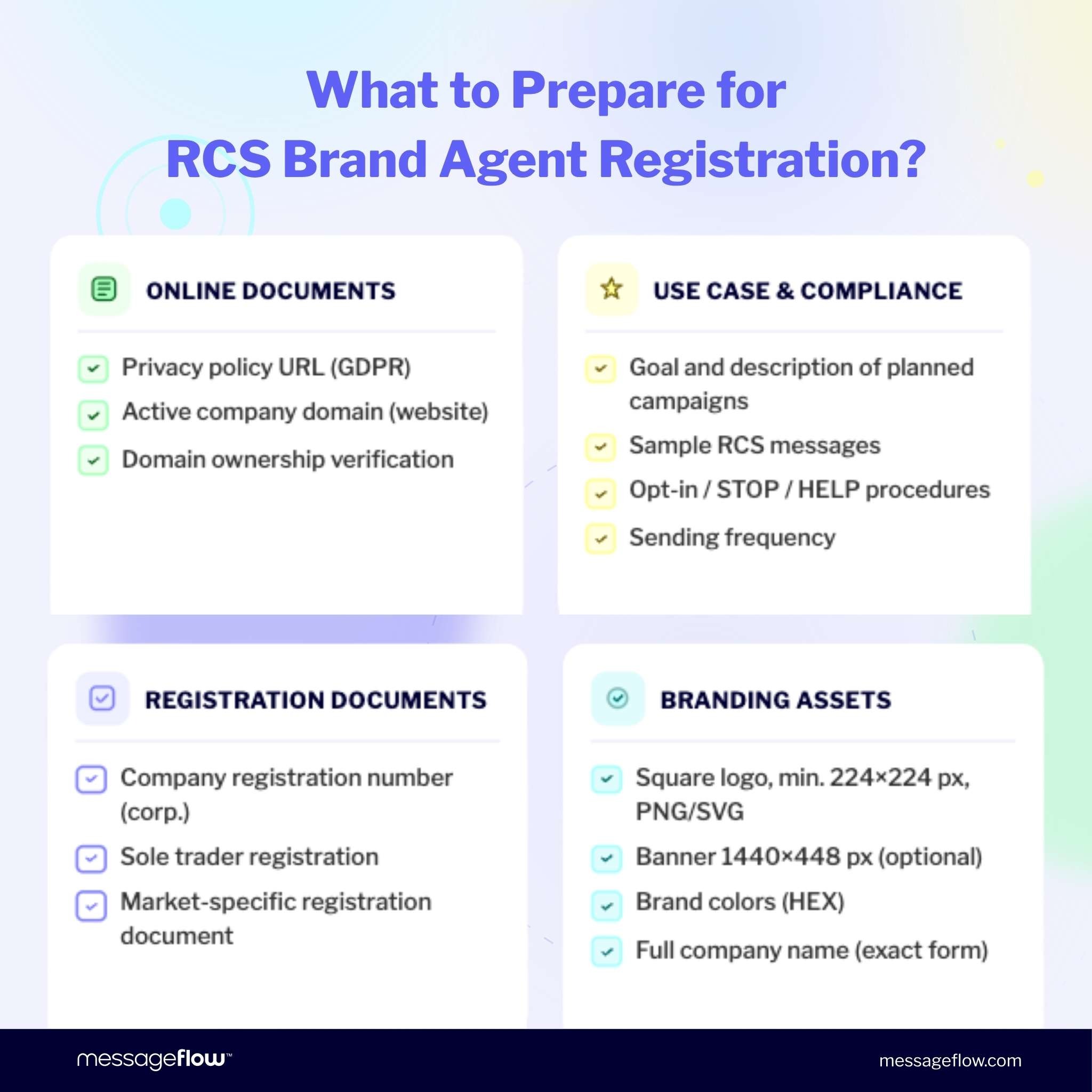
Before submitting, collect the following:
- Brand logo (square format, minimum 224 x 224 px, PNG or SVG with transparent background)
- Your business name, exactly as you want it displayed
- Privacy Policy URL
- Contact details: phone number, email, website
- A short company description
A full list of required documents is covered in the next section.
Step 3: Submit your Brand Agent profile
Once the materials are prepared, the verifying body submits your brand profile through the Google Business Communications Developer Console or a dedicated partner pathway. At this stage, the following details are also completed:
- use case descriptions – such as OTP, transactional, promotional, or multi-purpose messaging,
- sample RCS messages the brand intends to send,
- information about the campaign types you plan to run,
- the agent’s region (North America, Europe, Asia-Pacific),
- billing category – whether you are billed per full conversation session (conversational model) or per individual message (single message).
This is an important step in the process, as it demonstrates how the brand intends to communicate with its audience.
Step 4: Google and carrier approval
RCS brand verification follows one of two approval paths:
- Google-managed launch: Google reviews and approves the profile, then distributes it to all Google-managed carriers. This is the faster route to market.
- Carrier-managed launch: Each carrier reviews the profile independently. This model is common in the US and typically takes significantly longer.
During this stage, your brand assets, business documents, and sample messages are checked for compliance with RCS ecosystem requirements.
Step 5: Test phase and go live
Once your profile is approved, you’ll test your Brand Agent on pre-authorized devices before launching to your full audience.
During testing, confirm that your logo and brand name display correctly, that messages arrive as configured, that interactive elements function as expected, and that RCS to SMS fallback activates when a recipient’s device doesn’t support RCS.
After a successful test phase, your Brand Agent goes live and your RCS campaigns can begin.
Once approved, you’ll test your Brand Agent on pre-authorized devices before the full launch.
What you need to submit for RCS Brand Agent verification
Thorough documentation is the single biggest factor in how quickly your verification clears. Incomplete or inconsistent materials are the most common reason for delays. Get everything together before you submit.
Business registration documents
Depending on your company type and target market, you’ll typically need a tax ID, company registration number, or equivalent incorporation certificate for your jurisdiction.
Brand assets
These are the elements that will be visible to your RCS recipients – which is why they need to be consistent, clear, and aligned with your brand’s visual identity. Prepare the following:
- Brand logo: 224 × 224 px, PNG or SVG format. Note that the logo is automatically cropped to a rounded square – leave adequate margins on all sides to ensure no element gets cut off. Avoid transparent backgrounds: in dark mode, a logo with transparency blends into the background and becomes illegible. Use a white background if transparency does not suit your mark.
- Brand banner: 1440 × 448 px, aspect ratio 45:14. The banner is displayed on the agent information screen and partially overlaps the logo – design it with this effect in mind. If the proportions are incorrect, the image will be cropped.
- Brand color: provide the value in HEX format. The color must meet a minimum contrast ratio of 4.5:1 against white (WCAG 2.0 accessibility requirement) – you can verify this using a tool such as the WebAIM Contrast Checker.
Online documents
- Privacy Policy URL: Must clearly cover how you handle personal data, including phone numbers, and how RCS/SMS opt-in is managed. Requirements vary by carrier and market, so review them with your legal team and your Verification Authority before submitting.
- Active company domain: A live website associated with your brand
- Domain ownership verification: Proof that you control the submitted domain
Use case description
Carriers want to understand how you’ll use the RCS channel. Prepare a description covering your planned message types (notifications, marketing, customer service), your campaign objective, expected send frequency, and sample messages that will be reviewed as part of the submission.
Compliance materials
- Opt-in flow description: How do subscribers consent to receive RCS messages?
- Opt-out mechanism: How does the STOP keyword work in your flows?
- HELP response: What does your system send back when a recipient types HELP?
How long does RCS verification take?
The timeline depends mainly on two things: your chosen launch path and how complete your submission is. Get both right and you’ll move through the process as fast as the ecosystem allows.
- Google-managed launch: Typically two to four weeks from the date of a complete submission
- Carrier-managed launch: In markets like the US, this can take eight to sixteen weeks, as each carrier conducts its own review. European markets are generally faster.
Some of that timeline is outside your control. Most delays, though, come from avoidable documentation gaps.
A few practical tips to keep things on track:
- Submit early. Don’t assume the fastest approval path applies to your market. Build buffer time into your launch plan.
- Keep branding consistent. Your legal business name must match exactly across all submitted documents and your Brand Agent profile.
- Submit everything in one pass. Each round of corrections adds time to the review cycle.
- Review your Privacy Policy before submitting. It should be current and compliant with GDPR or any applicable local regulations.
What your RCS Brand Agent looks like in the inbox
Once verification is complete, your Brand Agent is visible to recipients from the very first message. The experience looks closer to a modern messaging app than a traditional SMS thread.
At the top of the conversation, recipients see your brand logo and verified business name alongside a shield icon or checkmark. That badge confirms your sender status before the message is even opened.
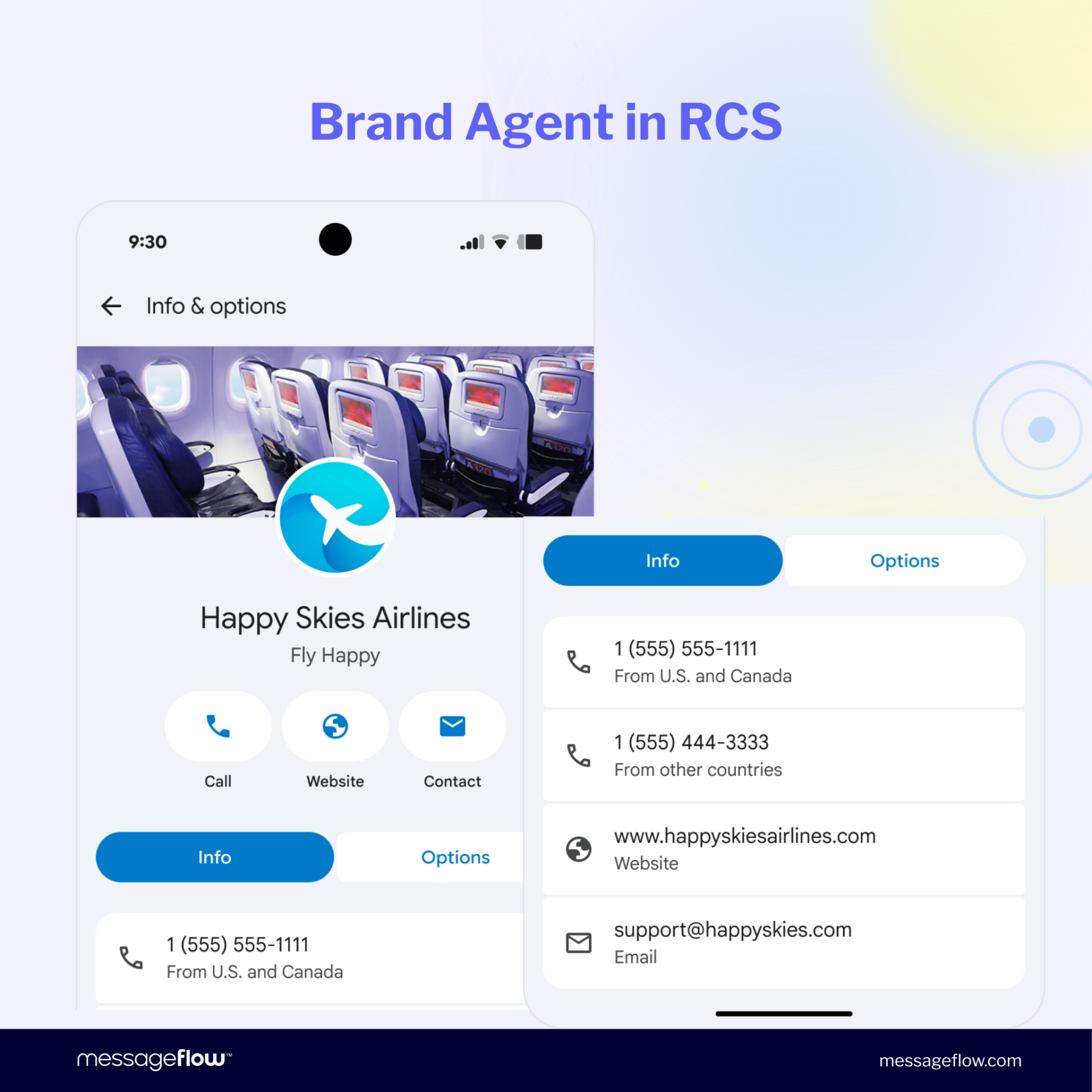
Tapping the logo opens the Universal Profile: your full contact details, business description, links, and banner image, all in one place.
Verification also unlocks the full RCS format capabilities:
- Image and product carousels
- Suggested reply chips
- CTA buttons with links, phone numbers, and location triggers
- Rich card layouts
- Multimedia content: photos, video, and audio
All of it works natively inside the recipient’s default messaging app. No extra app download needed.
RCS Brand Agent in action: e-commerce use case
Here’s a concrete example of a verified Brand Agent at work, using an RCS Brand Chatbot built on top of one.
The Brand Agent is what the recipient sees in their inbox: your logo, verified name, and shield badge. The Brand Chatbot is the conversation that plays out on top of that identity. Together, they create a complete experience. The customer knows who’s writing, trusts the sender, and has a clear reason to respond.
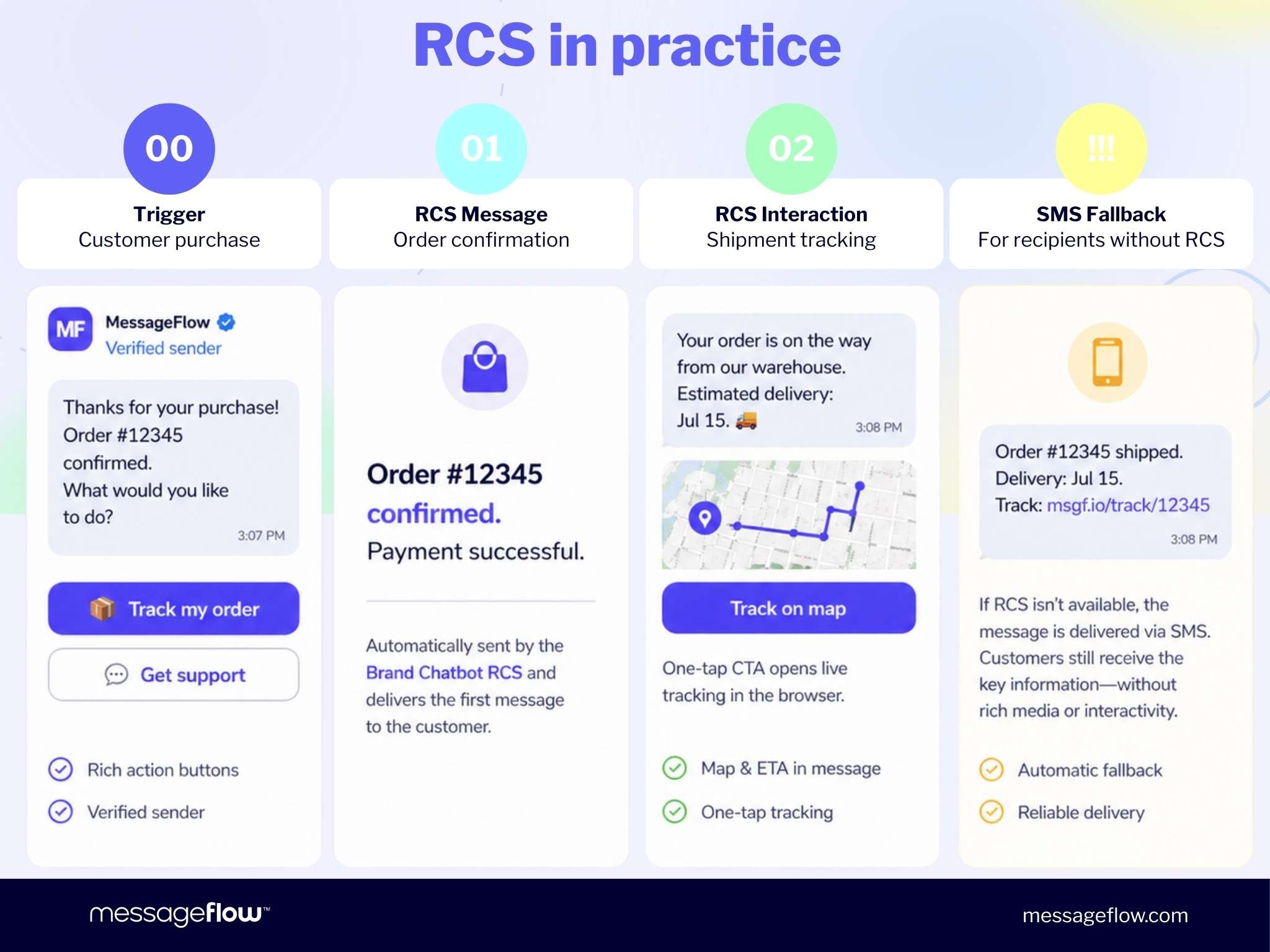
A practical example from online retail:
Trigger: The customer completes a purchase.
1. Order confirmation Before the recipient even opens the message, they can see the brand logo, verified name, and shield badge in their inbox. That’s the Brand Agent at work. Inside, the Brand Chatbot handles the conversation: “Thanks for your order. Your purchase #12345 has been confirmed. Track your shipment, contact support, or browse more products.”
2. Order tracking The customer taps “Track Order.” The Brand Chatbot responds with the current status and a tracking link. CTA buttons reduce the whole interaction to a single tap.
3. Shipping update On dispatch day, the Brand Chatbot sends an automated notification: “Your order #12345 has shipped. Expected delivery: July 15. Track your shipment here.” Throughout the entire conversation, the brand logo stays visible in the thread. Every message reinforces the same trust signal.
4. SMS fallback If the recipient’s device doesn’t support RCS, or their carrier hasn’t enabled it, the platform automatically switches the message to SMS. The customer gets the delivery update as a standard text, without rich media.
This is why every RCS campaign strategy should include an SMS fallback plan and a registered SMS sender. Fallback coverage keeps your messages reaching everyone, regardless of their device or carrier support.
💡For data on how RCS performs across industries, see our roundup of RCS engagement statistics.
Ready to get your RCS Brand Agent verified?
RCS Business Messaging gives brands a channel that’s verified, interactive, and far richer than SMS. It supports conversion, builds loyalty, and delivers sender trust that traditional text messages can’t replicate.
MessageFlow is a certified Verification Authority, working directly with mobile operators globally. We manage the full RCS Brand Agent registration and verification process on your behalf, so you can focus on building campaigns rather than navigating carrier approvals.
Ready to start? Contact our team to begin RCS sender verification or explore what the channel can do for your brand.
Frequently Asked Questions: RCS Brand Agent and Sender Verification
An RCS Brand Agent is the verified business identity within the RCS ecosystem. It stores your brand name, logo, colors, and business information, and displays them natively inside the recipient’s messaging app. Before sending RCS messages, every business must create and verify a Brand Agent through a certified Verification Authority.
The RCS Brand Agent is your brand’s verified identity in RCS: the logo, verified name, and contact details visible in the message thread. The RCS Brand Chatbot is the conversational layer built on top of that identity. It handles automated flows, triggers, suggested replies, and CTA buttons. You can’t run a Brand Chatbot without a verified Brand Agent in place first.
Verified sender profiles display your brand logo, business name, and a verification checkmark directly in the messaging thread, before the customer opens the message. Research shows that nearly 80% of consumers feel more confident engaging with a message when they can see the sender’s verified identity, reducing the likelihood of messages being ignored or flagged as spam.
RCS onboarding follows three main steps: selecting a Verification Authority, submitting your brand assets and business registration documents, and passing Google and carrier approval. Google-managed approvals typically take two to four weeks. Once approved, your Brand Agent goes live with a verified checkmark across all supported carrier networks.
No. An RCS Brand Agent is created once. With a Google-managed launch, Google handles approval and distribution across all Google-managed carriers. With a carrier-managed launch, each carrier reviews the profile independently, but you’re still submitting a single Agent through your Verification Authority.
Any business can apply. RCS sender verification isn’t reserved for large organizations. If you have a business registration document, an active domain, a logo, and a Privacy Policy, you can submit. Requirements may vary slightly by carrier and target market.
There is an option for the platform to automatically fall back to SMS (RCS fallback to SMS) when RCS is unavailable. In this case, the recipient receives the message as a standard SMS, without any rich media elements. For this reason, RCS campaigns require a fallback path to be configured and an SMS sender ID to be registered.
With traditional SMS, a sender can enter any name they choose – there is no reliable mechanism to verify its authenticity. This is the exact vulnerability that enables smishing: phishing attacks carried out over mobile channels, where criminals impersonate well-known brands.
A verified RCS Brand Agent eliminates this problem. The sender’s identity is confirmed by both Google and the mobile carriers. The recipient sees the brand’s logo, a verified name, and a shield icon or checkmark – all signalling the sender’s authenticity before the message is even opened. It is a clear indicator that the communication comes from a legitimate business.