

Imagine placing a $120 order in your favorite retailer’s app. A day passes. Then another. You start wondering whether the package even left the warehouse.
That’s a fast track to losing customer trust – and in a competitive market, losing the customer altogether.
Transactional push notifications exist precisely to prevent that. And the numbers back it up: according to Mobiloud, transactional push notifications achieve an average open rate of 69% – roughly three times higher than promotional messages. That’s not a coincidence. When a push message arrives at exactly the right moment in the customer journey and delivers information users are already expecting, they act on it.
Today, transactional push notifications are no longer a nice-to-have in the purchase or login flow. They accompany app users at every critical touchpoint: account creation, payment confirmation, data changes, order fulfillment, or a login attempt from an unknown device. They’re a cornerstone of user experience – and one of the foundations of brand credibility.
In this article, we’ll explain what transactional push notifications are and how to tell them apart from marketing messages. We’ll cover when to use them and how to write concise messaging that builds user confidence. You’ll find key use cases, ready-to-use push notification examples, and practical implementation guidance for both mobile and web apps.
This guide is especially useful if you work in marketing automation, CRM, product, or communications at an e-commerce, fintech, or banking company.
Key takeaways
- Transactional push notifications are automated messages triggered by specific system events – logins, payments, order status changes – delivered to the user in real time, regardless of whether the app is open.
- They differ from marketing push notifications in purpose, legal basis, and trigger. They’re required to deliver the service, not to promote it.
- The three most common use cases for transactional push notifications are: OTP and multi-factor authentication (MFA), order and delivery status updates, and security and account activity alerts.
- Transactional push generates an average open rate of 69% – making it one of the highest-performing channels for time-sensitive information.
- This article includes ready-to-use push notification templates, proven content best practices, and guidance on implementing these scenarios with MessageFlow – a mobile push and multi-channel communication platform.
- All examples apply to both mobile apps and web push notifications displayed in the browser.
What are transactional push notifications?
Transactional push notifications are automated messages sent in response to a specific user action or system event. They can be triggered by a login from a new device, a payment confirmation, an order status change, or a password reset request, among others.
Unlike marketing push notifications – which brands send as part of planned push campaigns – transactional messages are reactive. They fire automatically the moment a defined event occurs. They’re a direct system response to user behavior or a status change in the backend. In that sense, they’re a core component of any event-based push notification strategy.
Transactional push notifications are not meant to sell. Their job is to inform, confirm, and reinforce a sense of security.
When are transactional push notifications sent?
Push notifications reach the recipient regardless of whether the app is open. Users see them on the lock screen, in the Android or iOS notification tray, and – in the case of web push notifications – in the browser on desktop.
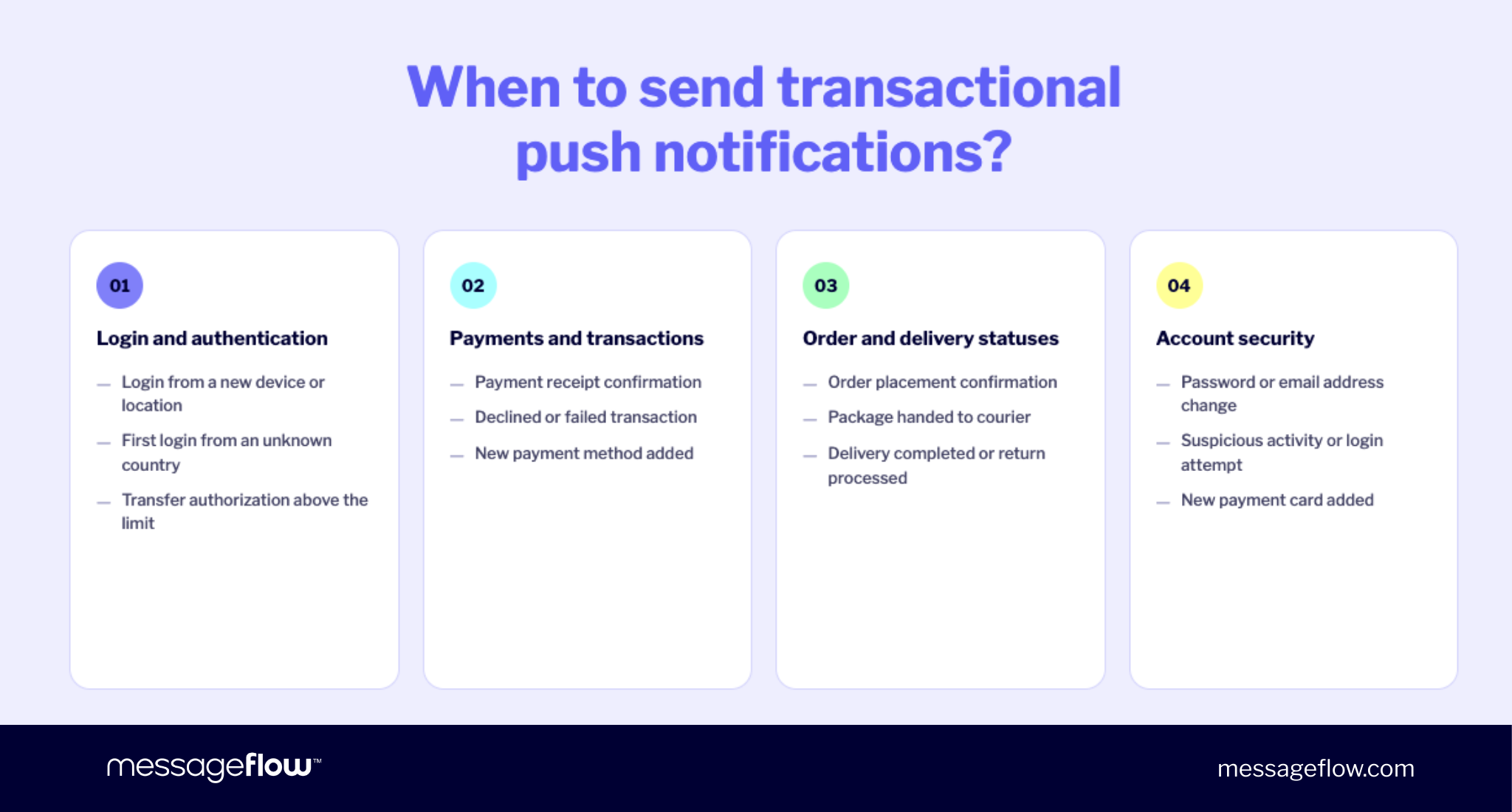
Typical system events that trigger transactional notifications include:
- New account registration and welcome message
- Login from an unknown device or location
- Order confirmations and payment received
- Parcel status change (shipped, out for delivery, delivered)
- Failed payment or declined transaction
- Password or email address change request
- Suspicious login or unusual account activity
Unlike email, push notifications are consumed almost instantly – often within seconds of delivery. That’s critical in scenarios like OTP or security alerts where every second counts. According to Wisernotify, push visibility rates can reach up to 90%, making it one of the most effective channels for time-sensitive information. When you need to capture a user’s attention at a specific moment and prompt immediate action, push notifications are hard to beat.
Transactional vs. marketing push notifications
Both types of push messages use the same technical channel, but serve entirely different functions. They differ in communication goal, legal basis, and the user action they expect.
Transactional push notifications respond to a user action. Promotional push notifications – and marketing messages more broadly – are initiated by the brand.
Understanding this distinction isn’t just good UX design – it’s the foundation of regulatory compliance and responsible customer communication.
The most effective notifications aim to confirm what users already expect, not surprise them with something they didn’t ask for. Personalized notifications that respond directly to user behavior consistently outperform generic promotional messages on every engagement metric.
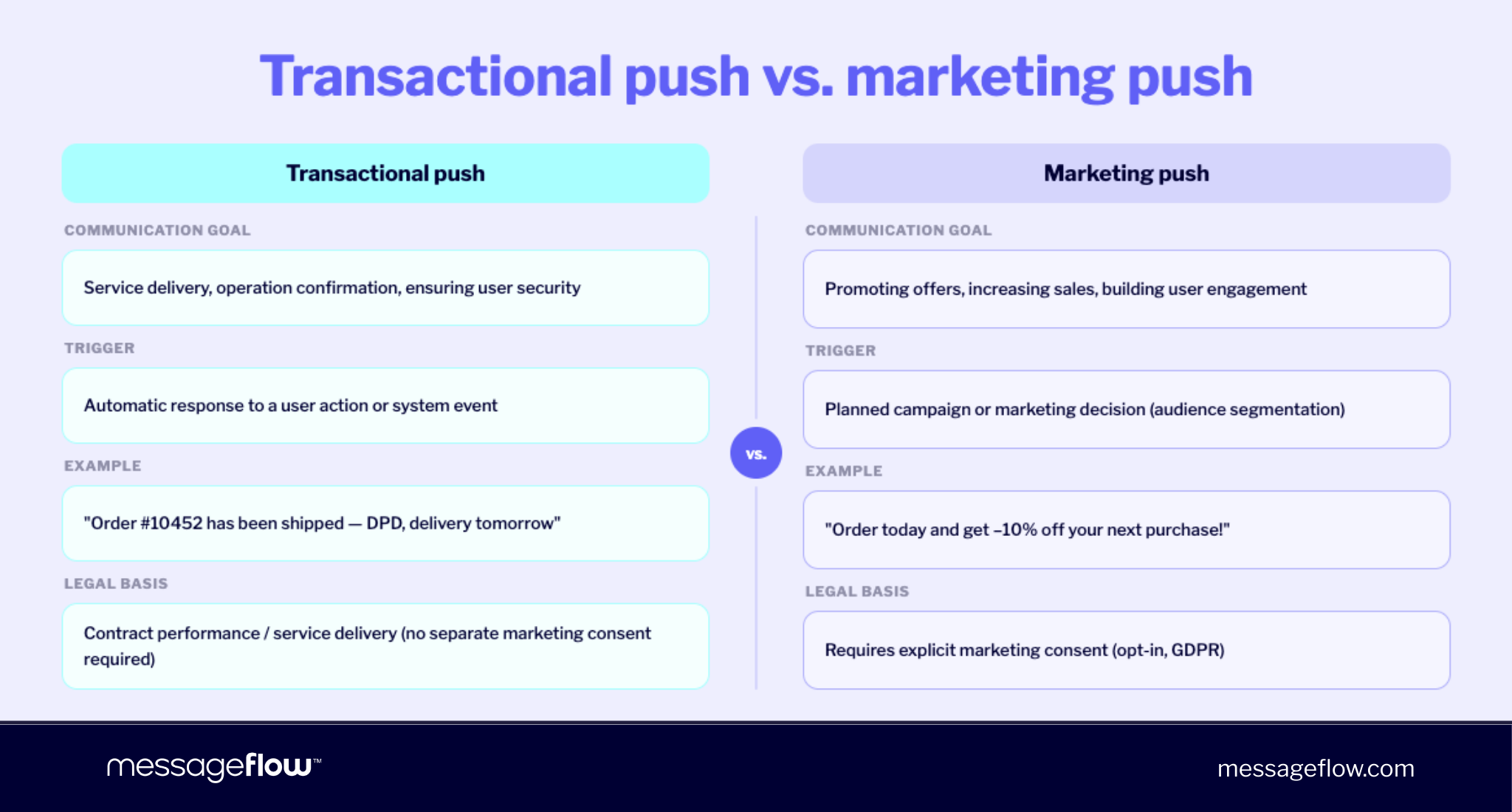
| Aspect | Transactional Push | Marketing / Promotional Push |
|---|---|---|
| Communication goal | Deliver service, confirm operation, ensure security | Promote offers, drive sales, build engagement |
| Trigger | Automatic reaction to user action or system event | Planned campaign, segmentation, or marketing decision |
| Send context | Directly tied to a specific user operation | Independent of user’s current activity |
| Example | “Order #10452 has shipped” | “Order today and get 10% off your next purchase” |
| Content character | Informational, operational, often time-critical | Persuasive, sales-oriented, or brand-building |
| Consent required | Based on contract/service execution | Requires explicit marketing opt-in |
| Opt-out | Limited (operational in nature) | Full opt-out available |
| Frequency | Determined by actual user actions | Planned and controlled by marketing |
| Legal framework | GDPR/CCPA; in regulated sectors also PSD2/PSD3 | GDPR/CCPA, CAN-SPAM/TCPA, prior consent required |
For a deeper breakdown of these two message types and how they fit into your overall push notification strategy, see our dedicated article on transactional vs. marketing push notifications.
Key use cases for transactional push notifications
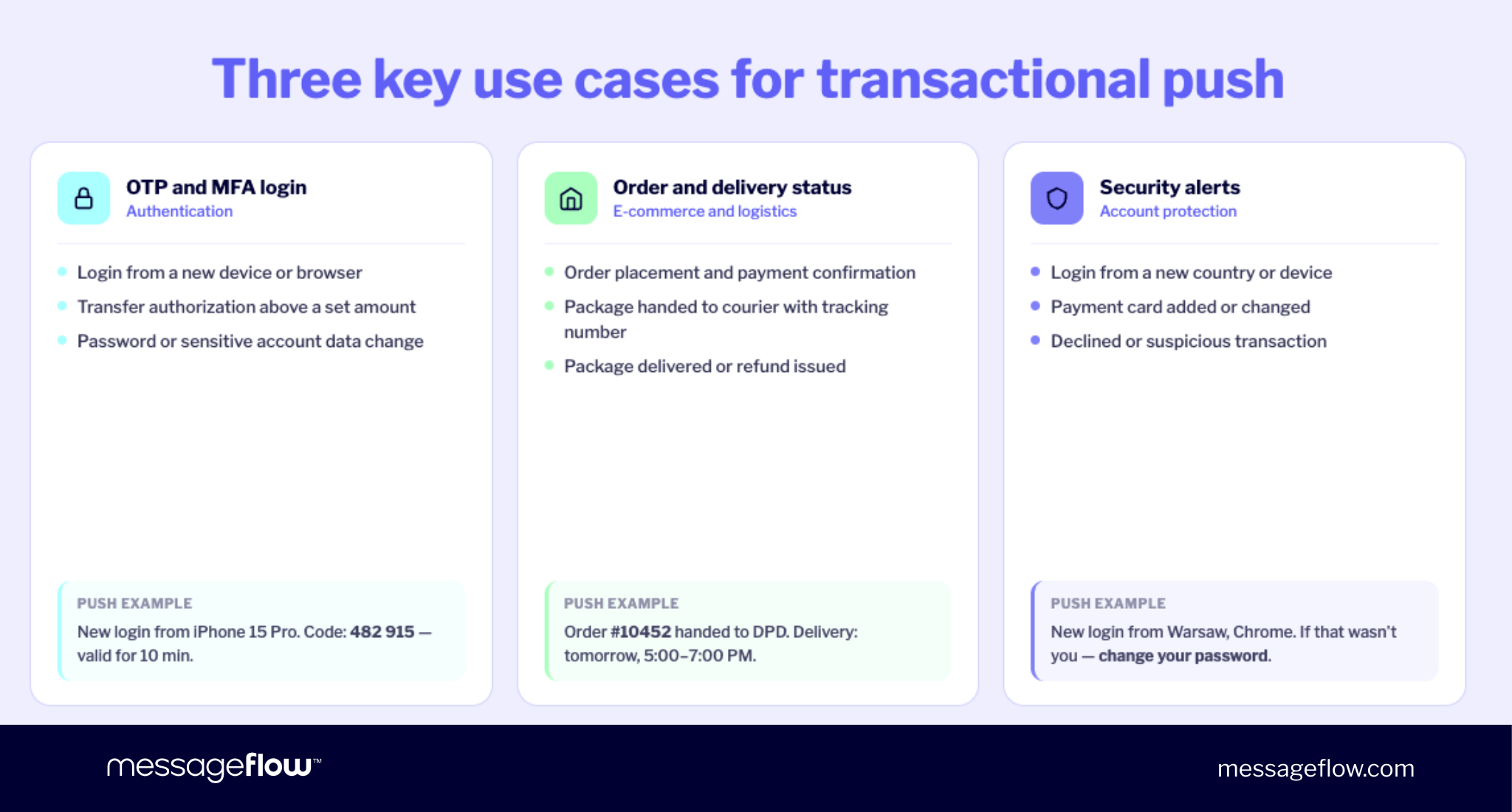
Most teams start implementing transactional push notifications in three areas: authentication (OTP, MFA), order statuses, and security alerts. That’s a natural starting point – these are the moments when app users need fast, unambiguous information most.
When a user is logging in, approving a payment, or waiting on a shipment, speed and precision matter. A clear push notification reduces support tickets, eliminates uncertainty, and builds trust in the product. These aren’t just examples of push notifications – they’re the moments that define user satisfaction and drive long-term app retention.
Which industries rely on transactional push the most?
Simply put, transactional push notifications are critical anywhere users need fast confirmation that everything is working as expected.
In fintech and banking, mobile push handles OTP codes, transaction authorization, and suspicious activity alerts. According to Pushwoosh benchmark data (Q4 2024–Q2 2025), click-through rates for fintech push notifications average 2.84% on Android and 2.09% on iOS – strong engagement figures that reflect how urgently users respond to important transactional messages in this sector. MessageFlow’s own platform data shows a 77% opt-in rate for fintech apps, significantly above cross-industry averages.
In e-commerce and marketplaces, transactional push organizes the entire customer journey – from payment confirmation and order confirmations through to delivery date updates. Data from Accio shows that back-in-stock push notifications achieve a CTR of 54.35%, while automated push campaigns account for just 2.9% of sends but drive 21% of all push-attributed orders. That ratio illustrates exactly why automating transactional notifications around key inventory and order events pays off.
In SaaS, push supports identity verification and notifies app users of account settings changes. In subscription apps – VOD, news, or e-learning platforms – it reminds users of recurring charges, expiring access, and confirms service delivery, helping to encourage customers to stay engaged and reduce churn.
In every one of these industries, a fast push message directly translates into a sense of security – and security builds long-term brand trust. For a strategic overview of how these types of push notifications fit into a broader mobile growth plan, see our guide on mobile push notification marketing strategy.
Use case 1: OTP codes and Multi-Factor Authentication (MFA)
A one-time password (OTP) is a single-use code used to verify a user’s identity during login, transaction approval, or sensitive data changes. MFA (Multi-Factor Authentication) raises the security bar by requiring verification through at least two independent factors – for example, a password plus a one-time code.
Mobile push notifications can serve as a convenient alternative or complement to SMS notifications for OTP delivery. They operate quickly without telecom carrier dependencies, eliminate the per-message SMS cost, and give you full control over how the push message is displayed – including on the lock screen.
These are event-based push notifications in their purest form: triggered the instant a specific system event occurs, sent to individual users, and designed to direct users toward a single, immediate action.
Scenarios that typically require OTP/MFA include:
- Login from a new device or browser
- First login from an unknown geographic location (geolocation push notifications can also flag these automatically)
- Wire transfer authorization above a set threshold
- Password, email address, or phone number change
- Adding a new payment method
In MessageFlow, an OTP/MFA scenario can be implemented as an automatic reactive send triggered by a system event (e.g., login_attempt or transaction_initiated). The backend passes the request to the Mobile Push API, and the user receives a transactional notification in real time.
Push notification examples: OTP and login verification
A good OTP push message should be short, clear, and to the point. In a fraction of a second, the user must understand three things: what’s happening, whether it’s safe, and what to do next. There’s no room for noise. These are some of the most effective push notifications precisely because they deliver critical information at the exact moment the user needs it.
Login from a new device:
New login to your account from a Samsung Galaxy S22. If that’s you, enter code: 482 915 (valid until 10:42 AM).
We detected a sign-in to your account from a new device (iPhone 15 Pro). Verification code: 739 201. Expires in 10 minutes.
Password or account data change:
Confirm your example.com password change. Your code is: 731 004 (expires in 5 minutes). Do not share it with anyone.
Changing your email address requires confirmation. Code: 284 956. If you didn’t initiate this, change your password immediately.
Blocked login attempt:
We blocked a login attempt on your account from Chicago, IL on 02/27/2026 at 6:12 AM. If that was you, try again or contact support.
When designing OTP notifications, make security a priority. Never expose full personal data or card numbers – mask sensitive details (e.g., “card ending in 4821”). The code itself should be visually prominent, easy to copy, and front-and-center in the message so the notification visually directs the user to key information immediately. Always include an expiration time to reduce uncertainty and accelerate immediate action. In security-related scenarios, clearly state what the user should do if they didn’t initiate the request.
Use case 2: Order status and delivery updates
After every purchase, the most critical moment for most customers begins: waiting for shipping. Users want to know immediately whether the payment went through, whether the order is being processed, and when the package will arrive. Without clear updates, they go looking for answers themselves – most often by contacting customer support.
That’s exactly why transactional mobile and web push notifications are such an effective complement to email in post-purchase communication. They arrive instantly, require no login or inbox check, and reduce the load on customer service teams. The information appears exactly when it’s needed – before the customer has a chance to ask “where’s my order?” This is the kind of proactive communication that keeps users engaged and protects app usage rates over time.
Order confirmations and delivery updates also represent a significant commercial opportunity beyond the immediate transaction. Research from Accio confirms that automated push sequences – including shipping updates – account for a disproportionate share of push-attributed revenue. Automated sends representing just 2.9% of total push volume can drive as much as 21% of all push-generated orders.
When to send order status push notifications
Mobile or web push can accompany customers from purchase all the way through to refund. Each stage is an opportunity to reduce anxiety and demonstrate that the process is on track. These are the moments where users expect transparency – and where silence creates frustration.
Key stages worth covering in your push notification strategy:
- Order confirmation and payment received
- Order being picked and packed in the warehouse
- Handed off to carrier / shipment label created
- Package in transit (tracking updates)
- Delivery date confirmed or updated
- Package delivered
- Return processed or refund issued
Well-designed communication produces concrete results: fewer “where’s my package?” tickets, greater user satisfaction, and faster response when issues arise (e.g., failed delivery or payment errors). It’s also one of the most reliable levers for improving app engagement and user retention – customers who receive consistent, accurate updates are more likely to return for their next purchase.
When integrated with MessageFlow’s Mobile Push API, your transactional communication can be fully automated. A status change in your OMS (e.g., NEW → PAID → SHIPPED → DELIVERED) triggers a REST API request, which instantly kicks off a transactional notification – real-time, consistent, and zero manual effort.
Push notification templates: order and delivery status
Below are app push notification examples you can adapt as push notification templates for order status communication. Adjust the wording to match your brand’s tone – but keep the core structure: what happened, key information, and where to go next.
Order confirmation:
Thanks for order #10452 placed on 02/27/2026. We’re packing it up now. View details in the app.
Order 2026/02/10452 has been accepted and is being processed. We’ll send you a separate notification when it ships.
Handed to carrier:
Order #10452 has been handed to UPS. Estimated delivery: 02/28/2026. Track your package in the app.
Your package #1Z999AA10123456784 is on its way. Your driver will arrive today between 5:00–7:00 PM.
Delivered and return processed:
Order #10452 was delivered on 02/28/2026 at 12:43 PM. Check the contents. Let us know how the delivery went.
Your refund for order #10321 was processed on 03/01/2026 to your Visa card ending in 4821.
When planning order push notifications, focus on the key milestones in the customer journey. Anchor every message in time – provide a date, a delivery date estimate, or a simple reference like “today” or “tomorrow.” Adding a deep link that takes users directly to the order details page is a strong practice: deep links are one of the simplest ways to reduce friction and direct users to the right place without extra taps. The shorter the path to critical information, the less frustrated the user. For more on timing strategy, see our guide on the best time to send push notifications.
Use case 3: Security alerts and account activity
There’s no room for delays or vague language in security communications. In banking, marketplaces, and subscription apps, account activity push notifications are critical. They should arrive instantly and clearly explain exactly what happened – this is the definition of important transactional messages.
If you’re configuring these scenarios, keep this in mind: the stakes here aren’t just user satisfaction – they’re real money, real data, and your brand’s reputation.
Situations where a transactional push helps users react immediately include:
- Login from a new country or device
- Password or personal data change
- New payment card added
- Payment attempt declined by the bank
- Unusual activity (e.g., logins from 3 countries within 2 hours)
Push message examples: Account security
A security push message should be unambiguous and specific. Include the date, location, and type of event so the user immediately knows what the notification is about. Keep the tone calm and factual – security push notifications aim to inform and protect, not alarm.
Most importantly, give a clear next step: “if that wasn’t you…,” a suggestion to change the password, or a direct link to support. The user needs to know exactly how to respond. The goal is immediate engagement – every second of hesitation is a security risk.
New login:
New login to your example.com account: Chicago, IL · 02/27/2026 · 10:18 PM · Chrome browser. If that wasn’t you — change your password immediately.
We detected a sign-in to your account from a new device (iPhone 15). Confirm it’s you in the app within 10 minutes.
Account data and card changes:
The email address on your account was changed on 03/01/2026 at 9:12 AM. If you didn’t do this, contact our security team immediately.
A new Visa card ending in 4821 was added to your account. If you didn’t authorize this, block the card in the app.
Suspicious or declined transactions:
A payment of $349.00 at Online Electronics Store was declined on 03/02/2026 at 6:04 PM. If this wasn’t you, file a dispute in the app.
We detected an unusual payment attempt from abroad. View details in the app and confirm whether you recognize this transaction.
More transactional push notification examples
OTP, order statuses, and security alerts are the most common starting points for transactional mobile and web push. But in practice, that’s just the beginning – there are many more moments across the customer journey where such push notifications can genuinely support the user.
Once the core flows are live, it’s worth mapping the full experience of your app users: where do they naturally wonder “what’s next?” or “is everything going as planned?” That’s exactly where transactional push delivers the most value – as a fast, unambiguous answer before the user searches for it themselves or opens a support ticket.
These additional examples of push notifications cover a wide range of industries and event types.
Appointments and reservations (healthcare, beauty, auto service):
Reminder: Appointment with Dr. Williams tomorrow, 02/28/2026 at 10:30 AM. Address: 315 Oak Ave, Chicago. Confirm or cancel in the app.
Your reservation at Belvedere Restaurant for 03/01/2026 at 7:00 PM has been confirmed. View details.
Recurring payments and subscriptions (SaaS, streaming, e-learning):
Your Premium subscription will auto-renew on 03/05/2026. Amount: $12.99/mo. Review or update your payment method in Settings.
We couldn’t process your subscription payment. Update your card details to keep your access active.
E-commerce re-engagement (price drops, back-in-stock):
The item you saved is back in stock: Nike Air Max 90 in your size. Order now before it sells out again.
Price drop alert: The laptop in your wishlist just dropped to $899. Tap to view the deal.
Back-in-stock and price drop notifications sit at the border between transactional and promotional — they’re triggered by a real inventory or pricing event, yet they directly encourage customers to complete a purchase. This hybrid nature makes them some of the highest-performing push messages in e-commerce. As noted earlier, back-in-stock push achieves a CTR of 54.35% according to Accio.
In-app operations (team and project management):
Jane Smith assigned you a new task: “Prepare Q1 Report.” Due: 03/03/2026. Check the details.
The status of your ticket #4521 changed to “In Progress.” Expected response time: 24 hours.
Service and system communications:
Scheduled maintenance: 03/02/2026 from 2:00–4:00 AM ET. Some features may be unavailable. We apologize for any inconvenience.
We’ve updated our Terms of Service. The new version takes effect on 03/10/2026. View the document.
Best practices for writing transactional push notifications
Even the most important notification can be undermined by content that’s too long, sent at the wrong time, or part of a message flood. A transactional push should help and reassure users – not irritate them. Treat it as a piece of product infrastructure, not just another push campaign. The best push notifications follow a consistent set of principles regardless of the use case.
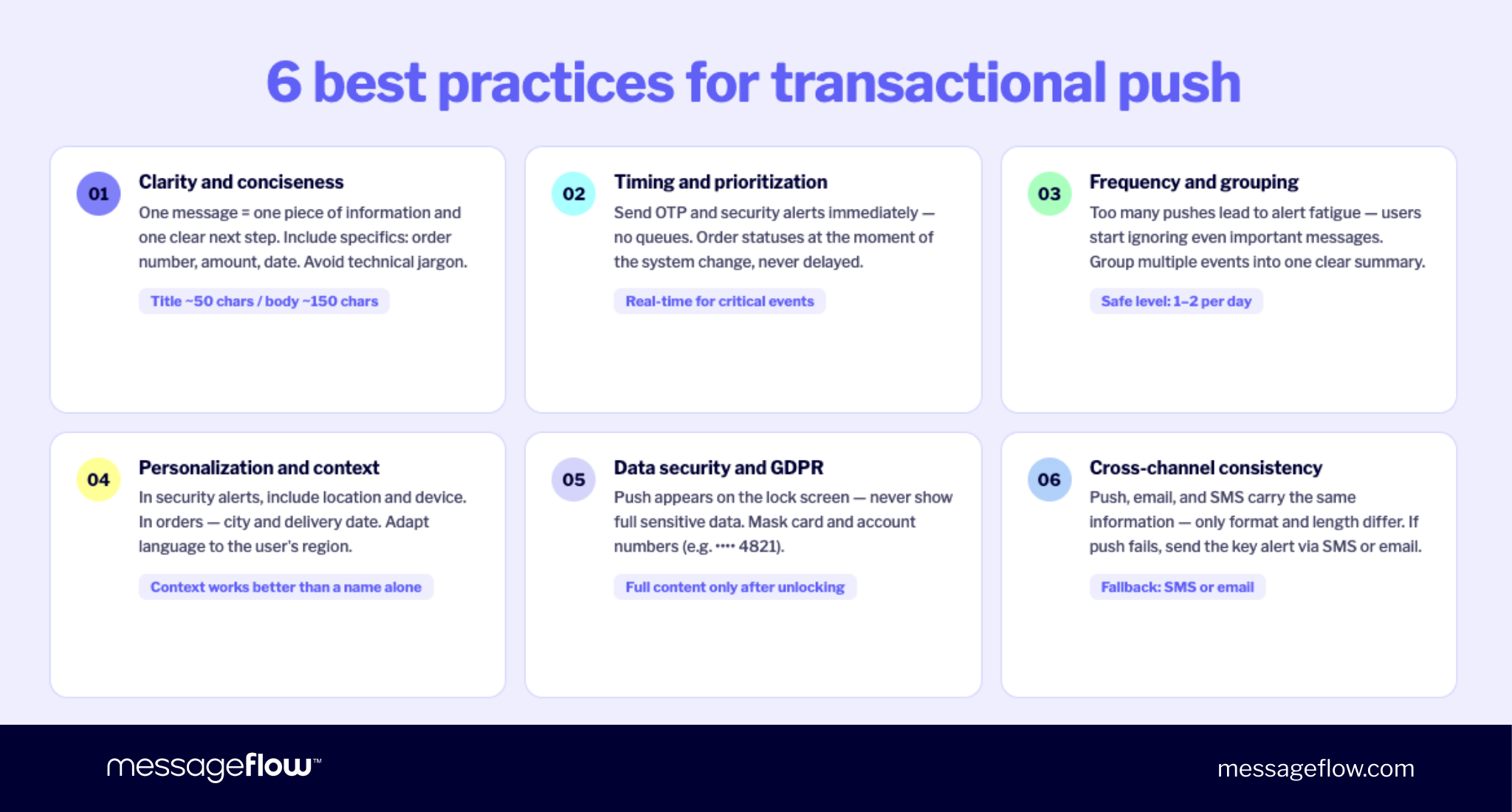
Clarity and conciseness
Transactional push is not the place for detailed explanations. Users should understand the push message in a fraction of a second – concise messaging is non-negotiable.
A good rule of thumb: keep titles to around 50 characters and body copy to 150 characters. More important than the exact count is including specifics – an order number, dollar amount, date, time. Avoid internal jargon or technical abbreviations. One notification should convey one piece of information and – when needed – one clearly indicated next step that directs users toward the right action.
Effective push notifications also respect the user’s language. For internationally deployed apps, make sure copy adapts to the user’s language and regional conventions. A notification that feels machine-translated erodes trust instantly, especially for important transactional messages like security alerts or payment confirmations.
Timing and prioritization
When you send matters as much as what you send. OTPs and security alerts should fire instantly – no queues, no delays. Order status updates should send the moment the status changes in your system, not hours later. For non-critical system changes generated overnight, consider buffering to morning hours. Assign priority levels to security messages so they don’t get buried under lower-priority events.
Frequency, fatigue, and grouping
Too many notifications is one of the most common failure modes in any push notification strategy. Research from Business of Apps shows that receiving push notifications at a rate of 3–6 per day leads 40% of users to disable them entirely. Once users turn off notifications at the OS level, you lose the channel – not just for push campaigns, but for critical transactional messages too.
For the average user, 1–2 transactional notifications per day is a safe baseline. If the system generates several events in quick succession, consider grouping them into a single readable summary rather than firing a series of individual pushes. Keeping the notification tray clean and the signal-to-noise ratio high is as important as making sure individual messages get through.
Opt-in rates and what they mean for reach
Opt-in rates set the ceiling on your push reach before a single message is sent. According to Batch’s 2025 benchmark data, the average push opt-in rate is 67% on Android and 56% on iOS.
The practical implication: opt-in is not guaranteed. Encouraging users to enable notifications requires clear value communication at the moment of the prompt. App users who understand they’ll receive important transactional messages – not spam – are significantly more likely to opt in and stay opted in over time.
Personalization and context
Using the user’s first name can feel natural in reservation or subscription messages. In security scenarios, more meaningful context is the login location, device type, or delivery city. Personalized notifications that incorporate specific details from the user’s actual activity consistently outperform generic templates – not because they look better, but because they’re immediately recognizable as relevant.
Geolocation push notifications add another powerful layer of context for location-aware apps: surfacing traffic updates, local store inventory, or delivery driver proximity at exactly the right moment. Properly implemented, they feel less like a push campaign and more like a helpful assistant. Match messaging to individual users based on their user preferences, user segment, and past user behavior – and you’ll see engagement lift across every type of notification.
Making notifications visually appealing with rich media
Standard text push is effective, but incorporating rich media can substantially improve click-through rates – especially for order updates and e-commerce use cases. Rich push notifications can include product images, delivery maps, action buttons, or expanded content that makes the notification visually appealing and more immediately actionable without any additional app usage required.
To incorporate rich media well, make sure the visual element adds genuine context – a product photo for a back-in-stock alert, a map pin for a delivery update – rather than decorating for its own sake.
For a full walkthrough of how to implement this, see our guide to rich push notifications.
Data security and compliance
Push notifications appear on the lock screen, so they should never contain full sensitive data. Mask card numbers, bank accounts, or other personal identifiers (e.g., “card ending in 4821”). Ensure proper log retention for notification records – in line with your security policy and applicable regulations (e.g., 90 days for financial transaction notifications, 30 days for security alerts).
Cross-channel consistency and SMS fallback
Push, email, and SMS notifications should deliver consistent information across every channel. Format and length can vary, but the content should never conflict. Plan for fallbacks: if a user has disabled push at the OS level, critical messages need an alternate path. For OTP and security scenarios, SMS notifications serve as the industry-standard fallback – they reach the user’s device without requiring app installation or push permission. Sending critical notifications through multiple channels is the standard in financial services, and it’s increasingly expected across all verticals.
A/B testing and continuous optimization
Transactional push is not a set-it-and-forget-it channel. Small copy changes in the title, the call-to-action, or the level of detail can meaningfully affect click-through rates and immediate engagement. Running A/B tests on push notification variants is one of the most underused optimization levers available to product and CRM teams. For a practical framework, see our guide to A/B testing push notifications.
How to implement a transactional push notification system
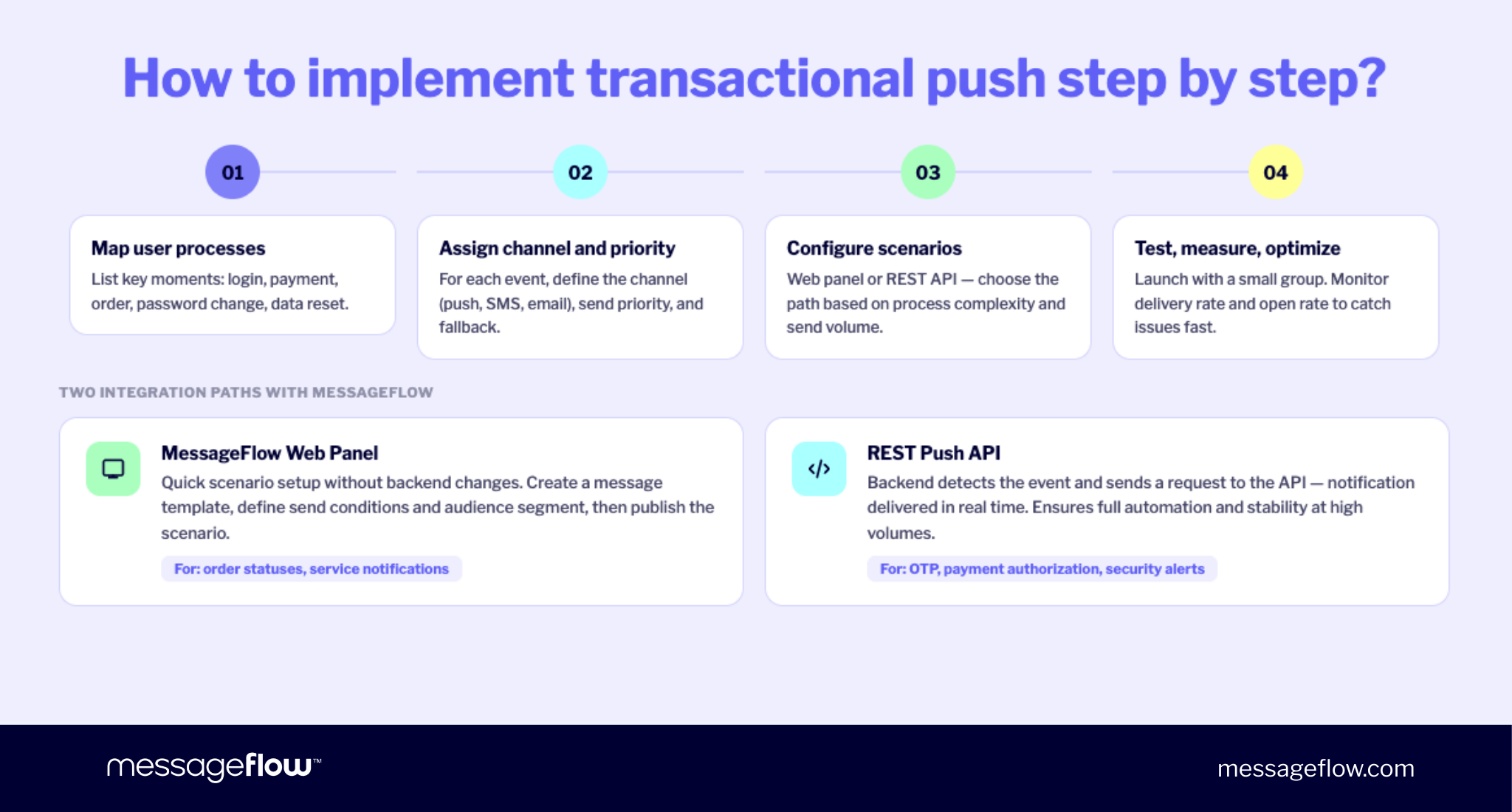
The best approach? Start with processes, not technology. Before touching any tool configuration, map your app’s key user moments: logging in, completing a payment, placing an order, changing account data, adding a card, or resetting a password.
Next, match each moment to the right channel and message – mobile push, web push notifications, email, or SMS. Think about what needs to be communicated, when, and with what priority. Consider how each notification fits into the broader push notification strategy and the overall customer experience.
For critical scenarios (security, OTP), you’ll need immediate and reliable delivery – mobile push with an SMS fallback is the industry standard for fintech and banking. For lower-urgency updates, email or an in-app message may suffice.
The best practice is building a unified multi-channel system – ideally within a single platform – where channels complement rather than duplicate each other. This ensures app users receive information at the right time through the right channel, communication stays consistent and predictable, and you maintain full control over send logic, priorities, frequency, and analytics in one place.
MessageFlow’s push notification platform supports exactly this approach. It allows you to manage mobile push, web push, email, and SMS in a single system, define event-driven scenarios, and configure cross-channel fallbacks. Transactional communication becomes part of a structured product architecture – not a collection of fragmented integrations.
Mobile push in MessageFlow
In a multi-channel model, mobile push most often serves as the immediate-contact layer – handling time-sensitive events like logins, payment authorization, security alerts, and order status changes. It’s the channel users check first, and the one most likely to drive immediate engagement.
In MessageFlow, transactional push notifications can be implemented in two ways, depending on the complexity of the flow.
Panel-based scenario configuration works well for simpler flows – service messages, welcome messages, or order status updates. You create a message template in the web panel, define send conditions and user segments, then publish the scenario. No backend changes required for each update.
REST Push API integration is recommended for critical processes like OTP, security operations, and payment authorization. In this model, your system detects an event and the backend sends a request to the API. The transactional notification fires in real time as a reaction to the system event – fully automated and stable even at high send volumes.
The MessageFlow platform supports transactional push communication through native iOS (APNs) and Android (FCM) delivery, attribute- and behavior-based segmentation, rich media support, and deep links. Throughput controls protect your backend from sudden traffic spikes. A/B testing capabilities let you continuously optimize notification copy based on real click-through rates and user behavior data. As part of a cross-channel push notification strategy, mobile push can also be boosted by SMS using the SMS Booster feature.
FAQ: Transactional Push Notifications
Transactional push notifications are triggered by a specific user action or system event — a login, payment, order status change. They’re event-based push notifications whose purpose is to inform and confirm. Promotional push notifications and other marketing messages are brand-initiated as part of a campaign or strategy, designed to encourage customers to make a purchase or increase app engagement. The legal distinction matters too: transactional pushes are based on contract/service execution, while promotional notifications require explicit user consent.
No – not in the marketing consent sense. Transactional notifications are necessary to deliver the service (payment confirmation, OTP code), so their legal basis is contract execution rather than an explicit marketing opt-in. However, app users still need to enable push notifications at the OS level on their device. If they disable them, it’s essential to have a fallback – SMS notifications or email – for delivery of critical messages like OTPs and security alerts.
The most effective app push notification examples include OTP codes with a clear expiration time, specific order confirmations and shipping updates (confirmed, shipped, delivery date, delivered), and security alerts tied to unusual account activity. The best such push notifications share a few traits: concise messaging, specific reference data (order number, transaction amount, date), and a clear indication of what happened and what the user should do next. See the push notification templates throughout this article for ready-to-use copy across common use cases.
There’s no fixed rule, since frequency is determined by actual user behavior – not a marketing calendar. That said, research from Business of Apps indicates that 3–6 pushes per day causes 40% of users to disable notifications entirely – a threshold that includes both transactional and push campaigns alike. The principle: send notifications only when there’s a genuine update. If multiple events fire in quick succession, batch them into a summary. Protecting your notification channel is as important as using it.
The most relevant metrics for a transactional push notification system are: delivery rate (did the push message reach the user’s device?), open/tap rate (did the user engage with it?), time to open (how quickly did they react – critical for OTP and security alerts), and downstream outcomes like support ticket reduction or conversion completion rate (e.g., completing a payment after receiving a notification). Use analytics in your push platform to monitor these KPIs, analyze user behavior over time, and run A/B tests to improve click-through rates.
Ready to build or improve your transactional push notification flows? Explore MessageFlow’s push notification platform to see how event-driven mobile and web push communication works in practice.