
Email has always had two gates: delivery (did it reach the inbox?) and attention (did a human decide it was worth opening?). What’s changing now is that the second gate is being formalized into the software. That’s why the future of email marketing won’t be decided only by your creative, timing, or list growth. It’ll be shaped by how inboxes judge what deserves a slice of someone’s day.
Google’s latest move makes that direction hard to ignore. In Google’s official announcement, Gmail starts using Gemini to summarize threads, surface relevant messages, and help users act faster. These aren’t cosmetic add-ons. They’re the first visible steps toward an inbox that behaves less like storage and more like a decision layer.
For mass email senders like yourself, this reframes the playbook.
Traditional filters asked, “Is this safe?” Increasingly, inboxes will also ask, “Is this worth recipient’s time and attention?”
That’s where AI in Gmail and Gmail AI summaries start to matter as devices and signals of how the inbox will mediate attention. And once that starts to happen, email deliverability becomes more than passing technical checks, it starts looking like earned access.
Despite the rollout being gradual, this article attempts to make a forecast already. We aim to predict where inbox decision systems are likely heading next, what that implies for email campaigns that go out at scale, and what you can do now – without panic, without gimmicks – to stay ahead of the curve. Let’s explore.
AI in Gmail: What is actually changing in the inbox?
Google didn’t simply bolt a writing assistant onto Gmail. The bigger change is that the inbox is starting to interpret your mail on the user’s behalf, then use that interpretation to help them decide what to do next. That’s the throughline behind features like Gmail AI summaries and context-based surfacing of messages.
In other words Gmail is moving from “show me everything, I’ll decide” to “I’ll decide what deserves your attention, and I’ll show you that.” This shift is the essence of AI in Gmail – not a new button or layout, but a new layer between sender and reader.
Gmail AI summaries are a new first impression
In the classic inbox model, the recipient’s first impression was the subject line + preheader text. In the Gemini-era model, the first impression can become a machine-written summary of the thread or message – an interpretation that may be read instead of the email itself.
That’s huge. It matters because summaries compress nuance.
They pull out what looks like the point (“What is this about?” “What’s the ask?” “Is there a deadline?”) and discard the rest. If your email needs 200 words to reveal what you want, the summary layer will punish you. Not by blocking delivery, but by stripping your message down to something easy to ignore.
💡 How to prepare:
- Write for extractability: Put the purpose in the first 1-2 sentences (“Here’s what this is” + “Here’s what to do next”).
- Use one clear primary action per email: If you include multiple competing asks, the summary may flatten them into marketing noise.
- Make the “why” explicit, not implied: If the benefit is subtle, AI will miss it and your reader won’t go digging.
- Treat preheader text like a second subject line: In a summary-first world, that top-of-email clarity becomes a deliverability-adjacent asset, not copy garnish.
Contextual prioritization turns the inbox into a decision system
Classic inbox logic is binary: accept or reject. Deliverability teams spent extensive amounts of time learning how to pass that gate.
What’s emerging now is different. The inbox still blocks obvious junk but it also starts doing something more subtle: sorting your accepted emails by implied usefulness. That’s the “decision engine” idea in practice – an inbox that behaves like an attention firewall instead of a passive list.
This is where the impact of AI in Gmail becomes real for senders. Not because AI reads your email like a human but because it can estimate (from signals it already has) whether your next message is likely to be wanted right now.
This makes inbox placement more dynamic. You can land in the inbox and still be effectively invisible if the system decides your message doesn’t deserve priority.
Think of it as moving from:
- Spam filtering → “Is this safe and compliant?”
to: - AI-driven prioritization → “Is this relevant, timely, and worth interrupting the user for?”
💡 How to prepare:
- Treat relevance as a deliverability lever, not just a conversion lever. Tighten segmentation so fewer people receive emails they’re unlikely to act on.
- Build timeliness into your sends. Trigger when a user’s context changes (behavior, lifecycle stage, transactional milestone) instead of relying only on calendar-driven blasts.
- Reduce repetition across channels. If the same message hits email + SMS + push at once, it’s easier for systems to interpret it as noise rather than value.
- Write subject lines that match intent, not curiosity. AI systems reward clarity because it helps them classify messages. Humans reward it because it respects their time.
“Ask your inbox” shifts email from browsing to retrieval
There’s one more change hidden inside the Gemini framing that’s easy to miss if you read it as “just productivity features”: the inbox becomes something you query.
When a user can type or say: “Find that invoice,” “Show me the last offer from X,” or “What did they promise about the renewal?”, they’re no longer scanning subject lines and choosing what to open. They’re retrieving what they need, when they need it. That’s a different mental model and it changes what kinds of emails win attention.
In a retrieval-first inbox, broad campaign emails face a tougher comparison:
- a message has to compete not only with other emails.
- but with the user’s ability to skip the email entirely and just pull the relevant detail when required.
This doesn’t kill campaigns. It changes their job. More emails will be evaluated as background information unless they contain a clear, time-bound reason to act now.
💡 How to prepare:
- Make key facts machine-findable. Put identifiers, dates, order numbers, plan names, and “what this is about” language where it belongs – near the top, not buried in paragraph four.
- Standardize your naming. Consistent terminology (product names, plan tiers, event names) increases the chance that both humans and inbox search / retrieval can match intent to content.
- Separate “reference” emails from “action” emails. If an email’s main value is being looked up later, write it like documentation: clear headers, scannable structure, no cute subject lines. If it’s meant to drive action, make the action unmissable and time-relevant.
- Stop hiding the point behind storytelling. You can still write like a human. But lead with the point, then earn the read with context.
That’s the practical summary of what’s changing: the inbox is starting to summarize, prioritize, and retrieve on the user’s behalf – three behaviors that collectively turn it into a decision layer.
AI and deliverability – What changes for senders?
Will AI affect deliverability?
Yes but mostly by changing what deliverability means in practice. The baseline gate (authentication, reputation, spam filtering) won’t disappear. What will expand is the layer that decides whether your email earns attention once it’s technically delivered, and that layer increasingly looks like a prioritization system, not a yes / no filter.
So instead of thinking “did it land in the inbox?”, you’ll need to think “did it land in the part of the inbox that gets seen?” That’s why conversations about AI in email marketing quickly connect to inbox placement and the broader deliverability outcome, not just content convenience.
💡 How to prepare:
- Separate “delivered” from “noticed” in reporting. Treat inbox placement as necessary, not sufficient, and track downstream behavior (site actions, replies, conversions) with more weight than opens.
- Make relevance a reputation strategy. Tighten targeting and suppress chronically inactive segments. Fewer low-interest sends reduces the signals that teach inboxes to ignore you.
- Make your intent obvious fast. If a human (or a summary layer) can’t tell what the email is for in a glance, it’s harder to earn priority.
From technical deliverability to trust engineering
For years, good deliverability mostly meant you had the technical basics right: authentication, infrastructure, complaint rates, and steady sending behavior. Important stuff but it assumes the inbox is asking a simple question: Did this message qualify to arrive?
The next phase adds a harder question: Did this sender earn the right to interrupt?
In practice, trust engineering is the combined effect of:
- Your technical posture (still table stakes).
- Your history of being acted on (signals that you deliver value).
- Your discipline around attention (how often you ask vs. how often you deliver).
This is also where AI in email marketing becomes more than a buzz phrase. When inboxes can summarize, classify, and prioritize, they can treat low-value but technically compliant mail as a tax on the user’s attention and quietly reduce its reach without the drama of a spam placement.
💡 How to prepare:
- Define (and enforce) a “right to send” rule. Make it explicit what qualifies someone to receive a message: lifecycle stage, behavior, account status, recent engagement. If you can’t explain why someone is getting a send, that’s your first risk flag.
- Move reputation ownership from deliverability teams to the whole program. Creative, segmentation, and cadence decisions are reputation decisions in the AI era, not just technical operations.
- Design email programs around value density, not volume. Winning senders will be those who send less, think systemically, and treat attention as finite. Start by reducing “because we always do” campaigns and replacing them with fewer, sharper moments.
- Operationalize engagement as a control signal. Don’t wait for quarterly list cleaning. Use rolling suppression (e.g., pause non-critical sends after repeated non-engagement) so you don’t train inbox systems that your messages are easy to ignore.
Inbox placement in the AI era: “Delivered” isn’t the same as “seen”
When people ask whether AI will hurt deliverability, they’re usually picturing more spam filtering. But the more likely near-term story is quieter: the inbox keeps accepting your messages, while your inbox placement gets less predictable.
Not “did Gmail accept it?” but “did the user encounter it at the moment they were deciding what to read and do?”
AI features accelerate this because they encourage the inbox to act like a curator:
- Summarizing long threads into a few lines.
- Surfacing messages that look time-sensitive or relationship-relevant.
- Pushing everything else down the stack.
For AI in email marketing, this creates a practical implication: inbox visibility becomes more dependent on signals of usefulness than on pure volume or clever copy.
In the long run, that could mean senders need to optimize for priority placement, not just inbox vs. spam.
💡 How to prepare:
- Stop treating opens as the primary KPI. If the inbox is summarizing and triaging, opens can drop without your program actually getting worse. Make conversions, replies, and on-site behavior your north star.
- Build visibility moments into your calendar. Identify the emails that truly deserve attention (billing, renewals, account changes, real deadlines) and design the program so those aren’t diluted by constant promotional noise.
- Protect your best messages from your own cadence. If you send too frequently, you compress the perceived value of each message. The inbox learns you’re always there, which is another way of saying rarely urgent.
- Engineer consistency in identity. Keep a stable From-name, domain alignment, and brand voice. When inboxes and humans both rely on pattern recognition, consistency improves recognition and recognition is an input to trust.
Predictions: Where email programs are headed next
The inbox becomes a “decision engine,” not a mailbox
The simplest way to describe the next phase is this: inboxes will behave less like message storage and more like a system that helps users decide.
That doesn’t mean every inbox turns into a fully autonomous agent. It means the default experience shifts from “here are your messages” to “here’s what matters, here’s what you can do, and here’s what you can ignore.” Gmail’s Gemini direction is one visible step but the underlying pattern is bigger: AI is a natural fit for triage.
For senders, that creates a new competitive axis.
Historically, you competed on:
- recognition (Do they know you?)
- relevance (Is it for them?)
- timing (Is it the right moment?)
- and creative (Is it compelling?)
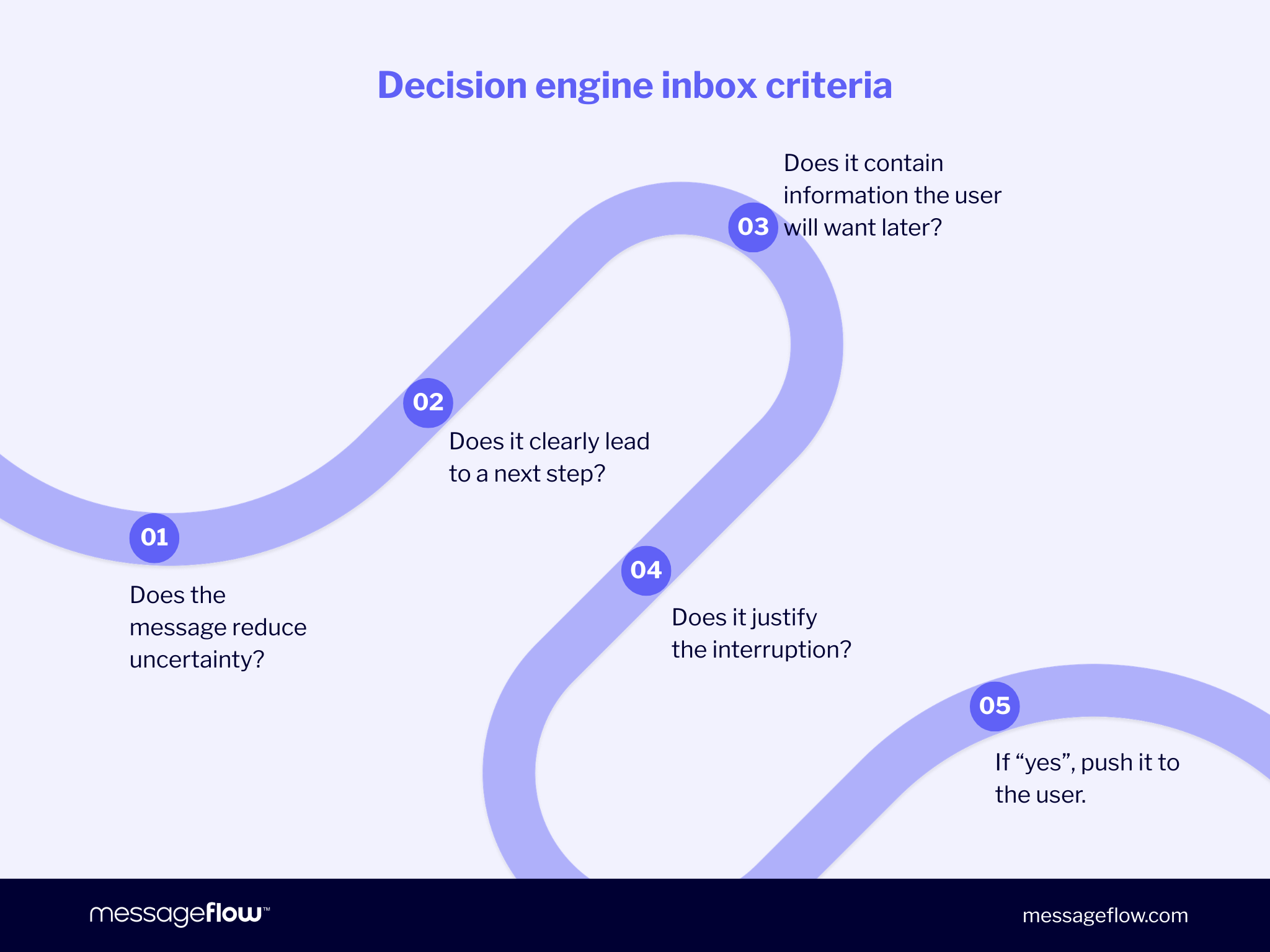
In a decision-engine inbox, you also compete on decision utility:
- Does the message reduce uncertainty?
- Does it clearly lead to a next step?
- Does it contain information the user will want later?
- Does it justify the interruption?
If not, the inbox can still accept it while steadily learning that it belongs in the “later / never” category.
💡 How to prepare:
- Classify every send by job-to-be-done. Is it informational, transactional, or persuasive? Don’t mix them casually. In decision systems, mixed intent reads as noise.
- Increase decision clarity in the first screen. Lead with the point, add the reason, then the action. If the email can’t be summarized accurately in one sentence, it’s probably trying to do too much.
- Invest in lifecycle and event-driven messaging. Decision engines prioritize “this matters now” content. Triggered emails (behavioral, account, renewal, usage) naturally fit that.
- Reduce broadcast debt. Audit your recurring campaigns and ask: which of these would a rational inbox downrank because the user’s life doesn’t change if they miss it? Cut or narrow those first.
From open rate to action rate: When the reader isn’t always a human
One of the most practical future of email marketing trends to watch is also the least comfortable: the inbox is learning to act on messages, not just display them.
If Gmail (and eventually others) can extract structured meaning from an email – “this is a bill,” “this is a renewal,” “this is a promo with terms” – then the obvious next step isn’t a higher open rate. It’s a higher completion rate of the task that the email represents.
This is where AI in email marketing stops being about writing faster and starts being about designing messages that can be interpreted reliably.
A useful way to think about it: email becomes a headless app. The HTML is the UI for humans, but the data layer is what decision systems can read, compare, and act on.
If that sounds far out, you don’t need to bet on full agent-to-agent commerce to treat this seriously. Even a modest version of this changes how inboxes rank messages:
- Emails that clearly express what they are and what happens next become easier to triage.
- Emails that bury meaning behind fluff become harder to classify and easier to downrank.
It’s also an email marketing trends 2026 and beyond implication: measurement drift. If users get what they need from summaries, previews, extracted details, or quick actions, opens may become less representative of impact, while actual outcomes (payments, upgrades, confirmations, product usage) matter more.
💡 How to prepare:
- Start reporting action rate alongside classic metrics. Pick 1-2 business actions per email type (renewal completed, trial activated, invoice paid, demo booked) and make them first-class KPIs, especially for lifecycle and transactional streams.
- Make your emails easier to parse by humans and machines. Lead with: what this is, why it matters now, what to do next. Avoid emails that require a scroll to reveal the point.
- Treat data consistency as a creative standard. Use stable naming for products, plans, dates, and terms. If your offer is called three different things across three emails, you’re creating ambiguity that decision systems (and people) resolve by ignoring.
- Design for one primary outcome. If you want action, don’t dilute the email with three competing CTAs just in case. Decision engines love a clear job-to-be-done.
- Build a machine-readable checklist for your templates. Before sending, check: clear subject intent, identifiable offer / terms, explicit deadline (if any), and a single next step.
The rise of summary economy: Why inbox SEO becomes a thing
Once the inbox starts summarizing, a new unit of competition appears: not the email, but the summary of the email.
That’s the summary economy – a world where AI decides what’s worth surfacing, and the user increasingly consumes the “compressed” version first (or only).
If you run large-scale programs, that’s not a philosophical change. It’s a mechanical one. The inbox can take a long, well-designed campaign and turn it into a single blunt line:
- “Promotion from X. Ends soon.”
- “Reminder about Y.”
- “Update about Z.”
When that happens, persuasion doesn’t disappear. It moves upstream. Your job becomes to make the right meaning easiest to extract.
This is also where the idea of inbox SEO starts to make sense. Not spammy keyword stuffing in subject lines but optimizing for the signals that summarizers and prioritizers can reliably pick up: what the email is, who it’s for, why it matters, and what action it enables.
And yes, there’s a plausible monetization path here too. The inbox is one of the last high-intent spaces not fully packaged into an auction. If decision layers become valuable real estate, sponsored summaries isn’t that crazy of an idea. It’s simply the ad model being applied to a new interface.
This is one of those future of email marketing trends that doesn’t require new standards to start influencing outcomes. Even without paid placements, summaries and prioritization change what users notice. For email marketing trends 2026, we expect more programs to feel this as “we’re sending the same volume, but attention behaves differently.”
💡 How to prepare:
- Write a summary sentence on purpose. Before you send, force yourself to draft the one line you’d want an inbox to output. Then make sure your first screen supports that line clearly.
- Optimize for intent clarity, not cleverness. Subjects like “A quick thing…” or “You’ll want to see this” are fragile in a summary-first inbox. If AI in email marketing changes anything quickly, it’s that ambiguity gets punished by compression.
- Use consistent, explicit nouns. Product names, plan tiers, event names, renewal terms, dates. When terminology drifts, summaries drift too.
- Structure your emails like a decision card. A tight header (what / why / when), a short body, one primary action. This isn’t dumbing down, it’s respecting how inboxes are learning to triage.
- Treat internal linking and landing pages as proof, not decoration. If the email makes a claim, the click destination should confirm it fast. In summary economy, the inbox is doing the first filtering. Your site is where trust gets locked in.
The generative arms race: when everyone can write, quality becomes signal
Generative AI makes email production cheap. That’s the obvious part.
The less obvious part is what happens next. When volume increases and good-enough copy becomes the default, inboxes have even more incentive to get aggressive about prioritization. Not only because spam exists, but because the inbox is flooded with messages that are technically legitimate yet disposable.
A generative arms race means more brands using AI to scale content → more lookalike messaging → more pressure on inboxes to protect attention → stricter filtering, more invisible downranking, more emphasis on trust signals.
This is one of those moments where the sender instinct is to optimize the wrong thing. People respond by:
- sending more (to make up for shrinking attention)
- testing more subject tricks
- pushing harder on urgency
That approach often backfires because it trains exactly the signals decision engines are designed to suppress: repetition, low-value frequency, and short-term manipulation.
The better bet is to assume the inbox will get smarter with identifying pattern email – messages that could have been sent by anyone, to anyone, with minimal consequence if ignored.
In that world, quality isn’t an aesthetic but an actual, strong signal.
Not literary quality. Specificity, relevance, constraint. The things AI can generate, but teams rarely enforce at scale.
💡 How to prepare:
- Use AI to accelerate production, but enforce human standards at the edges. Make your differentiators explicit: tone rules, product truths, compliance constraints, and what you never claim. The goal is consistency and specificity, not more words.
- Increase message uniqueness by using your own data. AI-written content based on generic prompts will converge. Content anchored to real customer behavior, usage patterns, and lifecycle states won’t.
- Reduce template fatigue. If every email follows the same rhythm (“Hey {name}, quick update…”) you become predictable in the worst way. Rotate structures, not just headlines.
- Adopt a volume budget. Decide what you’ll not send so that what remains has a higher chance of being treated as worth attention. In a generative arms race, restraint reads as confidence.
- Treat unsubscribe and complaint reduction as growth work. Lower friction opt-downs, preference centers, and segmentation aren’t merely retention tools. They help preserve reputation signals that underpin deliverability.
Structured data and lean code become deliverability signals
Many marketers think of deliverability as a sender-level problem: authentication, reputation, list hygiene, complaint rates. All true.
But as inboxes lean harder on AI to summarize, rank, and extract meaning, the cost of processing your email starts to matter too. If an inbox has to parse heavy HTML, load multiple assets, and infer what your message even is, at scale, that’s not just a UX issue. It’s compute. And compute is money.
Lean code becomes a deliverability advantage, and email design shifts toward messages that are both human-readable and machine-friendly.
Two practical implications sit underneath this:
- Lean emails are easier to interpret. If your message is structurally clean, the summary layer has fewer chances to misread it (or default to “generic promo”).
- Lean emails are cheaper to process. If inbox providers start optimizing for efficiency, especially as AI features roll out more widely, senders who generate digital waste at scale may face more throttling, more downranking, or simply less forgiveness.
This could go even further with carbon-based throttling. Not that we’ll see a literal CO₂ meter in Gmail tomorrow, but unwanted and heavy communication may become a measurable quality signal. In other words, inefficiency becomes reputational.
This fits neatly into the 2026 horizon. If you peek into the future through an operator’s lens, it’s not only about better copy. It’s also about building programs that behave well under automated scrutiny. That’s one of the quieter future of email marketing trends that serious senders will notice first.
💡 How to prepare:
- Put your templates on a weight budget. Treat email size as a KPI. Audit your heaviest templates, remove unnecessary markup, compress images, and cut anything that exists because it was always there.
- Design for AI readability with structure, not gimmicks. Use clear hierarchy (headline → key point → supporting detail → CTA). If the email can’t be summarized cleanly, fix the structure before you tweak the copy.
- Reduce asset dependency. If your message requires multiple remote assets to make sense, you’re increasing fragility. Aim for meaning that survives with images off.
- Treat list hygiene as efficiency hygiene. Sending heavy emails to inactive segments is the worst of both worlds: low engagement plus higher processing cost. Suppression extends beyond deliverability hygiene, it’s operational discipline.
- Start thinking in data layers. Even before the industry standardizes anything new, you can build internal discipline around consistency: stable product names, explicit offer terms, clear deadlines, and predictable formatting. That’s what makes AI in email marketing work for you rather than flattening your message.
Emerging risks for senders and why they’re mostly self-inflicted
The “attention half-life” problem: Messages expire faster
In a curated inbox, most emails don’t fail because they’re blocked. They fail because they become irrelevant before a human ever reaches them.
The idea of attention half-life assumes the time window in which a message has a realistic chance to influence behavior shrinks when inboxes prioritize and compress.
In the old model, a user might skim 50 subject lines and open a few out of curiosity. In a decision-engine model, the inbox is doing the first skim. If your email doesn’t look time-relevant or relationship-relevant, it’s easy to push it down. And once it’s down, the probability of recovery drops quickly.
This is especially brutal for broad, calendar-based campaigns:
- Weekend sale that lands Friday night gets triaged until Monday → effectively dead.
- Product update with no clear personal implication gets filed as “later” → later never comes.
This is not a Gmail-only phenomenon. It’s simply what happens when the inbox starts acting like a feed that protects attention.
💡 How to prepare:
- Engineer urgency honestly. If something truly has a deadline, state it plainly. If it doesn’t, don’t fake it. Fake urgency trains the inbox and users to ignore you.
- Shift more sends from “calendar” to “event.” Trigger on user behavior, account status, lifecycle milestones, and real moments of need. You’ll naturally land inside the short attention window because your timing is anchored in reality.
- Use follow-ups as relevance checks, not nag loops. If someone didn’t engage, don’t resend the same email louder. Send a different angle only when you have new information or a better-fit segment.
- Protect critical emails with quieter background noise. If you need some messages to reliably get attention (billing, security, renewals), reduce low-value promotional volume so you don’t bury your own priority traffic.
Cross-channel message collision makes redundancy visible
Plenty of teams moved into omnichannel for a good reason: different people prefer different channels, and different moments call for different reach.
The risk is turning omnichannel into redundant-channel – the same campaign, same timing, same CTA, pushed through email + SMS + push (and sometimes OTT) as if more touchpoints automatically means more impact.
In a decision-engine context, repetition becomes easier to detect. Not necessarily through a single central brain that reads all your channels at once but through the combined effect of user behavior signals:
- people ignore the email because they already saw the push
- they dismiss the push because the email already explained it
- engagement drops across the board
- systems learn that your messages correlate with low utility
This is how a well-intentioned omnichannel strategy can quietly compress your reputation. It’s not spam per-se. It’s a patterned noise.
💡 How to prepare:
- Assign each channel a job. Email can carry detail and context. Push is best for time-sensitive nudges. SMS is for high-salience moments that must be seen. RCS or OTT can handle conversational workflows. If two channels are doing the same job at the same time, you’re paying twice for the same outcome.
- Stagger and branch instead of blasting. Example pattern: push first → if no action, email with context → SMS only for a critical deadline or high-value segment. Build logic, not duplication.
- Use exposure caps across campaigns. Even if your tools are siloed, you can still enforce a human rule: No more than X interrupts per week per user across all channels. Then implement it where you can (suppression lists, segment exclusions, cooldown windows).
- Make cross-channel messages additive. If you do use multiple channels, each touch should add something: new information, a new format, a narrower offer, a different CTA, not the same copy resized.
- Measure overlap, not just channel KPIs. Look for patterns like “push engagement up, email engagement down” or “SMS drives action while email gets ignored.” That’s not necessarily a failure but rather a signal to reassign roles.
Reputation compression: The margin for mediocre sends shrinks
In traditional email programs, you could carry a lot of average sends if your deliverability foundation was solid. Some campaigns underperformed, others did fine, and the overall program stayed afloat.
As inboxes lean into AI-driven triage, that buffer gets thinner. This results in reputation compression: when decision systems get better at ranking and summarizing, fewer messages sit in the neutral zone. More get pushed into “worth it” or “not worth it,” faster.
The result isn’t a dramatic cliff. It’s a slow squeeze:
- slightly lower visibility
- slightly lower engagement
- slightly more dependence on discounts and urgency
- slightly more pressure to send more
Over a few quarters, that “slightly” becomes a program that feels like it’s fighting gravity.
💡 How to prepare:
- Build a minimum value standard for every send. Before an email goes out, force a simple answer: what does the recipient gain – information, savings, status, access, certainty? If you can’t name it, the email is a candidate for removal or redesign.
- Create an inactive protection rule. Suppress or downshift non-critical campaigns for recipients who haven’t engaged in a defined window. This protects both the user experience and your sender signals. It also stops you from training inboxes that your mail equals background noise.
- Adopt tighter experimentation: fewer big blasts, more controlled tests. Test subject clarity, cadence, segment definitions, and offer framing in smaller cohorts so you improve without broadcasting your mistakes to your whole list.
- Make deliverability a cross-functional KPI. If deliverability is owned only by the technical team, creative and lifecycle decisions can slowly erode it. Put shared accountability around complaint rate, unsub rate, and engagement trends.
- Audit your program like a product. Monthly, not yearly. Identify which sends are pulling the program forward and which are dragging it down. Then remove drag. In AI-curated inboxes, cleanup is compounding.
What marketers should do today
If the inbox is becoming a decision layer, the goal is no longer to beat the algorithm. It’s to build an email program that decision systems want to surface because it consistently helps the user get something done.
Here’s a practical readiness plan you can start applying this quarter with no speculative tech required.
Tighten the definition of relevance and enforce it
Most deliverability issues don’t start with infrastructure. They are caused by sending too many messages to too many people just in case.
✅ Do this now:
- Create a simple send-eligibility rule per stream (promo, lifecycle, transactional, product updates).
- Introduce cooldown windows so one user isn’t hit repeatedly in short bursts.
- Suppress chronically inactive segments from non-critical sends and re-engage intentionally (or let them go).
Write for extractability: Make your meaning easy to summarize
In the context of Gmail AI summaries, “clarity early” stops being a style preference and becomes performance insurance.
✅ Do this now:
- Put the purpose in the first two sentences: what this is + why now.
- Use consistent nouns (plan names, product names, renewal terms) so summaries don’t drift.
- Design each email around one primary action and make it unmissable.
Treat opens as a weak signal, build measurement that survives AI mediation
As AI in email marketing changes how messages are surfaced and consumed, opens will get noisier – sometimes down, sometimes misleading, often detached from actual business impact.
✅ Do this now:
- Promote 1-2 action rate metrics per stream (activated trial, paid invoice, booked demo, completed onboarding step).
- Instrument conversions properly (UTMs, event tracking, server-side where possible).
- Use opens as a directional indicator, not a scoreboard.
Reduce cross-channel collisions, make omnichannel additive
Your audience doesn’t experience channels. They experience interruptions. If you’re running email, SMS, push, and OTT, you need orchestration, not duplication.
✅ Do this now:
- Assign each channel a job (email = depth, push = urgency, SMS = must-see, OTT = interaction).
- Branch sequences instead of blasting all channels at once.
- Cap exposure across campaigns (even if you enforce it through manual rules at first).
❗This is also where an orchestration layer helps. MessageFlow, for example, is built around cross-channel reach and data-driven automation, so you can coordinate timing and targeting rather than letting channels compete.
Keep the technical foundation boring and flawless
Even in an AI-curated inbox, the basics stay non-negotiable: authentication, reputation, compliance, list hygiene, clean templates. The difference is that these basics now support something bigger: visibility inside a decision system.
✅ Do this now:
- Audit SPF / DKIM / DMARC alignment and monitor changes.
- Keep template code lean and resilient (works with images off, no unnecessary bloat).
- Watch complaint signals closely; treat them as early warnings for long-term deliverability and inbox placement outcomes.
Conclusion: The inbox is becoming a referee, not a mailbox
The most useful way to read Gmail’s Gemini move isn’t “new features.” It’s “new behavior.”
The inbox is beginning to summarize, prioritize, and retrieve on the user’s behalf. That puts an interpretation layer between sender and reader, and once interpretation exists, attention gets managed, not merely offered.
For email programs that send at scale, the implication is straightforward: the future of email marketing won’t be won by chasing tactics that inflate opens. The strategy must assume earning visibility inside decision systems by being consistently relevant, structurally clear, and respectful of attention.
That’s not a threat model but a quality model.
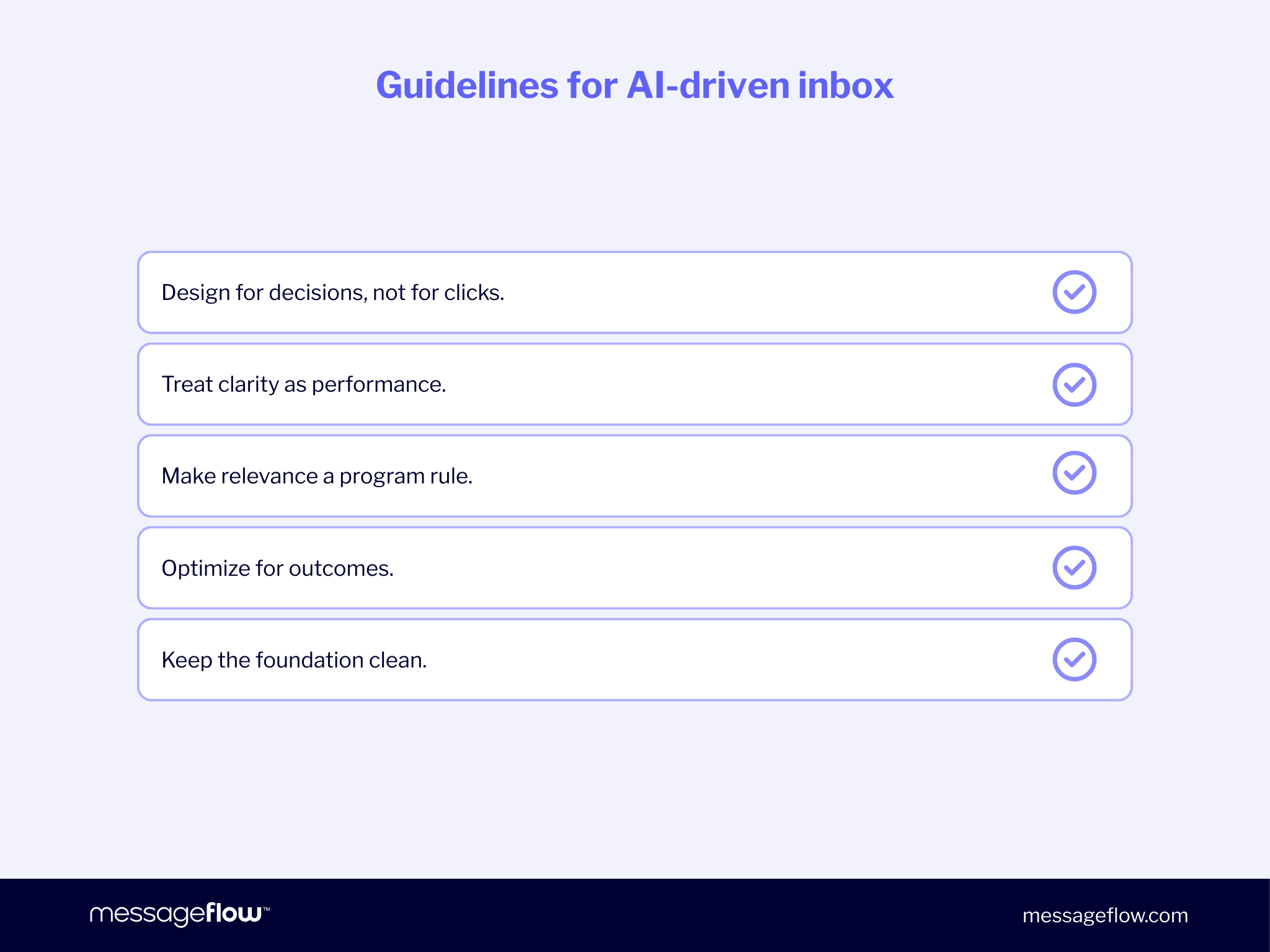
Here are the principles you can use to guide your thinking moving into this next chapter:
- Design for decisions, not for clicks. Make the next step obvious and justified.
- Treat clarity as performance. If your message can’t survive compression, it won’t survive prioritization.
- Make relevance a program rule. The fastest way to lose attention is to spend it carelessly.
- Optimize for outcomes. If the inbox changes how messages are consumed, your measurement has to be anchored in action.
- Keep the foundation clean. Deliverability, compliance, and trust signals remain the price of entry, especially as inboxes get stricter about what they surface.
We’ve covered a lot here so if you want a short checklist to take away, it’s this:
- Cut or narrow the campaigns that don’t have a clear job-to-be-done.
- Make every email’s purpose legible in the first screen.
- Shift reporting toward action rate and downstream impact.
- Reduce channel collisions, make omnichannel additive.
- Keep your deliverability basics tight and your templates lean.
💡 Worth noting is that this isn’t a Gmail-only trajectory. Similar AI initiatives are emerging across other inbox ecosystems (for example, Copilot in Outlook, Apple Intelligence in Apple Mail, and Scout in Yahoo). The mechanics and rollout pace will differ, so this article isn’t a side-by-side comparison. It’s a set of general concepts, anchored in the clearest directional signals coming from Google.
The Gemini era doesn’t remove email from the funnel. It changes how the inbox decides which emails deserve to be part of it. Teams that treat this shift seriously, without drama, will be the ones whose messages keep getting seen, read, and acted on.