


Introduction
Few things are more frustrating in email marketing than sending a well-planned campaign only to discover that a significant part of it never reached recipients’ inboxes. Email delivery failures are common and directly affect campaign performance, sender reputation, and long-term deliverability.
Using double opt-in for new subscribers helps ensure that email addresses are valid and that recipients have explicitly agreed to receive your emails, reducing the risk of incorrect email addresses causing hard bounces.
One of the most frequent reasons behind failed delivery is email bounces. Understanding the difference between a soft bounce and a hard bounce is essential if you want to reduce bounce rates, protect your sender reputation, and improve inbox placement. A strong email strategy should include monitoring bounce rates, avoiding spam filters, and regularly reviewing your practices to maintain high deliverability.
Soft bounce vs hard bounce is ultimately the difference between a temporary delivery issue and a permanent one. While both impact deliverability, they require very different responses and should be handled as part of a broader email marketing strategy that balances list hygiene, sending behavior, and infrastructure quality.
Monitoring bounce rates and using double opt-in are key practices for improving deliverability and sender reputation.
TL;DR – Soft vs Hard Bounce (Quick Answer)
- Soft bounce = temporary delivery failure (retry possible), often due to issues like a full mailbox or server problems; indicated by SMTP 4XX error codes
- Hard bounce = permanent delivery failure (remove/suppress address), typically caused by invalid email addresses or blocked delivery; indicated by SMTP 5XX error codes
- The difference between hard and soft bounces is that hard bounces are permanent and require address removal, while soft bounces are temporary and may resolve on their own
- Soft bounces often relate to server or mailbox conditions
- Hard bounces usually indicate invalid addresses or blocked delivery
- Repeated bounces damage sender reputation and deliverability
SMTP error codes help identify bounce types: 4XX codes signal soft bounces, while 5XX codes indicate hard bounces.
Why email deliverability matters
Email deliverability refers to your ability to successfully deliver messages to recipients’ inboxes rather than being rejected, filtered, or blocked. Without strong deliverability, even the best-designed campaigns fail to generate results.
IP addresses used to send emails can be flagged by mailbox providers, leading to global bounces and contributing to a poor sender reputation. This can significantly impact your ability to reach inboxes and the overall effectiveness of your email marketing efforts.
Mailbox providers continuously evaluate sender behavior. High bounce rates–especially hard bounces–signal poor list quality or risky sending practices. Over time, this can lead to increased filtering, throttling, or complete blocking of your sending infrastructure, which is why email deliverability should be treated as an ongoing operational discipline rather than a one-time setup.
Maintaining good deliverability ensures:
- higher inbox placement
- better engagement rates
- protection of sender reputation
- long-term stability of email campaigns
- maintaining a strong sender reputation and avoiding global bounces
As of 2026, mailbox providers have stricter delivery requirements, emphasizing sender authentication and list quality. Using automated tools like Mailreach’s Email Warm-Up and Spam Test services can help build a strong sender reputation, reduce bounces, and boost your chances of landing in the inbox.
Understanding email bounce types
Even well-maintained email programs encounter bounces. What matters is how you interpret and handle them.
There are two primary types of bounces in email marketing:
- Soft bounces (temporary failures)
- Hard bounces (permanent failures)
Bounced emails are categorized based on the RFC code and error codes found in email bounce reports, which help clarify the reason for delivery failure.
Technically, bounce classification is often derived from SMTP response codes:
- 4xx codes typically indicate temporary issues (soft bounces)
- 5xx codes usually signal permanent failures (hard bounces)
Email bounce reports and RFC codes provide detailed reasons for delivery failures, making it easier to identify and address issues with bounced emails.
Understanding how these signals affect your email bounce rate is critical, because bounce metrics are one of the strongest negative signals used by mailbox providers.
What is a soft bounce?
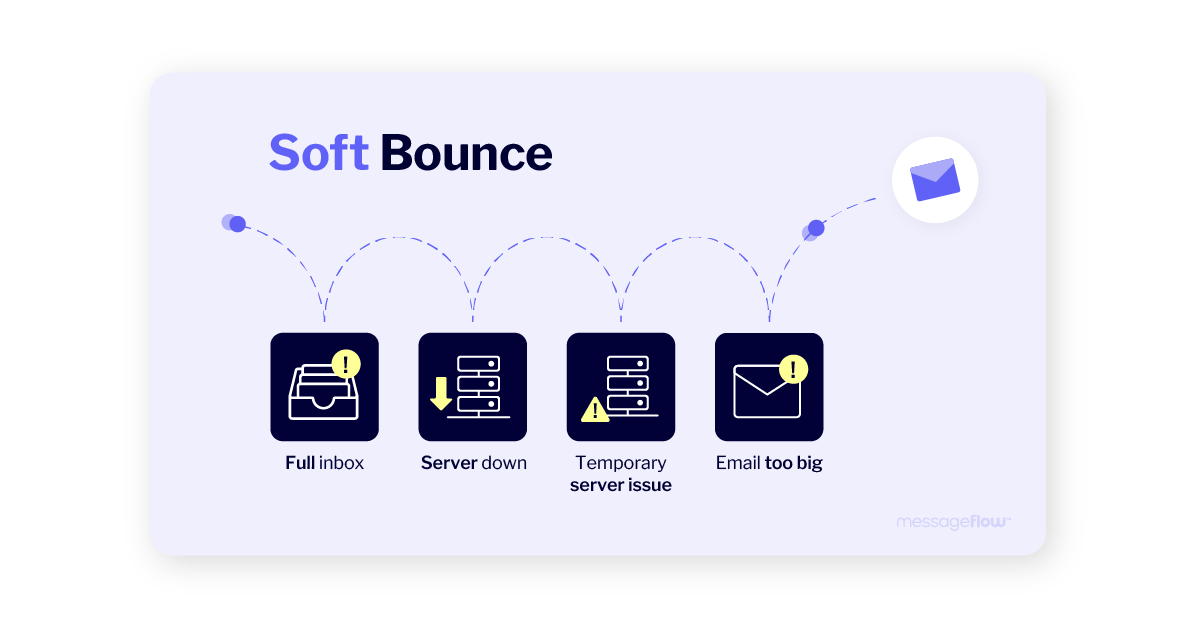
A soft bounce occurs when an email message reaches the recipient’s mail server but cannot be delivered due to a temporary issue. This often happens because the recipient’s inbox is full (full mailbox), the recipient’s server is experiencing temporary server issues, or the message is too large and exceeds size limits. In these cases, the recipient’s email may not be able to accept incoming messages until the temporary issue is resolved.
Common soft bounce causes include:
- full mailbox (the recipient’s inbox is full)
- the receiving server is temporarily unavailable (temporary server issues)
- message is too large (message size exceeds mailbox limits)
- greylisting or temporary rate limiting
- short-term DNS or routing issues
Soft bounces are not permanent failures. Most email systems automatically retry delivery multiple times. If the issue resolves, the email may still be delivered successfully.
However, persistent soft bounces should not be ignored. Repeated failures inflate your soft bounce email metrics, which over time negatively affect sender reputation and overall deliverability.
What is a hard bounce?
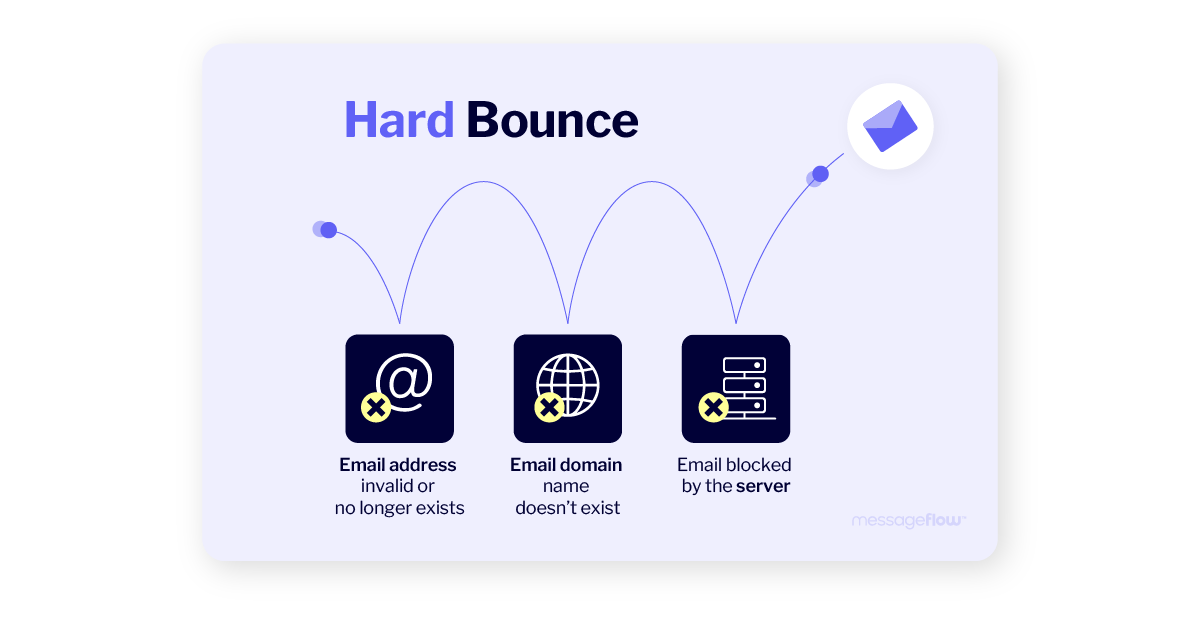
A hard bounce indicates a permanent delivery failure. In these cases, retrying will not result in successful delivery. A hard bounce occurs when the recipient email server returns a permanent failure, often because the email address is invalid or the recipient’s email address does not exist.
Common hard bounce causes include:
- invalid email addresses
- non existent addresses
- non existent domain
- permanently blocked delivery by the recipient email server
- domains that do not exist or no longer accept mail
- permanent server-level blocks
- addresses that are disabled or deleted
Most Email Service Providers (ESPs) automatically suppress hard bounced emails to protect sender reputation. It’s important to regularly update and edit your email list to remove hard-bounced addresses.
Hard bounces require immediate action. Continuing to send emails to hard-bouncing addresses harms sender reputation and increases the risk of broader deliverability issues across all future campaigns.
Soft bounce vs hard bounce – comparison
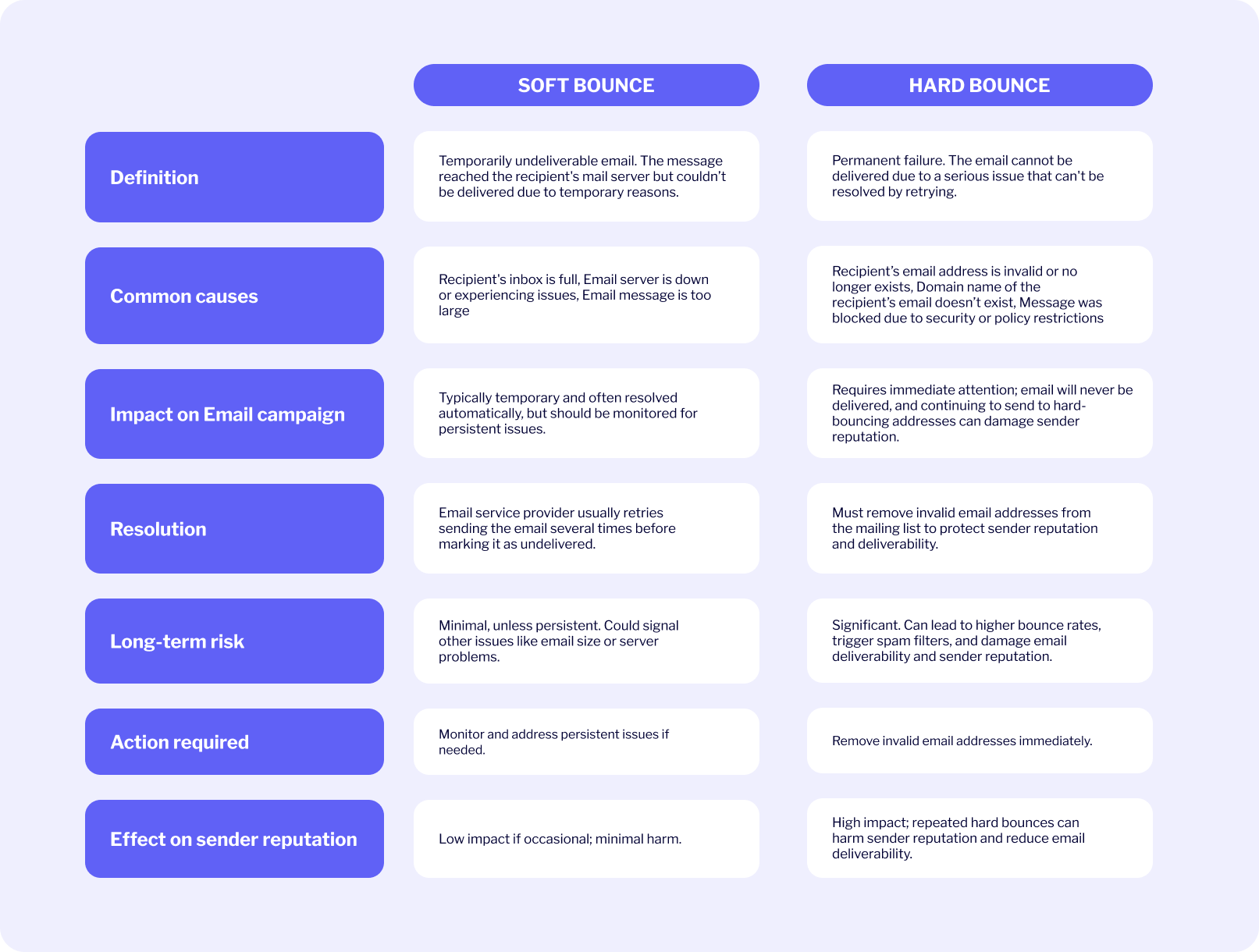
| Aspect | Soft Bounce | Hard Bounce |
| Delivery failure type | Temporary | Permanent |
| Retry possible | Yes | No |
| Common SMTP codes | 4xx | 5xx |
| Typical cause | Mailbox/server issue | Invalid address/domain |
| Required action | Monitor & suppress if persistent | Remove immediately |
Note: Understanding hard bounce vs soft bounce is essential for managing hard and soft bounces effectively. Proper handling of these types of email delivery failures directly impacts your email campaign’s deliverability and helps maintain a strong sender reputation.
Why the difference matters
Soft and hard bounces impact campaigns differently:
- Soft bounces often resolve on their own but become risky if repeated
- Hard bounces are strong negative signals and must be eliminated quickly
Actively managing bounces and regularly cleaning your list helps improve deliverability. Monitoring incoming messages and bounce activity is essential for maintaining sender reputation.
Failing to handle bounces correctly can:
- increase spam filtering
- reduce inbox placement
- damage sender reputation across future campaigns
Regular cleaning of both hard and soft bounces is crucial for maintaining high engagement and good sender scores.
Understanding this distinction is a foundational element of sustainable email deliverability management.
How to reduce your email bounce rate
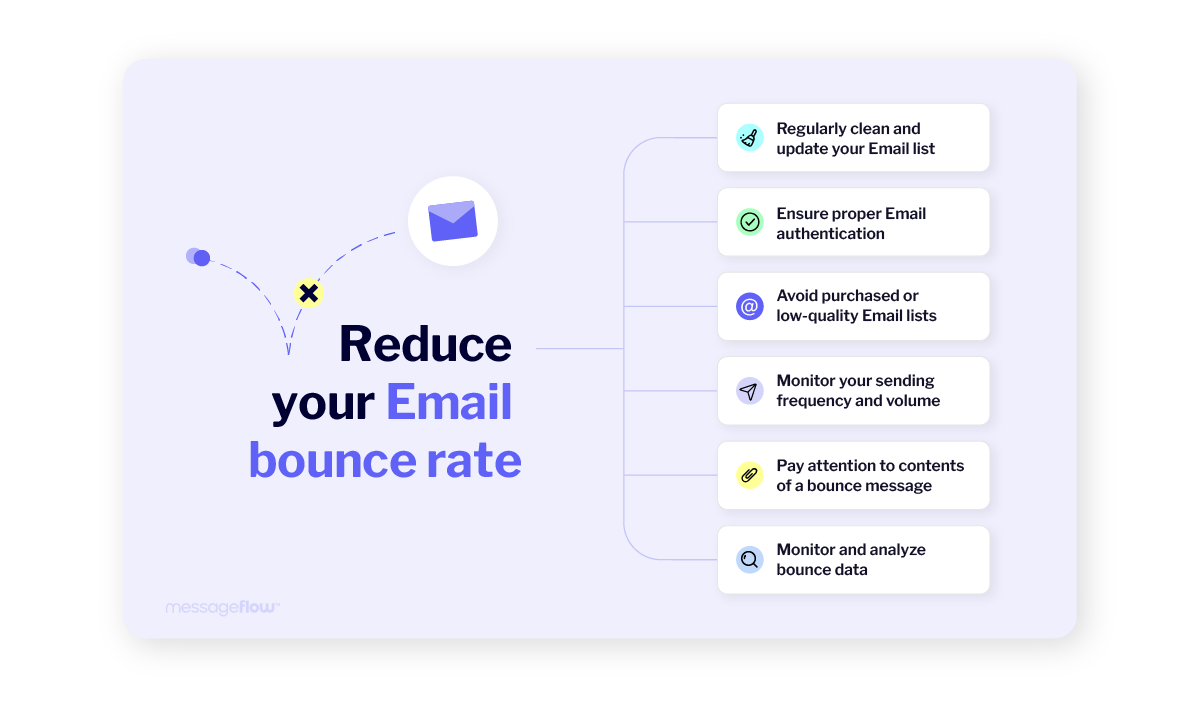
1. Maintain regular list hygiene
Removing hard-bouncing addresses and suppressing persistent soft bounces helps stabilize your email bounce rate and protects sender reputation.
Using automated tools for list cleaning can efficiently identify and remove invalid or inactive email addresses, improving your list quality and engagement rates.
SendClean offers features like bounce list management, allowing you to automatically remove hard-bounced addresses and set rules for handling soft bounces.
It’s also important to remove inactive, invalid, or role-based addresses from your email list to avoid repeat bounces.
2. Verify addresses before sending
Validating new sign-ups reduces invalid entries and prevents hard bounces caused by typos or fake addresses.
Implementing a double opt-in process, also known as double opt, requires new subscribers to confirm their email address by clicking a verification link sent to their inbox. This not only validates email addresses and ensures explicit consent from subscribers, but also improves list quality, reduces hard bounces, and supports best practices for deliverability and compliance.
3. Optimize sending behavior
Avoid sudden volume spikes, send in controlled batches, and align frequency with engagement levels to reduce temporary rejections.
4. Optimize email content
Oversized messages and heavy HTML increase soft bounce risk. Keeping messages lightweight aligns with email marketing best practices.
5. Monitor bounce data continuously
Bounce monitoring should be an ongoing process, not a post-campaign check.
How to fix a soft bounce (practical checklist)
When a soft bounce occurs:
- Review the bounce reason and SMTP response
- Check for size or content-related issues
- Reduce sending speed if rate-limited
- Verify authentication (SPF, DKIM, DMARC)
- Check the status of the recipient’s mail server and email server for temporary issues (such as server overload or downtime)
- Ensure the recipient’s email address is a valid address before retrying delivery
- Retry delivery automatically
- If the bounce persists across campaigns → suppress the address
Bounce message and email error report: Understanding bounce codes and what they mean
When an email fails to reach the intended recipient’s inbox, the sender often receives a bounce message—an automatic notification from the recipient’s mail server explaining why the delivery failed. Understanding these bounce messages and the accompanying email error reports is essential for anyone looking to maintain a healthy sender reputation and maximize email deliverability.
Transactional vs marketing emails and bounce handling
Bounce handling is especially critical for transactional emails, where failed delivery directly affects user experience–such as password resets, order confirmations, or account alerts.
Unlike marketing campaigns, transactional traffic requires stricter monitoring, faster retries, and clearer escalation paths. If you’re unfamiliar with the distinction, this transactional email guide explains why delivery expectations differ.
From a user perspective, failed transactional delivery directly degrades trust and usability, which is why transactional email experience is tightly linked to bounce handling quality.
Improve your email marketing by cutting down on hard bounce and soft bounce
Maintaining a low bounce rate is vital for keeping your email deliverability high, which in turn safeguards your sender reputation. A good sender reputation is crucial for the long-term success of your email marketing efforts. Without it, even the best campaigns may fail to reach their audiences.
💡 Proactively monitor your bounce rates and take the steps discussed throughout this article to identify potential issues early and address them before they impact your deliverability. By paying attention to both soft bounces and hard bounces, you can take the right actions to keep a healthy email list, protect your sender reputation, and ensure successful delivery of your marketing and transactional communication.
At MessageFlow, we work directly with international Email Service Providers to create infrastructure that ensures 99% delivery rate. We offer tools to manage your bounce rate, and with features designed to support your deliverability goals, you can:
- Validate your email list: Our system scans addresses for errors or invalid characters, helping you catch problematic entries before sending.
- Monitor bounce types: Our comprehensive campaign reports show both soft bounces and hard bounces, giving you the insights you need to take appropriate action.
- Easily manage hard bounces: With just a single click, you can archive all hard-bounced addresses, preventing them from hurting your future campaigns.
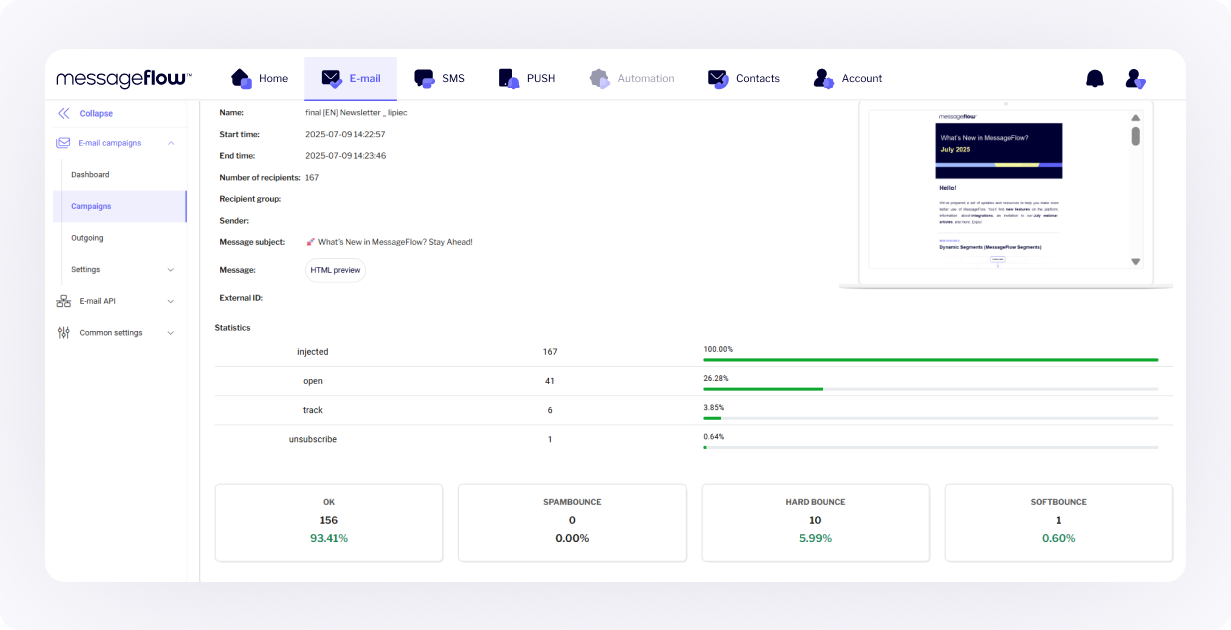
By leveraging these features, you can take control of your bounce rate, protect your sender reputation, and improve the overall effectiveness of your email campaigns. Contact us today to learn more about MessageFlow’s capabilities and grow with the flow!
FAQ: Soft bounce and hard bounce in email marketing
A soft bounce is a temporary email delivery failure. The message reached the recipient’s mail server but couldn’t be delivered due to a short-term issue, such as a full inbox, server downtime, or rate limiting.
A hard bounce is a permanent delivery failure. A hard bounce occurs when the recipient’s email address is invalid, incorrect, or does not exist, the domain is invalid, or the receiving server has permanently rejected the message. This means the email address is invalid or there is a permanent issue with the recipient’s email address.
The key difference is permanence. A soft bounce is temporary and retryable, while a hard bounce is permanent and requires removing or suppressing the address from your list.
Occasional soft bounces are normal. However, repeated soft bounces signal mailbox providers that addresses may be inactive or that sending behavior is problematic, which can negatively affect deliverability over time.
Not after a single occurrence. Soft-bouncing addresses should only be removed or suppressed if the bounce repeats across multiple campaigns, indicating a persistent issue.
Yes. Hard bounces should be removed or suppressed immediately. Continuing to send to hard-bouncing addresses harms sender reputation and increases the risk of filtering or blocking.
The most common causes include full inboxes, temporary server outages, message size limits, greylisting, rate limits, and short-term DNS or routing issues.
A hard bounce occurs when an email cannot be delivered due to a permanent issue, such as an invalid or incorrect email address, non-existent domains, deleted mailboxes, or permanent server-level rejections. If the recipient’s email address is invalid or mistyped, the email will hard bounce and should be removed from your mailing list to maintain sender reputation.
Start by checking the bounce reason, including reviewing SMTP error codes and email bounce reports for more details. Reduce message size, slow down sending speed, verify authentication (SPF, DKIM, DMARC), and allow retries. If the bounce persists, suppress the address.
Yes. If an address remains unreachable for a long time, what starts as repeated soft bounces can eventually be treated as a permanent failure and should be removed.
Both soft and hard bounces increase your email bounce rate, but hard bounces have a stronger negative impact. High bounce rates are a key signal mailbox providers use to evaluate sender quality.
While exact thresholds vary by provider, a consistently low bounce rate especially with minimal hard bounces is considered a sign of good list hygiene and healthy sending practices.
For transactional emails (password resets, confirmations), failed delivery directly impacts user experience. Proper bounce handling ensures retries happen quickly and invalid addresses are suppressed to prevent repeated failures.