


Push notifications are short messages sent directly from an app server or web service to a user’s smartphone. They appear on the screen even when the app is closed and the phone is locked. This lets brands reach users in real time, without requiring them to open an email inbox or launch an app.
Key takeaways:
- Push notifications are short messages sent from a mobile app server or a website directly to a user’s device. They remain visible even when the screen is locked or the app is running in the background.
- There are two main types of push notifications. Mobile push notifications are sent from mobile apps and typically appear on the lock screen or in the notification center. Web push notifications are delivered through web browsers. They work on both desktop and mobile devices and do not require installing an additional app.
- Push notifications require user consent and are delivered over the internet (Wi-Fi or mobile data). They use very little data, often less than loading a single webpage.
- Android and iOS handle push notifications differently. The systems vary in how and when they request user permission, how notifications are displayed, how categories or channels are organized, and how users can manage them in device settings.
In this article, we explain how mobile push notifications work on Android and iOS and when they’re most effective in customer communication.
What are push notifications?
Imagine you’re shopping online. You add a few items to your cart but don’t complete the purchase. An hour later, a message appears on your smartphone screen: “Your cart is waiting – complete your purchase and enjoy free delivery.”
That’s a push notification: a short message sent by a brand directly to your phone screen (and, in the case of web push notifications, to your computer as well).
Today, push notifications are one of the primary ways apps and websites communicate with users. They allow brands to reach people instantly, without requiring them to open their email inbox or actively use an app.
Push notifications on a phone: A quick definition
Push notifications are short messages (usually one or two sentences, often including a call-to-action button) that appear on a phone or computer screen – regardless of whether the user is actively using the device or even if the screen is locked.
Their key characteristic is that they are a “push” form of communication. This means the user doesn’t need to check or refresh anything – the information is delivered automatically.
Push notifications can:
- inform users about new messages in a messaging app,
- provide order status updates,
- remind users about an abandoned cart,
- notify users about promotions,
- alert users to account changes,
- send reminders about upcoming events or payments.
Mobile push notifications vs. web push notifications
In practice, there are two main types of push notifications: mobile push notifications and web push. They differ in terms of environment and technical requirements.
Mobile push notifications
Mobile push notifications are sent through mobile apps on Android and iOS devices.
To receive them, users must install the app and grant permission to receive notifications.
They are delivered via system services:
- Firebase Cloud Messaging (FCM) on Android
- Apple Push Notification Service (APNs) on iOS
Mobile push notifications allow for deeper integration with the app. For example, they can redirect users to a specific screen (deep linking), display rich media content, or include interactive action buttons.
Web push
Web push notifications are sent through a web browser and do not require installing an app. Users simply need to grant permission within their browser (such as Chrome, Safari, or Firefox).
Web push notifications work on both desktop and mobile devices. They are especially popular in e-commerce and media, where they make it easy to quickly inform users about promotions, new content, or product availability.
How do push notifications work on a phone?
From the user’s perspective, a push notification is just a short message that appears on the screen. Behind the scenes, it’s part of a system that connects the app, the company’s server, and the operating system’s push infrastructure.
So how do push notifications work on a phone? Here’s the process step by step.
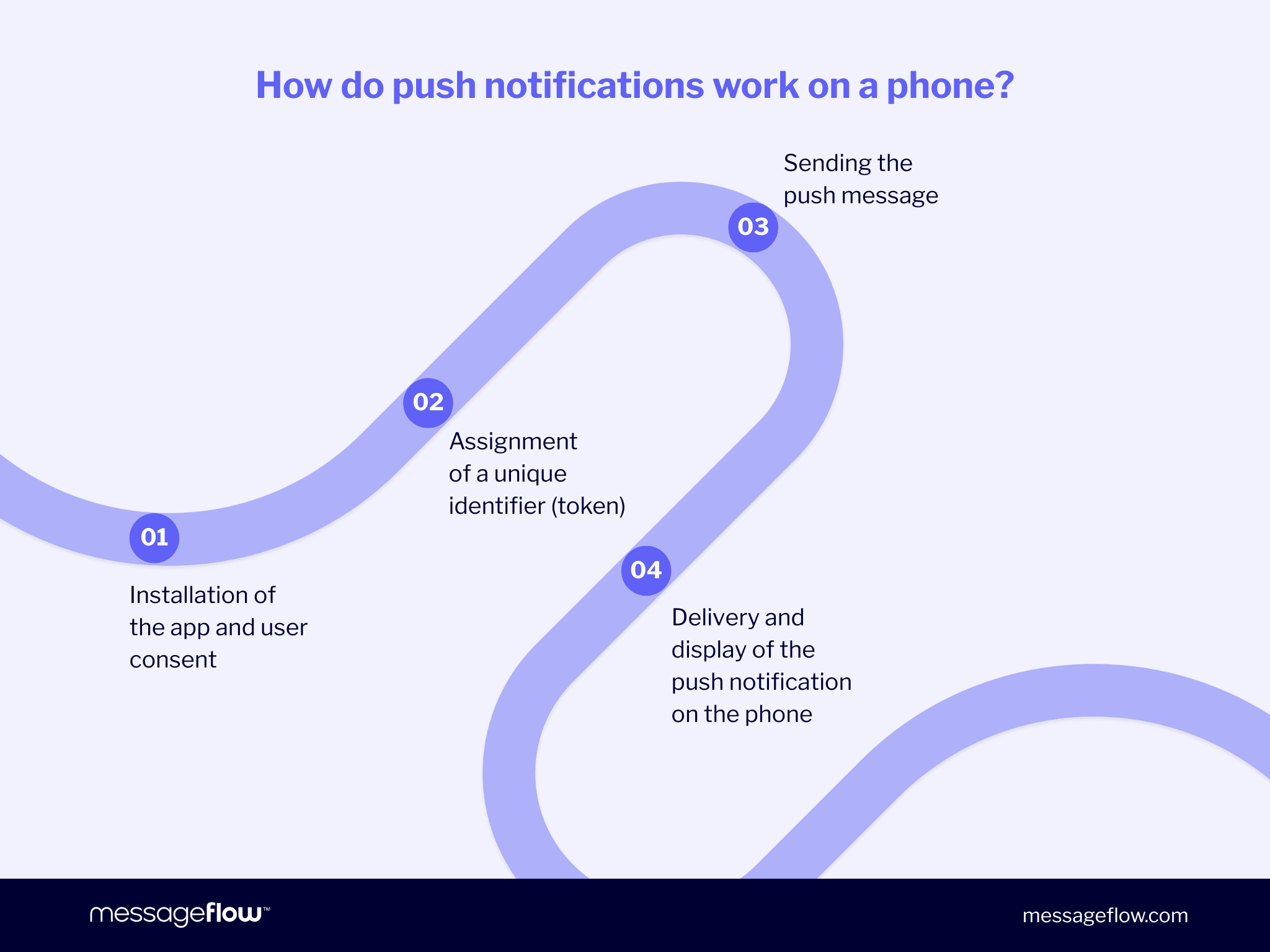
1. App installation and user permission
The user installs the app (or visits a website, in the case of web push notifications) and grants permission to receive notifications. Without this consent, push messages cannot be delivered.
2. Assigning a unique identifier (token)
Once permission is granted, the system generates a push token – a unique identifier for that user’s device (and, in many cases, that specific app installation).
The operating system creates the token, passes it to the app, and the app sends it to the company’s server, where it is stored. This token tells the push system which device should receive a given message.
3. Sending the message
When a company wants to send a notification, its server sends the message content along with the token to the platform’s push service:
- FCM (Firebase Cloud Messaging) for Android;
- APNs (Apple Push Notification service) for iOS.
The company’s server does not connect to the phone directly – the operating system’s push service acts as the intermediary.
4. Delivery and display
The user’s device maintains an energy-efficient background connection to the push notification service. When a new message arrives, the system delivers it and displays it as a banner, alert, notification center item, or an app icon badge.
At this point, the app does not need to be open. It typically launches only when the user taps the notification.
When does a push notification appear?
How a mobile push notification appears depends on system settings and user preferences.
When the screen is active, the message typically appears as a banner and disappears after a few seconds. When the phone is locked, the notification appears on the lock screen. Notifications can also be stored in the notification center or displayed as a badge on the app icon.
Users have full control over how, and whether, they receive push notifications. In both Android and iOS settings, users can:
- completely disable notifications for a specific app,
- mute them (silent delivery),
- limit their visibility on the lock screen,
- manage notification categories or channels.
Mobile push notifications on Android vs. iOS: What’s the difference?
Push notifications work on both Android and iOS. From a technical standpoint, the delivery mechanisms are similar: Android uses FCM (Firebase Cloud Messaging) and iOS uses APNs (Apple Push Notification service).
The key differences emerge at the user experience level – and these differences directly impact marketing consent rates, engagement, and overall campaign effectiveness.
Notification display, configuration, and control vary significantly between platforms. When designing push communication, it’s important to understand these nuances to fully leverage each system’s potential.
Below are the most important areas to consider when designing push notifications for Android and iOS.
| Aspect | Android | iOS |
|---|---|---|
| Permission request timing | Typically requested within the app at any time after installation (high flexibility in choosing the optimal moment) | System-level dialog – usually shown at first launch or at a carefully chosen moment |
| Default notification display | Banner at the top of the screen, expandable content, and the ability to take action without opening the app | Banner, alert, or badge – depending on user settings |
| Settings management | Settings → Apps → [App Name] → Notifications | Settings → Notifications → [App Name] |
| Notification channels / categories | Notification channels (e.g., “Promotions,” “Orders”) – users can disable specific categories without opting out entirely | Alert styles and intelligent grouping by app or time |
| Lock screen visibility | Fully configurable – show full content, hide sensitive content, or disable notifications entirely | Configurable – show full content, notification count only, or none |
| Typical limitations | Aggressive battery management on some mobile devices (e.g., Xiaomi, Samsung, Huawei) may restrict background delivery for Android users | Focus mode, notification summaries, and system-level limits may delay delivery |
| Example use cases | Banking alerts (e.g., BLIK), marketplace notifications, food delivery apps | iCloud calendar reminders, Apple Wallet tickets, streaming apps |
How to design push notifications for Android and iOS
Although Android and iOS rely on similar technical foundations, the user experience differs significantly between the two platforms. These differences, rather than the underlying technology, are what truly impact the effectiveness of push communication.
The timing of the permission request can strongly influence opt-in rates, particularly on iOS, where users often make their decision during their first interaction with the system prompt. It’s equally important to tailor the length and structure of the message to how notifications are displayed on each platform.
Sending frequency also requires careful consideration. System-level features, such as Focus mode on iOS or battery optimization on certain Android devices, can affect delivery and visibility. Ignoring these factors may reduce campaign performance, even if the message itself is well crafted.
For this reason, campaign performance should be analyzed separately for each platform. What drives a high CTR on Android may not deliver the same results on iOS. An effective push strategy should not be one-size-fits-all, but intentionally adapted to the operating system and user environment.
That said, adapting communication for two systems does not have to mean doubling your workload. Omnichannel communication platforms such as MessageFlow allow you to create a single mobile push campaign while customizing its parameters based on the operating system.
What types of push notifications are there on a phone?
Push notifications on a phone generally fall into two main categories: marketing and transactional. They differ in purpose, timing, and the role they play in the overall user experience.
Transactional notifications build trust and support customer service. Marketing notifications drive sales, engagement, and retention. An effective push strategy relies on using both types appropriately – delivering the right message at the right time.
What are marketing push notifications?
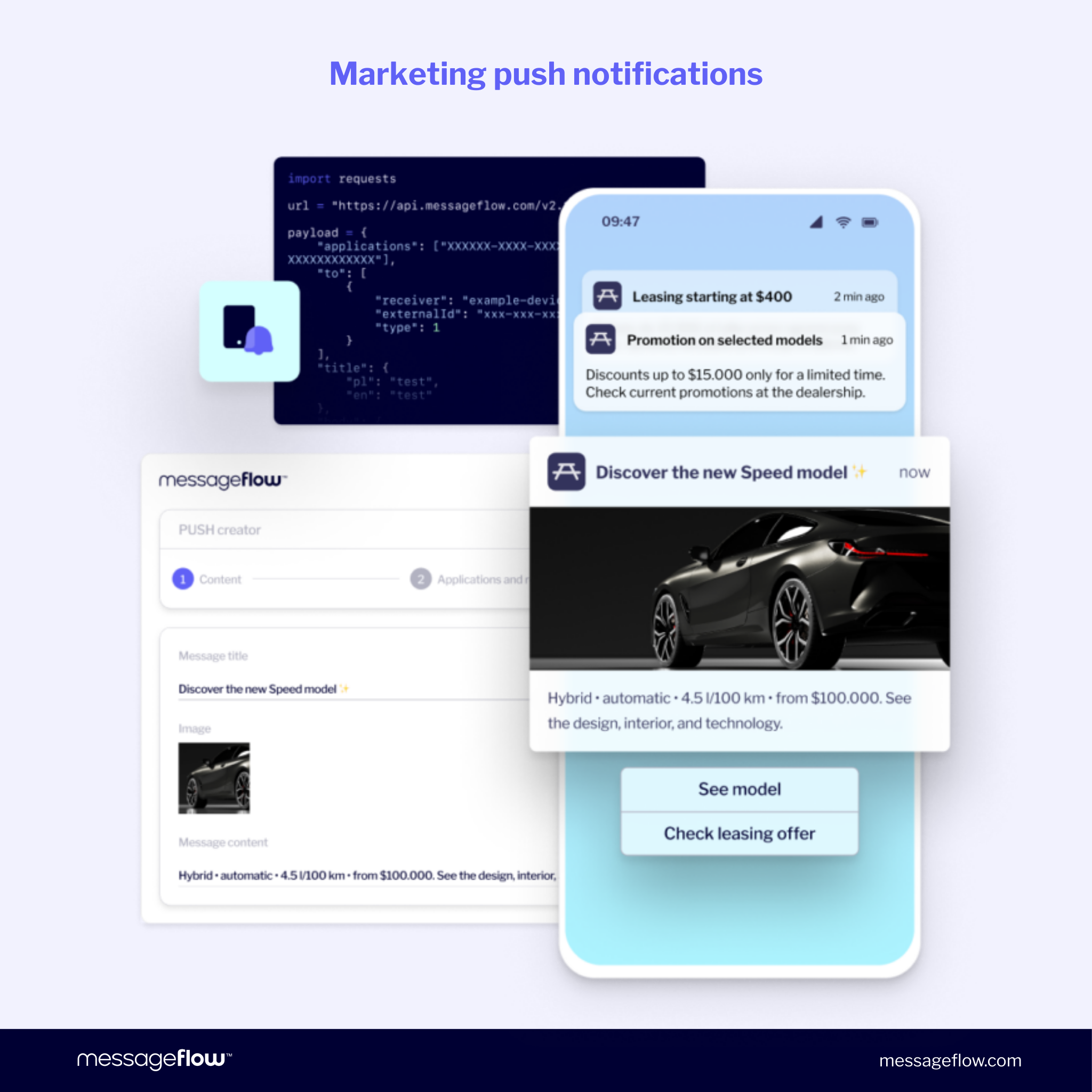
Marketing push notifications are initiated by the brand. Their goal is to increase sales, boost app engagement, or re-engage users. They may be scheduled as part of broader campaigns (e.g., seasonal sales or Black Friday promotions) or triggered automatically based on user behavior.
This category includes messages about:
- promotions and special offers,
- new product launches,
- discount codes,
- limited-time deals,
- abandoned cart reminders,
- re-engagement prompts after a period of inactivity.
With marketing notifications, precise segmentation, personalization, and frequency control are essential. Sending too many irrelevant messages can quickly lead users to disable push notifications altogether.
What are transactional push notifications?
Transactional push notifications are direct system responses to specific user actions. They inform users about events related to their activity and are therefore expected.
Examples of transactional push notifications include:
- order confirmations,
- shipping status updates,
- payment reminders,
- transaction authorizations in banking apps.
In e-commerce, this might be a shipping confirmation. In banking, a login alert or BLIK payment notification. In booking systems, an appointment confirmation.
Due to their nature, transactional notifications achieve very high open rates and play a key role in building trust. Their primary purpose is not to drive sales, but to deliver relevant information at exactly the right moment.
Want to learn more about mobile push notifications in transactional and marketing communication? Read our article exploring key use cases and their role in brand strategy.
How to design mobile push notifications without annoying users
Push notifications can significantly increase sales and engagement – but they can just as quickly lead users to disable permissions or delete the app. The difference lies in how they are designed, both in terms of content and timing.
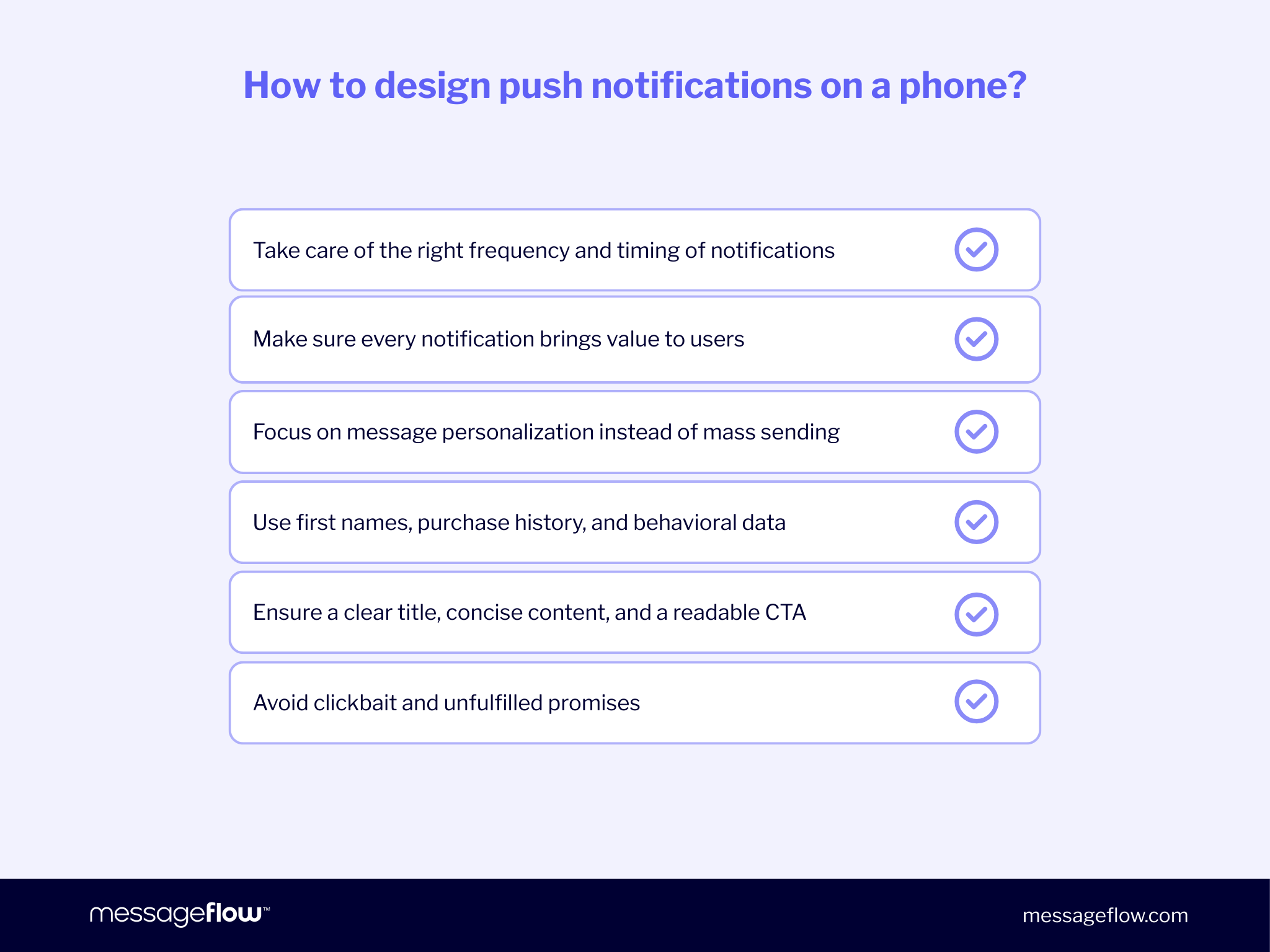
Frequency and timing matter
One of the most common mistakes is sending too many notifications. Bombarding users with a dozen messages per day almost always leads to frustration. It’s better to send fewer, more relevant notifications.
Context matters. Consider the time of day, the day of the week, and the user’s current situation. Aggressive promotions sent early in the morning or late at night rarely create a positive experience. A well-timed message can significantly increase effectiveness without increasing frequency.
Every push notification should deliver value
When sending mobile push notifications, ask yourself one simple question: What does the user gain from this? If the answer isn’t clear, the message is probably unnecessary.
The highest CTRs are typically achieved by notifications that:
- simplify decision-making,
- remind users of something important,
- offer a tangible benefit (e.g., a limited-time discount),
- inform users about product availability.
Value should always come before visibility.
Personalization over mass messaging
The more tailored the message, the lower the risk of irritation. Using the user’s name, purchase history, or behavioral data significantly increases relevance.
Frequency should also align with user activity. Users who rarely open the app should receive fewer notifications than those who engage daily. Behavior-based segmentation is now a core element of effective push communication.
Simplicity wins
A strong push notification is short, specific, and focused on one clear call to action.
A compelling headline, a concise message, and a clear CTA are typically more effective than long, complex copy. For inspiration, see our collection of creative push notification ideas and examples.
It’s also important to avoid clickbait or exaggerated promises. If users don’t find what they expect after tapping the notification, trust erodes quickly.
Push notifications in omnichannel communication
You now know what push notifications are and how they differ between Android and iOS. The natural next step is to place them within a broader communication strategy. Mobile push should not operate in isolation – its full potential is realized only within an omnichannel framework.
In modern mobile marketing, push notifications are rarely the only customer touchpoint. They are often part of a larger communication scenario: reminding users about an abandoned cart after an email has been sent, reinforcing an SMS campaign, or responding to specific in-app behavior.
The key, therefore, is having a tool that allows you to manage this process in a consistent, scalable, and measurable way.
Implement mobile push notifications with MessageFlow
MessageFlow is an omnichannel communication platform that supports mobile push notifications (for Android and iOS users), SMS, email, RCS, and OTT channels. From a single dashboard – or via one flexible API – you can design, send, and analyze mobile push campaigns without splitting activities across multiple systems.
The platform provides an intuitive campaign builder that enables marketers to create in-app push notifications independently – including rich media (rich push), clear CTAs, and deep links that direct users to a specific screen within the app.
Advanced segmentation and personalization capabilities allow content to be tailored based on user behavior, interaction history, and lifecycle stage.
For IT teams, a high-performance Push API enables transactional and marketing notifications to be sent directly from backend systems, CRM platforms, or sales tools. The platform’s high-volume architecture ensures strong performance and reliability (99.95%+ API uptime), even during peak traffic periods such as Black Friday campaigns or large-scale security alert broadcasts.
FAQ: frequently asked questions about push notifications on a phone
No. An internet connection (Wi-Fi or mobile data) is required to deliver new push notifications in real time.
If the phone was temporarily offline, Android or iOS will attempt to deliver pending push notifications once the connection is restored – provided their expiration time has not passed.
Push notifications that were already downloaded to the device may still be visible in the notification center, even if the phone switches to airplane mode.
No. Data usage is minimal. Standard push notifications typically contain only a few to several dozen kilobytes of text and metadata. For most smartphone users, the impact on a monthly data plan is practically negligible.
Higher data usage may occur with rich notifications (e.g., those containing images) or when the app downloads additional content after the user taps the notification, such as a product catalog or live feed.
No. Receiving push notifications does not incur any additional charges. Users rely on the same mobile data plan or Wi-Fi connection they use for regular app usage.
The cost of sending notifications is covered by the company running the push campaigns. On the user’s side, the only “cost” is minimal data usage and a slight impact on battery life.
The most common reasons include:
- Notifications disabled for the specific app in device settings
- Permission not granted when first launching the app
- “Do Not Disturb” mode (Android users) or “Focus” mode (iOS users) enabled
- Background activity restrictions or battery-saving mode (especially on certain Android devices)
- Notification categories turned off within the app
Make sure push notifications are enabled in your device settings and that the app is updated to the latest version.
The push notification mechanism is managed by the Android and iOS operating systems, which apply high security standards for data transmission.
Potential risks usually stem from the content of the message itself, for example, a link leading to an unknown website. For this reason, it’s best to install apps only from official app stores and exercise caution when clicking unfamiliar links.
B2B communication platforms such as MessageFlow also ensure GDPR compliance, robust data protection, and high infrastructure standards, further enhancing overall communication security.
Yes – through web push notifications. These are delivered via web browsers (e.g., Chrome, Firefox, Safari) after the user grants permission.
Permission can be withdrawn at any time in the browser settings. In practice, many companies combine in-app push notifications with web push to reach users across devices and channels.
Push notifications appear outside the app: on the lock screen, as banners, or in the notification center – even when the app is closed.
Pop-up messages (in-app messages) appear only while the user is actively using the app. They are often used to support onboarding, highlight features, or guide users through a specific action.
Both formats can work together as part of a connected user experience.
On Android, apps can create notification categories (also called notification channels), such as “Promotions,” “Orders,” or “Security Alerts.” Users can disable selected categories without turning off push notifications entirely.
On iOS, push notifications are automatically grouped by app or time, helping users manage high volumes of alerts more efficiently.
This level of control improves the user experience and reduces the risk of users disabling push notifications altogether.
Yes. Modern messaging strategies rely heavily on personalization. Push notifications can be tailored based on:
- user behavior
- purchase history
- app activity
- user interests
- lifecycle stage
Personalized messages significantly increase engagement and reduce the likelihood that users will disable push notifications.
Companies typically analyze:
- how many users have push enabled
- delivery rate
- open rate (CTR)
- conversion rate
- number of customers engaged
- impact on user downloads and retention
Campaign performance is often measured separately for Android and iOS users to optimize results across platforms.In this article, we explain how mobile push notifications work on Android and iOS and when they’re most effective in customer communication.