AI in email marketing strategy works when you give it three things: a clearly defined audience, a documented workflow, and alignment between your marketing and technology teams. Without these foundations, AI just produces average content faster – and delivers it to the wrong people. This guide explains how to build each layer so your AI email marketing strategy drives real results.
Most marketing teams adopt AI content tools and expect better results overnight. They don’t get them.
According to Ahrefs, 87% of content marketers now use AI to help create content. And yet, research by NP Digital found that AI-generated content produces 5.44x less organic traffic than well-crafted human content, measured across 744 articles over five months.
The gap isn’t about AI capability. It’s about what teams feed into it.
Effective email marketing still depends on three basics: the right message, the right person, the right moment. AI doesn’t change that. It reflects the quality of the inputs, structure, and decisions your team provides.
Get the foundations right, and AI email content becomes a genuine multiplier. Skip them, and AI just scales mediocre copy faster.
This article is based on a presentation delivered at Masters of Email Marketing 2026. Download the full presentation – including the practical framework, workflow templates, and ready-to-use prompts – using the link below.
Three mistakes that kill your AI in email marketing strategy
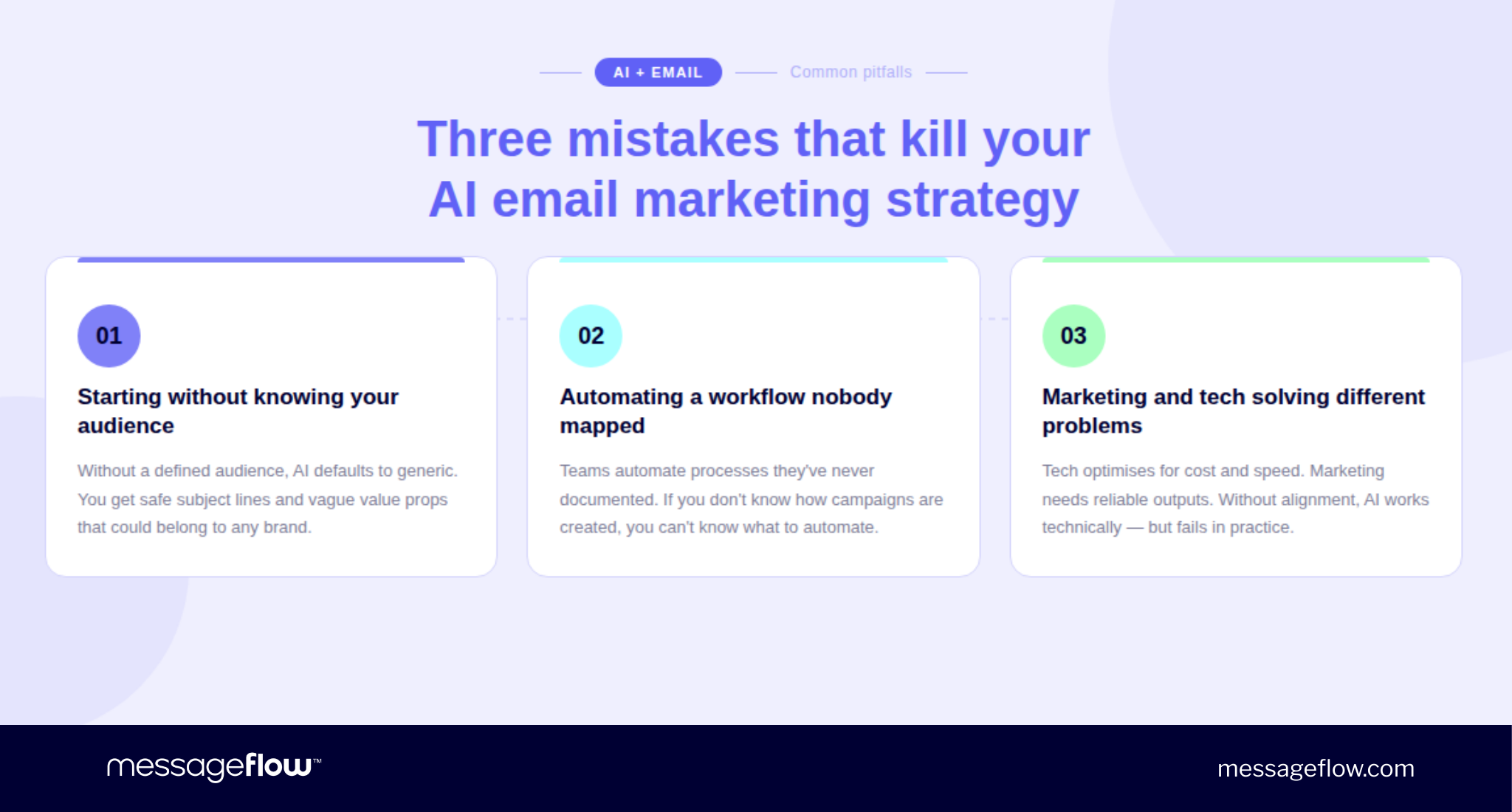
Before building anything, it’s worth understanding where most teams go wrong. The same three problems appear in nearly every failed AI email content rollout – and most teams walk straight into all three.
Mistake 1: Starting without knowing your audience
AI doesn’t know your customers – it only knows what you tell it. If your ICP is three years old, your AI email content generationtool will produce copy that sounds like it was written for a company you used to be.
When the audience is undefined, AI defaults to safe, broad copy. Subject lines that could belong to any brand. Value propositions that say nothing specific. The problem is not the model. The problem is the input.
Mistake 2: Automating a workflow nobody has mapped
Most teams try to automate processes they have never written down. If you don’t know how your email campaigns actually get made – who does what, how long each step takes, where decisions are made – you can’t identify what to automate.
You also can’t measure whether AI improved anything. This is why most AI in email marketing strategy rollouts stall after the first demo: the team generates one impressive output, can’t repeat it, and quietly stops using the tool.
Mistake 3: Marketing and tech solving different problems
Technology teams optimize for cost reduction, scalability, and automation speed. Marketing teams need trustworthy outputs, workflow compatibility, and gradual rollout with feedback loops. Neither goal is wrong. Without a shared framework, these teams build email AI systems that technically function and practically fail.
McKinsey research found that only around 25% of organizations using AI have moved beyond pilots to tangible value. The primary barrier is not technology. It is organizational misalignment.
AI is a multiplier, not a fixer. Strong inputs get amplified. Weak ones do too.
Three foundations for AI email content that actually works
Foundation 1: Build the audience inputs your AI needs
The best input you can give AI is the real language your customers use – in sales calls, demos, support conversations, and NPS responses. That language is what separates AI email content that sounds generic from content that sounds like it was written specifically for the reader.
The difference is direct. Prompting AI to “write a follow-up email” produces something serviceable. Prompting it with actual customer language – “customers say they’re confused about pricing and want clarity before committing” – produces something useful. The difference is input quality, not model quality.
What your AI needs before it writes a single email:
A realistic ICP based on actual closed deals. Go to your CRM. Look at which industries, company sizes, and roles actually convert. Build two or three profiles from customers you have genuinely won – not from a workshop whiteboard.
A tone of voice document – one to two pages. How your brand sounds. Ten phrases you use. Ten you avoid. Three examples of good versus bad sentences. Without this, AI defaults to generic marketing language that could belong to any company in your industry.
Customer call transcripts. Discovery calls, demos, sales conversations. Tools like Fireflies, Bluedot, or Gemini make transcript generation automatic. Record with consent, export, and store where your team actually works.
Examples of your best-performing past emails as format and tone reference.
Don’t have these documents yet? AI can help you build them. Paste your five best-performing emails, website copy, and top ads into Claude or ChatGPT and ask:
Based on these materials, write a tone of voice document for our brand. Include: how we sound, five communication principles, ten phrases we use, ten we avoid, and three examples of good vs. bad sentences.
Twenty minutes. A working hypothesis your team can refine. The same approach works for your ICP – feed it your sales call notes, CRM segments, and NPS responses and ask for a draft customer profile. Not perfect, but something concrete to react to.
Foundation 2: Map your workflow before you automate AI email content generation
Start with one repeatable process. A monthly newsletter works well. Write down every step from brief to post-send analysis. For each step, identify the owner, inputs, outputs, and time it takes.
Then ask three questions: Is it repetitive? Does it have structured inputs? Can a human check the output before it goes out? All three yes – it’s a candidate for automation.
Then ask three questions about each step: Is it repetitive? Does it have structured inputs? Can a human check the output before anything goes out? If all three are yes – it is a candidate for automation.
Here’s what that mapping looks like in practice:
Step
Owner
Auto or Human
Why
Define topic & goal
Editor
Human
Requires business context AI doesn’t have
Gather company news
Marketing
Human
Requires internal knowledge
Research industry news
—
Automate
Pattern-based, easy to evaluate
Write content brief
—
Automate
Structured input, consistent format
Generate first draft
—
Automate
Human reviews before anything goes out
Edit & refinement
Editor
Human
Brand voice, craft, final judgment
Translation
—
Automate
Rules-based when tone of voice doc is strong
Graphic asset briefs
—
Automate
Structured spec from visual identity doc
HTML build & QA
Developer
Human
Too many variables before send
Send & performance review
Marketing
Human
Accountability, interpretation
This kind of mapping typically reveals that around 50% of your email production steps can be automated – saving several hours per campaign cycle without compromising quality.
The reason behind each decision matters as much as the decision itself. Research gets automated because it’s time-consuming, pattern-based, and easy to verify. Topic definition stays human because it requires knowing what’s happening in the business this month. Editing stays human because the AI draft is a starting point, not a finished product.
Foundation 3: Align marketing and tech around shared goals
Successful AI in email marketing strategy requires three things shared across both marketing and technology teams.
Shared quality standards.
Marketing defines what a good email looks like – brand voice, tone, what the brand absolutely cannot say. Technology builds systems that enforce it. Standards that live only in someone’s head cannot be encoded into a prompt.
Shared data access.
Audience segments, behavioral signals, and campaign performance sit in systems owned by tech. Marketing needs structured access to feed AI tools and improve targeting. An AI writing tool that can’t see your audience data is writing blind.
Shared feedback loops.
When AI email content misses brand voice or produces errors, that feedback must flow back into the system – not stay in a Slack thread. One correction that gets encoded improves every campaign that follows.
One practical pattern that consistently works: a bridge person. Someone who speaks both languages – what the technology can do and what the business actually needs. The title varies: AI consultant, solutions architect, prompt engineer. The function is always the same.
The practical workflow for AI email content generation
With the three foundations in place, AI email content generation becomes straightforward and repeatable.
Step 1: Build your stable context library
Your ICP, tone of voice guide, brand context, and email examples become your stable context – loaded into your AI tool once and referenced automatically every session.
The key distinction: context documents are not prompts. Prompts change per task. Context documents stay constant. A prompt tells AI what to do right now. A context document tells AI who you are, how you sound, and who you’re writing for. Keep them separate – this is the foundation of consistent AI email content at scale.
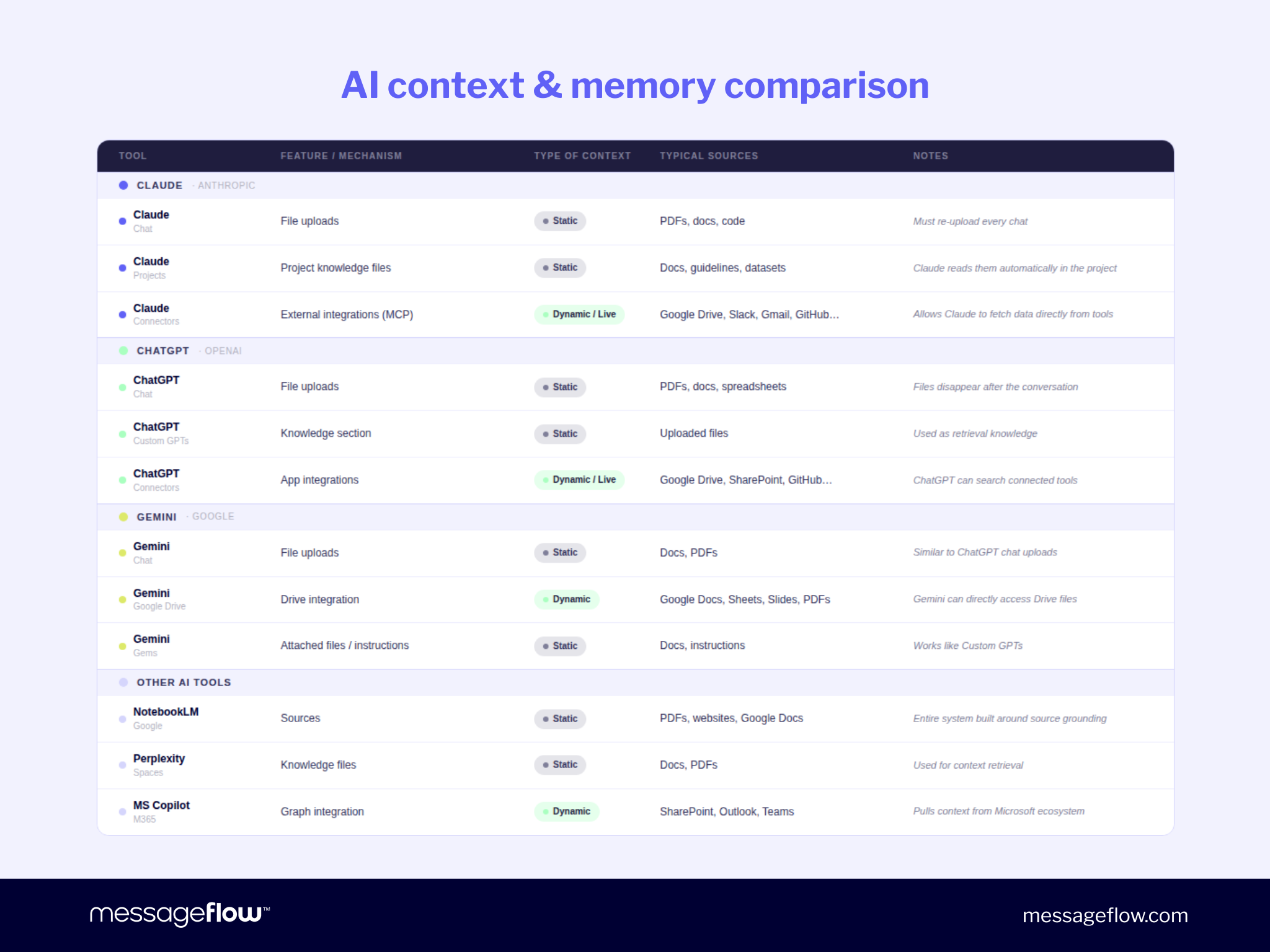
How you load them depends on your tool:
Claude Code / Claude Skills – saved as Skills, referenced automatically every session
ChatGPT Custom GPT – loaded into the Knowledge section permanently
Gemini – connected via Google Drive integration
Plain chat – uploaded at the start of each conversation
The tool changes. The principle doesn’t.
Step 2: Start with one task.
Pick the most repetitive, most time-consuming, least creative step in your workflow. One proof of concept, measured before and after. Then the next.
Step 3: Generate, then edit.
AI handles research synthesis, draft structure, and format consistency. You handle craft, judgment, and final voice. A human reads every draft before it goes out. This is non-negotiable – not because AI email content generation produces bad output, but because brand voice is a human judgment call.
Step 4: Refine the system, not just the output.
The first AI output is rarely the final version. Run two or three real campaign cycles. Log what breaks down specifically. Fix one thing at a time.
Every fix compounds. The system that generates campaign ten looks nothing like the one that generated campaign one. That is the real return on investment.
Useful prompts for refining your system:
The output is too long. Add a rule: max 400 words per section, no filler, no transitional padding.
This sentence sounds wrong: [paste example]. Update the instructions so the output never sounds like this.
Read the current instructions and flag any contradictions.
How to automate your email content creation using Claude Skills
Once your context library is ready and your workflow is mapped, you can encode the entire process into a reusable AI skill – a permanent set of instructions your AI tool follows automatically every time you run a campaign.
Start with a conversation, not code
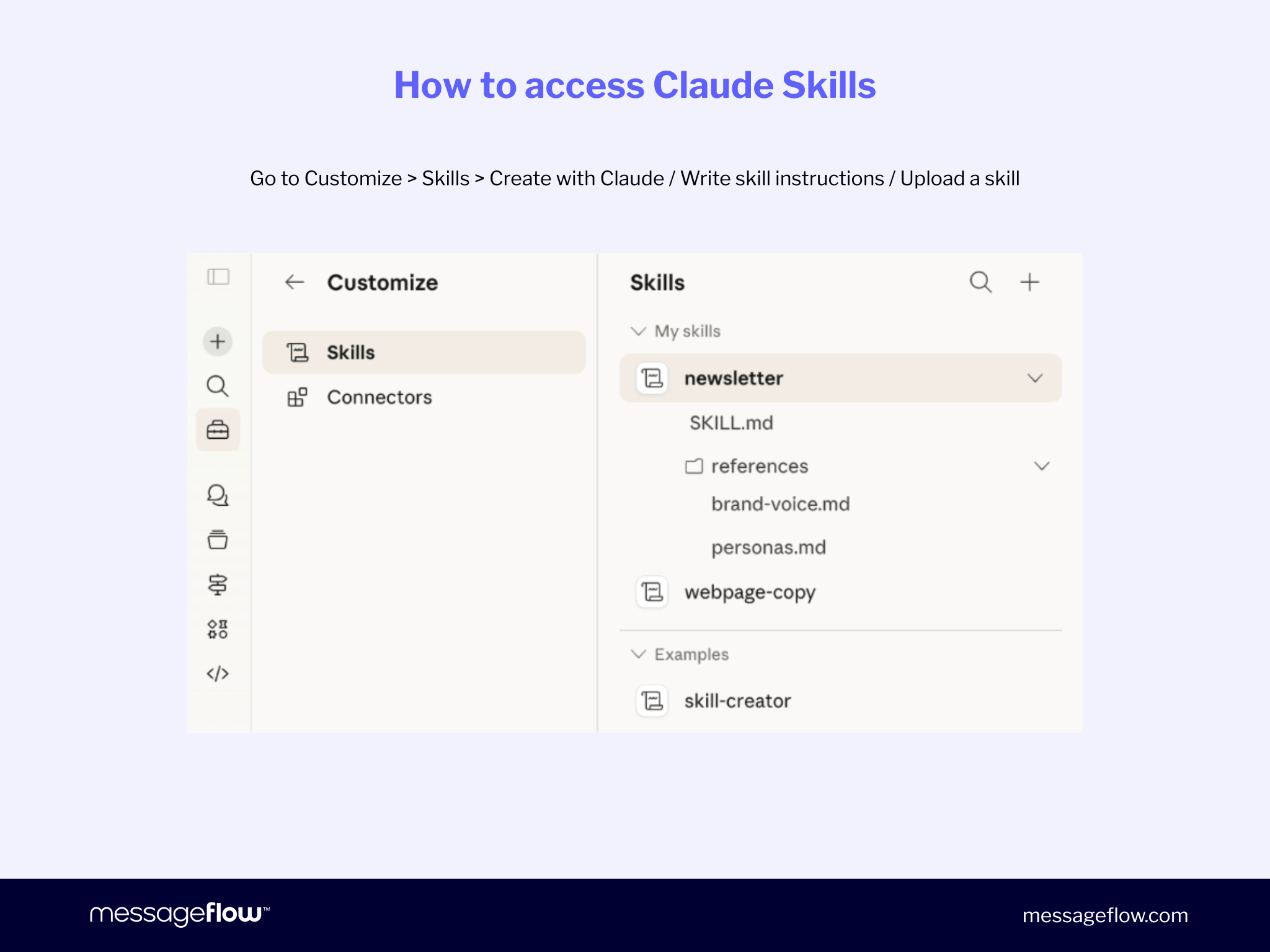
In Claude, go to Customize → Skills → Create with Claude. Describe what you want the skill to do in plain language. Claude will ask clarifying questions: what format should each section follow, what inputs does it need from you, what tone register should it use. Each answer becomes a permanent instruction inside the skill.
Load your context documents
Convert your tone of voice guide, ICP, brand context, and email examples into markdown files. These become the stable context the skill references automatically. You load them once. The skill uses them every time.
Define your pipeline
A well-structured AIemail content generation skill typically runs in phases: you provide the brief and campaign inputs; the skill researches relevant context before writing anything; it proposes a content outline for your approval; it drafts the full email; and it delivers the complete package.
Build a human approval step between the outline and the draft – this is where you course-correct before significant work is done.
Test and tighten
The first output will be roughly 80% right. Run two or three campaigns through it. Log specifically what breaks down. Fix one thing at a time.
The same approach works in ChatGPT Custom GPTs – load your documents into the Knowledge section and encode your workflow in the system prompt.
The goal is a system you run once per campaign cycle, not a prompt you rewrite every time.
Conclusion
AI in email marketing strategy doesn’t make weak strategies strong. It makes them faster.
The teams getting real results from AI email content aren’t the ones with the most sophisticated tools. They’re the ones who defined their audience precisely, mapped their workflows before automating them, and aligned marketing and technology around shared goals.
Three things before any AI email tool:
A real audience definition backed by customer data
A documented, end-to-end email content workflow
Shared standards between your marketing and tech teams
Get these right, and AI becomes the multiplier it promises to be.
But there is one more thing worth saying before you close this tab.
Everything in this guide – the audience inputs, the workflow, the skill, the carefully edited draft – only matters if the email actually reaches the inbox. Content quality and email deliverability are two separate problems. Both need to be solved.
AI handles the content layer. The delivery layer is infrastructure: sender reputation, SPF/DKIM/DMARC authentication, list hygiene, dedicated IPs, and partnerships with mailbox providers that determine whether your email lands in the inbox or the spam folder. That layer cannot be prompted into existence.
MessageFlow’s email marketing platform handles it. 99.98% average delivery rate. Direct partnerships with local and global mailbox providers. CSA certification. Dedicated IPs and reputation monitoring. Marketing and transactional sending streams separated at infrastructure level – so your newsletters never put your order confirmations at risk.
Great content and reliable delivery aren’t competing priorities. They are two halves of the same result.
Frequently Asked Questions about AI Email Marketing Strategy
AI in email marketing strategy means using artificial intelligence to plan, generate, and optimize email content at scale. It covers audience segmentation, first draft generation, subject line variants, bilingual adaptation, and performance-based refinement. The strategy part matters: AI without a defined audience, a mapped workflow, and quality standards produces generic output regardless of which tool you use.
AI email content generation is the process of using tools like Claude, ChatGPT, or Gemini to draft email copy, subject lines, briefs, and supporting assets based on inputs you provide. The output quality depends almost entirely on what you feed in: your tone of voice guide, ICP, brand context, and examples of high-performing past emails. The better the inputs, the less editing the output needs.
Build a tone of voice document with explicit examples of copy that fits your brand and copy that doesn’t. Load it into every AI session as stable context – as a Claude Skill, a Custom GPT knowledge base, or a file uploaded at the start of each session. The more specific your inputs, the less editing the output needs.
Yes – often more so than for large teams. Smaller teams have fewer people to absorb repetitive work. Automating research, brief writing, and first draft generation can save several hours per campaign cycle without adding headcount. Start with one task, measure the time saved, then expand.
Marketing defines quality standards, provides audience inputs, and creates feedback loops that flag errors. Technology builds the systems, manages data access, and implements feedback into prompt frameworks. Both teams need shared success metrics tied to email performance – not output volume.
Each channel requires deliberate adaptation. Email subject lines, SMS messages, push notifications, and RCS messages have different format constraints and audience expectations. Build channel-specific templates and prompts. Content quality and channel delivery are always separate problems – even well-written AI email content needs solid sender reputation and authentication to reach the inbox.
Choose the perfect one-stop-shop for your omnichannel communication