Choosing between a push API, a software development kit (SDK), and a dedicated platform for push notifications has a direct impact on your time to deployment, your marketing team’s independence from IT, and the overall scalability of your communication. To make this decision with confidence, you need to understand what each solution is, the role it plays in the system – and, just as importantly, what every push SDK and platform share by default, and what makes a specific tool like MessageFlow different.
In this article, we explain those differences without oversimplifying, describe the limitations of each approach, and show you how to choose a model that won’t hold you back a year from now.
How to choose the right way to send push notifications?
A user installs your mobile app, consents to receive notifications, and from that moment on you have direct access to their lock screen and notification center – without depending on algorithms, fighting for reach, or relying on intermediaries.
That’s a real privilege. But before you can use it, you need to make a decision that many companies keep postponing: how do you technically organize the delivery of push notifications? Through a push API, a push SDK, a ready-made platform, or perhaps all three at once?
Failing to answer this question will eventually catch up with you. Your marketer may find they can’t launch a campaign without involving IT. A developer may spend weeks building something a platform already offers at a fraction of the cost. And your token database may be full of outdated entries – with no clear picture of how many active users you’re actually reaching.
Before you begin: how do push notifications work?
Push notifications are short messages sent directly to a user’s device – to the lock screen or notification center – even when the mobile app is running in the background or completely closed. They don’t require an active session, but they do require something more important: the user’s consent. Without it, no message will ever be delivered.
Push message transport runs through two separate systems, depending on the operating system. On iOS, it’s the Apple Push Notification Service (APNs) – which requires a valid Apple push certificate to authorize your app. On Android, it’s Firebase Cloud Messaging (FCM). Both work similarly: when a user installs or first opens your app, a unique device token is generated. This string of characters uniquely identifies the device and is the essential key to delivering push notifications.
That’s why token management is one of the foundations of every push architecture. Without a valid token, no sending method – whether push API or platform – can reach a specific user. What’s more, tokens expire over time. Uninstalling the app, switching devices, or prolonged inactivity renders them useless. It’s your responsibility to decide who maintains the hygiene of that database and how.
It’s also worth distinguishing mobile push from web push. Web push notifications are sent via the browser using a service worker framework and don’t require an installed app. On desktop computers and mobile phones alike, they appear in the notification bar or system notification center – but they offer fewer personalization and segmentation capabilities than mobile push, which is the main focus of this article.
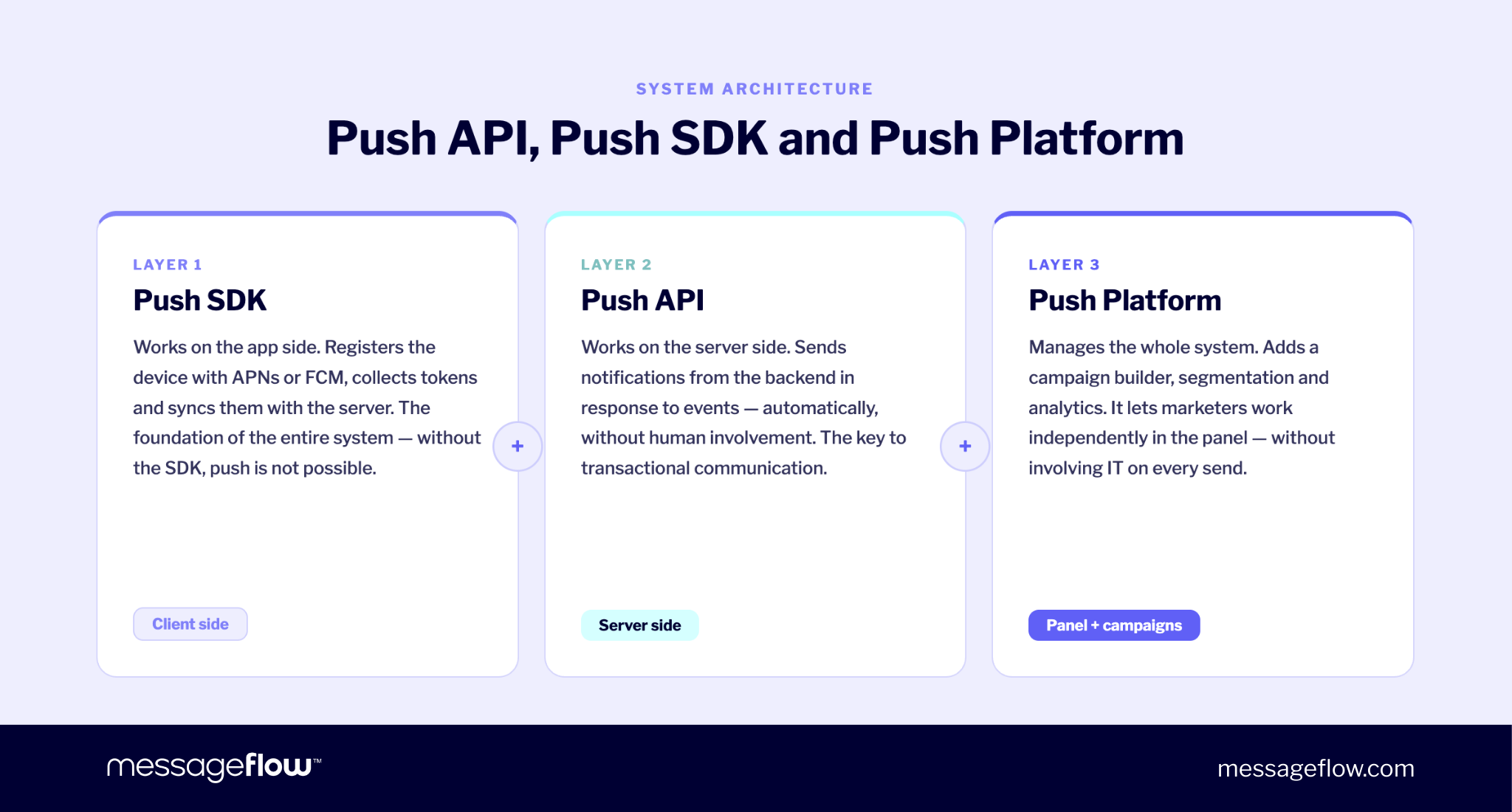
Push API, push SDK, and platform: three layers of one system
Before comparing these three approaches, it’s worth establishing one thing: they are not alternatives from which you pick one. They are layers of the same system, each serving a different role.
A push SDK (Software Development Kit) operates on the app side. It’s a set of code libraries installed directly into the mobile app’s codebase as part of the mobile app development process. Its job is purely technical: it registers the user’s device with APNs and FCM, collects tokens, and syncs them with the server. Without it, sending push notifications is technically impossible. The SDK is the foundation of the entire system – one of the core software building tools in any modern push implementation.
A push API (Application Programming Interface) operates on the server side. Once you have registered devices and tokens, you need a way to send messages in real time – from a backend, CRM, or transactional system, triggered by a specific event. Everything happens automatically, without human involvement. This model works best for transactional communication, where delivering the right information immediately is what matters.
A push platform is the layer that manages everything. It builds on the SDK and the API, and adds a campaign builder, audience segmentation, and analytics on top. The result is a system that developers and marketers can both use effectively. This is the level at which a key question arises: who operationally manages communication day to day?
Framed this way, the question stops being “which solution should I choose?” and becomes: “what elements do I need, and who should be using them?”
Push SDK: the foundation without which nothing will work
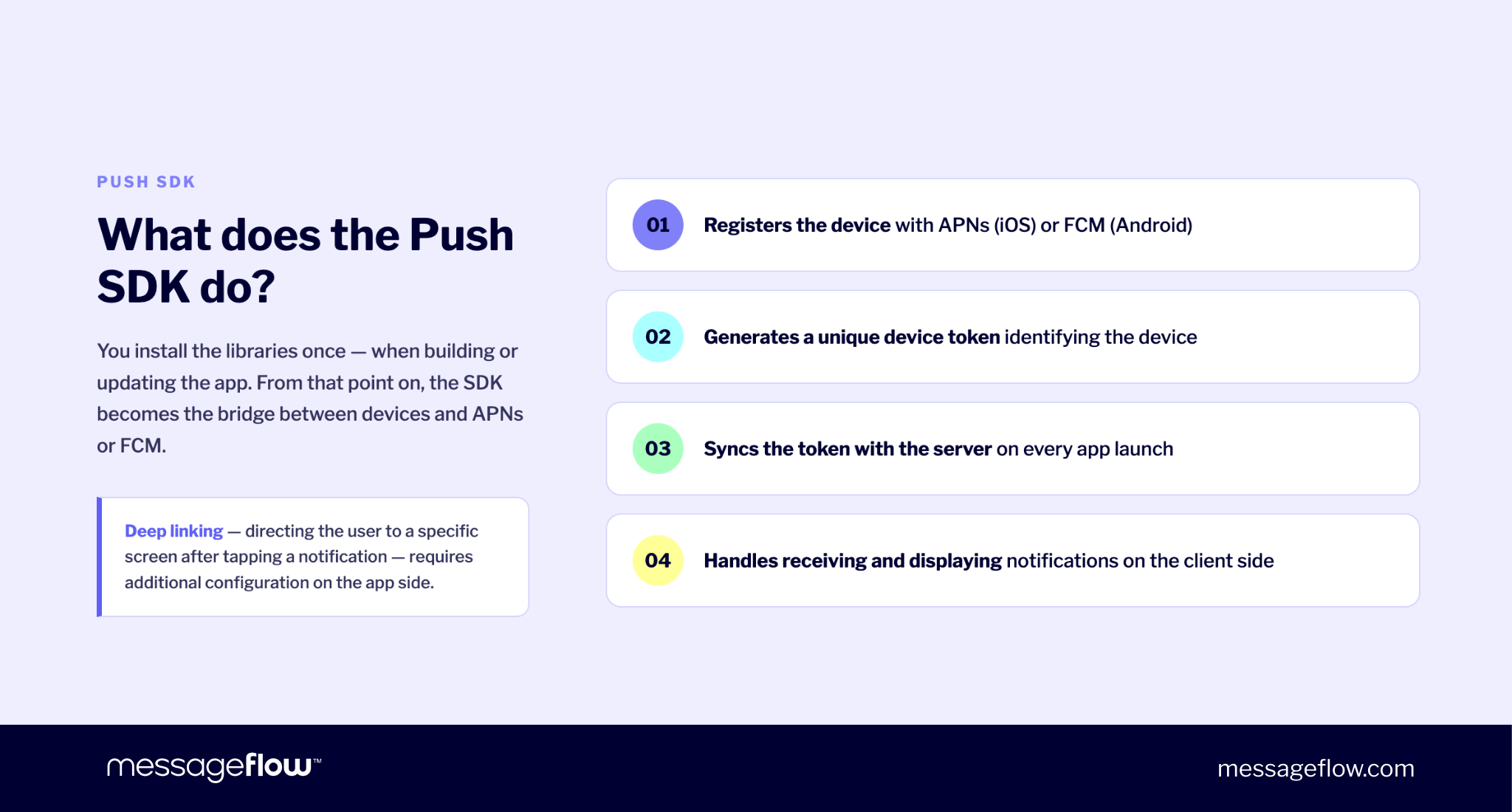
SDK integration is the first technical decision in any push project, and it has long-term consequences for your entire software development process. You install the code libraries once, during the creation or update of the app. From that point on, the SDK becomes the bridge between user devices and the APNs and FCM systems.
Every push SDK, regardless of vendor, performs the same core tasks. To unlock the full potential of those capabilities, you’ll eventually want to pair the SDK with a mobile push platform that adds campaign management and analytics on top. But first, the SDK handles:
- Registering the device with APNs (iOS) or FCM (Android)
- Generating a unique device token that identifies each user’s device
- Synchronizing the token with the server at every app launch
- Handling the receipt and display of notifications on the client side
Deep linking – directing users straight to a specific screen within the app after tapping a notification – is also a standard feature of every push SDK. It requires proper technical configuration on the app side, but it’s one of the most effective tools for driving in-app conversions. Done right, deep links can increase conversion rates by as much as 56% compared to notifications that simply open the app’s home screen.
SDK integration is also the point where your choice of vendor begins to matter. Inactive tokens are a silent drain on campaign performance: they inflate your audience numbers, distort delivery metrics, and waste budget. Standard SDK implementations don’t clean them up automatically.
Choosing a vendor whose SDK handles this – as MessageFlow does via a force-update mechanism that removes invalid tokens after each send – eliminates an entire category of ongoing development work.
Push API: the transactional layer and control over sending logic
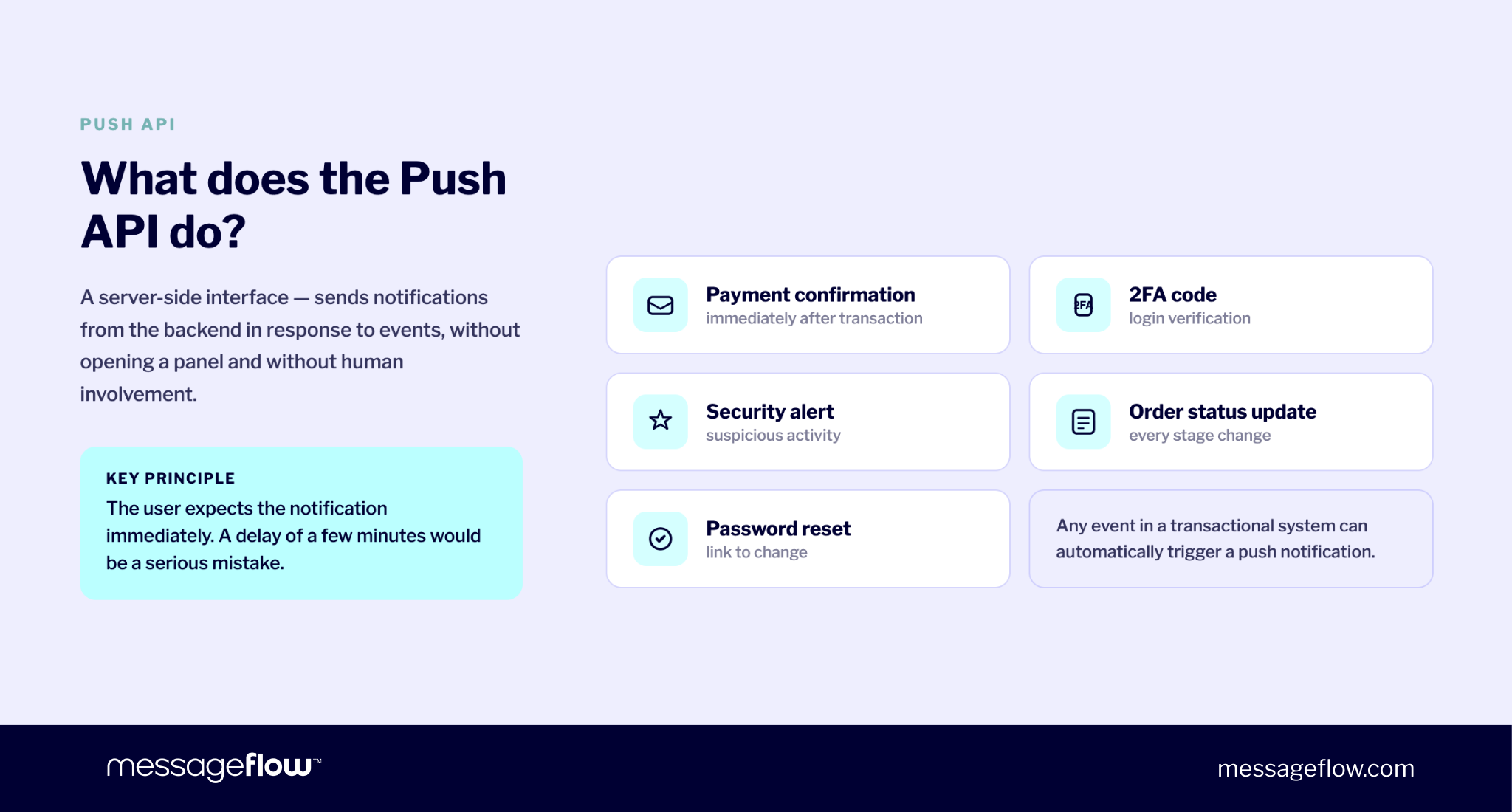
A push API is a server-side interface – specifically a REST API endpoint – that lets you send push messages from the backend in response to events, without opening a dashboard. For developers working in any language or framework, a well-documented REST API is the fastest path from integration to production.
This model works best for transactional communication: payment confirmations, 2FA codes, security alerts, order status updates, password resets. In every one of these cases, the user expects a notification immediately. A delay of even a few minutes is a meaningful failure.
How the MessageFlow push API works
The MessageFlow push API handles HTTPS POST requests. In the request body, you pass an array of device tokens and the message content. The system validates the request and routes it to the correct gateway: FCM for Android or APNs for iOS. The operation is asynchronous, so your backend doesn’t block waiting for delivery confirmation.
Full push API documentation is available for developers, including code samples, request and response examples, and ready-to-use methods in multiple programming languages.
Delivery statuses (DLR) can be received via webhook or callback directly into your system. The full sending history is visible in the dashboard, which speeds up error verification and customer support ticket resolution.
MessageFlow’s API uptime has been above 99.95% for years, with the platform delivering over 250 million push notifications daily. The infrastructure is designed for high-volume traffic – even when millions of events fire simultaneously in real time.
Where the push API has limitations
The push API has one significant bottleneck – and it applies to every API implementation, not just MessageFlow’s.
Every change to notification content, every new campaign scenario, and every adjustment to audience segmentation requires developer work. A marketer who wants to launch a campaign with a new creative for the weekend has to file a ticket with IT and wait. This bottleneck isn’t technical. It’s organizational – and it’s precisely what a push platform is designed to solve.
Push platform: the layer that gives marketers independence
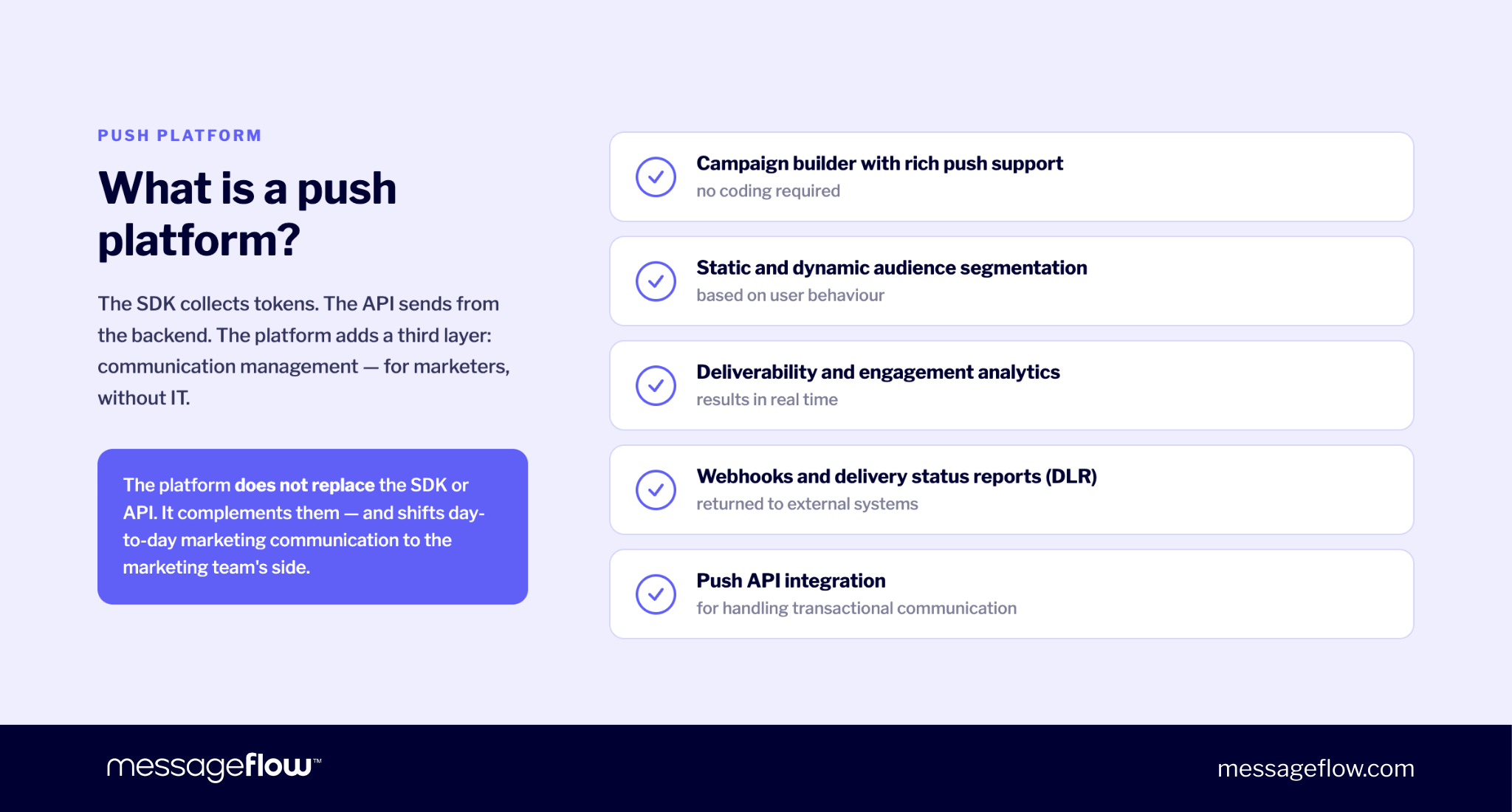
So far we have two elements: the SDK, which collects tokens, and the API, which sends notifications from the backend. Both are technical solutions that require developer involvement by definition.
A push platform adds a third layer: communication management.
With a platform, a marketer can independently prepare and send a campaign without involving IT. Developers can still use the API – for example, to handle transactional communication – but day-to-day marketing sends can be fully owned by the marketing team, directly in the dashboard.
A complete push platform should deliver the following:
- Campaign builder with rich push support – no code required
- Audience segmentation (static and dynamic) based on real behavioral data
- Delivery and engagement analytics in real time
- Push API integration for transactional communication alongside campaigns
- Documentation and resources that support self-serve onboarding
A platform doesn’t replace the SDK or API – it completes the system. Most often, it shifts marketing communication ownership to the marketing team: they create campaigns, manage segmentation, and configure sends independently, without needing a developer in the loop every time.
What sets the MessageFlow mobile push platform apart
A good push platform should eliminate three recurring problems: IT dependency for every campaign, working from stale audience data, and no fallback when a push is missed. MessageFlow addresses each one concretely.
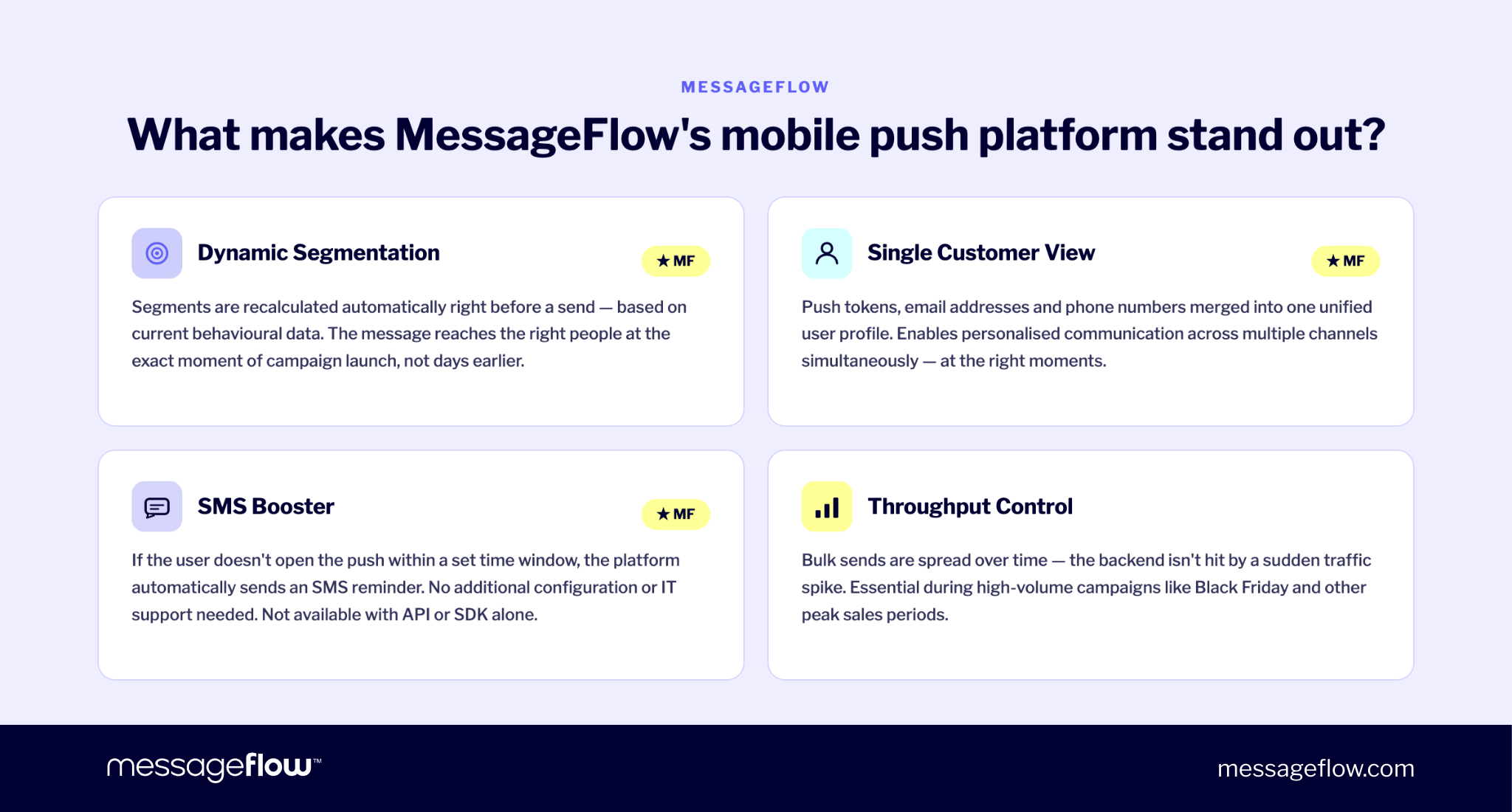
Dynamic segmentation (MessageFlow Segments)
In MessageFlow, dynamic segments are recalculated automatically just before each campaign launches, based on current behavioral data and user preferences. The message reaches users who meet the specified criteria at the exact moment of sending – not according to a list built several days earlier. This matters most for time-sensitive communication: flash sales, expiring offers, and critical alerts.
Single Customer View
MessageFlow links push tokens collected by the SDK with email addresses and phone numbers uploaded to the platform, building a single unified user profile. This enables personalized, multichannel communication tailored to each customer – across channels, simultaneously, at the right moments. It’s the kind of data infrastructure that lets you customize messages at scale without losing behavioral context between sends.
SMS Booster
Push doesn’t go to spam – but it can be missed. SMS Booster closes that gap automatically: if a user doesn’t open a push notification within a defined time window, the platform sends a follow-up SMS. No additional configuration, no IT involvement. This kind of fallback scenario simply isn’t possible with a standalone push API or a basic SDK.
Throughput control
The platform lets you spread large-scale sends over time, protecting your backend from sudden traffic spikes. For high-volume campaigns – Black Friday, product launches, flash sales – this often determines whether your store stays available under load.
Comparison: push API vs. push SDK vs. platform
| Criterion | Push API | Push SDK | Platform |
|---|---|---|---|
| Role in the system | Server-side sending | Device & token registration | Full communication management |
| Transactional sending | Yes (native) | N/A | Yes (via API) |
| Marketing campaigns | Requires code | N/A | No-code builder |
| Marketer independence from IT | Low | None | High |
| Audience segmentation | Manual, via code | None | Static & dynamic |
| Inactive token management | Manual | Depends on SDK* | Automatic* |
| Deep linking | Yes | Technical config | Builder + templates |
| Analytics & A/B testing | Custom implementation | None | Built-in, real-time |
| Webhooks & DLR | Yes | N/A | Yes |
| SMS Booster (fallback) | No | No | Yes* |
| Single Customer View | No | No* | Yes* |
| iOS (APNs) & Android (FCM) | Native support | Native support | Native via SDK |
| Best for | Developers, transactional systems | Foundation for any integration | Marketers, eCommerce, fintech, media |
*Items marked with an asterisk are features specific to MessageFlow, unavailable or limited in standard implementations.
Push API vs. mobile push platform: developer vs. marketer
A developer working with push typically needs a clean, well-documented REST API that provides full control over sending logic, access to delivery confirmation webhooks, and straightforward integration with any backend language or framework. A marketer needs to plan, test, and send campaigns – abandoned cart sequences, seasonal promotions, re-engagement flows – without filing a development ticket every time. A product manager wants results visible in a dashboard, not buried in an ad-hoc script.
All three perspectives are valid. The problem arises when a company picks one at the expense of the others.
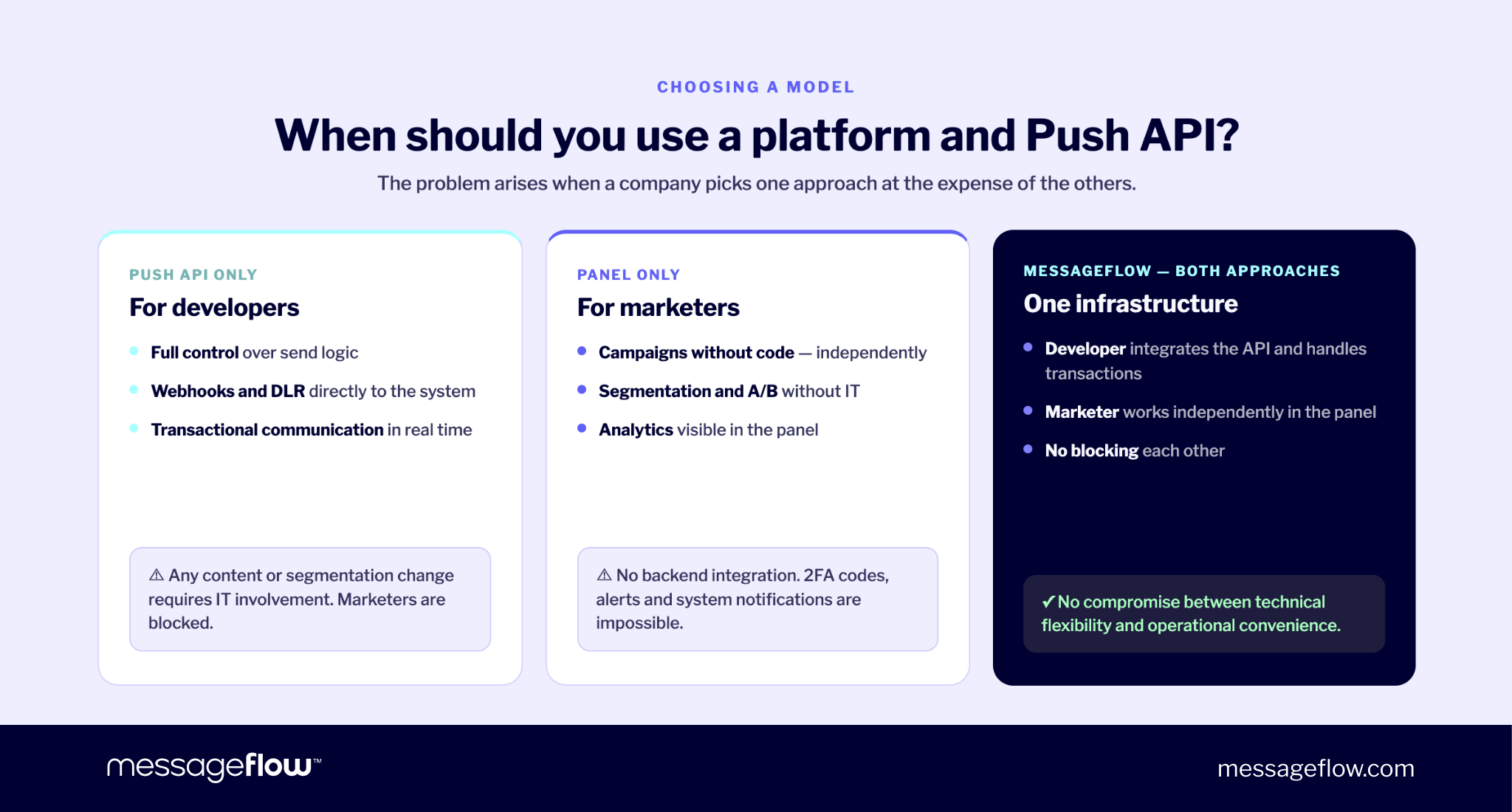
If you rely exclusively on the push API, you serve the developer’s needs but create a permanent bottleneck on the marketing side. Every content change, segmentation update, or A/B test requires IT involvement. Push campaigns stop functioning as a marketing channel and start resembling engineering projects.
If you rely solely on a dashboard with no API access, you lose the ability to integrate with transactional systems and CRM platforms. Real-time communication – 2FA codes, security alerts, system notifications – becomes limited or impossible to deliver reliably.
MessageFlow resolves this conflict by combining both approaches in a single infrastructure. A developer integrates the API with the backend and owns transactional communication. A marketer works independently in the dashboard, planning campaigns, managing segmentation, and launching behavior-based automation. Neither team blocks the other.
How companies combine different mobile push methods in practice
In practice, companies that rely heavily on mobile push rarely use just one delivery method. They combine several approaches in a single system, matching the method to the purpose of each message. A well-designed mobile push marketing strategy typically builds on all three layers – SDK, API, and platform – working in parallel.
Mobile push in eCommerce
A retailer with millions of active app users needs to operate on two levels of communication simultaneously.
On one level, transactional notifications go out every day: order confirmations, shipping updates, payment receipts. These are triggered automatically by the backend and handled by the push API.
On the other level, marketing campaigns run several times a week: new arrivals, last-minute offers, abandoned cart reminders. Speed and the ability to test variants are critical here, so the marketer works directly in the platform without involving IT.
In the background, the SDK continuously collects and refreshes tokens, ensuring every send reaches real, active users.
This combination is no accident. Industry data shows that eCommerce apps achieve an average opt-in rate of around 68% – nearly 7 in 10 users agree to receive notifications. That’s a significant owned audience, but realizing its value requires the right architecture. For a practical breakdown of how to structure push communication for retail, see our guide on mobile push in retail and eCommerce.
A well-designed push campaign – built on current data and precise segmentation – directly translates into revenue. The prerequisite is that the marketer can act independently, and the system reflects changes in user behavior without a lag.
Mobile push in fintech
In fintech, the same architecture applies – but the priorities are different.
The most critical notifications are transactional and security-related: suspicious payment alerts, logins from unrecognized devices, account changes. These must be delivered immediately, to a specific user, with full certainty. That’s why they rely on a push API integrated directly with the backend.
In this context, 99.95% API uptime, throughput control, and delivery confirmation webhooks aren’t nice-to-haves – they are critical requirements for the system to function and for your business to remain trustworthy.
At the same time, fintech companies don’t need to give up marketing communication. Informing users about new features, offers, or product updates is equally important for retention. The platform handles that layer – allowing the marketing team to operate independently, without touching backend logic.
The result in both cases is the same: the push API handles real-time communication, the platform handles marketing campaigns, and the SDK ties everything together at the device level.
MessageFlow combines these elements in a single infrastructure, so you don’t need to build and maintain separate systems for each use case. Everything works cohesively – whether you’re sending a time-critical notification within seconds or planning a campaign for a million users.
Build vs. buy: when does building your own solution make sense?
Building your own push infrastructure can be tempting, especially when your IT team is technically capable and values control. Before committing, it’s worth asking a few direct questions.
Who maintains the APNs and FCM integrations when Apple or Google changes their requirements? Both companies update their policies regularly – often without much advance notice. Who manages token hygiene and removes inactive entries? Who builds the segmentation module, campaign analytics, and real-time reporting? And, most importantly: is any of this core to your business?
For most companies, the answer is clear. Outsourcing this infrastructure to a proven platform is faster, cheaper, and lower risk than building from an open source project baseline and maintaining it indefinitely. MessageFlow supports over 79,000 businesses worldwide and delivers more than 250 million push notifications daily. Scalability is built into the platform – it doesn’t require a separate engineering project on your side.
Summary: how to choose the right model?
The choice between a push API, a push SDK, and a platform comes down to one question: who manages your push communication operationally, and what do they need to do it well?
- Transactional-only communication triggered by the backend? A push API may be all you need.
- Regular marketing campaigns without IT involvement for every send? You need a mobile push platform.
- Both scenarios, plus automated SMS fallback for users who miss the push? You need a complete, integrated ecosystem.
MessageFlow offers a push SDK for mobile app integration, a REST API for transactional automation with full webhook and DLR support, and a campaign dashboard for the marketing team – all in one place, on one infrastructure, with no trade-offs between technical flexibility and operational independence.
Find out how the MessageFlow push notification platform can shorten your time to deployment and give your team the autonomy it needs.
Check our pricing and plans to see which option fits your communication volumes and business goals.