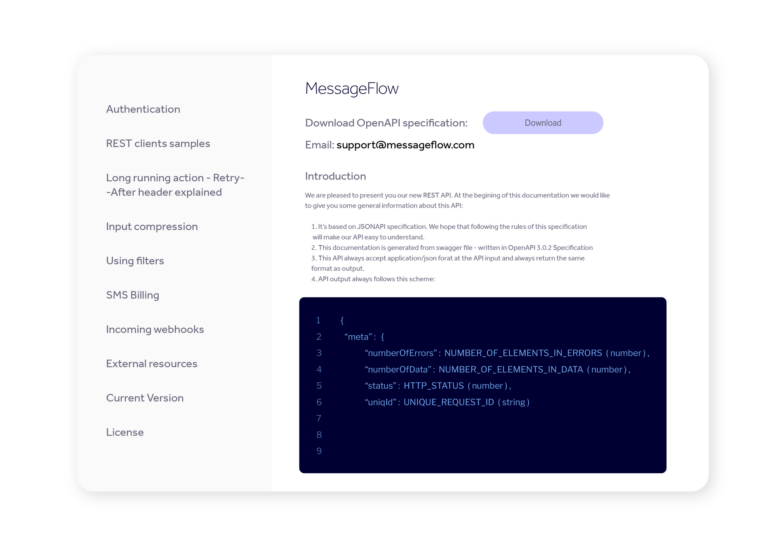
Developer messaging platform: MessageFlow API

The MessageFlow API is a unified REST API for sending and managing email, SMS, mobile push and Viber messages. As a developer messaging platform, it supports marketing and transactional traffic, contact management, and real-time delivery tracking – compliant with JSONAPI and OpenAPI 3.0.2, with Gzip compression support.

API Documentation

One REST API messaging interface – four communication channels. Each with dedicated endpoints, independent status tracking and its own section within a single, centralised developer documentation hub. Get access to full technical references, authentication guides and request examples. The API documentation messaging specification is available in OpenAPI 3.0.2 format – ready to import into Postman or Swagger UI directly from dev.messageflow.com/openapi.yaml.

Email API

Send transactional messages via REST to up to 200 recipients per request. Dynamic templates support variables, conditional statements and dataset loops – one template for all recipients. Delivery event statuses can be retrieved via the API (GET methods), received in real time using webhooks, or browsed in the analytics dashboard.

SMS API

Send transactional SMS with full DLR tracking. Our message delivery API supports Unicode, link shortening, priority routing and two-way communication (incoming SMS via webhooks).

Mobile push API

Send push notifications via REST API to iOS and Android. We support multilingual content, images, silent push, TTL and post-click actions (URL or deeplink). Our push API statuses distinguish six states – from operator acceptance through to user interaction (DISCARDED → REACTED_ON).

Viber API

Access the Viber OTT channel for transactional messaging. The MessageFlow messaging api supports four content combinations: text, image, text with action, or text with image and action. Senders require prior registration (max. 28 characters). Up to 200 recipients per request.

Integration model

The MessageFlow API is built on a proven technical architecture – designed for high-scale production environments.

Architecture and data format

All REST endpoints return JSON with a meta object containing the HTTP code, error count and uniqId – a unique identifier for every request, required when contacting technical support. Our REST API messaging specification is fully compliant with JSONAPI and OpenAPI 3.0.2.

{
"meta": {
"numberOfErrors": NUMBER_OF_ELEMENTS_IN_ERRORS (number),
"numberOfData": NUMBER_OF_ELEMENTS_IN_DATA (number),
"status": HTTP_STATUS (number),
"uniqId": UNIQUE_REQUEST_ID (string)
"someField": SOME_VALUE (string)
},
"data": [],
"errors": [
{
"title": ERROR_TITLE (string),
"message": ERROR_MESSAGE (string),
"code": ERROR_CODE (string),
"meta":{
"parameter": SOME_VALUE (string),
"value": SOME_VALUE (string),
"source": SOME_VALUE (string),
"someField": SOME_VALUE (string)
}
}
]
}

API key authentication

API access is controlled by a key pair – Authorization and Application-Key – generated and managed directly from the dashboard. Each key can additionally be bound to a specific list of IP addresses, meaning that even a compromised key won’t grant access from outside your trusted infrastructure. This is an important security layer for environments where customer data protection is non-negotiable.

$ curl --request POST \
--header 'Content-Type: application/json' \
--header 'Application-Key: ' \
--header 'Authorization: ' \
--url '...'
--data '{ ... }'

Event-driven architecture and webhooks

Instead of polling, your application receives event notifications the moment they occur – no redundant requests, no latency. Webhooks messaging works across all channels and covers the full event range: delivery statuses, clicks, opens and errors. Every notification is cryptographically signed (SHA1). For each channel you configure two URLs: if the primary endpoint is unavailable, the event is automatically forwarded to the fallback.

[{
"externalId":"xxxxxxxxxxxxxxxxxxxxxxxx",
"phoneNumber":"+48XXXXXXXXX",
"status":1,
"statusDesc":"DELIVERED",
"statusTime":"2021-04-27T00:00:18",
"webhookUrl":"xxxxxxxxxxxxxxx"
}]

Delivery tracking and status handling

The MessageFlow API provides a complete status model for every channel. This architecture allows the integrating application to react to events in real time: automatically update records in target systems, trigger fallback logic across alternative communication channels, and maintain rigorous list hygiene through automated handling of hard bounces and spam complaints.

Email API: message statuses

injected ok hardbounce softbounce spambounce deferred dropped

Webhooks report seven states per message – from injected (queued) through ok (delivered) to hardbounce, softbounce, spambounce, deferred and dropped. Every event carries the full message status history (allStatuses), sender and recipient data and a timestamp. The platform automatically validates email addresses against a built-in spam trap database before sending – no configuration required on your end.

SMS API: DLR statuses

SENT DELIVERED UNDELIVERED EXPIRED REJECTED

Get full visibility into every SMS delivery: DELIVERED, UNDELIVERED, EXPIRED, REJECTED. The architecture supports two DLR monitoring approaches: asynchronously in real time via webhooks, or by polling a dedicated endpoint using GET. The choice is yours – you can also specify the target webhook URL directly in the send request, routing DLR statuses to the endpoint of your choice regardless of the default configuration.

Push API: Delivery and interaction statuses

DELIVERED OPENED REJECTED EXPIRED

Push API reports four statusDesc values: DELIVERED, OPENED, REJECTED, and EXPIRED, allowing you to distinguish between notification delivery, opening, rejection, and expiration. The statusDetails field provides additional context about the event or interaction type, for example NOTIFICATION_CLICK_ACTION. This makes it possible to analyze not only whether a push notification was delivered, but also how users interacted with it.

Structured errors and partial responses

Every error response from the message delivery API contains a JSON object with a code, description, and context – including the parameter, value, and source of the problem. HTTP 207 Multi-Status indicates a partial success of the request – for example, 180 out of 200 recipients were processed successfully, while 20 were rejected.

Performance and throughput

The MessageFlow API is designed for production environments where send volume is high and delivery reliability is critical.

Queuing and high throughput

Temporary operator-side overload does not halt the sending process. The message queuing architecture ensures that every message waits in the queue and goes out when the path is clear – with no need to manually retry requests.


Redundancy and reliability monitoring

Infrastructure is built on redundant nodes with automatic failover. Monitor platform status publicly via the Status Page – or embed the GET /v2.1/service/status endpoint directly into your own monitoring system and respond programmatically.

                        
{
"meta": {
"numberOfErrors": 0,
"numberOfData": 1,
"status": 200,
"uniqId": "00d928f759"
},
"errors": [
{
"title": "Empty result",
"message": "Not found any result with this query",
"code": "E-0-005"
}
]
}

Developer resources

Take advantage of ready-to-use resources that reduce time to first integration – regardless of your tech stack. Code examples are available in C#, Java, Node.js, PHP, Python and Go – each with correct authentication, payload structure and API response handling.

Send an SMS via the messaging API (Node.js):
using System.Net.Http.Headers;
var client = new HttpClient();
var request = new HttpRequestMessage
{
Method = HttpMethod.Post,
RequestUri = new Uri("https://api.messageflow.com/v2.1/sms"),
Headers =
{
{ "Accept", "application/json" },
{ "Authorization", "123" },
{ "Application-Key", "123" },
},
Content = new StringContent("{\n \"sender\": \"string\",\n \"message\": \"Twoja wiadomość testowa\",\n \"phoneNumbers\": [\n \"+48111222333\",\n \"+48111222444\"\n ],\n \"phoneNumber\": \"+48111222333\",\n \"validity\": 4320,\n \"scheduleTime\": 0,\n \"type\": 0,\n \"shortLink\": true,\n \"webhookUrl\": \"string\",\n \"externalId\": \"xxxx-xxxx-xxxx\"\n}")
{
Headers =
{
ContentType = new MediaTypeHeaderValue("application/json")
}
}
HttpRequest request = HttpRequest.newBuilder()
.uri(URI.create("https://api.messageflow.com/v2.1/sms"))
.header("Content-Type", "application/json")
.header("Accept", "application/json")
.header("Authorization", "123")
.header("Application-Key", "123")
.method("POST", HttpRequest.BodyPublishers.ofString("{\n \"sender\": \"string\",\n \"message\": \"Twoja wiadomość testowa\",\n \"phoneNumbers\": [\n \"+48111222333\",\n \"+48111222444\"\n ],\n \"phoneNumber\": \"+48111222333\",\n \"validity\": 4320,\n \"scheduleTime\": 0,\n \"type\": 0,\n \"shortLink\": true,\n \"webhookUrl\": \"string\",\n \"externalId\": \"xxxx-xxxx-xxxx\"\n}"))
.build();

HttpResponse<String> response = HttpClient.newHttpClient().send(request, HttpResponse.BodyHandlers.ofString());
System.out.println(response.body());
import http.client

conn = http.client.HTTPSConnection("api.messageflow.com")

payload = "{\n \"sender\": \"string\",\n \"message\": \"Twoja wiadomość testowa\",\n \"phoneNumbers\": [\n \"+48111222333\",\n \"+48111222444\"\n ],\n \"phoneNumber\": \"+48111222333\",\n \"validity\": 4320,\n \"scheduleTime\": 0,\n \"type\": 0,\n \"shortLink\": true,\n \"webhookUrl\": \"string\",\n \"externalId\": \"xxxx-xxxx-xxxx\"\n}"

headers = {
'Content-Type': "application/json",
'Accept': "application/json",
'Authorization': "123",
'Application-Key': "123"
}

conn.request("POST", "/v2.1/sms", payload, headers)

res = conn.getresponse()
data = res.read()

print(data.decode("utf-8"))
<?php

$curl = curl_init();

curl_setopt_array($curl, [
CURLOPT_URL => "https://api.messageflow.com/v2.1/sms",
CURLOPT_RETURNTRANSFER => true,
CURLOPT_ENCODING => "",
CURLOPT_MAXREDIRS => 10,
CURLOPT_TIMEOUT => 30,
CURLOPT_HTTP_VERSION => CURL_HTTP_VERSION_1_1,
CURLOPT_CUSTOMREQUEST => "POST",
CURLOPT_POSTFIELDS => json_encode([
'sender' => 'string',
'message' => 'Twoja wiadomość testowa',
'phoneNumbers' => [
'+48111222333',
'+48111222444'
],
'phoneNumber' => '+48111222333',
'validity' => 4320,
'scheduleTime' => 0,
'type' => 0,
'shortLink' => null,
'webhookUrl' => 'string',
'externalId' => 'xxxx-xxxx-xxxx'
]),
CURLOPT_HTTPHEADER => [
"Accept: application/json",
"Application-Key: 123",
"Authorization: 123",
"Content-Type: application/json"
],
]);

$response = curl_exec($curl);
$err = curl_error($curl);

curl_close($curl);

if ($err) {
echo "cURL Error #:" . $err;
} else {
echo $response;
}
package main

import (
"fmt"
"io"
"net/http"
"strings"
)

func main() {

url := "https://api.messageflow.com/v2.1/sms"

payload := strings.NewReader("{\n \"sender\": \"string\",\n \"message\": \"Hello world!\",\n \"phoneNumbers\": [\n \"+48111222333\",\n \"+48111222444\"\n ],\n \"phoneNumber\": \"+48111222333\",\n \"validity\": 4320,\n \"scheduleTime\": 0,\n \"type\": 0,\n \"shortLink\": true,\n \"webhookUrl\": \"string\",\n \"externalId\": \"xxxx-xxxx-xxxx\"\n}")

req, _ := http.NewRequest("POST", url, payload)

req.Header.Add("Content-Type", "application/json")
req.Header.Add("Accept", "application/json")
req.Header.Add("Authorization", "123")
req.Header.Add("Application-Key", "123")

res, _ := http.DefaultClient.Do(req)

defer res.Body.Close()
body, _ := io.ReadAll(res.Body)

fmt.Println(res)
fmt.Println(string(body))

}
const response = await fetch('https://api.messageflow.com/v2.1/sms', {
method: 'POST',
headers: {
'Content-Type': 'application/json',
'Accept': 'application/json',
'Authorization': 'YOUR_AUTHORIZATION_TOKEN',
'Application-Key': 'YOUR_APPLICATION_KEY'
},
body: JSON.stringify({
sender: 'YourCompany',
message: 'Hello world!',
phoneNumbers: ['+48111222333']
})
});

const data = await response.json();

console.log(data);

Webhook guide

Full API documentation messaging for webhook configuration: data formats, retry mechanisms and request authenticity verification. If the primary endpoint fails to respond within 500 ms, the event is automatically routed to the secondary URL. Configure webhooks in the panel or directly via the API.

Technical Support

We provide integration support dedicated to developer and IT teams – at every stage of your implementation. Enterprise clients with dedicated Support Packages gain access to a Technical Account Manager (TAM) who oversees the integration process and ensures the continuity of your production environment.

Technical onboarding

We’ll walk you through the entire integration process – from generating your first API keys to going live in production. Configuration is tailored to your technical environment and security requirements.

Deliverability consulting

We’ll help you get the most out of every channel. For the email API: SPF, DKIM and DMARC configuration. For the sms API: routing selection through local operators. We work alongside your team to make sure your messages reach their destination.

Second-level support

Complex integration issues go directly to a specialized technical team with a guaranteed response time. Just include meta.uniqId from the API response in your ticket – we’ll handle the rest.

FAQ: Integrating via the MessageFlow REST API

Every request requires two HTTP headers simultaneously: Authorization with a 128-character authorization key, and Application-Key with your application key. Both keys are generated in the admin panel under Account → Settings → API. Optionally, access can be restricted to specific IP addresses – configured per key. A missing header returns HTTP 401 Unauthorized.

Yes – webhooks messaging is the central event notification mechanism in MessageFlow. Supported events include delivery statuses (DLR), opens, clicks and error events for all channels. For each webhook type you configure two URLs (primary and fallback) – failover is automatic. Configuration is available via the panel (Account → Settings → Webhooks) or directly through the API.

Delivery statuses are pushed via webhooks in real time – no polling required. For SMS: DLR codes (DELIVERED, UNDELIVERED, EXPIRED, REJECTED). For email: event statuses (injected, ok, hardbounce, softbounce, spambounce, dropped, deferred). For push: six states from operator acceptance through to user interaction. For Viber: delivery and interaction statuses. All events are also available in the searchable operational dashboard.

The transactional messaging API uses JSON format compliant with the JSONAPI specification. Requests support Gzip compression (Content-Encoding: gzip) for transfer optimization. The API specification is available in OpenAPI 3.0.2 format at dev.messageflow.com/openapi.yaml and dev.messageflow.com/openapi.json – ready to import into Postman or Swagger UI.

Redlink API is the former name of the MessageFlow platform’s API interface. If you’re working with documentation or code based on Redlink API, resources are available in the version history section. Contact the technical team for any migration questions.

RSS